
Highlight
Apple Maps has always been a client-centric ecosystem—MapKit on iOS, MapKit JS on the web—but the server side was a gap. If you wanted geocoding or nearby business search on your backend, you either called Google Maps API or did it on the client and tolerated lots of network requests.
Core Content
Building a store locator underestimates the “assemble the card” step. The client fetches store addresses from your business server, converts them to coordinates with MapKit or MapKit JS, calculates distance from the user to each store, then merges every response into a contact card. On good networks that’s just extra wait; on high-latency cellular, each independent request raises the chance of failure and incomplete responses.
This session narrows the problem to a comic book store locator. The screen needs three cards: store address, user’s current location, distance. Without server-side map APIs, the client must talk to your backend and Apple Maps services back and forth and merge results locally. Users see spinners; the device pays in bandwidth and battery.
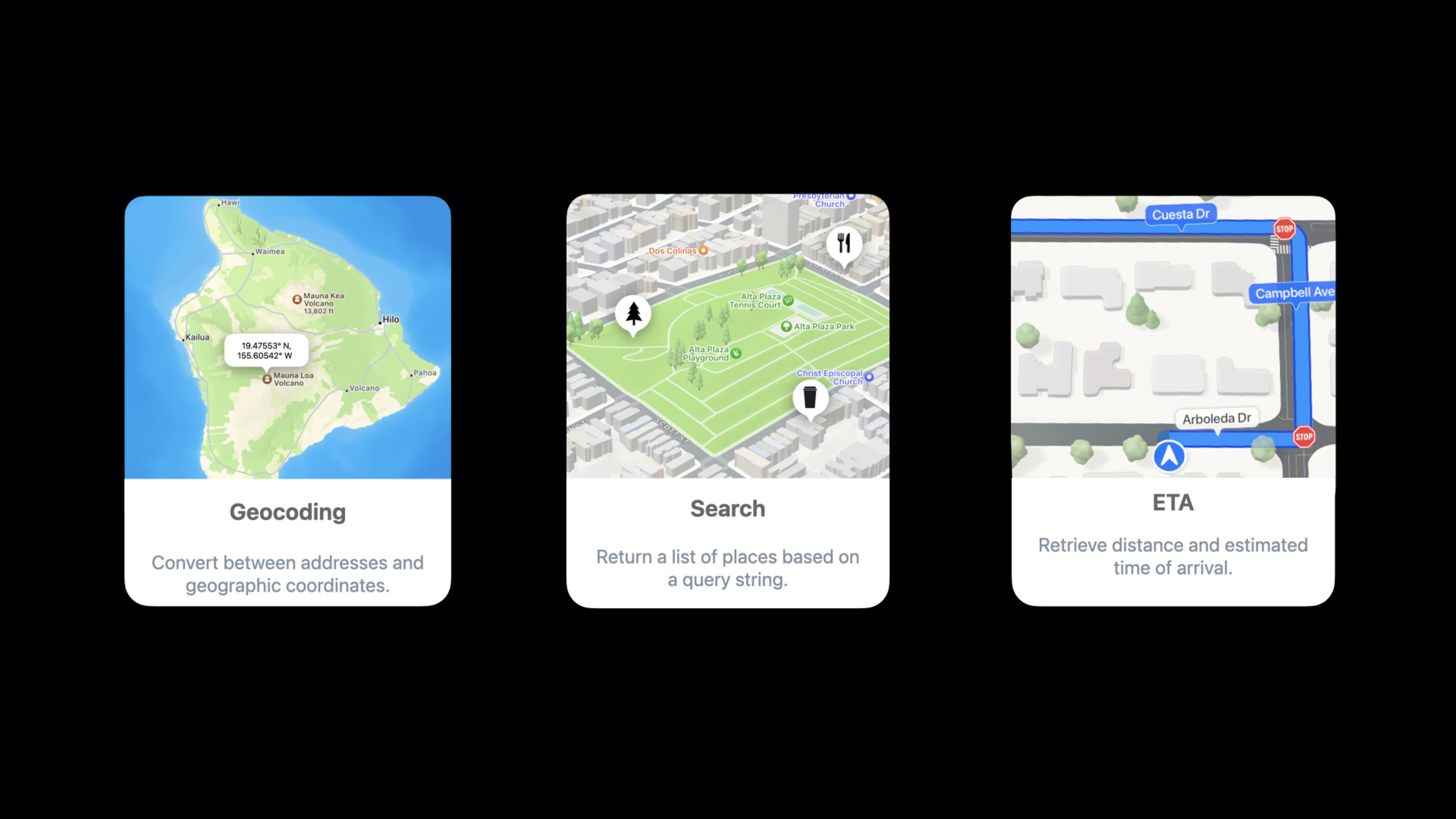
Apple filled the gap at WWDC22 with Apple Maps Server APIs. It provides four server capabilities: Geocoding, Reverse Geocoding, Search, and Estimated Time of Arrival (ETA). Your business server can act as a gateway—resolve addresses, compute ETAs, merge business data, then return UI-ready results in one response.
After this change, the client only needs one request to your server. The backend sends comic store addresses to the Geocode API, passes coordinates to the ETA API, then merges distance with store hours and other owned data. MapKit, MapKit JS, and Apple Maps Server APIs form one Apple Maps stack: the client keeps presentation; repetitive, cacheable, aggregatable work moves to the server.
Detailed Content
Four server APIs for four map problems
(01:01) Apple Maps Server APIs debut with four APIs: Geocoding, Reverse Geocoding, Search, and ETA. They cover basic map workflows from address resolution to arrival time estimates.
Geocoding: address -> latitude / longitude
Reverse Geocoding: latitude / longitude -> address
Search: search string -> business / point of interest locations
ETA: origin + destination -> estimated time of arrival / distanceMeters per destination
Key points:
- Geocoding converts store addresses to latitude and longitude; downstream calculations depend on both values.
- Reverse Geocoding goes the other way—good for turning user-selected coordinates back into addresses.
- Search lets users enter a query string to discover businesses, points of interest, and other places.
- ETA takes origin and destination and returns ETA per destination; the session example uses
distanceMetersfor store distance.
Consolidating multiple client requests behind a backend gateway
(03:41) Without Apple Maps Server APIs, after the client gets store addresses it must keep calling map capabilities. The session states that chattiness between client and backend hurts performance and scalability; on high-latency cellular, independent requests can cause connection drops or incomplete requests.
Old flow:
Client -> Business Server: request store address list
Business Server -> Client: return addresses
Client -> Apple Maps service: map requests per address
Client: wait for multiple responses and merge locally

New flow:
Client -> Business Server: request display-ready store list
Business Server -> Apple Maps Server APIs: Geocoding / ETA requests
Business Server: merge map responses with owned store info
Business Server -> Client: return UI-ready data
Key points:
- The new flow does not have the client orchestrate multiple map requests.
- The business server can “do each repeated address lookup once on the backend,” reducing duplicate requests across devices.
- The backend returns results closer to what the UI needs; the client does less network waiting and response merging.
- This is where the session’s “reduce network calls” and “power efficient” come from: bandwidth and processing shift from the user’s device to the server.
Store locator: Geocode first, then ETA
(06:16) The example computes distance from the user to the store with Geocoding and ETA. First URL-encode the comic store address as a Geocode API query parameter. The response includes latitude and longitude. Do the same for the user address.
1. URL encode comic book store address
2. Call Geocode API with the encoded address as a query parameter
3. Read latitude and longitude from the response
4. Repeat the same process for the customer address
5. Pass origin and destination query parameters to ETA API
6. Read distanceMeters from the ETA response
Key points:
- The session does not give specific endpoint paths, so this stays as call order, not fabricated URLs.
- Geocode API output is ETA API input: store and user coordinates become destination and origin.
- ETA API accepts up to 10 destinations—good for comparing multiple stores at once.
- The example passes one destination, so the response has one ETA; a real locator can batch multiple stores in one calculation.
- The business server can merge results with owned info such as store hours.
Authentication: Maps auth token exchanged for 30-minute access token
(08:29) All Apple Maps Server APIs require authentication. They use the same mechanism as MapKit JS: download a private key from your developer account, generate a JWT Maps auth token, then call the token API to exchange it for a Maps access token.
Private key from developer account
  -> generate Maps auth token (JWT)
  -> call token API with Maps auth token in a header
  -> receive Maps access token (JWT)
  -> use Maps access token in Apple Maps Server API calls
  -> refresh every 30 minutes
Key points:
- Maps auth token and Maps access token are two different tokens.
- Maps auth token is used to exchange for an access token; it does not by itself authorize all subsequent API calls.
- Maps access token is a JWT; the response includes expiry, issuedAt, and
expiresInSeconds. - The session says access tokens refresh every 30 minutes; the backend should handle refresh and must not ship the private key to clients.
Quotas and 429: design the failure path too
(10:47) Apple Maps Server APIs share a daily quota of 25,000 service calls with MapKit JS service usage. The Maps developer dashboard categorizes server API usage under Services.
Daily quota: 25,000 service calls
Shared with: MapKit JS service usage
Quota exceeded: HTTP 429 Too Many Requests
Retry strategy: exponential backoff, not a tight retry loop
Key points:
- Exceeding the daily quota rejects new service calls with HTTP 429.
- Abnormal traffic can also trigger 429—for example a code or infrastructure bug causing excessive requests.
- After 429, do not retry in a tight loop; the session recommends exponential backoff with increasing intervals.
- A store locator backend should return degradable data on 429—for example address and hours only, distance added later.
Core Takeaways
-
What to do: Move address resolution and distance calculation for your store locator to the backend.
Why it matters: The session’s comic store example shows the backend can merge map responses with Geocode and ETA APIs; the client receives one business response.
How to start: URL-encode store and user addresses on the backend, call Geocoding, then ETA with coordinates and writedistanceMetersinto store card data. -
What to do: Add business data overlays to map search results.
Why it matters: Search API returns businesses and points of interest; the session mentions you can overlay your own data.
How to start: On the backend, match Search results with hours, inventory, and membership benefits from your database, then return to MapKit or MapKit JS. -
What to do: Cache common address lookups on the server.
Why it matters: Apple specifically notes that different user devices repeatedly looking up the same address wastes bandwidth with duplicate requests.
How to start: Use normalized addresses as cache keys for Geocoding latitude/longitude; keep ETA real-time because it depends on user origin. -
What to do: Build a quota dashboard and degradation strategy for Apple Maps Server APIs.
Why it matters: Server APIs share a daily 25,000-call quota with MapKit JS; exceeding it returns 429.
How to start: Monitor Services usage in the Maps developer dashboard; on 429 use exponential backoff and return store lists without distance as fallback. -
What to do: Encapsulate token refresh as backend infrastructure.
Why it matters: Maps access tokens expire every 30 minutes; multiple map APIs share one auth flow.
How to start: Store the private key on the server; generate Maps auth tokens only on the server; exchange for access tokens via the token API and refresh beforeexpiresInSeconds.
Related Sessions
- What’s new in MapKit — client-side map presentation and interaction updates; together with Apple Maps Server APIs they form a complete map architecture.
- Meet WeatherKit — another Maps & Location service data API; combines with location, routes, and store scenarios.
- Reduce networking delays for a more responsive app — deep dive on how network latency affects responsiveness; explains why fewer client requests improve experience.
- Q&A: Maps technologies — engineering Q&A entry for MapKit, MapKit JS, and Apple Maps Server APIs.
Comments
GitHub Issues · utterances