
Highlight
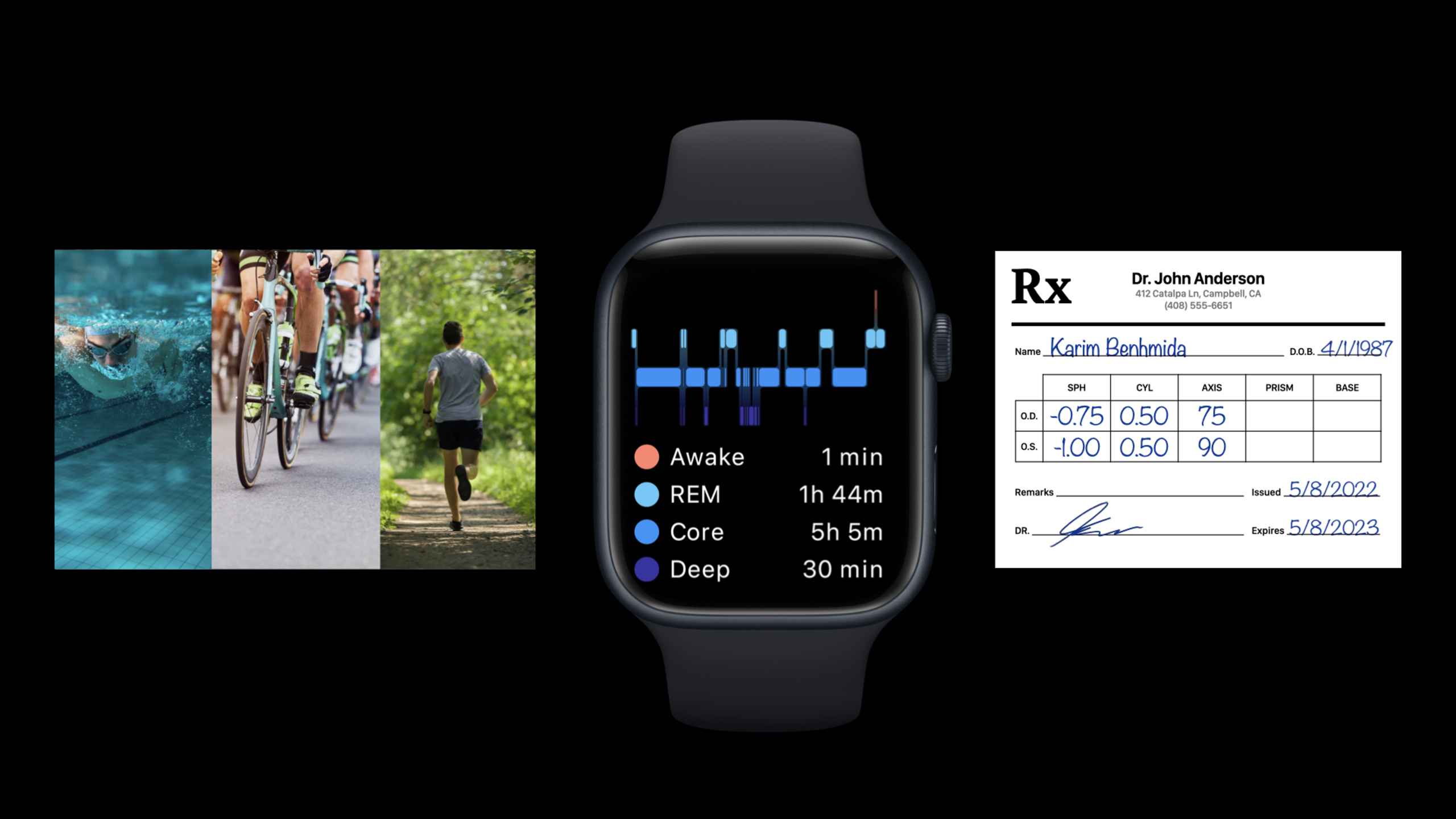
HealthKit engineer Karim introduces four major HealthKit updates in iOS 16 and watchOS 9: sleep stage tracking, Swift async query APIs, enhanced representation for multi-activity workouts like triathlons, and digital storage for vision prescriptions.
Core Content
Health apps often struggle because data isn’t granular enough. Sleep apps only know the user “fell asleep” but can’t distinguish REM, core sleep, and deep sleep. Workout apps can save a session but struggle to split swim, bike, run, and transitions in a triathlon. Eyewear apps make users shuttle information between paper prescriptions, photos, and forms.
iOS 16 and watchOS 9 put these problems into HealthKit’s data model. Apple Watch automatically records sleep stages; HealthKit queries support Swift async; the Workout API uses HKWorkoutActivity to express multiple activities in one workout; vision prescriptions can be saved as HealthKit samples with attached still images or PDFs.
The value: apps maintain fewer private formats and reuse system-level health data. Sleep stages, workout segments, heart rate recovery, and glasses and contact lens prescriptions all follow HealthKit’s permission model. Users still control authorization scope; developers get data structures closer to real-world scenarios.
Sleep: from “asleep” to specific stages
Reading sleep data used to make .asleep enough to mean the user was sleeping. Apple Watch now splits sleep into REM, core, and deep stages. HealthKit adds .asleepCore, .asleepDeep, and .asleepREM; the old .asleep is replaced by .asleepUnspecified for sleep without a specified stage.
When saving, each continuous stretch of the same sleep stage creates a separate sleepAnalysis category sample. When reading all stages, code that only queries .asleep misses new stage values—switch to .allAsleepValues.
Workouts: one workout, multiple activities
A triathlon isn’t one continuous “workout type.” It has swim, transition, bike, transition, run. HealthKit’s new HKWorkoutActivity is built for this timeline. Each activity has its own workout configuration, events, and statistics. Activities cannot overlap but don’t need to be back-to-back—transition time can be recorded separately with .transition.
On Apple Watch, HKWorkoutSession handles live tracking; the associated workout builder writes data to HealthKit. Each time you enter a new activity, the app calls beginNewActivity and updates the builder data source to collect only what the current activity needs—for example swim distance during swim, disabled during transition.
Prescriptions: HealthKit stores vision data and attachments
Glasses or contact lens prescriptions are easy to lose and often contain sensitive information like name and birth date. iOS 16 lets apps save vision prescriptions as HealthKit samples: HKGlassesPrescription for glasses, HKContactsPrescription for contacts. Prescription start date is the issue date; end date is the expiration date.
If the user has a paper prescription, apps can attach a still image or PDF to the prescription sample with HKAttachmentStore. Read permission is authorized per prescription object—users choose which prescriptions to share with an app and can change that choice anytime.
Detailed Content
Reading and writing sleep stages
(01:33) Apple Watch automatically tracks sleep stages and saves them to HealthKit. Apps can also read and save these stages. The talk lists three stage values: .asleepCore, .asleepDeep, and .asleepREM.
The call sequence below is organized from the transcript; it is not complete code from the session.
1. Select the sleep stage to read, e.g. asleepREM.
2. Create a sleep stage predicate with predicateForSamples.
3. Combine the sleepAnalysis sample type and stage predicate into a query.
4. Execute the query with Swift async result(for:) to get REM sleep samples.
Key points:
asleepREMselects the REM stage.predicateForSamplesis the new predicate mentioned in the talk for filtering samples by sleep stage.sleepAnalysisis the HealthKit identifier for sleep category samples.result(for:)is the Swift async query entry point returning matching sleep samples.
(04:13) To read all sleep stages, the query must cover new stage values and unspecified stages. The talk requires .allAsleepValues.
The call sequence below is organized from the transcript; it is not complete code from the session.
1. Use allAsleepValues to represent all sleep stages and unspecified.
2. Create a predicate covering all asleep values with predicateForSamples.
3. Query sleepAnalysis samples with Swift async.
4. Distinguish REM, core, deep, and unspecified by sample value.
Key points:
.allAsleepValuesincludes REM, core, deep, and unspecified.- The old
.asleepis deprecated; continuing to use it misses stage data. - Each continuous stage is saved as a separate sample; read results are naturally time intervals.
Swift async HealthKit queries
(04:36) HealthKit queries move from closure callbacks to query descriptors. HKStatisticsCollectionQuery maps to HKStatisticsCollectionQueryDescriptor. For a current snapshot, call result(for:); to keep listening for updates, call results(for:), which returns an AsyncSequence.
The call sequence below is organized from the transcript; it is not complete code from the session.
1. Create a statistics collection query descriptor.
2. Predicate matches calorie samples.
3. Options use cumulativeSum for total amount.
4. anchorDate is thisSunday; interval is one week.
5. Call result(for:) to get the current statistics collection.
6. If continuous updates are needed, iterate the AsyncSequence from results(for:).
7. Break out of the loop to stop the query when no longer listening.
Key points:
HKStatisticsCollectionQueryDescriptorcorresponds to the oldHKStatisticsCollectionQuery..cumulativeSumcalculates totals over a period; the talk uses it for weekly calories burned.anchorDateandintervalComponentsdefine the statistics interval; the example is one week.result(for:)gives a one-time snapshot.results(for:)returns an iterable update stream; breaking the loop stops the query.
Multi-activity workouts and segment statistics
(07:32) iOS 16 and watchOS 9 Workout API can express multi-activity training. Each HKWorkoutActivity has its own HKWorkoutConfiguration and is stored in HKWorkout.workoutActivities.
The call sequence below is organized from the transcript; it is not complete code from the session.
1. Prepare a workout configuration for the swim segment; activity type is swimming.
2. Create HKWorkoutActivity with that configuration, start date, end date, and optional metadata.
3. Add this activity to the workout builder.
4. Repeat for bike, run, or transition segments.
Key points:
- Workout configuration specifies the activity type for that segment.
- Start and end dates define the activity time range.
- Activities cannot overlap; transition time can leave gaps.
addWorkoutActivitywrites segments to the workout builder and saves with the finalHKWorkout.
(10:21) Live recording on Apple Watch: create a swimBikeRun workout session, start the session and builder, then call beginNewActivity at each segment start.
The call sequence below is organized from the transcript; it is not complete code from the session.
1. Create HKWorkoutSession with swimBikeRun workout configuration.
2. At workout start, start the session activity.
3. Also start collection on the associated workout builder.
4. When swim starts, call beginNewActivity with swimming configuration and start time.
5. Update builder data source to collect only swim distance and other current-segment data.
6. When swim ends, call endCurrentActivity.
7. To analyze transition time, immediately start a transition activity and disable swim distance collection.
8. Repeat the switch flow for bike and run segments.
9. At workout end, end the session, then finish the workout builder to save HKWorkout.
Key points:
startActivityandbeginCollectionmark the start of the full workout.beginNewActivityswitches to a new activity segment.- Update the builder data source at each segment start to collect only relevant data.
endCurrentActivityends the current activity; at full workout end, the session ends any still-running activity.
(12:29) Fixed properties like totalEnergyBurned, totalDistance, and totalSwimmingStrokeCount no longer fit every workout. HealthKit now provides a method that returns statistics by quantity type; both HKWorkout and HKWorkoutActivity support it.
The call sequence below is organized from the transcript; it is not complete code from the session.
1. Select the quantity type to read, e.g. distance or heart rate.
2. Request statistics for that quantity type on HKWorkout for the full workout.
3. Request the same quantity type on an HKWorkoutActivity for that segment's statistics.
4. Drive analysis or visualization from segment statistics.
Key points:
statistics(for:)reads statistics by quantity type.- On
HKWorkout, the scope is the full workout. - On
HKWorkoutActivity, the scope narrows to one activity segment. - These statistics come from samples collected by the workout builder or live workout builder.
Heart rate recovery and new workout metrics
(15:14) Apple Watch Series 6, SE, and newer automatically collect new running metrics like stride length and power. Swimming workouts add SWOLF score, calculated per lap event and segment event.
(16:23) iOS 16 adds Cardio Recovery data type; HealthKit identifier is .heartRateRecoveryOneMinute. With HKLiveWorkoutBuilder, heart rate recovery samples and context are saved automatically after the workout ends.
The call sequence below is organized from the transcript; it is not complete code from the session.
1. Select heartRateRecoveryOneMinute quantity type.
2. Record one-minute post-exercise heart rate drop; talk example is 50 beats per minute.
3. Set sample start date and end date.
4. Add recovery test type to metadata; example is maxExercise.
5. Add activity type to metadata; example is swimBikeRun.
6. Add workout duration and maximum heart rate to metadata; talk example max heart rate is 184.
7. Save heart rate recovery quantity sample.
Key points:
.heartRateRecoveryOneMinuteis the one-minute post-exercise heart rate drop.- The example
50comes from the talk: 50 beats per minute drop one minute after exercise. - Metadata stores test type, activity type, workout duration, and max heart rate.
.maxExercisemeans the recovery test followed maximum effort exercise.
Vision prescriptions and attachment authorization
(19:31) Vision prescriptions in HealthKit are visionPrescriptionType samples. Glasses use HKGlassesPrescription; contacts use HKContactsPrescription. Each prescription consists of left and right lens specifications.
The call sequence below is organized from the transcript; it is not complete code from the session.
1. Create glasses lens specification for the left eye.
2. Create glasses lens specification for the right eye.
3. Create glasses prescription sample with left and right specifications.
4. Prescription start date is the issue date.
5. Prescription end date is the expiration date.
6. For reading glasses, write the purpose into description.
7. Save prescription sample to HealthKit.
Key points:
HKGlassesLensSpecificationstores lens parameters for one eye.HKGlassesPrescriptioncombines left and right specs into one glasses prescription.- Start date is issue date; end date is expiration date.
- Description can record purpose like “reading glasses.”
(21:25) Prescription samples can attach still images or PDFs. Attachments are HKAttachment; save and read with HKAttachmentStore.
The call sequence below is organized from the transcript; it is not complete code from the session.
1. Create HKAttachmentStore with healthStore.
2. Select an already-saved prescription sample.
3. Set attachment name, e.g. Prescription.png.
4. Pass URL of still image or PDF file.
5. Add attachment to the prescription sample.
Key points:
HKAttachmentStoremust be created with the samehealthStore.addAttachment(to:)attaches a file to an already-saved prescription sample.- HealthKit only allows still images or PDFs as prescription attachments.
- Prescription attachments may contain sensitive information like name and birth date; read permission is per prescription object.
(23:07) When requesting prescription read access, the app calls requestPerObjectReadAuthorization. The system shows a list of prescriptions matching the predicate; the user selects which objects the app may read.
The call sequence below is organized from the transcript; it is not complete code from the session.
1. Prepare vision prescription type.
2. If only some prescriptions are needed, prepare a predicate first.
3. Call requestPerObjectReadAuthorization to request read access to matching prescription objects.
4. System shows prescription list; user selects which objects the app may read.
5. Use HealthKit query to read prescriptions the app is authorized to read.
Key points:
- Authorization scope is per prescription object, not the entire prescription type.
- A predicate can limit the authorization request to prescriptions relevant to the current task.
- The authorization prompt always appears—best placed when the user explicitly imports or selects a prescription.
- Queries only return prescriptions the app has read permission for.
Core Takeaways
1. Sleep stage trend cards
- What to do: Show users REM, core, and deep sleep duration trends over the last 7 days.
- Why it matters: watchOS 9 saves sleep stages to HealthKit; apps don’t need to infer stages themselves.
- How to start: Query
sleepAnalysiswith.allAsleepValues, group by sample value, then chart stacked bars with Swift Charts.
2. Triathlon recap page
- What to do: Split a swim-bike-run workout into swim, transition, bike, and run segments with pace, distance, and heart rate per segment.
- Why it matters:
HKWorkoutActivitygives multi-segment structure to one workout; segment statistics come directly from HealthKit. - How to start: Read
HKWorkout.workoutActivities, callstatistics(for:)on each activity, mark.transitionsegments separately.
3. Interval run training analysis
- What to do: Show average heart rate, distance, and recovery for each interval in a running workout.
- Why it matters: The talk recommends multiple
HKWorkoutActivityentries with the same activity type for interval workouts. - How to start: Treat running workout activities as an interval list; read heart rate and distance statistics per segment; correlate with
.heartRateRecoveryOneMinute.
4. Vision prescription vault
- What to do: Let users save glasses and contact lens prescriptions and attach clinic-provided images or PDFs.
- Why it matters: iOS 16 supports
HKGlassesPrescription,HKContactsPrescription, and prescription attachments. - How to start: Create prescription samples with left/right lens specifications; after saving, add images or PDFs with
HKAttachmentStore.
5. On-demand prescription sharing flow
- What to do: When the user buys glasses, request read access only for the prescription being used.
- Why it matters: HealthKit prescription read authorization is per-object, avoiding a one-time read of all prescriptions.
- How to start: Call
requestPerObjectReadAuthorizationafter a “Select prescription” action; use a predicate to limit candidates; show query results after authorization.
Related Sessions
- Swift Charts: Raise the bar — sleep, heart rate, and workout segment data from HealthKit often needs clear, interactive charts with Swift Charts.
- Design app experiences with charts — health data overloads easily; this session covers chart choices that reduce misreading.
- Get timely alerts from Bluetooth devices on watchOS — also Health & Fitness; how Bluetooth health devices send timely alerts to Apple Watch.
Comments
GitHub Issues · utterances