
Highlight
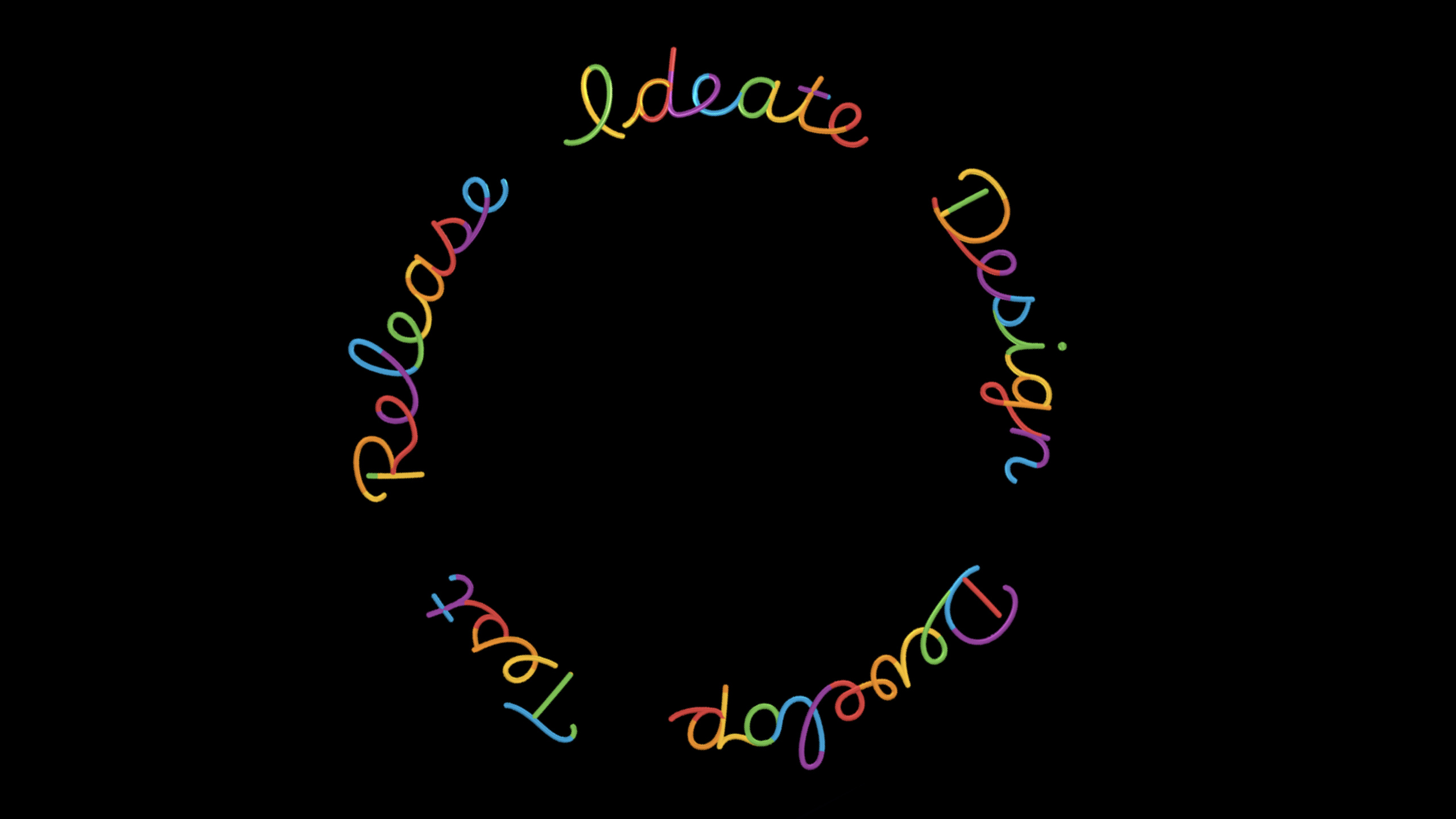
Apple defines inclusive design as a workflow that runs through team, research, design, development, testing, release and iteration, helping developers discover the real needs of different groups of people at an early stage and reducing the cost of fixing experience gaps after release.
Core Content
When a team is building an application, it is easiest to start with users that they are familiar with. Team members live in the same cities, use the same networks, read the same language, and have similar physical abilities and cultural experiences. During the requirements review, everyone will feel that the product has covered the main scenarios.
Problems often don’t come to light until after release. Someone is unable to complete a critical process on a slow network. Someone using VoiceOver (a screen reader) can’t hear the custom control. Some people see ex-partners or deceased relatives in photos and memories, and what was originally a warm function becomes a source of stress.
Apple didn’t announce a single new framework at this presentation. It lays out a process that first uses diversity axes to expand perspective, and then builds inclusion checks into ideation, design, development, testing, launch, and post-launch iterations.
This method solves the problem of timing. If inclusiveness is only checked before going online, many designs will be difficult to change. Release dates, resources, and architecture all become constraints. By placing it at each stage, the team can decide earlier whose feedback they want to listen to, how long they want to keep it, and which features they want to cut that don’t work well.
Start with the team
Apple stresses that having a diverse team is not enough. Team members need to be invited to express different perspectives, and these perspectives need to be factored into decisions. Small teams especially need to do this early, as early hires set culture and product assumptions in place.
A straightforward approach is to change “culture fit” to “culture add”. When hiring and collaborating, ask what perspective is missing and avoid looking only for people who most closely resemble your existing team.
Start with the process
Inclusion processes, like security and privacy, require setting aside time. During the ideation stage, ask what human good the product serves. Examine extreme usage scenarios during the design phase. Plan ahead for Accessibility and Internationalization during the development phase. The testing phase involved people using assistive technology and diverse backgrounds. The release phase identifies trade-offs and sets a plan for unresolved issues.
Continue iterating from real feedback
The example of Photos Memories illustrates the need to continue iterating after launch. Someone wanted the system to generate more interests and holiday themes, so the team expanded the catalog of sports, hobbies, and international holidays. If someone doesn’t want to be reminded of someone, the team adds controls for Feature Less and Never Feature Again.
These changes come from specific feedback. The team first listens to the story, then designs a plan, and then goes back to the interviewees to verify it.
Detailed Content
Diversity Dimension: First admit that the default perspective is very narrow
(00:53) Apple recommends that teams think about users around diversity dimensions. Dimensions listed in the speech include class, culture, ethnicity, language, education, creed, race, gender, sexual orientation, age, ability, disability, handedness, height, as well as location, network connectivity and device access conditions.
let diversityAxes = [
    "class",
    "culture",
    "ethnicity",
    "language",
    "education",
    "beliefs",
    "race",
    "gender",
    "sexualOrientation",
    "age",
    "abilitiesAndDisabilities",
    "handedness",
    "bodyMeasurements",
    "location",
    "internetConnectivity",
    "deviceAccess"
]

func reviewQuestion(for axis: String) -> String {
    "What will the experience be for people across \(axis)?"
}

for axis in diversityAxes {
    print(reviewQuestion(for: axis))
}
Key points:
diversityAxesFrom the dimensions of diversity listed at the beginning of the presentation. -languageRemind the team to review copywriting, localization, and input formatting. -abilitiesAndDisabilitiesCorresponds to accessible design and assistive technology testing. -internetConnectivityCorresponds to low-speed network, offline and traffic-limited scenarios. -reviewQuestion(for:)Turn abstract dimensions into review questions. -for axis in diversityAxesBring every dimension into product reviews and avoid checking only the people your team is most familiar with.
This code would be suitable to put into a design review script or PR template generator. Its function is to remind the team: every time a new core process is added, it must be clear which dimensions have been checked and which dimensions still lack evidence.
Concept stage: first answer why we do it and who it is for.
(09:32) During the ideation stage, Apple asks two questions: why is it making this app or game, and who is it for. The team needs to explain the benefits of who it serves and what it helps people do, become, or feel.
struct ProductIdeaReview {
    let purpose: String
    let humanGood: String
    let targetPerspectives: [String]

    var isReadyForDesign: Bool {
        !purpose.isEmpty && !humanGood.isEmpty && !targetPerspectives.isEmpty
    }
}

let review = ProductIdeaReview(
    purpose: "Help people revisit meaningful photos and videos.",
    humanGood: "Enable people to relive moments they care about.",
    targetPerspectives: [
        "people with different hobbies",
        "people celebrating regional holidays",
        "people with difficult memories around specific people"
    ]
)

print(review.isReadyForDesign)
Key points:
purposeCorresponds to “Why are you making this?”. -humanGoodCorresponds to “what human good are you trying to serve?” in the speech. -targetPerspectivesTo write about specific groups of people and situations, you can’t just write “all users.” -isReadyForDesignIt is required that all three fields have content to prevent the team from entering the design with empty goals.- The photo memory scene in the example comes from the Photos Memories case in the second half of the lecture.
This model can be used in product requirements documents. Before starting each new function, ask the person in charge to fill in these three fields. If you can’t fill it out, you need to continue the interview or narrow down the scope.
Development Phase: Plan ahead for accessibility and internationalization
(12:23) Apple reminds developers to plan for accessibility and internationalization at the beginning of development. Standard UIKit, AppKit, and SwiftUI controls implement UIAccessibility methods by default; custom controls and views require additional time.
import SwiftUI

struct ReminderSettingsView: View {
    @State private var isEnabled = true

    var body: some View {
        Form {
            Toggle("Show Memories", isOn: $isEnabled)
            Text("Use standard SwiftUI controls before building custom controls.")
        }
    }
}
Key points:
import SwiftUIIntroducing the SwiftUI framework. -ReminderSettingsViewis an example of a common settings page. -ToggleIt is a standard SwiftUI control, and the speech points out that standard SwiftUI controls support accessibility by default. -TextUse the system text control to access the system’s text and accessibility systems. -FormUse the platform’s standard form structure to reduce the accessibility costs of custom layouts.- This code does not create a custom control because speech reminder custom controls require additional planning and testing.
When developing, give priority to using system controls to reduce complex adaptation of each interface. Add VoiceOver labels, focus order, dynamic fonts, and keyboard navigation to your development tasks only if you really need to customize the controls.
Machine learning function: Image description needs to handle cross-identity
(14:56) Apple introduced the Markup Description function of iOS 15, which allows users to write their own descriptions for photos; VoiceOver Recognition can also use machine learning to generate natural language descriptions for images. The team later discovered that models need to be careful when describing a person’s gender, because it’s impossible to tell a person’s gender just by looking at a photo.
struct ImageDescriptionInput {
    let hair: String
    let clothing: String
    let setting: String
}

func genderNeutralDescription(for input: ImageDescriptionInput) -> String {
    "A person with \(input.hair) wearing \(input.clothing) and standing \(input.setting)."
}

let input = ImageDescriptionInput(
    hair: "curly black hair",
    clothing: "a red and white striped shirt",
    setting: "in front of a building"
)

print(genderNeutralDescription(for: input))
Key points:
ImageDescriptionInputOnly appearance information that can be described from the photo is saved. -hairCorresponds to “curly black hair” in the speech example. -clothingCorresponds to “red and white striped shirt” in the speech example. -settingCorresponds to “in front of a building” in the speech example. -genderNeutralDescription(for:)useA person, in line with the gender-neutral description direction the team ultimately took.- The code is not inferred
male、female、non-binaryortransgender, because the speech explicitly states that a person’s gender cannot be known from a photo.
This example is suitable for post-processing the output of a machine learning function. Models can identify clothes, hairstyles, and scenes, but product copywriting should avoid writing undetermined identities into facts.
Test phase: Write assistive technologies into the test plan
(21:34) The testing phase allows people from different backgrounds to use the product, and adds assistive technology and various accommodations. The talk gives three straightforward check-ins: learn the basics of VoiceOver, maximize text, and use the keyboard to navigate an app or game.
let inclusiveTestPlan = [
    "Navigate every primary flow with VoiceOver",
    "Increase text size to the maximum level",
    "Navigate the app or game with the keyboard",
    "Collect feedback from testers with diverse backgrounds",
    "Review and prioritize feedback before release"
]

for item in inclusiveTestPlan {
    print("[ ] \(item)")
}
Key points:
VoiceOverTesting advice from the talk. -maximum levelCorrespondingly adjust the text size to the maximum. -keyboardNavigate apps or games with the app keyboard. -diverse backgroundsCorrespondence allows testers with different backgrounds to discover edge scenes. -Review and prioritize feedbackCorresponds to “listen, review, and prioritize feedback” in the speech. -print("[ ] ...")A pre-launch checklist can be generated.
This type of list should go into the test plan and not be left in your personal memory before going live. Apple also recommends tracking inclusion testing goals as KPIs (key performance indicators).
Post-launch: Photos Memories uses feedback to transform product control
(24:31) The Photos Memories team received two types of feedback. One category of users wanted to see more hobbies and holiday themes, and the team expanded into martial arts, skateboarding, football, and festivals like Diwali, Lunar New Year, Eïd al-Fitr, Hanukkah, and more. Another type of user doesn’t want to be reminded of a certain person, so the team added control over the frequency of the character’s appearance.
enum MemoryPersonPreference {
    case featureLess
    case neverFeatureAgain
}

struct MemoryFeedbackResponse {
    let personName: String
    let preference: MemoryPersonPreference
}

let response = MemoryFeedbackResponse(
    personName: "Alex",
    preference: .neverFeatureAgain
)

print(response.preference)
Key points:
MemoryPersonPreferenceWrite the two iteration results in the speech as states. -.featureLessShow less of a person. -.neverFeatureAgainThe corresponding person is no longer shown. -MemoryFeedbackResponseRepresents a product setting brought about by user feedback. -personNameIn real products, it should come from the user’s own photo character library.- The example retains the two-level control because the speech mentioned that different people have different tolerance thresholds for recall content.
(32:39) The team also discovered that the thumbs down icon can make people feel like they are hating someone. In scenarios such as the death of a loved one, this connotation can hurt the user. In the end the team settled on a more neutral glyph.
let rejectedGlyph = "hand.thumbsdown"
let selectedGlyph = "minus.circle"

func glyphForSensitivePreference() -> String {
    selectedGlyph
}

print(glyphForSensitivePreference())
Key points:
rejectedGlyphIndicates a negative icon direction that the team no longer takes. -selectedGlyphIndicates a more neutral icon orientation. -glyphForSensitivePreference()Centralize selections for collaborative review by design and development.- This example reminds developers: the icon itself is also copywriting and will convey attitude.
The focus of this case is closed loop. The team first reads comments, then interviews, then designs, and then takes the sketches back to the interviewees for verification. If the feedback on the first version is not enough, we will continue to iterate.
Core Takeaways
1. Make a pre-launch inclusivity check page
- What to do: Generate a one-page checklist for each release in an internal tool, covering diversity dimensions, VoiceOver, maximum font size, keyboard navigation, slow networks, and localization.
- Why it’s worth doing: The speech emphasized that inclusion needs to be throughout the process, not just a temporary fix before launch.
- How to start: Use
diversityAxesGenerate a PR template or Release Checklist from the array, and bind each check to the responsible person and deadline.
2. Add “rarely appear” and “never appear again” controls to user content
- What to do: Allow users to control the frequency of a certain person, place or theme in photos, diary, social review, music review and other functions.
- Why It’s Worth Doing: Photos Memories explains that automatic recall can trigger difficult experiences. Control reduces harm.
- How to start: First define something like
MemoryPersonPreferenceenumeration, and then use the preferences for recommendation, sorting, or filtering logic.
3. Make an image description editor
- What to do: Allow users to add text descriptions to uploaded images and bring descriptions when sharing.
- Why it’s worth doing: The speech mentioned that Markup Description in iOS 15 can allow photo descriptions to be passed along with sharing, helping blind or low-vision users understand images.
- How to start: Added in the image upload process
descriptionFields, provide previews, require descriptions to focus on identifiable content and avoid inferring identities.
4. Add a layer of inclusive review to machine learning output
- What to do: Conduct rule review on machine learning outputs such as image descriptions, recommendation reasons, automatic tags, etc., and filter identity judgments that cannot be confirmed from the input.
- Why it’s worth it: The VoiceOver Recognition team found that gender-neutral image descriptions can serve users who are blind or have low vision and respect different gender identities.
- How to start: First collect model output samples, mark words related to gender, age, race, and culture, and then write post-processing rules and manual review processes.
5. Turn user interviews into iteration portals
- What to do: Arrange one-on-one interviews in response to negative feedback, record specific moments, feelings and suggestions for improvement, and then use the prototype to return the interview.
- Why it’s worth doing: The Photos Memories team discovered through interviews that the first version of Feature Less was not enough, and subsequently added Never Feature Again.
- How to start: Add tags to the feedback background, filter out cases of “feeling not included”, “being reminded by errors” and “unable to use assistive technology”, and give priority to appointments.
Related Sessions
- The practice of inclusive design — explains how to implement inclusivity in interface copy, imagery, marketing materials, and content design.
- SwiftUI Accessibility: Beyond the basics — Showcases SwiftUI accessibility previews, custom controls, grouping, focus, and rotor.
- Tailor the VoiceOver experience in your data-rich apps — Introducing the Accessibility Custom Content API to help VoiceOver users understand complex data.
- Developer spotlight: Accessibility — Blind and deaf developers share real-world experiences creating accessible apps.
- Localize your SwiftUI app — Introducing SwiftUI localization strings, formats, layouts, and Xcode 13 workflows.
Comments
GitHub Issues · utterances