
Highlight
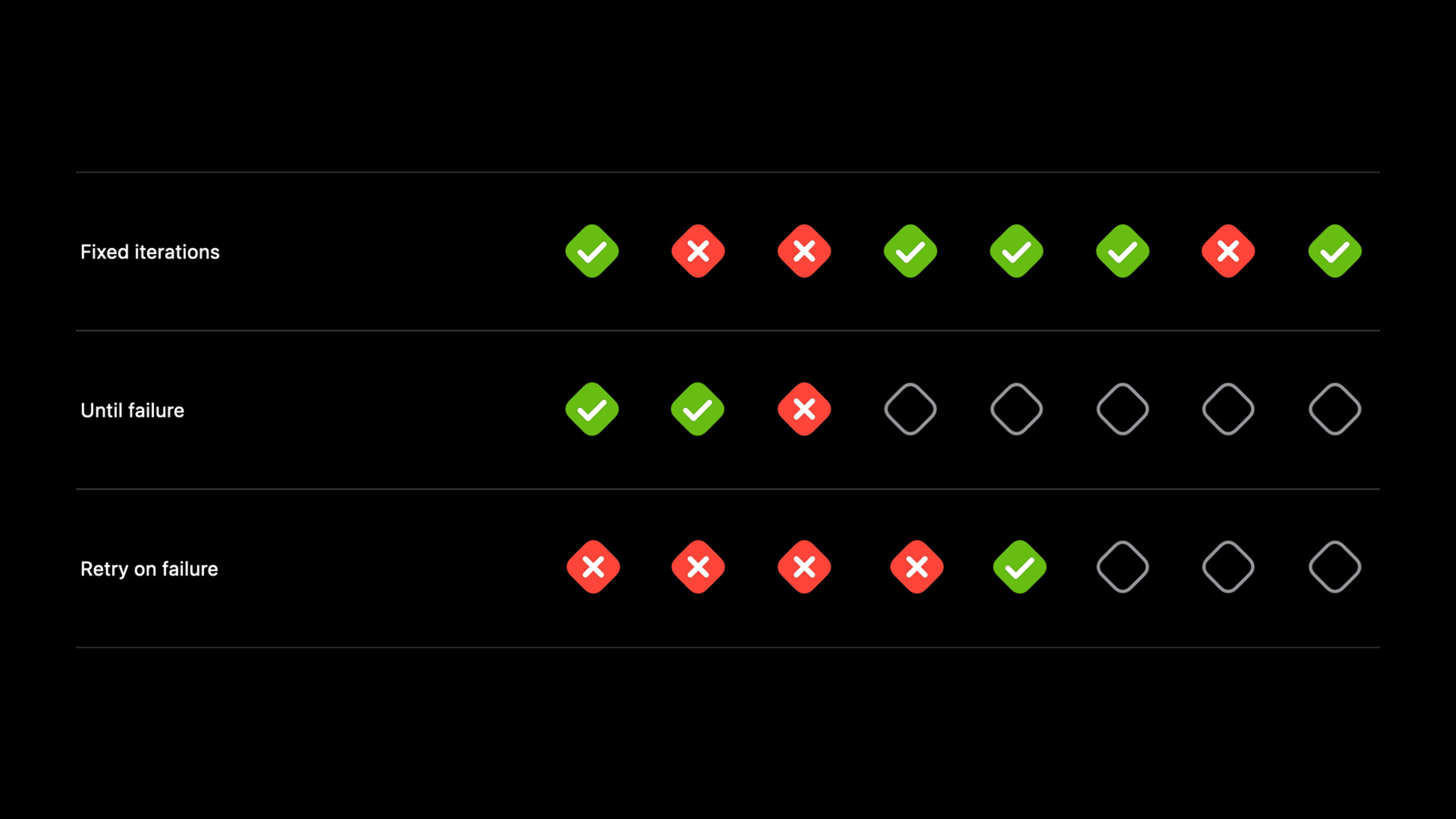
Xcode 13 adds test repetition (Test Repetition) to XCTest. Developers can use three modes: fixed number of times, until failure, and failure retry to reproduce unstable tests, and use Xcode, test plan and xcodebuild to collect diagnostic data.
Core Content
Occasional test failures are the most difficult to deal with.
The same test passes on the local machine today and fails on the CI tomorrow. Click again and pass again. Problems may arise from race conditions, environmental assumptions, global state, or external service communication. Developers have no stable reproduction path and can only look at the failure log once and guess where to check next.
The repeated execution of tests in Xcode 13 solves this entry problem. It runs a test a specified number of times and adds a stopping condition to each run. Failure no longer happens just once. You can press it out, stop at the failure site, and then enter the debugger to see the object status.
An example of a Session is an IceCreamTruckCountdown App. testtestFlavorsfromtruckDepotTo get the ice cream truck, callprepareFlavors, finally asserting that there are 33 flavors on board. This test fails sporadically on the master branch in Xcode Cloud. After failure retry is enabled, the report shows the first few failures and the last pass. This means that the problem will recur, but the probability is not high.
The developer then runs the same test 100 times locally. The test failed 4 times. Then change the stop condition to until failure and enable failure pause. Xcode will stop at the failure. Seen in the debuggerflavorsStill 0, the reason isXCTestExpectationCompleted in the outer completion handler, the innerprepareFlavorsIt’s not over yet.
The fix is to change the test to Swift 5.5’s async/await. Asynchronous processes become sequential code,prepareFlavorsOnly enter the assertion after completion. After it is repeated 100 times and all passes, the developer removes the failed retry configuration from the test plan.
Detailed Content
Three modes of repeated execution of tests
(00:56) Test repeat execution in Xcode 13 can set the maximum number of iterations and stop conditions. Session introduces three modes: Fixed iterations, Until failure, and Retry on failure.
# Fixed count: run the specified number of times; results do not stop early
xcodebuild test -test-iterations 100

# Retry on failure: retry after a failure until success or the maximum count is reached
xcodebuild test -test-iterations 10 -retry-tests-on-failure

# Until failure: keep running and stop at the first failure
xcodebuild test -test-iterations 100 -run-tests-until-failure
Key points:
xcodebuild testRun the test action. --test-iterations 100Specify a maximum of 100 runs. --retry-tests-on-failureRetries failed tests to temporarily collect data on unstable tests in CI. --run-tests-until-failureStop when encountering failure, suitable for bringing non-deterministic failures into the debugger.
(01:10) A fixed number of times is suitable for observing the reliability of the test suite. It will run a full number of times, regardless of failures in between. Teams can use it to check whether the suite starts failing sporadically after new tests are added.
xcodebuild test -test-iterations 100Key points:
- This command only sets the number of iterations.
- There are no additional stopping conditions, so every iteration is executed.
- The output results can be used to calculate the failure rate, for example, 4 failures out of 100 times.
(01:28) until failure is suitable for local reproduction. It keeps running tests until the first failure. With Xcode’s Pause on Failure, you can stop at the failure site.
xcodebuild test -test-iterations 100 -run-tests-until-failureKey points:
-test-iterations 100Set an upper limit for repeated execution. --run-tests-until-failureChange the stop condition to stop on failure.- During local debugging, developers can first use this mode to convert occasional failures into checkable failure sites.
(01:41) Failed retries are suitable for temporary diagnostic CIs. It retries after a failed test until the test succeeds or the maximum number of times is reached. Session explicitly reminds you that failed retries may hide real problems in the product, so they should be removed after diagnosis is complete.
xcodebuild test -test-iterations 10 -retry-tests-on-failureKey points:
-retry-tests-on-failureOnly retry after failure.- Final success does not mean that there are no problems on the first run.
- This mode is suitable for collecting failure data, but not suitable for covering up failures for a long time.
A race condition caused by completion handler
(02:39)testFlavorsThe original version usedXCTestExpectationWait for an asynchronous callback. The code looks like it’s waiting for the ice cream truck to prepare flavors, but the actual waiting point is in the wrong place.
func testFlavors() {
    var truck: IceCreamTruck?

    let flavorsExpectation = XCTestExpectation(description: "Get ice cream truck's flavors")
    truckDepot.iceCreamTruck { newTruck in
        truck = newTruck
        newTruck.prepareFlavors { error in
            XCTAssertNil(error)
        }
        flavorsExpectation.fulfill()
    }

    wait(for: [flavorsExpectation], timeout: 5)
    XCTAssertEqual(truck?.flavors, 33)
}
Key points:
var truck: IceCreamTruck?Declare the car as an optional value first, because it will be assigned a value in the asynchronous callback. -XCTestExpectationUsed to make tests wait for asynchronous operations. -truckDepot.iceCreamTruck { newTruck in ... }Retrieve the ice cream truck asynchronously. -newTruck.prepareFlavors { error in ... }Continue preparing flavors asynchronously. -flavorsExpectation.fulfill()Put it in the outer callback, earlier than the inner callbackprepareFlavorsFinish. -wait(for:timeout:)Only waits for the expectation to complete, not for the flavor preparation to complete. -XCTAssertEqual(truck?.flavors, 33)may be inflavorsExecuted while still 0.
(05:30) After Xcode pauses on failure, the debugger showsflavorsis 0. After continuing to check the breakpoint, I found that the inner completion handler has not been executed yet. The root cause is in the wait position: the test ends the wait prematurely and the assertion runs early.
newTruck.prepareFlavors { error in
    XCTAssertNil(error)
}
flavorsExpectation.fulfill()
Key points:
prepareFlavorsThe completion handler represents when the flavor is ready. -fulfill()Executed outside the completion handler.- When the test considers the asynchronous process to be completed, the real business operation is still running.
- This type of error is easily ignored in nested completion handlers.
Rewrite tests using async/await
(06:18) XCTest supports async/await in Swift 5.5. Test methods can be declared asasync throws, and then directly wait for the asynchronous API to complete.
func testFlavors() async throws {
    let truck = await truckDepot.iceCreamTruck()
    try await truck.prepareFlavors()
    XCTAssertEqual(truck.flavors, 33)
}
Key points:
async throwsAllow test methods to call asynchronous APIs and pass errors to XCTest for handling. -await truckDepot.iceCreamTruck()Waiting for the ice cream truck to return. -let truckis no longer optional because the code will wait until return before continuing execution. -try await truck.prepareFlavors()Wait for the flavor to be ready and handle any errors that may be thrown. -XCTAssertEqual(truck.flavors, 33)Executed after both asynchronous steps have completed.
(06:31) Session shows the first step in the rewriting process: first addasync throws. This step only changes the method signature, for subsequentawaitCall to open the portal.
func testFlavors() async throws {
    var truck: IceCreamTruck?

    let flavorsExpectation = XCTestExpectation(description: "Get ice cream truck's flavors")
    truckDepot.iceCreamTruck { newTruck in
        truck = newTruck
        newTruck.prepareFlavors { error in
            XCTAssertNil(error)
        }
        flavorsExpectation.fulfill()
    }

    wait(for: [flavorsExpectation], timeout: 5)
    XCTAssertEqual(truck?.flavors, 33)
}
Key points:
asyncTesting allowed for in vivo useawait。throwsTesting allowed for in vivo usetry await.- At this time, the test logic has not been fixed yet, it is just preparation for rewriting asynchronous calls.
- The expectation and completion handlers will be removed in subsequent steps.
(06:40) Then use the asynchronous versioniceCreamTruck, then use the asynchronous versionprepareFlavors. The final code retains the original assertion target, but removes the manual wait object.
func testFlavors() async throws {
    let truck = await truckDepot.iceCreamTruck()
    try await truck.prepareFlavors()
    XCTAssertEqual(truck.flavors, 33)
}
Key points:
- The first line of function signature indicates that this is an asynchronous test.
- Second line waiting
truckDepotreturnIceCreamTruck. - The third row waits for the car to finish flavor preparation.
- Line 4 checks if the number of flavors is equal to 33.
- The code sequence is consistent with the business sequence, which is wrong
fulfill()The location disappears.
View iteration results in Xcode and Xcode Cloud
(03:00) Session First temporarily enable Retry on failure in the test plan, and then go to Report Navigator to view the Xcode Cloud report. The iteration label in the report will indicate the sequence number of each run. After the developer expands the record, he sees that the assertion failed the same and the last one passed.
xcodebuild test -test-iterations 10 -retry-tests-on-failureKey points:
- This command corresponds to the failure retry idea in the test plan.
- CI reports retain results from multiple iterations.
- If the failure information is the same multiple times, it means you can continue checking along the same assertion.
- The last pass only means that the retry was successful, but does not mean that the problem has disappeared.
(04:03) Locally, developers can Control-click the test diamond icon and selectRun "testFlavors()" Repeatedly…. The stop condition, maximum number of repetitions, and Pause on Failure can be set in the dialog box.
xcodebuild test -test-iterations 100 -run-tests-until-failureKey points:
- Xcode’s graphical interface is suitable for ad hoc reproduction of a single test.
-
xcodebuildGood for overriding test plan settings in scripts and CI. - The Session example sets the maximum number of times to 100, and 4 failures occur locally.
- After selecting Pause on Failure for the second run, Xcode automatically checks Pause on Failure, making it easier to enter the debugger.
Core Takeaways
-
What to do: Add a “repeat a single failed test” diagnostic task to CI. Why it’s worth doing: Session demonstrates using failure retries to collect unstable test data in Xcode Cloud. How to start: Append the target test in the CI script
-test-iterations, select by scene-retry-tests-on-failureor-run-tests-until-failure。 -
What to do: Record the failure rate of occasional failed tests as a trend. Why it’s worth doing: The fixed-times mode can measure the reliability of the test suite, and it is easier to detect the decrease in stability after adding new tests. How to start: Run regularly
xcodebuild test -test-iterations 100, records the number of passes, the number of failures, and failed assertions. -
What: Audit XCTest with nested completion handlers in the project. Why it’s worth doing: The Session bug comes from expectation being completed in the wrong completion handler. How to get started: Search
XCTestExpectation、wait(for:timeout:)and multi-layer callbacks to confirmfulfill()Whether it is placed in a position where business operations are actually completed. -
What to do: Migrate asynchronous XCTest to async/await. Why it’s worth doing: XCTest support
async throwsTest methods and asynchronous steps can be written in business order. How to start: First change the test method toasync throws, and replace the available asynchronous API withawaitortry awaitcall. -
What to do: Establish a “stop on failure” habit for local debugging. Why it’s worth doing: Till-to-failure mode can bring low-probability failures into the debugger, reducing the guesswork of just looking at logs. How to start: Control-click the test diamond icon in Xcode and select
Run Repeatedly…, set the stop condition to Until failure, and enable Pause on Failure.
Related Sessions
- Embrace Expected Failures in XCTest — Use
XCTExpectFailureMark known issues to reduce test report noise. - Meet async/await in Swift — Understand
async、awaitand a basic way to migrate from completion handlers. - Explore Xcode Cloud workflows — Configure build, test, and distribution processes in Xcode Cloud.
- Explore Digital Crown, Trackpad, and iPad pointer automation — Expand UI test coverage with Xcode 13’s new input automation capabilities.
- Discover breakpoint improvements — Use breakpoints and LLDB to inspect failure scenarios at runtime.
Comments
GitHub Issues · utterances