
Highlight
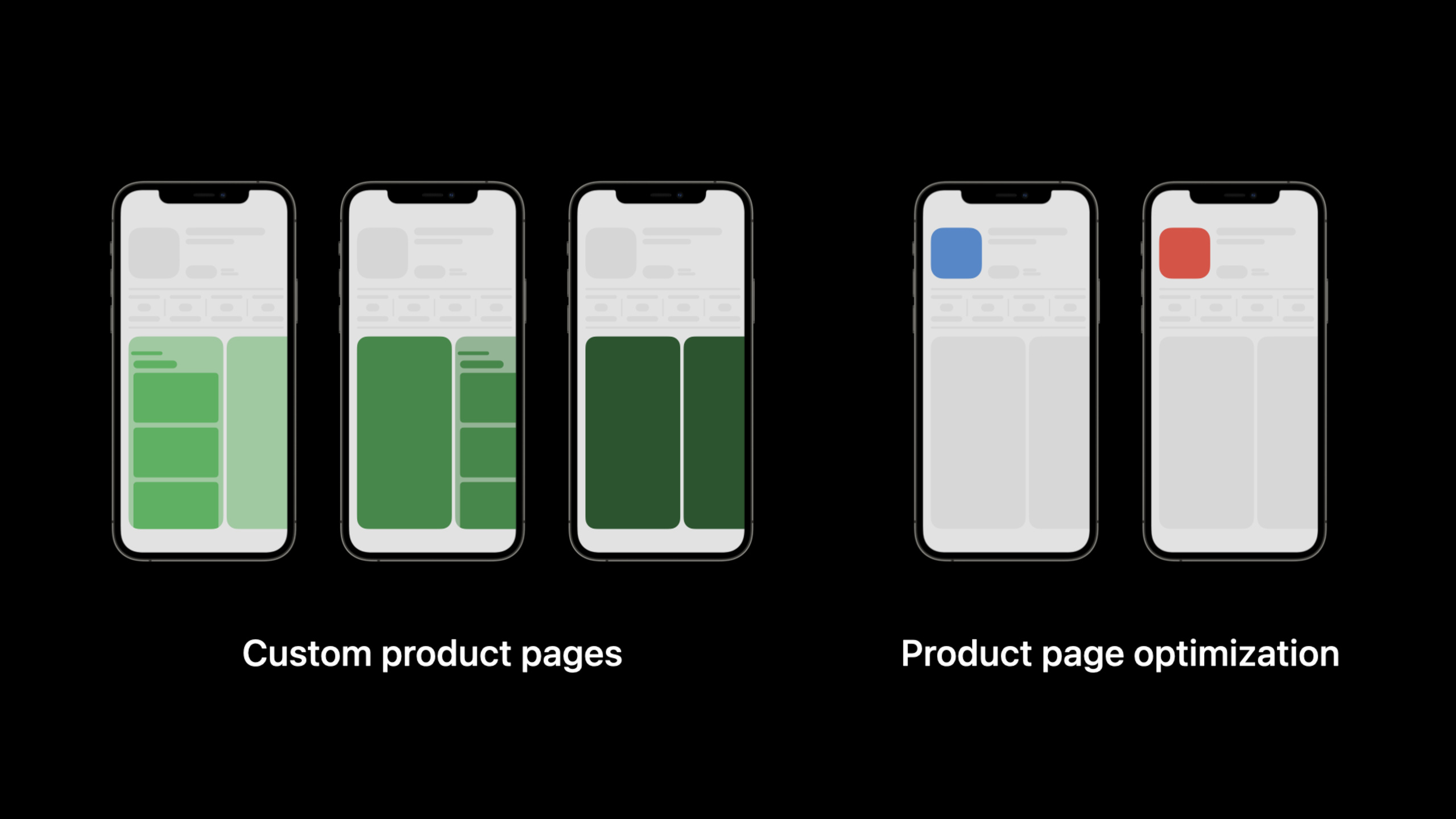
Apple has added custom product pages and product page optimization to the App Store product page. Developers can prepare up to 35 independent pages for different users, and use up to 3 processing groups to test the download conversion effect of the default page material.
Core Content
An app usually serves multiple types of users. In the mountaineering app, some people want to watch real-time live broadcasts, while others only care about GPS tracks. In the game, some people are attracted by the characters, and some are attracted by the gameplay mode. Previously, there was only one default product page, and icons, screenshots, preview videos, and promotional copy had to do all the work at the same time.
The result can easily become a compromise. Live broadcast users see GPS screenshots, and team users see live broadcast selling points. Ad placement can only bring everyone to the same page, and subsequent analysis can only look at the overall conversion rate.
Apple is offering two new capabilities at WWDC21. The first is Custom Product Pages. Each app can create up to 35 pages, each with its own preview video, screenshots, promotional copy, localized content, and unique URL.
The second one is Product Page Optimization. The default product page can be used for testing. Developers prepare different icons, preview videos or screenshots, allocate a portion of the traffic to treatment groups (Treatment), and then use App Analytics to view impressions, downloads, conversions and improvements relative to benchmarks.
These two capabilities solve the same problem: product pages no longer rely solely on pre-launch guesswork. You can first prepare corresponding pages for different channels, and then use data to determine which material is more likely to drive downloads.
Detailed Content
Customized product page: give different users different entrances
(01:02) Custom product pages allow an App to display different features and content. Each page can have different App preview videos, screenshots, and promotional text. Each page supports localization and has its own unique URL.
It happens on the App Store product page, where the goal is to show more relevant content before the user downloads.
customProductPage:
  goal: "highlight-live-streaming"
  audience: "people following climbers in real time"
  assets:
    appPreviewVideos:
      - "live-streaming-preview.mov"
    screenshots:
      - "summit-live-feed-1.png"
      - "climber-broadcast-2.png"
    promotionalText: "Watch climbers reach the summit live."
  localization:
    - "en-US"
    - "ja-JP"
  sharing:
    url: "unique App Store URL for this page"
Key points:
goalWrite clearly the goal of this page. Session recommends planning the goals first and then creating the page. -audienceCorrespond to the people this page is intended to serve. The example comes from the Mountain Climber App in the talk. -appPreviewVideos、screenshots、promotionalTextIt is a material that can be configured individually for custom product pages. -localizationThis means that every page can be fully localized. -sharing.urlIndicates that after the page is approved, it can be shared through a unique URL.
(01:27) App Analytics provides independent metrics for each custom product page. Metrics listed in the speech include impressions, downloads, conversion rate, retention data and average proceeds per paying user.
customProductPageMetrics:
  impressions: "tracked in App Analytics"
  downloads: "tracked in App Analytics"
  conversionRate: "tracked in App Analytics"
  retentionData: "tracked after download"
  averageProceedsPerPayingUser: "tracked after download"
Key points:
impressionsTells you how many times this page has been viewed. -downloadsRecord downloads from this page. -conversionRateUsed to determine the page’s ability to convert visits into downloads. -retentionDataExtend analysis beyond download. -averageProceedsPerPayingUserHelp you determine the value of paying users brought by a certain type of page.
(02:53) There are three steps to prepare a custom product page: first determine the goal, then select the features or content to highlight, and finally prepare the metadata. After the function is launched, these metadata can be submitted in App Store Connect without submitting a new app version.
customProductPagePreparation:
  - planGoals
  - chooseFeaturesOrContent
  - prepareMetadata:
      appPreviewVideos: true
      screenshots: true
      promotionalText: true
  - submitInAppStoreConnect
  - shareAfterApproval
Key points:
planGoalsCorresponds to “Have a clear objective” in the speech. -chooseFeaturesOrContentUsed to avoid repeatedly creating pages for the same type of users. -prepareMetadataContains three categories of material explicitly mentioned in the speech. -submitInAppStoreConnectIndicates that the page was submitted through App Store Connect. -shareAfterApprovalIt means that the unique URL will be shared only after the page has been reviewed and approved.
Product page optimization: Use testing to determine default page materials
(03:59) Product page optimization is used to test the default product page. Developers can set up different processing groups and compare icons, preview videos or screenshots to see which version is more likely to drive downloads.
The examples given in the presentation were blue icons and red icons. The system divides the traffic entering the default product page between the original page and the processing group, and then measures the download conversion.
productPageOptimizationTest:
  baseline:
    appIcon: "blue-icon"
  treatments:
    - name: "red-icon-treatment"
      appIcon: "red-icon"
  measurement:
    primaryMetric: "download conversion"
  possibleAction:
    applyTreatmentMetadataToDefaultProductPage: true
Key points:
baselineIs the current default product page. -treatmentsThis is a beta version. Each test can have up to 3 treatment groups. -primaryMetricdownload conversion from the speech. -possibleActionWhen indicating better test results, you can apply treatment group metadata to the default product page.
(04:35) The processing group can test different App icons, different App preview videos, or different screenshots. Maximum of 3 treatment groups per test. You can choose how many users enter the test traffic.
If you select 30% traffic and set up 3 processing groups, each processing group gets 10% of the total traffic.
trafficAllocation:
  audiencePercentageInTest: 30
  numberOfTreatments: 3
  trafficPerTreatment: 10
  baselineTraffic: 70
Key points:
audiencePercentageInTestis the share of total traffic entering the test. -numberOfTreatmentsCannot exceed 3. -trafficPerTreatmentPer lecture example is 30% divided by 3. -baselineTrafficIt is traffic that has not entered the processing group and continues to see the default page.
(05:04) Icon testing has special requirements. Users who see the test icon and download the app will also see the same icon on their device. To do this, the variant icon resource must be included in the binary for the current online version of the app, including all sizes for the applicable device and the 1024x1024 version used by the App Store.
iconTreatmentRequirements:
  binary: "currently live app version"
  includedAssets:
    deviceIconSizes: "all applicable devices"
    appStoreIcon: "1024x1024"
  userExperience:
    productPageIconMatchesInstalledAppIcon: true
Key points:
binaryRefers to the current online version. The talk emphasized putting variant icons into the binary of the app version you want to test. -deviceIconSizesCovers the required dimensions for applicable equipment. -appStoreIconIs the 1024x1024 icon required by the App Store. -productPageIconMatchesInstalledAppIconEnsure that users see the same icon from the product page to the home screen.
(05:42) Testing can be restricted to specific localized versions. Assuming that the product page supports English, Japanese, and Korean, you can run the test only on the Japanese page. Users who see the page in English or Korean will not enter this test.
localizedTest:
  availableLocalizations:
    - "English"
    - "Japanese"
    - "Korean"
  testLocalizations:
    - "Japanese"
  excludedFromTest:
    - "English"
    - "Korean"
Key points:
availableLocalizationsThis is the current localization of the product page. -testLocalizationsis the language in which the tests actually run. -excludedFromTestIndicates that users in these locales will not enter the test.- This capability is suitable for material changes that are only relevant to a certain market.
(06:12) When the test is running, App Analytics will display impressions, downloads, conversion, and improvement (improvement) of each treatment group relative to the baseline. After viewing the results, you can apply a processing group to the default product page.
If you want to apply a different App icon, you need to update the default icon in the binary file of the next App version.
optimizationResults:
  metrics:
    - impressions
    - downloads
    - conversion
    - improvementAgainstBaseline
  applyWinner:
    metadata: "apply to default product page"
    differentAppIcon: "update default icon in next app binary"
Key points:
impressions、downloads、conversionare metrics that can be monitored during testing. -improvementAgainstBaselineUsed to judge the performance of the processing group relative to the default page. -metadataIndicates that common materials can be applied to the default product page. -differentAppIconis a limitation on icon changes: the default icon needs to be updated with the next App version.
App Store Connect API support
(07:50) At the end of the speech, it was stated that both custom product pages and product page optimization will support the App Store Connect API. The full API specification will be released later that year.
This session does not provide an endpoint, request body, or SDK call. The only fact that can be determined is that the two functions will be covered by the API, and developers can incorporate the relevant processes into the automated system.
appStoreConnectApiSupport:
  customProductPages: true
  productPageOptimization: true
  apiSpec: "published later this year"
Key points:
customProductPagesIndicates that the custom product page will support the API. -productPageOptimizationIndicates that product page optimization will support API. -apiSpecPreserve timing information in presentations to avoid inventing unpublished interfaces.
Core Takeaways
-
What to do: Create dedicated product pages for advertising channels. Why it’s worth it: Custom product pages have unique URLs that can bring different ad creatives to different pages. How to start: Start by listing the 3 main channels and write one for each
goal, and then prepare the corresponding preview video, screenshots and promotional copy. -
What to do: Build a landing page for each of the core functions of the app. Why it’s worth it: Up to 35 custom product pages per app, perfect for highlighting different features or content. How to start: Make a list of the functions that users are most concerned about before downloading, and prepare a screenshot group and a promotional text for the first 5 functions.
-
What to do: Test icon color or style with product page optimization. Why it’s worth doing: Product page optimization can perform processing group testing on the App icon on the default page, and use download conversion to judge the results. How to start: Put the variant icon in the current online version of the binary, complete the device size and 1024x1024 App Store icon, and then set up the test in App Store Connect.
-
What to do: Only test new screenshots in a single localized market. Why it’s worth doing: Testing can be limited to specific localized pages to avoid irrelevant markets affecting the results. How to start: Choose a language version with clear growth goals, prepare screenshots and preview videos of this language, and only add this localization to the test.
-
What to do: Integrate the product page indicators into the weekly growth review. Why it’s worth it: App Analytics delivers impression, download, conversion, retention, and paying user revenue by custom product page and treatment group. How to start: Record the goal, material version and launch date for each page, and compare it with App Analytics metrics every week to decide whether to retain, adjust or take it offline.
Related Sessions
- What’s new in App Analytics — See new metrics for custom product pages, product page optimization, in-app activity, and transactions.
- Meet in-app events on the App Store — Learn how to create, schedule, and manage limited-time events on the App Store.
- Meet privacy-preserving ad attribution — Understanding privacy-friendly attribution between ad serving and App Store downloads.
- Distribute apps in Xcode with cloud signing — Learn about the new workflow for distributing from Xcode to App Store Connect.
Comments
GitHub Issues · utterances