
Highlight
Apple launched MusicKit for Swift at WWDC21. Developers can use Swift concurrency and SwiftUI to request Apple Music content, handle authorization and subscription status, play catalog music, and display subscription offers in the app.
Core Content
In the past, when integrating Apple Music into the app, developers had to deal with several types of problems at the same time.
Content requests are a category. You need to call the Apple Music API, parse the JSON, and convert the results into a model usable in the app. There are also relationships between albums, songs, artists, and genres. If you want to get the album tracks, you have to organize the request and parse logic yourself.
Authorization and tokens are another category. The Apple Music API requires a developer token. The past practice was to go to the developer’s backend to create a MusicKit private key, put the private key on your own server, and then let the app request the token from the server. When it comes to user profiles or music libraries, user consent and user tokens are also dealt with.
There are also options for playback. Social apps may want to control what the system music app is playing. The fitness app may need its own playback queue, which does not affect the system music app. The subscription status also affects whether the button can be clicked. Unsubscribed users need to see the appropriate subscription entrance.
MusicKit for Swift brings these scattered tasks into a Swift framework. It provides a strongly typed music model, structured requests, generic data requests, automatic token generation, subscription state streaming, playback API, and SwiftUI subscription offer modifiers.
The example for this talk is an album app. Users can search Apple Music albums, view tracks, and click to play. Later, the App added a code scanning function: use the camera to identify the barcode of old CDs, then use MusicKit to query the Apple Music catalog according to UPC, and map the physical records to digital albums.
This example illustrates MusicKit’s positioning: it allows music content to enter apps like ordinary Swift data. Developers care about the search, display, playback and subscription processes, and do not need to build bridges from the underlying API themselves.
Detailed Content
1. Music model: album attributes, relationships and associations
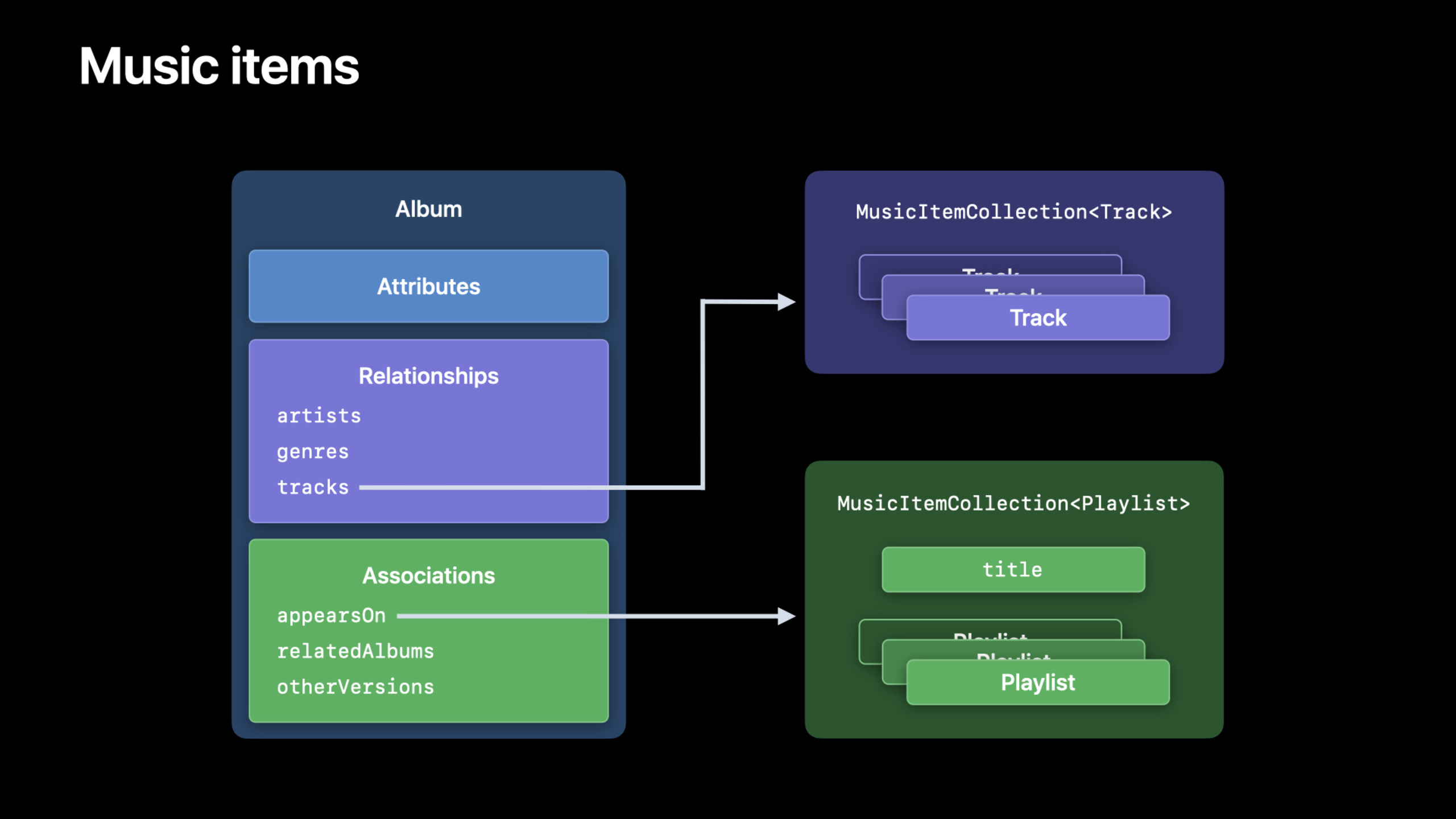
(01:23) MusicKit provides a new model layer to access music items. Requests can search the Apple Music catalog or fetch resources based on filter criteria. The returned results are placed in a collection, which has built-in pagination support.
for speechAlbumExplain the structure of the music model.AlbumIs a value type (value type), including three types of data: ordinary attributes, relationships (relationships) and associations (association). Common attributes includetitle、isCompilation、artwork. Relationships includeartists、genres、tracks. The association is more towards editing scenarios, e.g.appearsOnorrelatedAlbums, the collection itself may also be titled.
(02:56) When loading relationships, MusicKit useswithmethod. It gets a more complete representation of the album from the Apple Music API over the network.
// Loading and accessing relationships

let detailedAlbum = try await album.with([.artists, .tracks, .relatedAlbums])
print("\(detailedAlbum)")

if let tracks = detailedAlbum.tracks {
    print("  Tracks:")
    tracks.prefix(2).forEach { track in
        print("    \(track)")
    }
}
Key points:
album.with([.artists, .tracks, .relatedAlbums])Request a more complete version of the same album. -try awaitIndicates that this step will perform an asynchronous network request and may throw an error. -.artists、.tracksand.relatedAlbumsare the relationships and associations that are to be loaded together. -detailedAlbum.tracksIt is an optional value and will only be entered when the request result contains a track.if let。tracks.prefix(2)Just take the first two songs and use it to print a small number of results. -forEach { track in ... }Iterate over the collection returned by MusicKit as you would an ordinary array.
(03:31) Access associations in the same way. The difference is that associated collections usually have titles, examples are viarelatedAlbums.titleRead it.
// Loading and accessing associations

let detailedAlbum = try await album.with([.artists, .tracks, .relatedAlbums])
print("\(detailedAlbum)")

if let relatedAlbums = detailedAlbum.relatedAlbums {
    print("  \(relatedAlbums.title ?? ""):")
    relatedAlbums.prefix(2).forEach { relatedAlbum in
        print("    \(relatedAlbum)")
    }
}
Key points:
relatedAlbumsfromalbum.withspecified in the request.relatedAlbums。if let relatedAlbums = detailedAlbum.relatedAlbumsIt is guaranteed to be accessed only when related data exists. -relatedAlbums.title ?? ""Reads the title of the associated collection, printing an empty string if there is no title. -relatedAlbums.prefix(2)Take the first two related albums. -relatedAlbumIt is a MusicKit music project that can be printed directly or continue to the details page.
2. Structured request: find album from barcode using UPC
(05:46) The app in the talk can already recognize the barcodes of old CDs. The missing step is to turn the recognized barcode value into an album in Apple Music.
MusicKit providesMusicCatalogResourceRequest. Example creates an album request and putsUPCattributes anddetectedBarcodeDo equivalent matching.UPCIt’s a Universal Product Code, which is a barcode.
let albumsRequest = MusicCatalogResourceRequest<Album>(
    matching: \Album.upc,
    equalTo: detectedBarcode
)

let albumsResponse = try await albumsRequest.response()

if let firstAlbum = albumsResponse.items.first {
    await handleDetectedAlbum(firstAlbum)
}
Key points:
MusicCatalogResourceRequest<Album>Indicates that this request is looking for album resources. -matching: \Album.upcSpecifies that the filter field is the UPC of the album. -equalTo: detectedBarcodeUse the barcode recognized by the camera as the query condition. -try await albumsRequest.response()Execute the request and get the response asynchronously. -albumsResponse.items.firstGet the first album from the returned collection. -await handleDetectedAlbum(firstAlbum)Call the processing logic related to the main thread. In the speech, this method closes the scan code view and pushes the album details page.
3. General data request: access any Apple Music API URL
(07:47) Structured requests are suitable for common scenarios. When encountering any Apple Music API endpoint, MusicKit also providesMusicDataRequest. It receives a URLRequest and returns raw JSON data.
(09:02) Example loads the top-level genre list. The Apple Music API returns JSON, and the code usesJSONDecoderdecoding.Genreitself conforms toDecodable, so the response structure only needs to declare onedataarray.
// Loading top level genres

struct MyGenresResponse: Decodable {
    let data: [Genre]
}

let countryCode = try await MusicDataRequest.currentCountryCode
let url = URL(string: "https://api.music.apple.com/v1/catalog/\(countryCode)/genres")!

let dataRequest = MusicDataRequest(urlRequest: URLRequest(url: url))
let dataResponse = try await dataRequest.response()

let decoder = JSONDecoder()
let genresResponse = try decoder.decode(MyGenresResponse.self, from: dataResponse.data)
print("\(genresResponse.data[9])")
Key points:
MyGenresResponseThe top-level JSON structure returned by the mapping API. -let data: [Genre]Reuse MusicKitGenretype. -MusicDataRequest.currentCountryCodeGet the country or region code corresponding to the current user. -URL(string: ...)Spell out the genre endpoints for the Apple Music API. -MusicDataRequest(urlRequest:)Use ordinaryURLRequestCreate a MusicKit data request. -try await dataRequest.response()Perform network requests and return responses. -JSONDecoder().decode(...)put the originaldataResponse.dataDecodes into a strongly typed Swift value. -genresResponse.data[9]Visit the Tenth Genre Project.
4. Authorization and token: First ask for user consent, and then let MusicKit manage the token.
(09:56) Apple emphasizes that users need to control which apps can access Apple Music data. Apps must ask for user consent before accessing the user’s listening history or music library. This authorization is separated by device and app.
The authorization pop-up window will show that the App isInfo.plistApple Music usage description configured in . This copy should explain why the app needs to access Apple Music.
(10:49) Request for authorization to useMusicAuthorization.request()。
// Requesting user consent for MusicKit

@State var isAuthorizedForMusicKit = false

func requestMusicAuthorization() {
    detach {
        let authorizationStatus = await MusicAuthorization.request()
        if authorizationStatus == .authorized {
            isAuthorizedForMusicKit = true
        } else {
            // User denied permission.
        }
    }
}
Key points:
@State var isAuthorizedForMusicKit = falseUse SwiftUI state to record authorization results. -requestMusicAuthorization()is the method that triggers the authorization process. -detach { ... }Create an asynchronous execution block. -await MusicAuthorization.request()Request Apple Music authorization. -authorizationStatus == .authorizedIndicates that the user is authorized. -isAuthorizedForMusicKit = trueMake features that rely on MusicKit available. -elseThe branch handles the case where the user refuses authorization.
(11:21) Token processing has also become simpler. In the past, developer tokens required a private key, a server, and a request link from the app to the server. MusicKit for Swift can automatically generate developer tokens. Developers only need to enter App Services on the page where they register their App ID and enable the MusicKit checkbox.
The personalization endpoint also requires a user token. The speech notes that the user token will also be automatically generated by MusicKit.
let authorizationStatus = await MusicAuthorization.request()

// Developer token: enable MusicKit in App Services for the App ID.
// User token: MusicKit generates it for personalized endpoints.
Key points:
MusicAuthorization.request()It is the authorized entrance before accessing the user’s Apple Music data.- The generation of developer token is left to MusicKit, but the App ID must enable the MusicKit service.
- user token is used for personalized endpoints.
- Developers do not need to put the MusicKit private key on their own server to generate tokens.
5. Subscription status: Use abilities to control the play button
(12:23) The App needs to know whether the user has an Apple Music subscription. MusicKit breaks down subscription information into three capabilities: whether the user can play Apple Music catalog content, whether the iCloud Music Library is enabled, and whether the user can become a subscriber.
The play button only carescanPlayCatalogContent. If the user cannot play catalog content, the button should be disabled.
(12:54) ExampleMusicSubscription.subscriptionUpdatesContinuously receive subscription changes.
// Using music subscription to drive state of a play button

@State var musicSubscription: MusicSubscription?

var body: some View {
    Button(action: handlePlayButtonSelected) {
        Image(systemName: "play.fill")
    }
    .disabled(!(musicSubscription?.canPlayCatalogContent ?? false))
    .task {
        for await subscription in MusicSubscription.subscriptionUpdates {
            musicSubscription = subscription
        }
    }
}
Key points:
@State var musicSubscription: MusicSubscription?Save current subscription status. -Button(action: handlePlayButtonSelected)Define the play button. -Image(systemName: "play.fill")Use the system play icon. -.disabled(...)Control whether the button can be clicked based on subscription capabilities. -musicSubscription?.canPlayCatalogContent ?? falseDirectory content cannot be played by default without subscription information. -.task { ... }Start an asynchronous task in a SwiftUI view. -for await subscription in MusicSubscription.subscriptionUpdatesListen to the subscription status stream. -musicSubscription = subscriptionWrite the latest state back to SwiftUI state, and the interface will be updated accordingly.
6. Player selection: system player and App player
(13:28) MusicKit provides two players:SystemMusicPlayerandApplicationMusicPlayer。
Social apps are availableSystemMusicPlayerControl what the system Music App is playing. Fitness apps are more suitableApplicationMusicPlayer, keeping the playback state separate from the system Music App.
The key API capabilities mentioned in the presentation are as follows.
// MusicKit playback concepts from the session
SystemMusicPlayer
ApplicationMusicPlayer

// Both players:
// - set the queue with one or more items
// - add an item to play next
// - add an item to play later
// - report now playing information
// - handle remote commands

// ApplicationMusicPlayer also owns a separate queue:
// - insert items in the middle
// - remove previously added items
Key points:
SystemMusicPlayerRemote control system Music App.- use
SystemMusicPlayer, the system reports the Music App as a now-playing app. -ApplicationMusicPlayerLet the current App have an independent playback queue. - use
ApplicationMusicPlayer, the system will report your app as the playing app. - Both players report now playing information and handle system media controls such as lock screen.
- Both players can set the queue, add the next song, and add to play later.
- only
ApplicationMusicPlayerProvides finer-grained queue control, such as inserting intermediate positions or removing added items.
7. Subscription discount: display contextual subscription entrance in the app
(14:50) Users who have not subscribed to Apple Music may not be able to use the music functions in the App. MusicKit can display subscription offers within the app. This offer can be tied to specific songs, albums or playlists.
(15:34) Example writes the ID of the current albumMusicSubscriptionOffer.Options.itemID, and use SwiftUI’smusicSubscriptionOfferModifier display sheet.
// Showing contextual music subscription offer

@State var musicSubscription: MusicSubscription?
@State var isShowingOffer = false

var offerOptions: MusicSubscriptionOffer.Options {
    var offerOptions = MusicSubscriptionOffer.Options()
    offerOptions.itemID = album.id
    return offerOptions
}

var body: some View {
    Button("Show Subscription Offers", action: showSubscriptionOffer)
        .disabled(!(musicSubscription?.canBecomeSubscriber ?? false))
        .musicSubscriptionOffer(isPresented: $isShowingOffer, options: offerOptions)
}

func showSubscriptionOffer() {
    isShowingOffer = true
}
Key points:
musicSubscriptionSave the user’s current subscription status. -isShowingOfferControls whether the subscription discount sheet is displayed. -MusicSubscriptionOffer.Options()Create a subscription offer configuration. -offerOptions.itemID = album.idBind the offer to the current album. -Button("Show Subscription Offers", ...)Provide a button to display the subscription entry. -.disabled(!(musicSubscription?.canBecomeSubscriber ?? false))The button is only enabled if the user can become a subscriber. -.musicSubscriptionOffer(isPresented: $isShowingOffer, options: offerOptions)Attach the SwiftUI sheet to the view. -showSubscriptionOffer()BundleisShowingOfferset totrue, triggering an impression.
Core Takeaways
1. Scan the physical record and open the digital album
- What to do: Create a CD or vinyl collection management function, scan the barcode and display the same album in Apple Music.
- Why it’s worth doing: The presentation has been shown
MusicCatalogResourceRequest<Album>according toAlbum.upcThrough the query process, physical collections can be directly connected to digital playback. - How to start: First use camera or Vision to identify the barcode and get
detectedBarcode, then useMusicCatalogResourceRequest<Album>(matching: \Album.upc, equalTo: detectedBarcode)Request an album and finally push it to the album details page.
2. Add independent music queue to fitness app
- What to do: Configure a different Apple Music album or playlist for each training plan, and start an independent playback queue when starting training.
- Why it’s worth doing: Speech Notes
ApplicationMusicPlayerThe playback status is independent of the system Music App, suitable for fitness scenarios. - How to start: Check before training starts
musicSubscription?.canPlayCatalogContent, find the track or playlist through MusicKit, and then selectApplicationMusicPlayerManage playback queues.
3. Use subscription status to drive the interface
- What to do: Make the play button, add library button, and subscribe button into a state machine, and automatically switch with the Apple Music subscription capability.
- Why it’s worth doing:
MusicSubscription.subscriptionUpdatesSubscription changes will continue to occur, and the interface can respond to user login, logout or subscription status changes in real time. - How to start: In SwiftUI view
.taskmiddlefor awaitmonitorMusicSubscription.subscriptionUpdates,usecanPlayCatalogContentTo control the play button, usecanBecomeSubscriberControl subscription entry.
4. Make an Apple Music genre browser
- What to do: Display the top music genres in the current country or region, and then enter the album or song list of each genre.
- Why it’s worth doing:
MusicDataRequestCan access any Apple Music API URL,Genreand can participate directlyDecodabledecoding. - How to start: Use
MusicDataRequest.currentCountryCodespell out/v1/catalog/{countryCode}/genres,passMusicDataRequestRequest data, then useJSONDecoderDecoded to contain[Genre]response structure.
5. Display contextual subscription offers on content pages
- What: When a user opens an album but can’t play it, show a “Join Apple Music” button and let the subscription offer highlight the album.
- Why it’s worth doing:
MusicSubscriptionOffer.Options.itemIDSpecific albums can be bound, and the subscription entry is related to the content currently browsed by the user. - How to start: Save
album.id,structureMusicSubscriptionOffer.Options, add on the button.musicSubscriptionOffer(isPresented:options:), and usecanBecomeSubscriberControl button state.
Related Sessions
- Explore the catalog with the Apple Music API — Continue with a deep dive into catalog searches, suggestions, and metadata requests for the Apple Music API.
- Explore ShazamKit — Learn to use ShazamKit to identify songs and integrate the music recognition results into the App.
- Discover concurrency in SwiftUI — Understanding MusicKit examples
await、.taskand the basics of SwiftUI state updates. - Meet AsyncSequence — Go deeper
for awaitpattern, understandingMusicSubscription.subscriptionUpdatesThis type of asynchronous flow. - Meet async/await in Swift — Master Swift concurrency syntax used in MusicKit network requests.
Comments
GitHub Issues · utterances