
Highlight
Apple Music API New
/search/suggestions、relate、extend, relationship views, and Charts API parameters, allowing developers to quickly obtain search suggestions, related resources, extended attributes, and ranking playlists.
Core Content
You made a music search page. user inputtaylor, the interface should give suggestions immediately.
In the past, a common practice was to call/search/hintsTake suggested words. It can tell you what users may want to search for, but it cannot directly give results such as artists and songs. You still have to wait for the user to submit before going the regular route./search. Entering the association page will take a few seconds.
Apple added to Apple Music API in 2021/search/suggestions. it replaces/search/hints, retain the suggested words, and return top results. Artists and songs can appear directly below the input box.
After the search results came out, there was a second question. You may just want to jump from a song to its album page. useincludePulling the full album will get a lot more fields. Apple Newrelate, only the ID, type and href of the associated resource are returned. The jump is enough and the response is lighter.
Some fields cannot be given by default. Such as songsartistUrl. It works, but returning every search can slow down the response or make the object model larger.extendLets you request extended attributes by name by resource type.
Product pages have another type of data. The artist page needs hot songs, hot MVs, and singles lists. They are more like page modules. Apple uses relationship views to carry this type of data, and developers can useviewsparameters or/view/{viewName}Path request.
Finally, the Charts API can directly retrieve the chart playlist. Can pass the global daily list and city list/chartsaddwithOnce the parameters are obtained, it is suitable for discovery pages and local trend portals.
Detailed Content
use/search/suggestionsReturn to search suggestions
(01:25)
/search/suggestionssubstitute/search/hints. If you only need the old suggestion word capability, specify this in the requestkinds=terms。
GET /v1/catalog/us/search/suggestions?term=taylor&kinds=termsKey points:
GETRepresents reading Apple Music catalog data. -/v1/catalog/usSpecifies the directory to access the US storefront. -/search/suggestionsis the new search suggestions endpoint. -term=tayloris the search term currently entered by the user. -kinds=termsRequests that suggested search terms be returned.
The response will indicate the kind of each suggestion. It also differentiates between the words used in search queries and the words displayed to the user. The search box can make the display copy more user-friendly and hand over query terms to subsequent search requests.
Use top results to drive input Lenovo
(02:09)
Input associations often require direct display of artists and songs. new endpoint forkinds=topResultsTo do this, you also specify the type of resource you want.
GET /v1/catalog/us/search/suggestions?term=taylor&kinds=topResults&types=artists,songsKey points:
kinds=topResultsRequests that popular search results be returned. -types=artists,songsLimit results to artists and songs.- The resource of top results is placed in the response
contentkey down. - This endpoint prioritizes speed, the results may be as good as regular
/searchdifferent. - Regular
/searchStill fits into the full search results page.
This type of request is suitable for input box drop-down layers. Users can click on artists or songs before pressing Enter.
userelateGet only the associated resource identifier
(03:47)
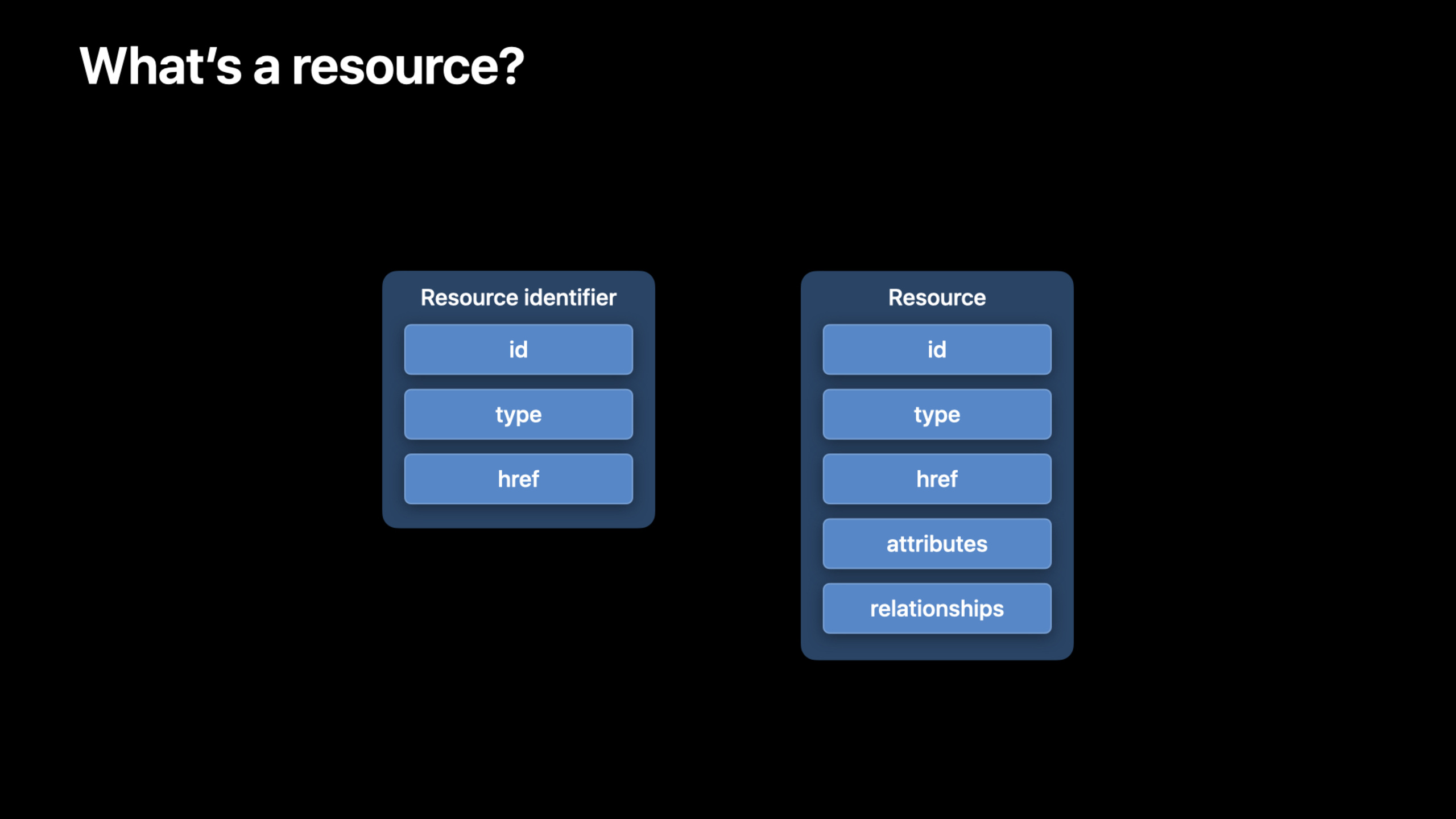
The resource identifier for the Apple Music API consists of ID, type, and href.relateWhen requesting a relationship, only these identifiers are returned.
GET /v1/catalog/us/search/suggestions?term=taylor&kinds=topResults&types=artists,albums,songs&relate[songs]=albumsKey points:
types=artists,albums,songsAllows suggested results to include artists, albums, and songs. -relate[songs]=albumsIndicates that only requests for song resources are madealbumsrelation.- The returned album relationship only contains resource identifiers.
- If you click on a song, you only need to jump to the album page.
hrefIt’s enough. - This response is faster than requesting the full relationship object.
This solves a common waste of search pages. The list page only needs jump targets and does not require album names, covers and other attributes.
useextendRequest extended attributes
(05:03)
Resources include common attributes such as name and artwork by default. Some properties are more expensive to compute, or are used less frequently, and so are not returned by default.extendUsed to request these extended attributes by name.
GET /v1/catalog/us/search/suggestions?term=taylor&kinds=topResults&types=artists,albums,songs&relate[songs]=albums&extend[songs]=artistUrlKey points:
- This request inherits the previous search suggestions and
relate。 extend[songs]=artistUrlIndicates requesting only for song resourcesartistUrlExtended attributes. -artistUrlCan be used to take users to the artist’s page on Apple Music.- Extended properties are returned on demand to avoid slower or larger default responses.
One practical use is the “Open Artist Page” button in search results. Only requested if this button existsartistUrl。
Use relationship views to build artist page module
(06:16)
Views are suitable for product pages. It is looser than relationships and can have its own headers and data. The example given in the talk is an artist’s Top Songs view.
GET /v1/catalog/us/artists/159260351?views=top-songsKey points:
/artists/159260351Get an artist resource directly. -views=top-songsThe request response contains a view of top songs.- views can only be requested during direct resource retrieval.
- Other examples include Top Music Videos and singles.
- For which views a certain resource type supports, you need to check the Apple Music API documentation.
The same view can also be requested using a path.
GET /v1/catalog/us/artists/159260351/view/top-songsKey points:
/view/top-songsPlace after the resource ID.- This way of writing only requests one view.
- It is suitable for lazy loading of page modules, such as sending a request when the user scrolls to the “Hot Songs” area.
Use Charts API to get the chart list
(06:59)
Apple Music supports world, storefront and city-level chart playlists. Users can add these playlists to the database, and the playlists will be updated automatically. Now developers can directly access the/chartsGet them.
GET /v1/catalog/us/charts?types=playlists&with=dailyGlobalTopCharts,cityChartsKey points:
/chartsIs the leaderboard endpoint. -types=playlistsSpecifies the ranking list of the playlist type to be returned. -with=dailyGlobalTopCharts,cityChartsRequest global daily list and city list. -withParameters can be passed in only one of the collections, or both.- The returned results are suitable for placing on a music discovery page.
Core Takeaways
-
What to do: Make an instant search drop-down layer for the music app. Why it’s worth doing:
/search/suggestionsCan return both suggested words and popular results, suitable for typeahead. How to start: Monitor the text changes in the input box and callGET /v1/catalog/{storefront}/search/suggestions?term={text}&kinds=topResults&types=artists,songs,BundlecontentArtists and songs below are rendered as clickable items. -
What to do: Add the “View Album” shortcut to the song search results. Why it’s worth doing:
relate[songs]=albumsOnly the album resource identifier is returned, gethrefYou can jump. How to Get Started: Search Suggestions Request to Joinrelate[songs]=albums, read the album relationship in the song resultshref, click to obtain the album details page data. -
What to do: Add an “Open artist on Apple Music” button to the search results. Why it’s worth doing:
extend[songs]=artistUrlYou can get the artist link corresponding to the song on demand, without having to make all requests carry extended attributes by default. How to start: Only when the interface requires external link buttons, append to the requestextend[songs]=artistUrl, and then return theartistUrlBind to button. -
What to do: Create a “Hot Songs” module for the artist details page. Why it’s worth doing: relationship views specialized service product page module,
top-songsDirectly express the needs of this page. How to start: Request when entering the artist page/v1/catalog/{storefront}/artists/{id}?views=top-songs, render the view data into a song list; if the module is outside the first screen, you can use/view/top-songsLazy loading. -
What to do: Make an urban music trends page. Why it’s worth doing: Charts API works
with=cityChartsGet city chart playlists, suitable for showcasing local popular content. How to start: Call/v1/catalog/{storefront}/charts?types=playlists&with=cityCharts, use the returned chart playlists as the entrance, click to enter the playlist details.
Related Sessions
- Meet MusicKit for Swift — Access Apple Music content with Swift types, concurrency, and automatic token management.
- Explore ShazamKit — Recognize audio in apps and connect the results to your music experience.
- Create custom audio experiences with ShazamKit — Create custom matching capabilities for your own audio catalog.
- What’s new in AVFoundation — Learn about updates to Apple’s platform media framework for playback, capture, and processing.
Comments
GitHub Issues · utterances