
Highlight
Apple is exposing walking endurance, walking stability, and fall risk to HealthKit in iOS 15 and watchOS, allowing developers to build remote rehabilitation, physical therapy, and health monitoring capabilities with Six-Minute Walk recalibration and Walking Steadiness.
Core Content
Jamie just had knee surgery. Doctors knew she would barely be able to walk after surgery, but the Apple Watch’s Six-Minute Walk estimate showed only a small drop. The problem lies in the data window: This estimate uses a period of historical activity and movement data, and the window also includes preoperative status, diluting the true postoperative changes.
(02:13) iOS 15 provides the HealthKit estimate recalibration API. Once the app knows the surgery date, it can request that the Six-Minute Walk estimate be re-established from this date onwards. This way, several postoperative estimates will reflect reduced endurance more quickly, and the care team can judge earlier whether recovery is going well.
Walking ability also includes another issue: how far the patient can walk only indicates endurance; whether the patient walks steadily is related to the risk of falling. In remote physical therapy, it is difficult for doctors to see the patient’s true gait every week. The patient may be clocking in and training on time, but stability is declining.
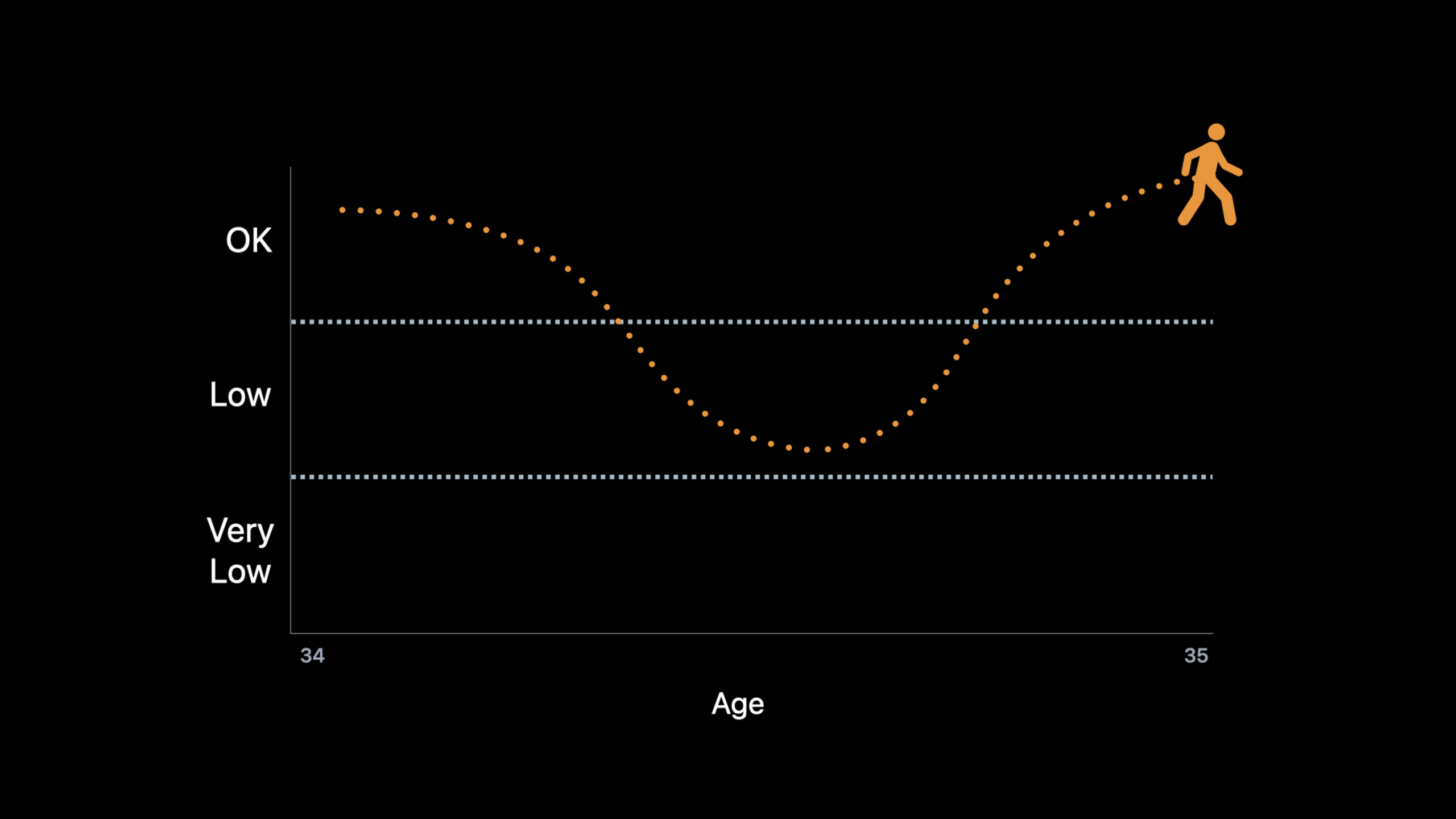
(06:24) Apple Walking Steadiness measures walking quality with iPhone. HealthKit saves the scores once a week and categorizes the scores as OK, Low, or Very Low. After the user opens it in the Health App and the stability drops to Low or Very Low, the system will write a notification event. Applications can monitor these events and prompt patients to schedule follow-up appointments.
What these two abilities have in common is clear: turning staged assessments in the clinic into continuous signals in daily life. Developers do not need additional hardware, nor do they need users to complete special tests every day; the premise is that users authorize HealthKit and bring an iPhone or Apple Watch to generate enough samples.
Detailed Content
1. Six-Minute Walk: Get read and write authorization first
(03:39) Recalibration passedHKHealthStore.recalibrateEstimatesFinish. Apple explained three requirements in its presentation: the sample type must support recalibration, the app needs a new entitlement (authorization capability), and it needs to obtain HealthKit authorization to both read and write the type. The types of recalibrations available in iOS 15 aresixMinuteWalkTestDistance。
import HealthKit

let healthStore = HKHealthStore()
let types: Set = [
    HKObjectType.quantityType(forIdentifier: .sixMinuteWalkTestDistance)!
]

healthStore.requestAuthorization(toShare: types, read: types) { success, error in
    if let error = error {
        print(error.localizedDescription)
        return
    }

    print("Six-Minute Walk authorization: \(success)")
}
Key points:
import HealthKit: Use HealthKit types and authorization API. -HKHealthStore():Create an entry to the HealthKit database. -HKObjectType.quantityType(forIdentifier: .sixMinuteWalkTestDistance)!: Take out the quantity type corresponding to the Six-Minute Walk distance. -toShare: types: Request write permission, which is required for recalibration. -read: types: Requesting read permission, the application needs to read the estimation results. -success: Indicates whether the user has completed the authorization process. -error: Failed to process authorization request.
2. Six-Minute Walk: Recalibrating Estimates with Surgery Dates
(04:27) After the application knows Jamie’s surgery date, it callsrecalibrateEstimates(sampleType:date:). The system will pop up a prompt asking the user to confirm that this operation will affect health data. Recalibration does not overwrite estimates that already exist in HealthKit; it affects estimates generated afterward. The presentation also explains that it may take up to 14 days for sufficient activity history to re-accumulate after recalibration, and that the effect will gradually end as the date gets further away.
import HealthKit

let healthStore = HKHealthStore()
let sixMinuteWalkType = HKSampleType.quantityType(forIdentifier: .sixMinuteWalkTestDistance)!
let surgeryDate = Date()

if sixMinuteWalkType.allowsRecalibrationForEstimates {
    healthStore.recalibrateEstimates(sampleType: sixMinuteWalkType, date: surgeryDate) {
        success, error in

        if let error = error {
            print(error.localizedDescription)
            return
        }

        print("Recalibration requested: \(success)")
    }
}
Key points:
HKSampleType.quantityType(forIdentifier:): Gets the sample type that can be passed to the recalibration method. -surgeryDate: Represents the date of an acute event, such as the date of surgery or injury. -allowsRecalibrationForEstimates: Checks whether this sample type supports estimation recalibration. -recalibrateEstimates(sampleType:date:): Asks HealthKit to re-create estimates from the specified date. -success: Indicates whether the request was submitted successfully. -error: Failed to handle entitlement, authorization, or system call.
3. Walking Steadiness: Read the latest score
(11:22) The Walking Steadiness score is a HealthKit quantity type namedappleWalkingSteadiness. It is a read-only metric defined by Apple. The unit is percent and the range is from 0 to 1. Scores are written weekly; estimates may be delayed when data are insufficient.
import HealthKit

let healthKitStore = HKHealthStore()
let types: Set = [
    HKObjectType.quantityType(forIdentifier: .walkingSteadiness)!
]

healthKitStore.requestAuthorization(toShare: nil, read: types) { success, error in
    if let error = error {
        print(error.localizedDescription)
        return
    }

    print("Walking Steadiness authorization: \(success)")
}
Key points:
HKHealthStore():Create HealthKit access portal. -.walkingSteadiness: Take out the walking stability score type. -toShare: nil: This indicator is read-only and is not written by the application. -read: types: Requests to read the Walking Steadiness score. -success: Record the authorization result. -error: Handle authorization errors.
After getting the authorization, check the latest score.
import HealthKit

let healthStore = HKHealthStore()
let steadinessType = HKObjectType.quantityType(forIdentifier: .walkingSteadiness)!
let sortByEndDate = NSSortDescriptor(key: HKSampleSortIdentifierEndDate, ascending: false)

let query = HKSampleQuery(sampleType: steadinessType,
                          predicate: nil,
                          limit: 1,
                          sortDescriptors: [sortByEndDate]) { query, samples, error in

    if let error = error {
        print(error.localizedDescription)
        return
    }

    if let sample = samples?.first as? HKQuantitySample {
        let recentScore = sample.quantity.doubleValue(for: .percent())
        updateStatus(score: recentScore)
    }
}

healthStore.execute(query)
Key points:
steadinessType: Walking Steadiness quantity type in HealthKit. -sortByEndDate: Sort by sample end time in reverse order, so that the latest samples are ranked first. -HKSampleQuery: Read samples from HealthKit. -predicate: nil: No time limit is required, and all samples can be checked directly. -limit: 1: Just the latest one. -samples?.first as? HKQuantitySample: Convert the returned samples into quantitative samples. -.percent(): Read the score in percentage units. -updateStatus(score:): Display the score to the application interface or state model.
4. Walking Steadiness: Convert scores into categories
(12:21) Individual values are not easy to interpret. HealthKit providesHKAppleWalkingSteadinessClassificationEnumeration, convert fraction to.ok、.low、.veryLow. The scenario in the presentation was a physical therapy application: when a patient is low, the application can alert the care team to the risk of falls.
import HealthKit

let healthStore = HKHealthStore()
let steadinessType = HKObjectType.quantityType(forIdentifier: .walkingSteadiness)!
let sortByEndDate = NSSortDescriptor(key: HKSampleSortIdentifierEndDate, ascending: false)

let query = HKSampleQuery(sampleType: steadinessType,
                          predicate: nil,
                          limit: 1,
                          sortDescriptors: [sortByEndDate]) { query, samples, error in

    if let error = error {
        print(error.localizedDescription)
        return
    }

    if let sample = samples?.first as? HKQuantitySample {
        let recentScore = sample.quantity.doubleValue(for: .percent())
        let recentClassification = HKAppleWalkingSteadinessClassification(for: sample.quantity)

        updateStatus(classification: recentClassification, score: recentScore)
    }
}

healthStore.execute(query)
Key points:
HKSampleQuery:Reuse the query that reads the latest score. -recentScore: Keep the original score, suitable for drawing trend charts. -HKAppleWalkingSteadinessClassification(for:): Use the HealthKit API to convert sample values into categories. -recentClassification: Gets OK, Low or Very Low. -updateStatus(classification:score:): Display categories and scores at the same time to facilitate patient understanding.
5. Walking Steadiness Event: Listen for system notification events
(13:15) The Walking Steadiness notification is written as a HealthKit category type sample with the nameappleWalkingSteadinessEvent. There are four categories of events:.initialLow、.initialVeryLow、.repeatLow、.repeatVeryLow. The first two categories are triggered approximately one month after the user enters Low or Very Low; the latter two categories are triggered approximately every three months while the user continues to be in the same category.
import HealthKit

let healthKitStore = HKHealthStore()
let types: Set = [
    HKObjectType.categoryType(forIdentifier: .walkingSteadinessEvent)!
]

healthKitStore.requestAuthorization(toShare: nil, read: types) { success, error in
    if let error = error {
        print(error.localizedDescription)
        return
    }

    print("Walking Steadiness Event authorization: \(success)")
}
Key points:
categoryType(forIdentifier:): Read the Walking Steadiness event using the classification type. -.walkingSteadinessEvent: Corresponds to the stability notification event written by the system. -toShare: nil: Events are written by the system and only read by the application. -read: types: Request to read event samples. -success: Confirm whether the user is authorized to read.
After authorization, useHKObserverQueryListen for new events.
import HealthKit

let healthStore = HKHealthStore()
let notificationType = HKCategoryType.categoryType(forIdentifier: .appleWalkingSteadinessEvent)!

let query = HKObserverQuery(sampleType: notificationType, predicate: nil) {
    query, completionHandler, errorOrNil in

    if let error = errorOrNil {
        print(error.localizedDescription)
        return
    }

    promptCheckupForNotification()

    completionHandler()
}

healthStore.execute(query)
Key points:
HKCategoryType.categoryType(forIdentifier:): Get the Walking Steadiness notification event type. -HKObserverQuery: Listen for newly written samples in HealthKit. -sampleType: notificationType: Only listen to walking stability notification events. -predicate: nil: Listen for all new events of this type. -errorOrNil: Handle errors in listening callbacks. -promptCheckupForNotification(): Prompt users in the app to schedule online follow-up consultations. -completionHandler(): Notify HealthKit that event processing is completed. -healthStore.execute(query): Start executing an observation query.
6. Query six weeks of data and judge the downward trend yourself
(15:12) System notifications only cover Low and Very Low. Physical therapy clinics may also be concerned about another type of patient: one whose classification has not worsened, but whose scores have continued to decline. The approach in the speech is to query the Walking Steadiness samples of the past six weeks, calculate the best-fit slope (best-fit slope), and prompt a review if the weekly average decreases by more than 5 points.
import HealthKit

let healthStore = HKHealthStore()
let end = Date()
let start = Calendar.current.date(byAdding: .weekOfYear, value: -6, to: end)
let datePredicate = HKQuery.predicateForSamples(withStart: start, end: end, options: [])

let steadinessType = HKObjectType.quantityType(forIdentifier: .walkingSteadiness)!
let sortByEndDate = NSSortDescriptor(key: HKSampleSortIdentifierEndDate, ascending: false)

let query = HKSampleQuery(sampleType: steadinessType,
                          predicate: datePredicate,
                          limit: HKObjectQueryNoLimit,
                          sortDescriptors: [sortByEndDate]) { query, samples, error in

    if let error = error {
        print(error.localizedDescription)
        return
    }

    detectTrends(samples)
}

healthStore.execute(query)
Key points:
end = Date(): The query window ends at the current time. -Calendar.current.date(byAdding:): Set the start time to six weeks ago. -HKQuery.predicateForSamples(withStart:end:options:): Limit the HealthKit query time range. -steadinessType: The target sample is still the Walking Steadiness score. -limit: HKObjectQueryNoLimit: Retrieve all samples in the window. -sortDescriptors: Sort by end time in reverse order. -detectTrends(samples): Hand the sample to the custom trend judgment function.
The trend function is implemented by the application itself. The following example only shows the judgment entry in the speech: calculate the slope, less than-5Prompt for review.
import HealthKit

func detectTrends(_ samples: [HKSample]?) {
    let quantitySamples = samples as? [HKQuantitySample] ?? []
    let slope = bestFitSlope(for: quantitySamples)

    if slope < -5 {
        promptCheckupForNotification()
    }
}
Key points:
samples as? [HKQuantitySample]: Convert HealthKit samples to an array of quantitative samples. -bestFitSlope(for:): Apply a custom function to calculate the best-fit slope for the six-week sample. -slope < -5: Corresponds to the threshold in speech, indicating an average weekly decrease of more than 5 points. -promptCheckupForNotification(): Reuse the follow-up consultation prompt in the notification scene.
7. Let users continue to generate Walking Steadiness samples
(16:21) Whether the application can monitor stability depends on whether HealthKit has samples. Apple gives four practical suggestions. First, users need to set their height in the health app; weight and age are also recommended. Second, users are prompted to turn on Apple Walking Steadiness notifications. Third, users are reminded to carry their iPhone with them when walking, whether in a trouser pocket, jacket pocket, or bag close to the body. Fourth, use Walking Speed samples to determine whether the user is carrying the device stably enough; having Walking Speed samples for two consecutive weeks is a good signal.
import HealthKit

let healthStore = HKHealthStore()
let walkingSpeedType = HKObjectType.quantityType(forIdentifier: .walkingSpeed)!
let end = Date()
let start = Calendar.current.date(byAdding: .weekOfYear, value: -2, to: end)
let predicate = HKQuery.predicateForSamples(withStart: start, end: end, options: [])

let query = HKSampleQuery(sampleType: walkingSpeedType,
                          predicate: predicate,
                          limit: HKObjectQueryNoLimit,
                          sortDescriptors: nil) { query, samples, error in

    if let error = error {
        print(error.localizedDescription)
        return
    }

    if samples?.isEmpty == true {
        promptUserToCarryPhoneWhileWalking()
    }
}

healthStore.execute(query)
Key points:
.walkingSpeed: The speech suggested using Walking Speed samples to determine whether users meet the conditions for carrying an iPhone. -startandend: Query the last two weeks. -predicateForSamples: Limit the query window. -HKObjectQueryNoLimit: Read all Walking Speed samples within two weeks. -samples?.isEmpty == true: When there is no sample, it means that the user may not have brought the iPhone as required. -promptUserToCarryPhoneWhileWalking(): Prompts users to carry their mobile phones with them when walking.
Core Takeaways
-
What to do: Create a Six-Minute Walk recovery board for post-op patients. Why it’s worth doing: Recalibrating the API allows postoperative estimates to reflect acute changes more quickly, avoiding dilution of preoperative data and postoperative decline. How to get started: Request read and write permission for
sixMinuteWalkTestDistance; after obtaining the surgery date, callHKHealthStore.recalibrateEstimates(sampleType:date:), and then read subsequent samples to draw the recovery curve. -
What to do: Create fall risk reminders for physical therapy clinics. Why it’s worth doing: Walking Steadiness has given OK, Low, and Very Low classifications, which is suitable for giving a hierarchical view to the nursing team. How to start: Read
.walkingSteadinessThe latest sample, useHKAppleWalkingSteadinessClassification(for:)Convert the classification and put Low and Very Low patients into the follow-up queue. -
What to do: Add a downtrend warning to the telerehabilitation app. Why it’s worth doing: System events cover high-risk categories, but a decline in scores can reveal earlier that the training is not suitable, the user is not persisting, or the injury has changed. How to get started: Query weekly for the past six weeks
.walkingSteadinessSample, calculate the trend slope, and prompt online review when it is lower than the threshold. -
What to do: Make a weekly report on the quality of elder walking for family care scenes. Why it’s worth doing: Walking Steadiness generates scores once a week, which is suitable for showing changes with low-frequency summaries and reducing the burden of checking health data every day. How to start: After user authorization, read the scores of recent weeks, display the classification changes, and
.appleWalkingSteadinessEventWhen it appears, the user is prompted to proactively contact their family members. -
What to do: Make trail difficulty recommendations for a fitness or hiking app. Why it’s worth it: The presentation mentioned that stability can be used to recommend workouts and hikes that are more tailored to an individual’s risk of falling. How to start: Read the Walking Steadiness classification, guide Low or Very Low users to gentle routes or low-impact training, and put high-risk instructions before starting training.
Related Sessions
- Build a workout app for Apple Watch — Using SwiftUI and HealthKit to build an Apple Watch training app is a direct reference for understanding sports and health data writing.
- Build a research and care app, part 1: Setup onboarding — Introducing onboarding for research and care apps, which can be used for health data authorization and patient consent processes.
- Build a research and care app, part 2: Schedule tasks — Shows how to schedule tasks and investigations, suitable for combining follow-up reminders with rehabilitation tasks.
- Build a research and care app, part 3: Visualize progress — Demonstrates how to visualize care progress, which can be used to map Walking Steadiness trends.
- Explore Verifiable Health Records — Explains verifiable health records, suitable for building a more complete patient profile together with exercise health indicators.
Comments
GitHub Issues · utterances