
Highlight
Apple supports bindless rendering in Metal with Argument Buffers Tier 2, allowing developers to organize scene assets into navigable data structures and access meshes, materials, and textures through a root buffer in ray tracing and rasterized shaders.
Core Content
Ray traced reflections most easily expose the limitations of traditional rigging models.
A reflected ray may hit any object in the scene. After a hit, the shader cannot just paint the pixel to a fixed color. It needs to know which instance, which mesh, and which triangle the hit point belongs to, as well as read vertex normals, materials, and textures to figure out the correct reflection color.
The traditional approach is to bind the required textures and buffers to fixed slots one by one before each draw call or dispatch. This model is suitable for small tasks with a clear set of resources. Reflections, diffuse global illumination, and some ambient occlusion scenes access a large number of objects. The resources of the entire scene are directly tied to the pipeline, and the quantity is unrealistic.
The solution given by Apple is bindless rendering. Developers first use Argument Buffers to organize meshes, materials, instances, and transformation matrices. Only the root buffer is passed to the shader when rendering. The shader navigates through the data structure based on intersection information to find the resources it really needs.
This model also works for rasterization. PBR (Physically Based Rendering) fragment shaders usually need to read multiple textures such as albedo, roughness, metallic, and occlusion. Bindless allows the material to reference the texture itself, and draw calls no longer need to bind each image one by one.
The focus of this session is not on a certain effect, but on the way resources are organized. You need to make the scene data into a graph that the GPU can move. Both ray tracing and rasterization shaders access resources along the same set of data structures.
Detailed Content
Use Argument Buffers to express scene graphs
(03:00) The basis for implementing bindless in Metal is Argument Buffers, and bindless scenarios require Argument Buffers Tier 2. As stated in the talk, Tier 2 is available for Apple6 and Mac2 GPU families, and can be used from all Metal shader types.
A common organizational style is the three-tier structure.
The first layer is the mesh argument buffer, which holds the mesh or submesh and references the vertex array and index array. The second layer is the material argument buffer, where the material references the texture and saves inline constants. The third layer is the instance argument buffer. Each instance refers to a mesh and a material, and saves the model transformation matrix.
The examples in the lecture are structured as follows.
struct Instance
{
    constant Mesh*     pMesh            [[id(0)]];
    constant Material* pMaterial        [[id(1)]];
    constant float4x4  modelTransform   [[id(2)]];
};
Key points:
InstanceIs a structure that can be written to the argument buffer. -pMeshuse[[id(0)]]Mark the member index, pointing to the grid data. -pMaterialuse[[id(1)]]Mark the member index, pointing to the material data. -modelTransformuse[[id(2)]]Label the member index and save the 4x4 transformation matrix from local space to world space.- After the shader gets the instance, it can continue to access the mesh and material along the pointer.
The value of this structure lies in the links. You no longer flatten a bunch of textures and buffers into fixed slots. Resources instead reference each other. The entry point to the shader only requires a root pointer.
Create an encoder through MTLArgumentDescriptor
(11:48) There are two ways to create an Argument buffer encoder. The first is throughMTLFunctionreflection. When the shader function directly receives the argument buffer parameter, you can letMTLFunctionCreate encoder.
This approach encounters limitations when encoding entire scenes.MTLFunctionThe signature does not know about indirectly referenced buffers. Reflection is also inconvenient when resource loading and pipeline state creation are separated. When a function receives an array, it cannot reflect the encoder in this way.
The second method provided by Apple isMTLArgumentDescriptor. You create a descriptor for each structure member, specify the binding index, data type and access, and then letMTLDeviceCreate encoder.
MTLArgumentDescriptor* meshArg
= [MTLArgumentDescriptor argumentDescriptor];

meshArg.index    = 0;
meshArg.dataType = MTLDataTypePointer;
meshArg.access   = MTLArgumentAccessReadOnly;

// Declare all other arguments (material and transform)

id<MTLArgumentEncoder> instanceEncoder
= [device newArgumentEncoderWithArguments:@[meshArg,
                                            materialArg,
                                            transformArg]];
Key points:
argumentDescriptorCreate a member description. -meshArg.index = 0correspondInstancein structure[[id(0)]]members. -MTLDataTypePointerIndicates that this member is a pointer type resource. -MTLArgumentAccessReadOnlyIndicates that the shader only has read access to the resource. -newArgumentEncoderWithArguments:Created from descriptor arrayMTLArgumentEncoder。materialArgandtransformArgNeed to be declared in the same way, corresponding to material and transform members.
(13:34) After getting the encoder, write the data into the buffer. When encoding an array, the offset of each element isindex * encodedLength. The speech emphasized that the shader side does not need to handle this array specially, nor does it need to know the buffer length.
// Offset for each array element
NSUInteger offset = index * instanceEncoder.encodedLength;

[instanceEncoder setArgumentBuffer:instancesBuffer offset:offset];
Key points:
encodedLengthis the encoding length of a single structure given by encoder. -index * encodedLengthGet the number in the arrayindexThe location of the instance. -setArgumentBuffer:offset:Move the encoder’s write position to this instance.- When subsequently setting mesh, material, and transform on the encoder, this instance slot will be written.
Declare indirect resource residency
(06:15) bindless only passes the root buffer to the pipeline. Metal knows about this root buffer, but does not know which textures and buffers the shader will access indirectly.
Therefore, the application must declare all indirectly accessed resources as resident. The meaning of resident is to tell the driver to make the resource memory available to the GPU. Missing this step is a common cause of GPU restart and command buffer failure.
The speech gives two entrances: compute encoder usageuseResource:usage:, render command encoder usesuseResource:usage:stages:。
// Compute encoder
[computeEncoder useResource:texture usage:MTLResourceUsageRead];

// Render command encoder
[renderEncoder useResource:texture
                    usage:MTLResourceUsageRead
                   stages:MTLRenderStageFragment];
Key points:
useResource:usage:Used on compute encoder. -textureIt is a resource that the shader will access indirectly through the argument buffer. -MTLResourceUsageReadIndicates that this access only reads resources. -useResource:usage:stages:Used on render command encoder. -MTLRenderStageFragmentLimit resident declarations to fragment stages.
(07:12) If the resource is fromMTLHeapallocated, availableuseHeapDeclare the entire heap to reside at once. The speech recommends doing this first when reading only static data. Static textures and meshes are put into the heap during the loading phase, requiring only one resident declaration on the rendering critical path.
[renderEncoder useHeap:staticResourceHeap
                stages:MTLRenderStageFragment];
Key points:
useHeapsuitable from the sameMTLHeapA set of resources allocated by the child. -staticResourceHeapRead-only resources such as static textures and meshes should be saved. -stagesSpecify which render stage these resources are used in.- Resources that need to be written must still be used separately
useResourceAssert write access.
Avoid serialization caused by false heap sharing
(07:35) The convenience of the heap also comes at a price. Starting from Metal 2.3, the heap can be configured with hazard tracking (access violation tracking). The problem is that Metal treats the heap as a resource and synchronization occurs at the heap level.
The example in the talk is two render passes. A writes the render texture in the tracked heap. B reads another buffer in the same heap. These two resources are originally unrelated, but Metal only sees read and write risks on the same heap, so it may serialize the access. This is false sharing.
There are two ways to respond. First, put updateable resources and static resources into different heaps. Second, configure the heap not to track suballocation resources, and the engine itself is responsible for synchronization. The talk adds that the default behavior of Metal is not to track sub-allocated resources in the heap.
MTLHeapDescriptor *descriptor = [[MTLHeapDescriptor alloc] init];
descriptor.hazardTrackingMode = MTLHazardTrackingModeUntracked;

id<MTLHeap> heap = [device newHeapWithDescriptor:descriptor];
Key points:
MTLHeapDescriptorDescribes the heap to be created. -hazardTrackingModeControls whether the heap tracks resource access violations. -MTLHazardTrackingModeUntrackedIndicates that the application takes over synchronization responsibilities. -newHeapWithDescriptor:Create a heap based on descriptor.- After using untracked heap, developers must ensure that the read and write order is correct.
(10:19) If fence is required, the speech recommends specifying it at stage granularity. In this way, the vertex stage and rasterizer can still be parallelized, and the fragment stage will only block when relying on the output of the previous pass fragment.
Navigating assets in ray tracing shaders
(14:35) Navigation in ray tracing starts from the intersection result. Metal’s intersection result providesinstance_id、geometry_idandprimitive_id. They are used to locate hit instances, geometry, and primitives within the acceleration structure.
Therefore, it is best for bindless scene structures to mirror ray tracing acceleration structures. This way the shader can use the intersection information to find the resource along the way.
// Instance and Mesh

constant Instance& instance = pScene->instances[intersection.instance_id];
constant Mesh&     mesh     = instance.mesh[intersection.geometry_id];

// Primitive indices

ushort3 indices; // assuming 16-bit indices, use uint3 for 32-bit

indices.x = mesh.indices[ intersection.primitive_id * 3 + 0 ];
indices.y = mesh.indices[ intersection.primitive_id * 3 + 1 ];
indices.z = mesh.indices[ intersection.primitive_id * 3 + 2 ];
Key points:
pScene->instancesis an array of instances in the root scene structure. -intersection.instance_idLocate the instance of the hit. -instance.meshReference the mesh data corresponding to this instance. -intersection.geometry_idLocate the hit geometry or submesh. -intersection.primitive_id * 3Find the three indices of the triangle. -ushort3Suitable for 16-bit index; for 32-bit indexuint3。
(16:43) After getting the index, the shader reads the vertex attributes and uses the center of gravity coordinates to interpolate. The lecture example reads the normals of three vertices and then calculates the hit point normal.
// Vertex data

packed_float3 n0 = mesh.normals[ indices.x ];
packed_float3 n1 = mesh.normals[ indices.y ];
packed_float3 n2 = mesh.normals[ indices.z ];

// Interpolate attributes

float3 barycentrics = calculateBarycentrics(intersection);
float3 normal       = weightedSum(n0, n1, n2, barycentrics);
Key points:
mesh.normals[indices.x]Read the normal of the first vertex of the triangle. -mesh.normals[indices.y]Read the normal of the second vertex. -mesh.normals[indices.z]Read the normal of the third vertex. -calculateBarycentrics(intersection)Calculate the coordinates of the center of gravity from the intersection point. -weightedSumWeighted sum of three normals using barycentric coordinates. -normalis the interpolated normal of the hit point, which can be used for reflection shading.
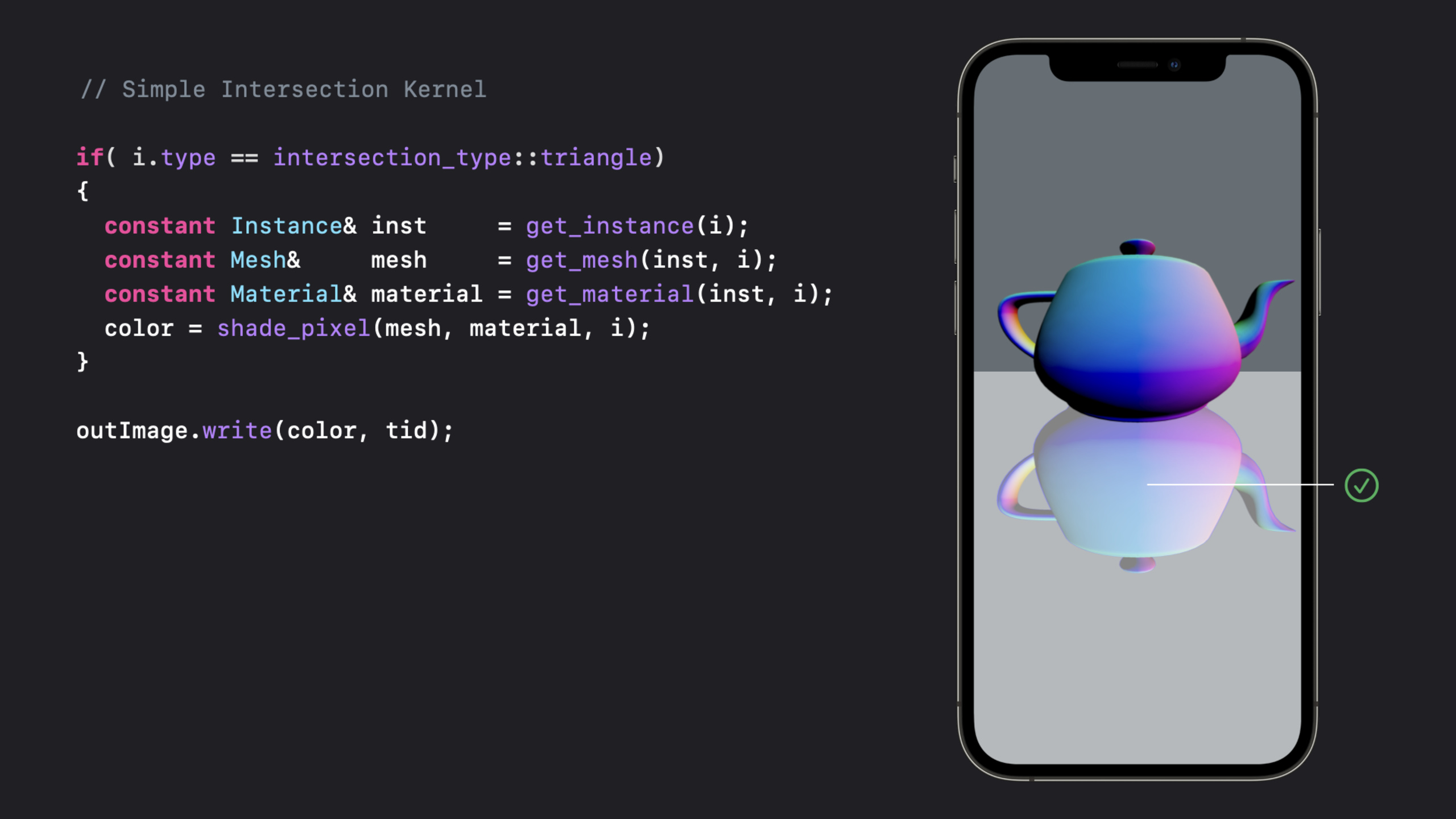
(17:15) After encapsulating these steps, the main logic of the shader becomes shorter. It finds the instance, mesh, and material from the intersection and passes them to the shading function.
if(i.type == intersection_type::triangle)
{
  constant Instance& inst     = get_instance(i);
  constant Mesh&     mesh     = get_mesh(inst, i);
  constant Material& material = get_material(inst, i);

  color = shade_pixel(mesh, material, i);
}

outImage.write(color, tid);
Key points:
i.typeCheck if the intersection hits the triangle. -get_instance(i)based on intersectioninstance_idFind the instance. -get_mesh(inst, i)based on instances and intersectionsgeometry_idFind the mesh. -get_material(inst, i)Find the material associated with the instance. -shade_pixelCalculate color using mesh, material, and intersection information. -outImage.write(color, tid)Write the result to the output texture.
Reduce texture binding in rasterized PBR
(18:40) PBR fragment shaders often read multiple textures. Under the traditional binding model, these textures must be bound to fixed slots before each draw call. The next time the draw call changes materials, another set of textures will be bound.
The speech uses four textures: albedo, roughness, metallic, and occlusion to show traditional writing methods.
fragment half4 pbrFragment(ColorInOut in [[stage_in]],
                           texture2d< float > albedo    [[texture(0)]],
                           texture2d< float > roughness [[texture(1)]],
                           texture2d< float > metallic  [[texture(2)]],
                           texture2d< float > occlusion [[texture(3)]])
{
	half4 color = calculateShading(in, albedo, roughness, metallic, occlusion);

  return color;
}
Key points:
albedobind totexture(0)。roughnessbind totexture(1)。metallicbind totexture(2)。occlusionbind totexture(3)。calculateShadingExplicitly receive four textures.- Each draw call must ensure that the texture required by the current material is placed in the slot.
(19:48) The bindless version only receives the scene root buffer. The shader finds the material from the instance, which then references the texture and constant data.
fragment half4 pbrFragmentBindless(ColorInOut in [[stage_in]],
                                   device const Scene* pScene [[buffer(0)]])
{
	device const Instance& instance = pScene->instances[in.instance_id];
	device const Material& material = pScene->materials[instance.material_id];

	half4 color = calculateShading(in, material);

	return color;
}
Key points:
pSceneis bound tobuffer(0)The root scene structure. -in.instance_idLocate the instance to which the current fragment belongs. -instance.material_idThe material used by the positioned instance. -materialTexture and constant data are referenced internally. -calculateShading(in, material)Read the required resources from the material.- draw calls can share the same root buffer and texture selection is transferred to the shader navigation process.
The speech also pointed out that this structure provides optimization space for instanced rendering. Because the engine only needs to bind a root buffer, more differences can be put into the instance and material data.
Core Takeaways
-
What to do: Add realistic material response to ray traced reflections. Why it’s worth doing: When the reflected light hits any object, bindless allows the shader to obtain the corresponding mesh, vertex normal and material. How to start: Let the instance level of the scene argument buffer match the acceleration structure, using
intersection.instance_id、geometry_id、primitive_idNavigate to Vertices and Materials. -
What to do: Change the PBR material system to a material with its own texture reference. Why it’s worth doing: Textures such as albedo, roughness, metallic, and occlusion do not need to be bound one by one with each draw call. How to get started: Definition
Materialargument buffer, which puts textures and constants into the material structure. The fragment shader only receivesScene* pScene [[buffer(0)]]。 -
What to do: Create a load-time heap for static models and textures. Why it’s worth doing: The speech suggested that heap is most suitable for read-only static data, which can be used when rendering.
useHeapReduce resident statement costs. How to start: Calculate the total size and alignment during the resource loading phase, and put the mesh and static textures intoMTLHeap, call heap before renderinguseHeap。 -
What to do: Separate the static resource heap and dynamic resource heap in the engine. Why it’s worth doing: Writable resources and read-only resources are mixed in the tracked heap, which may trigger heap-level synchronization and false sharing. How to start: Put skinning output, dynamic textures and other writable resources into a separate heap; put static textures and mesh into a read-only heap.
-
What to do: Make a bindless scene debug view. Why it’s worth doing: Apple’s example directly displays the output of the reflection ray tracing shader, making it easy to debug the shading results of hit points. How to start: In ray tracing pass
shade_pixelThe results are written to the debug texture, with a switch showing the intersection hit area.
Related Sessions
- Enhance your app with Metal ray tracing — Introducing Metal ray tracing capabilities, which is the basis for understanding the intersection and acceleration structures in this session.
- Explore hybrid rendering with Metal ray tracing — Shows how ray tracing and rasterization can be combined to continue achieving reflection effects.
- Discover Metal debugging, profiling, and asset creation tools — Explains the Xcode Metal tools that can be used to troubleshoot GPU resource, performance, and ray tracing issues.
- Discover compilation workflows in Metal — Explains the Metal shader compilation process, suitable for use with complex argument buffer shader pipelines.
Comments
GitHub Issues · utterances