
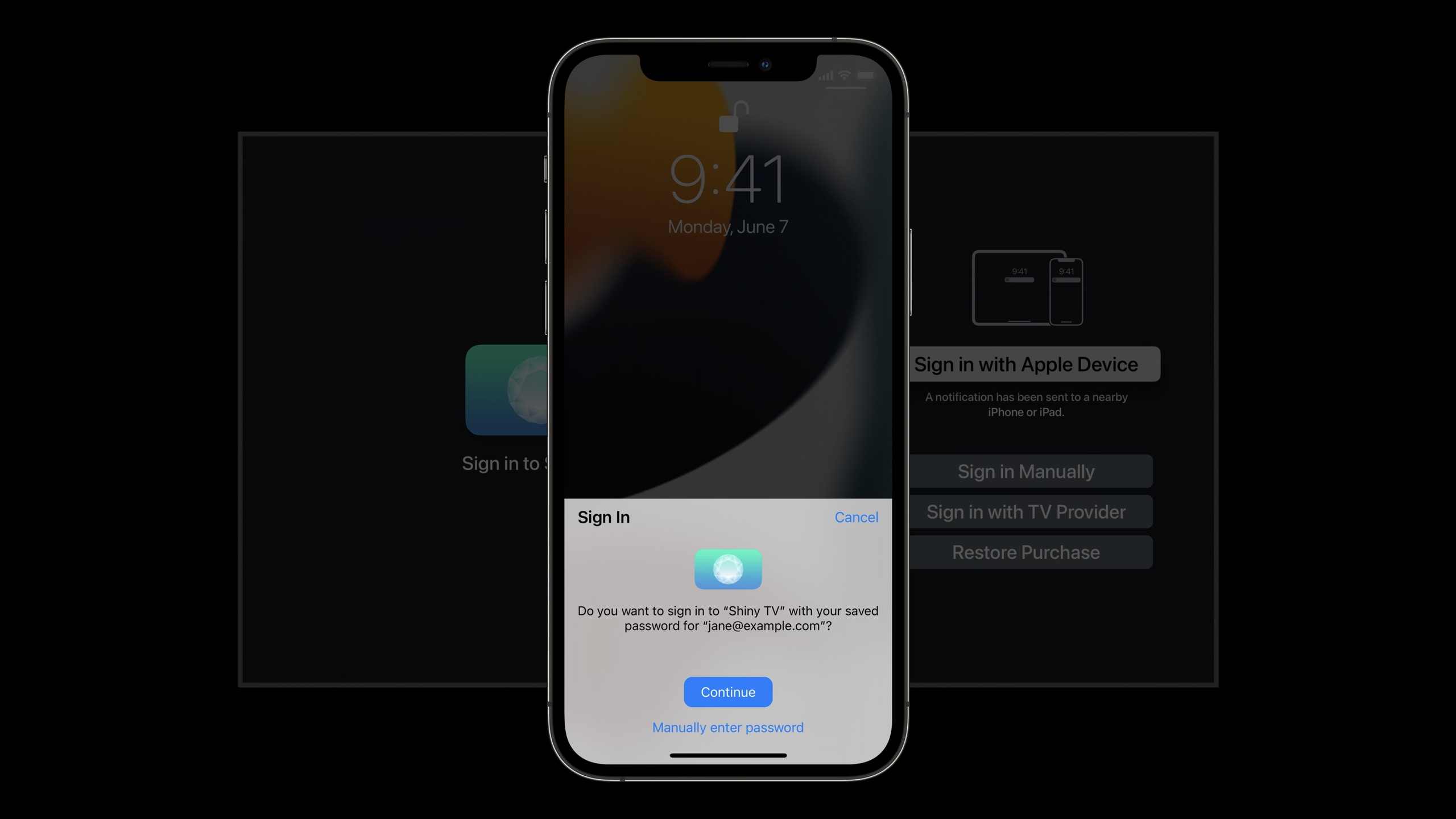
Highlight
tvOS 15 provides a system login view through AuthenticationServices, allowing users to use iCloud Keychain, Face ID or Touch ID on iPhone or iPad to complete Apple TV App login and purchase authorization.
Core Content
Signing in on Apple TV has always been a pain.
Media apps often require users to enter their email and password. Users use long, random passwords for security reasons. Entering this password on the TV remote control is a poor experience. The user is stuck on the login page before seeing the content.
What tvOS 15 does is to split the login process between Apple TV and iPhone or iPad. Users click to log in in the Apple TV App, and after picking up their iPhone, they will see notifications from Apple TV. Click on the notification, and the iPhone will recommend the credentials in iCloud Keychain and confirm with Face ID or Touch ID. After confirmation, the credentials are returned to Apple TV, and the App continues to complete its own server login.
This process uses the system login view. It unifies the login portal on tvOS and also tells users to continue using their iPhone or iPad. For App, the core code is still in the AuthenticationServices frameworkASAuthorizationController。
The login page can also retain other entrances. For example, manually log in, use a TV service provider account, and restore in-app purchases. Developer passescustomAuthorizationMethodsTells the system which additional buttons to display. After the user selects it, the App then enters the corresponding customization process.
Detailed Content
Configure Associated Domains
(02:22) This experience first requires the App and the website domain name to establish a security association. Apple TV and iPhone or iPad need to confirm that a credential belongs to your service before they can safely recommend it to users.
The verbatim draft gives three configuration steps:
1. In the apple-app-site-association file hosted on the domain,
   write the tvOS app's application identifier into the webcredentials key.
2. In Xcode, add the Associated Domains capability to the tvOS app.
3. In Associated Domains, add the domain with the webcredentials prefix.
Key points:
- Line 1:
apple-app-site-associationThe file is placed under your domain name and is used to declare which apps can use the web credentials of this domain name. - Line 2: Xcode’s Associated Domains capability allows the app to participate in system-level domain name association.
- Line 3:
webcredentialsThe prefix tells the system that this domain name is used for password and login credentials matching.
Complete this step before your iPhone or iPad can securely propose iCloud Keychain credentials during the Apple TV sign-in flow.
Request password credentials
(03:28) After the login button is clicked, the App creates an authorization controller and passes in the password request. used hereASAuthorizationPasswordProvider。
import AuthenticationServices

final class SignInViewController: UIViewController, ASAuthorizationControllerDelegate {
    func beginSignIn() {
        let controller = ASAuthorizationController(authorizationRequests: [
            ASAuthorizationPasswordProvider().createRequest()
        ])

        controller.delegate = self
        controller.performRequests()
    }
}
Key points:
- Line 1: Introducing the AuthenticationServices (authentication service) framework, the subsequent authorization controller and password credential types come from here.
- Line 3: View controller obeys
ASAuthorizationControllerDelegate, used to receive authorization success or failure callbacks. - Line 5: Create
ASAuthorizationController, which is responsible for starting the system login view and authorization process. - Line 6:
ASAuthorizationPasswordProvider().createRequest()Indicates that the saved username and password will be requested for this login. - Line 9: Set the current object as the proxy, and subsequent results will return to this object.
- Line 10:
performRequests()Initiate a login request. Users select and confirm credentials on their iPhone or iPad.
The verbatim draft mentions that the sameauthorizationRequestsArrays can hold multiple requests. If the app supports Sign in with Apple, you can also put an Apple ID request in there and let the user choose the type of credentials to use on their iPhone or iPad.
Complete login with credentials
(04:19) After the user selects the credentials on the iPhone or iPad, the system will calldidCompleteWithAuthorization. If returned isASPasswordCredential, the App can read the username and password and leave it to its own login logic.
import AuthenticationServices

extension SignInViewController {
    func authorizationController(controller: ASAuthorizationController,
        didCompleteWithAuthorization authorization: ASAuthorization) {
        if let credential = authorization.credential as? ASPasswordCredential {
            // Use the credential to sign in
        }
    }
}
Key points:
- Line 3: Put the authorization callback in
SignInViewControllerin the extension, separate from the startup code. - Line 4:
authorizationController(_:didCompleteWithAuthorization:)Is the proxy method when authorization is successful. - Line 6: Put
authorization.credentialConvert toASPasswordCredential, confirm that you got the password credentials this time. - Line 7: Access the App’s existing login process here. Verbatim instructions are available using the
userandpasswordProperties complete login.
This callback will not complete server-side authentication for you. It only hands over the user’s confirmed credentials to the app. The app still has to send the username and password to its own authentication service and handle session, subscription state, or content permissions.
Handling cancellations and failures
(04:43) Login may fail. Users may also cancel proactively. The recommendation for tvOS 15 is to treat cancellation as a normal path and return the interface to the main login entrance; for other errors, the user will be prompted to try again.
import AuthenticationServices

extension SignInViewController {
    func authorizationController(controller: ASAuthorizationController,
        didCompleteWithError error: Error) {
        if case ASAuthorizationError.canceled = error  { return }
        // Let the user know something went wrong
    }
}
Key points:
- Line 4:
authorizationController(_:didCompleteWithError:)Is the proxy method when authorization fails. - Line 6: Check if the error is
ASAuthorizationError.canceled. If the user cancels, return directly. - Line 7: Other errors need to inform the user that there was a login error and allow retry.
This branch is very important. Cancel indicates that the user exited the current login process. The app should return to the main login interface without popping up an error message.
Add custom login method
(06:00) The system login view can display additional buttons. Suitable scenarios include manual login, restoring purchases, and using TV service provider accounts.
import AuthenticationServices

final class SignInViewController: UIViewController, ASAuthorizationControllerDelegate {
    func beginSignIn() {
        let controller = ASAuthorizationController(authorizationRequests: [
            ASAuthorizationPasswordProvider().createRequest()
        ])

        controller.customAuthorizationMethods = [
            // Sign in Manually
            .other,
            // Restore Purchase
            .restorePurchase
        ]

        controller.delegate = self
        controller.performRequests()
    }
}
Key points:
- Line 5: Still create first
ASAuthorizationController, the main process is to request password credentials. - Line 9: Settings
customAuthorizationMethods, tells the system what additional actions to display in the login view. - Line 11:
.otherIt can be used to log in manually or jump to your own login method selection interface. - Line 13:
.restorePurchaseUsed to allow users to complete login or unlock by restoring in-app purchases. - Line 16: Set up the proxy and prepare to receive password login results and custom method selection results.
- Line 17: Start the request, and the system login view will display both iPhone/iPad login and custom buttons.
The verbatim version also mentions.videoSubscriberAccount. If the app supports logging in with a TV service provider account, this value should be used.
When the user clicks the custom button, the system will call thedidCompleteWithCustomMethod. App needs to check the incoming value and then start the corresponding process.
import AuthenticationServices

extension SignInViewController {
    func authorizationController(controller: ASAuthorizationController,
        didCompleteWithCustomMethod method: ASAuthorizationController.CustomAuthorizationMethod) {
        switch method {
        case .other:
            // Start your manual sign-in flow
            break
        case .restorePurchase:
            // Start your restore purchase flow
            break
        default:
            break
        }
    }
}
Key points:
- Line 4:
didCompleteWithCustomMethodTriggered when the user selects a custom login method. - Line 6: Pass
switchDetermine which method the user has chosen. - Line 7:
.otherCorresponds to manual login or the App’s own login selection interface. - Line 10:
.restorePurchaseCorrespond to resume purchase process. - Line 13: The default branch handles custom methods that are not currently connected.
Design a shorter login entry
(06:36) The best practice for tvOS login given by Apple is to start with a clear “Sign In” button and then let the system view provide limited options.
@IBAction func signInButtonPressed(_ sender: Any) {
    beginSignIn()
}
Key points:
- Line 1: The login button is only responsible for responding to user actions and does not stack multiple login branches in the button event.
- Line 2: Enter unified
beginSignIn(),Depend onASAuthorizationControllerDisplay the system login view.
The benefits of this are straightforward: users don’t have to decide which login method they should choose first. The default path is to log in with your iPhone or iPad. Additional paths are placed in the system view and the number is kept to a minimum.
Core Takeaways
-
What to do: Add a “Log in with iPhone” entrance to the video app. Why it’s worth it: tvOS 15’s system login view can directly guide users to select iCloud Keychain credentials on their iPhone or iPad, reducing remote control input. How to get started: Configuration
webcredentialsAssociated Domains, created in the login buttonASAuthorizationController, pass inASAuthorizationPasswordProvider().createRequest()。 -
What to do: Put the resume subscription into the login view. Why it’s worth doing: Many media apps’ “log in” and “restore purchases” lead to content permission verification.
customAuthorizationMethodsRestore purchases can be made an explicit option in the system login view. How to get started: Setupcontroller.customAuthorizationMethods = [.restorePurchase],existdidCompleteWithCustomMethodStart the StoreKit restore purchase process in . -
What to do: Be prepared to log in manually for Home Sharing TV. Why it’s worth it: Some users don’t have their credentials saved in iCloud Keychain, or want to use another account.
.otherYou can jump from the system view to the app’s own manual login interface. How to start: Put.otherjoin incustomAuthorizationMethods, open the username and password input page in the callback. -
What to do: Connect your TV service provider account to the same login portal. Why it’s worth doing: Verbatim description, Apps that support TV provider account should be used
.videoSubscriberAccount. Users don’t have to face multiple side-by-side buttons on the home screen. How to start: Add in custom mode.videoSubscriberAccount, the user enters the existing TV service provider authorization process after selection. -
What to do: Write login cancellation into the UI process as a normal state. Why it’s worth doing: When the user cancels authorization, the system will return
ASAuthorizationError.canceled. This state is suitable for returning to the main login page. How to start: IndidCompleteWithErrorjudge firstASAuthorizationError.canceled, return to the main login page when canceling, and a retry prompt will be displayed for other errors.
Related Sessions
- Move beyond passwords — Explains the security concerns posed by passwords, and the direction Apple is pushing towards passwordless logins.
- Secure login with iCloud Keychain verification codes — Introducing iCloud Keychain verification code autofill, suitable for improving the two-step verification experience.
- Use the camera for keyboard input in your app — Shows how to use the camera and Live Text to reduce input costs, the same goal as tvOS login.
- Deliver a great playback experience on tvOS — The tvOS playback experience update for media apps is suitable for planning together with the post-login content experience.
Comments
GitHub Issues · utterances