
Highlight
Apple provides notarytool specifically for Mac application notarization in Xcode, allowing Mac software distributed outside the App Store to submit and wait for notarization results with one command, while supporting faster uploads and CI callbacks.
Core Content
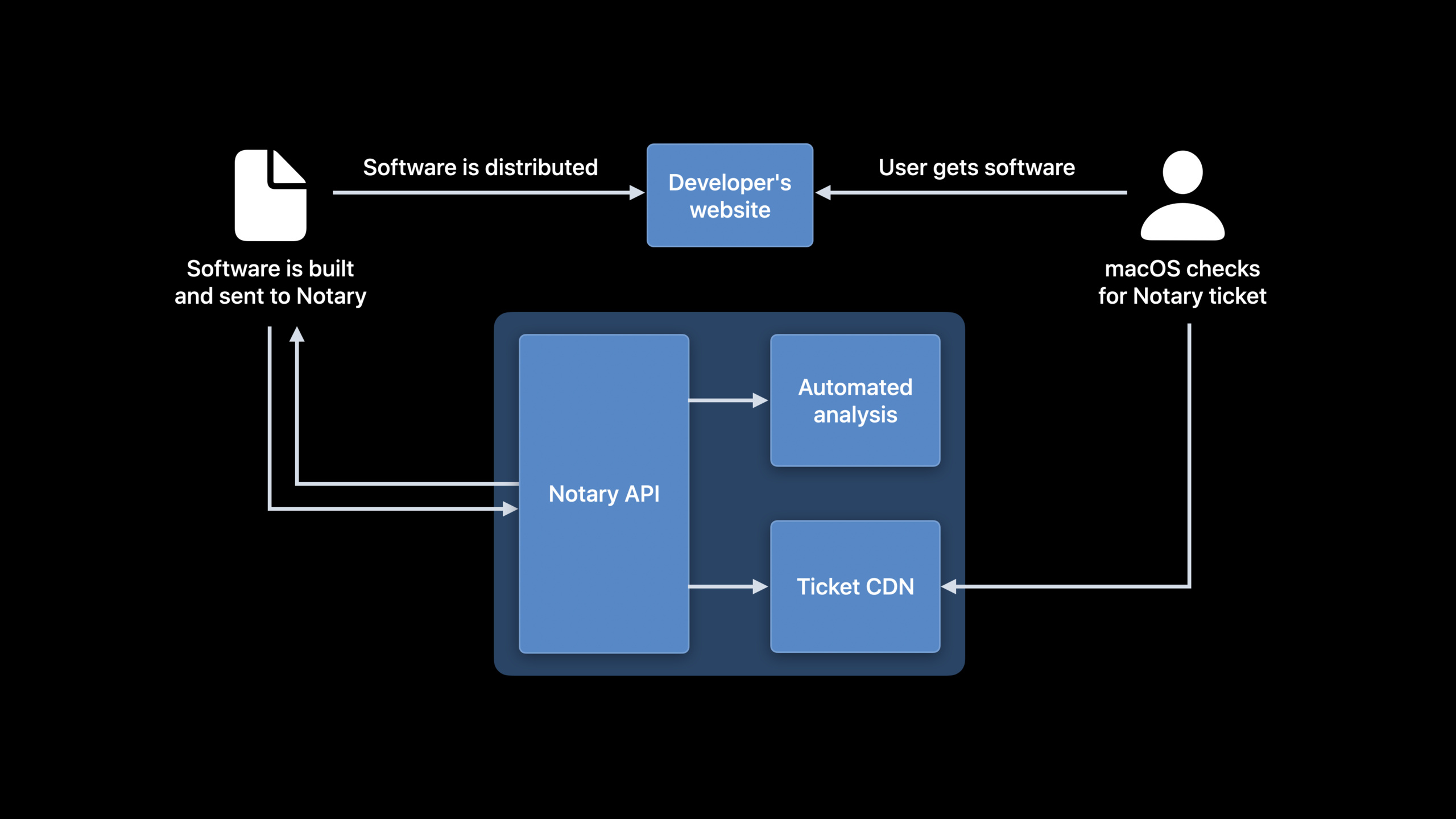
If Mac apps are not distributed through the App Store, they usually need to go through a notarization process before publishing. Developers hand their software to Apple, and the Notary service checks for malicious content and code signing issues. Once passed, Apple issues a ticket and macOS checks it when the user launches the app.
In the past, this was done using the command line. The common entry point wasaltool. It covers App Store and Notary multi-category tasks. For developers who only want to notarize Mac applications, the process is too convoluted: first submit the compressed package, then get the submission ID, and then repeatedly query the status. The CI script also needs to parse the command output to determine whether the task is completed.
The changes given in this WWDC21 session arenotarytool. It’s a new Notary client, distributed with Xcode, targeting the notarization process only.submitcommand plus--waitAfterwards, the client will upload, wait for processing, and return the results.
This change solves the waiting problem in the publishing link. After fixing a Mac application bug, developers can put archiving, compression, submission for notarization, and waiting for results into the same automated pipeline. The Notary service also adds a dedicated backend and increases upload speeds up to 4x for most developers.
From polling script to single line command
The previous script focused on “waiting”. After the submission is completed, CI must check the status every once in a while. The status is stillin progressContinue to sleep when it is finished, and then proceed to the next step.
notarytoolMove this waiting logic into the client. The developer writes a commit, and the tool handles uploading and waiting. Scripts have fewer loops and less parsing of text output.
Wait from local to CI callback
The CI pipeline is not necessarily suitable for occupying one task and waiting for the result. Apple mentions webhook notifications in session. Specify a URL when submitting, and the server will be called back after Notary processing is completed.
This allows the notarization result to trigger subsequent steps in reverse. After receiving the notification, CI will pull the results and Notary log to decide whether to continue publishing.
Detailed Content
What does the Notary service check?
(01:23) The process of Notarization is very short: build the software, submit it to Notary, wait for automatic analysis, get the results, and then distribute them to users. Notary scans for malicious content and checks for code signing issues.
Build Mac software
Submit to Notary service
Automated analysis scans for malicious content
Automated analysis checks code signing issues
Notary publishes a ticket when there are no issues
macOS checks the software before launch
Key points:
Build Mac software: The developer completes the building and packaging first. -Submit to Notary service: Notarization occurs before distribution. -Automated analysis scans for malicious content: Notary will scan for malicious content. -Automated analysis checks code signing issues: Code signing issues also come into the check. -Notary publishes a ticket when there are no issues: When there is no problem, the service issues a ticket. -macOS checks the software before launch: macOS checks the software before the user launches it.
Apple gave a processing time goal in the presentation: 98% of Notary submissions will be completed within 15 minutes, with most completed within 5 minutes. This number is suitable to be put into the timeout setting of the publishing process.
altool’s polling process
(04:10)altoolThe command line process is divided into two stages. The first stage submits the application, and the second stage loops to query the submission status.
# with altool
xcrun altool --notarize-app -f path/to/submission.zip \
    --primary-bundle-id "$BUNDLE_ID" \
    --apiKey "$KEY_ID" --apiIssuer "$ISSUER"
while true; do
  INFO_OUT=$(2>&1 xcrun altool --notarization-info "$SUBMISSION_ID" -u "$USER" \
      --apiKey "$KEY_ID" --apiIssuer "$ISSUER")
  STATUS=$(echo "$INFO_OUT" | grep "Status:" | sed -Ee "s|.*: (.*)$|\1|" )
  if [[ "$STATUS" != "in progress" ]]; then
    break
  fi
  sleep 30
done
Key points:
xcrun altool --notarize-app:passaltoolSubmit the compressed package to be notarized. --f path/to/submission.zip:Specify the submission file. ---primary-bundle-id "$BUNDLE_ID": Pass in the main bundle identifier. ---apiKey "$KEY_ID" --apiIssuer "$ISSUER": Use App Store Connect API key information for authentication. -while true; do: Enter an infinite loop until the notarization status changes. -xcrun altool --notarization-info "$SUBMISSION_ID": Query the notarization information of a submission ID. -INFO_OUT=$(2>&1 ...): Save command output to variables, including standard error output. -grep "Status:" | sed -Ee ...: Extract status from text output. -if [[ "$STATUS" != "in progress" ]]; then break: Exit the loop when the status is no longer Processing. -sleep 30: Query every 30 seconds.
The vulnerability of this script is state parsing. When the output format changes,grepandsedYou may not get the expected value. The publish script will also be filled with wait logic.
Submission and waiting for notarytool
(04:19)notarytoolThe new path given is a command.submitResponsible for submission,--waitResponsible for waiting for results.
# with notarytool
notarytool submit path/to/submission.zip --wait \
    --key "$KEY_PATH" --key-id "$KEY_ID" --issuer "$ISSUER"
Key points:
notarytool submit: Submit software using the new Notary dedicated client. -path/to/submission.zip: The path to the submitted Mac software compressed package. ---wait: Wait for the notarization result after submission, and display the submission result after completion. ---key "$KEY_PATH": Specify the API key file path. ---key-id "$KEY_ID": Pass in the key ID. ---issuer "$ISSUER": Pass in issuer information.
The key change here is--wait. Developers do not need to write their own polling loops, nor do they need to parse them themselvesStatus:text. When the task is completed, the tool displays the submission results.
Check the failure reason and Notary log
(04:36) After the notarization result is returned, developers only have one command to view the Notary log. The presentation did not show specific commands, but it was made clear that new clients can directly view the details of the results, including the reason why the application was not notarized.
notarytool
  submit software
  wait for result
  view Notary log
  inspect reasons when software is not notarized
Key points:
submit software: Submit the software to the Notary service. -wait for result: Wait for task processing to be completed. -view Notary log: Use the new client to view the notarization log. -inspect reasons when software is not notarized: View the reason when it fails, used to fix signature or content issues.
This is important for release troubleshooting. In the past, failure information was scattered in the steps of submission, query, and log acquisition. Now the same tool covers submitting, waiting and viewing details.
Webhook notification access CI
(04:52) Webhook notifications are another new capability of this session. When submitting to Notary, developers can specify a server callback URL. After processing is complete, Notary will notify this URL.
Submit to Notary with a webhook URL
Notary finishes processing the software
Notary sends a server callback
CI retrieves the result
CI retrieves the Notary log
CI continues or stops the release workflow
Key points:
Submit to Notary with a webhook URL: Bring the callback address when submitting. -Notary finishes processing the software: Notary completes automatic analysis. -Notary sends a server callback: The server receives the processing completion notification. -CI retrieves the result: CI obtains the notarization result according to the notification. -CI retrieves the Notary log: CI pulls the notarization log synchronously. -CI continues or stops the release workflow: The pipeline continues publishing or aborts based on the results.
This capability is suitable for long pipelines. The construction task does not have to be blocked and waited all the time. You can use “notarization completion” as the trigger point for subsequent tasks.
Core Takeaways
-
What to do: Make a one-click publishing script for Mac applications.
- Why it’s worth doing:
notarytool submit --waitBy merging submission and waiting, the release script can write less polling logic. - How to start: Append after existing packaging script
notarytool submit path/to/submission.zip --wait --key "$KEY_PATH" --key-id "$KEY_ID" --issuer "$ISSUER", and then enter the upload or distribution step after success.
- Why it’s worth doing:
-
What to do: Integrate the Notary results into the CI status page.
- Why it’s worth doing: Webhook notification allows Notary completion events to be received by the server, which is suitable for showing which step the release is stuck at.
- How to start: Prepare a URL for CI to receive callbacks, configure the URL when submitting notarization, and pull the results and Notary log after the callback.
-
What to do: Create automatic archiving for notarization failures.
- Why it’s worth doing:
notarytoolYou can view the failure reason and Notary log, and the failure information is suitable for precipitation into the build product. - How to get started: CI saves a Notary log when notarization fails and attaches a link to the log to the build report or pull request comment.
- Why it’s worth doing:
-
What to do: Set a release time budget for externally distributed Mac apps.
- Why it’s worth doing: Apple gives a service goal of 98% submissions being completed within 15 minutes and most within 5 minutes, and the pipeline timeout can be designed accordingly.
- How to start: Set the CI timeout of the notarization step to greater than 15 minutes, record the time taken for each submission, and alert when abnormalities are found.
-
WHAT TO DO: Migrate the old one
altoolNotarization script.- Why it’s worth doing: Apple has
altoolPaths used for Notary are marked deprecated, new performance and reliability improvements require switching tonotarytool. - How to start: Search the warehouse
--notarize-appand--notarization-info, replacing the submission and polling logic withnotarytool submit --wait。
- Why it’s worth doing: Apple has
Related Sessions
- Distribute apps in Xcode with cloud signing — Talk about how Xcode 13 simplifies signing, archiving, and distribution with Cloud Signing.
- Meet TestFlight on Mac — Talk about how to test and distribute macOS applications through TestFlight and connect to Xcode Cloud.
- Triage TestFlight crashes in Xcode Organizer — Talk about how to handle crashes and feedback in Xcode Organizer during the pre-release testing phase.
- Review code and collaborate in Xcode — Talk about the code review and collaboration process in Xcode, suitable for placing at the front of the release pipeline.
Comments
GitHub Issues · utterances