
Highlight
Swift Concurrency via
await, task groups, actors, and cooperative thread pools to make the Swift runtime aware of task dependencies, thereby reducing thread explosions, data races, and main thread switching overhead.
Core Content
You are writing a news reader.
The user clicked refresh. The app needs to read the feed list, initiate many network requests, parse the returned data, write it to the database, and finally refresh the interface.
Writing this in Grand Central Dispatch (GCD) felt natural. The database is placed in a serial queue, and the network callback is placed in a concurrent queue. The main thread does not block, and the database also has mutual exclusion protection.
The problem is hidden in network callbacks.
The callback of each feed will parse the data and then enter the database queue synchronously. If the database queue is busy, the current thread will block. GCD sees that there is still work in the concurrent queue and will continue to create threads. 100 feeds may push a 6-core iPhone to 100 callback threads, which is thread explosion.
If there are too many threads, the CPU needs to frequently perform thread context switching. Each blocked thread also holds stack and kernel data structures. Some threads may hold locks, leaving other threads waiting.
Swift Concurrency changes the execution model.
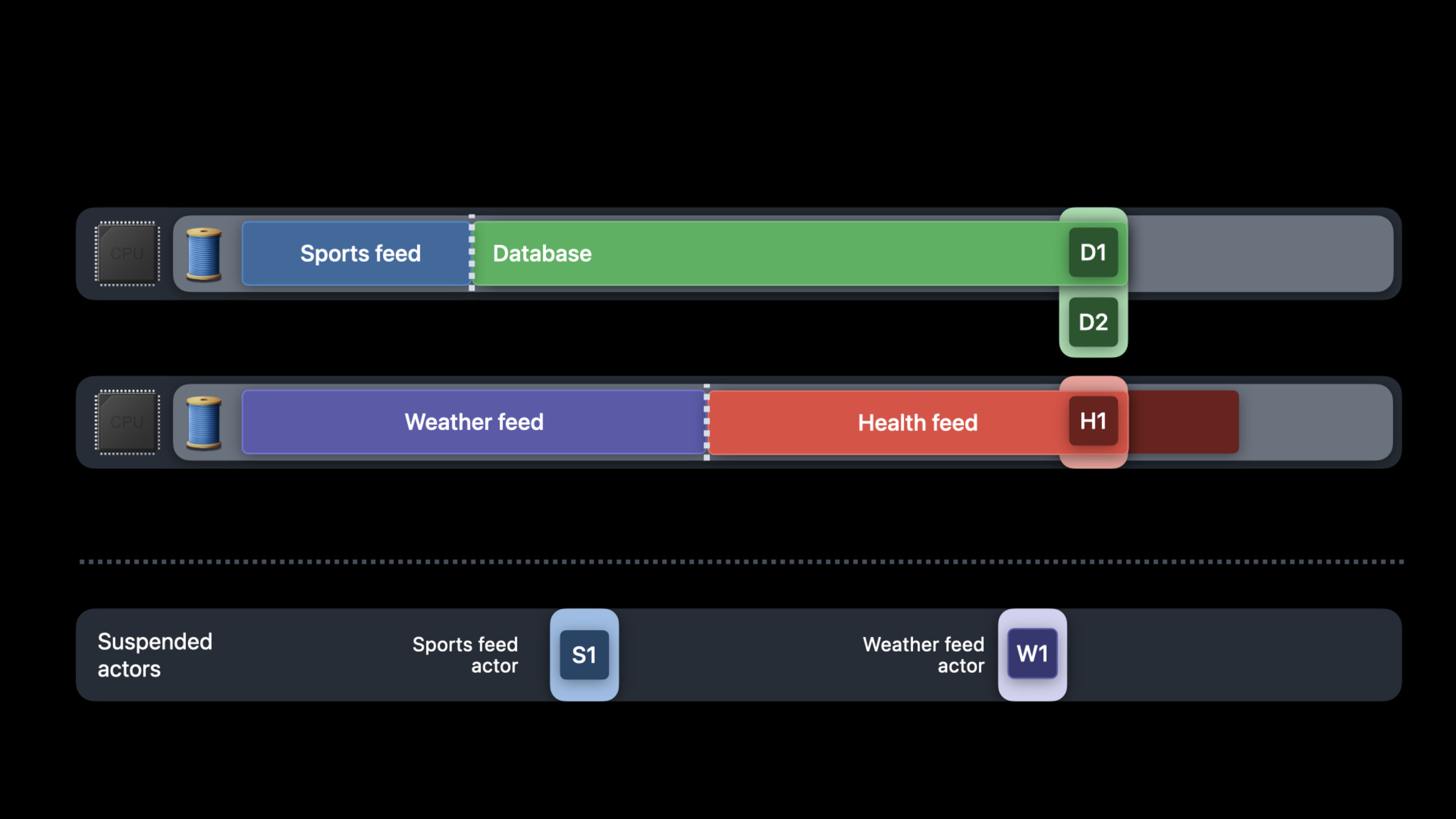
awaitIt’s an asynchronous wait. The function can be suspended here and the thread is released to perform other tasks. Use continuations to record subsequent work at runtime. When a thread switches tasks, the cost is closer to a function call than a complete thread context switch.
This requires a prerequisite: the Swift runtime must know the dependencies between tasks.
awaitMake the continuation’s dependencies explicit. Task group makes the dependencies of parent tasks and subtasks explicit. actors make mutually exclusive access to mutable state explicit. After getting this information at runtime, you can use a cooperative thread pool to create only threads close to the number of CPU cores.
The point of this session is not to teach you how to writeasyncgrammar. It explains why Swift Concurrency improves performance: The language feature hands off dependencies to the runtime, which uses them for better scheduling.
Detailed Content
Hidden costs of GCD
(04:57) The traditional way of writing is to set the URLSession delegate queue as a concurrent queue, and then enter the database queue synchronously in each callback.
func deserializeArticles(from data: Data) throws -> [Article] { /* ... */ }
func updateDatabase(with articles: [Article], for feed: Feed) { /* ... */ }

let urlSession = URLSession(configuration: .default, delegate: self, delegateQueue: concurrentQueue)

for feed in feedsToUpdate {
    let dataTask = urlSession.dataTask(with: feed.url) { data, response, error in
        // ...
        guard let data = data else { return }
        do {
            let articles = try deserializeArticles(from: data)
            databaseQueue.sync {
                updateDatabase(with: articles, for: feed)
            }
        } catch { /* ... */ }
    }
    dataTask.resume()
}
Key points:
deserializeArticles(from:)Convert the download results into an array of articles. -updateDatabase(with:for:)Write the article to the database record corresponding to the specified feed. -URLSessionuseconcurrentQueueAs a delegate queue, multiple callbacks can be executed concurrently. -for feed in feedsToUpdateCreate one for each feeddataTask。guard let data = data else { return }When there is no data, the callback ends directly. -databaseQueue.syncIt will wait synchronously for the database queue to complete the update.- When multiple callbacks enter at the same time
databaseQueue.sync, the waiting thread will be blocked. - GCD may create more threads in order to continue digesting work on the concurrent queue.
(05:58) GCD’s strategy is: if there is work in the queue, find a thread to execute it; a concurrent queue can execute multiple work items at the same time; when a thread is blocked, if there is still work in the queue, the system will create another thread.
This strategy can maintain concurrency, but may also cause thread explosion.
On dual-core devices such as the Apple Watch, after two threads are blocked, GCD will continue to create new threads to handle the remaining callbacks. The CPU starts switching between multiple threads. When the number of threads is much larger than the number of cores, the scheduling cost will exceed the actual business work.
task group expresses concurrency to the Swift runtime
(13:18) Swift Concurrency uses task group to express this batch of feed update tasks. Each feed is a child task. Downloading, parsing, and database updates are all written in a sequential code.
func deserializeArticles(from data: Data) throws -> [Article] { /* ... */ }
func updateDatabase(with articles: [Article], for feed: Feed) async { /* ... */ }

await withThrowingTaskGroup(of: [Article].self) { group in
    for feed in feedsToUpdate {
        group.async {
            let (data, response) = try await URLSession.shared.data(from: feed.url)
            // ...
            let articles = try deserializeArticles(from: data)
            await updateDatabase(with: articles, for: feed)
            return articles
        }
    }
}
Key points:
updateDatabase(with:for:) asyncDeclare database updates as asynchronous functions. -withThrowingTaskGroup(of:)Create a task group that will propagate errors. -for feed in feedsToUpdateAdd a subtask for each feed. -group.asyncStart child tasks, and the parent task is aware of the existence of these child tasks. -try await URLSession.shared.data(from:)Suspend the current task while waiting for the network, and the thread can do other work. -deserializeArticles(from:)It is a synchronous parsing logic, which will continue to be executed after the download is completed. -await updateDatabase(with:for:)It is also possible to hang during database updates. -return articlesReturn the results of each subtask to the task group.
The value of this code is in the dependencies.
The parent task knows which subtasks it has created. The subtask knows that it is waiting for URLSession and database updates. These dependencies are visible to the Swift compiler and runtime. GCD can only see queues and blocked threads, while Swift can see the task graph when running.
awaitHow to release a thread
(15:16) The asynchronous function isawaitmay hang. When suspended, the state that needs to be saved across the suspension point will be put into the async frame on the heap. Local variables that do not need to be saved across suspension points are still placed on the thread stack.
// on Database
func save(_ newArticles: [Article], for feed: Feed) async throws -> [ID] { /* ... */ }

// on Feed
func add(_ newArticles: [Article]) async throws {
    let ids = try await database.save(newArticles, for: self)
    for (id, article) in zip(ids, newArticles) {
        articles[id] = article
    }
}

func updateDatabase(with articles: [Article], for feed: Feed) async throws {
    // skip old articles ...
    try await feed.add(articles)
}
Key points:
save(_:for:) async throws -> [ID]It is a database save operation and returns the ID corresponding to the new article. -add(_:) async throwsyesFeedasynchronous method on. -try await database.save(...)is the hanging point. During database saving, the current thread does not need to block and wait. -newArticlesexistawaitpassed in before, inawaitlaterzip(ids, newArticles)It also needs to be used, so it will be saved in the async frame. -zip(ids, newArticles)It is a synchronous operation and will create a normal stack frame on the thread stack. -try await feed.add(articles)letupdateDatabaseIt is also possible to suspend while waiting for the feed to update.
These async frames are composed into continuations at runtime.
When the database request is not completed, the thread can perform other tasks. After the request is completed, the original thread may continue to execute, or another idle thread may resume execution. Code cannot assumeawaitBoth are on the same thread.
(22:12) This brings three migration rules.
// Safe shape: keep the critical section synchronous and short.
lock.lock()
updateSharedState()
lock.unlock()

// Avoid this shape: do not hold a lock across await.
lock.lock()
try await database.save(newArticles, for: feed)
lock.unlock()
Key points:
- Short critical sections in synchronized code can use locks because the thread holding the lock can continue running and release the lock.
-
awaitAtomicity will be broken and the task may be actively suspended. - Cross with lock
awaitThis will make lock release rely on asynchronous recovery, which can easily break the forward progress contract. - thread-specific data will not be
awaitPreserve before and after. - Semaphore (semaphore) and condition variable (condition variable) hide task dependencies and cannot be scheduled by the Swift runtime.
session It is recommended to use Instruments system trace to analyze performance, and it is also recommended to use a debug runtime environment variable to check for unsafe blocking primitives. If threads in a cooperative thread pool appear to hang, it usually indicates hidden blocking in the code.
actor protects state in a non-blocking way
(28:01) actors (participants) provide mutually exclusive access. An actor can execute at most one method call at a time, so its state will not be accessed concurrently.
// on Database
func save(_ newArticles: [Article], for feed: Feed) async throws -> [ID] { /* ... */ }

// on Feed
func add(_ newArticles: [Article]) async throws {
    let ids = try await database.save(newArticles, for: self)
    for (id, article) in zip(ids, newArticles) {
        articles[id] = article
    }
}
Key points:
database.save(...)Can be a call to a database actor. -awaitIndicates that the current task may jump from the feed actor to the database actor.- When the database actor is idle, the current thread can directly execute the database actor’s methods.
- When the database actor is busy, the current task is suspended and the thread is released to perform other work.
- The actor remains mutually exclusive: only one work item can be executed on the actor at a time.
This is different from a serial queue.
The serial queue blocks the calling thread when contention occurs.dispatch asyncIt does not block, but it is possible to wake up new threads to do asynchronous work when there is no contention. Actors use cooperative thread pools to reuse the current thread when there is no contention and suspend the current task when there is contention.
(34:24) The actor also supports reentrancy. When an earlier work item on the actor isawaitWhen suspended, new work items can continue to execute. The actor still only executes one work item at a time, but the execution order is no longer strictly FIFO (first in, first out).
This behavior gives the runtime a chance to perform higher-priority work first, mitigating priority inversion.
MainActor jumps need to be batched
(37:13) MainActor abstracts the main thread. The cooperative thread pool is separated from the main thread, so jumping from MainActor to other actors and then back to MainActor will cause thread context switching.
// on database actor
func loadArticle(with id: ID) async throws -> Article { /* ... */ }

@MainActor func updateUI(for article: Article) async { /* ... */ }

@MainActor func updateArticles(for ids: [ID]) async throws {
    for id in ids {
        let article = try await database.loadArticle(with: id)
        await updateUI(for: article)
    }
}
Key points:
loadArticle(with:)Read a single article on the database actor. -updateUI(for:)mark@MainActor, the interface must be updated on the actor associated with the main thread. -updateArticles(for:)Also marked@MainActor, the loop starts from the main thread context.- Each loop first jumps from MainActor to database actor.
-
await updateUI(for:)Jump back to MainActor. - each
idBring at least two context switches.
A small amount of circulation is not a big problem. Switching costs accumulate when the number of cycles is high and the actual work done each time is small.
(38:18) The change is to change single processing to batch processing. The database returns the article array once, and the UI updates the article array once.
// on database actor
func loadArticles(with ids: [ID]) async throws -> [Article]

@MainActor func updateUI(for articles: [Article]) async

@MainActor func updateArticles(for ids: [ID]) async throws {
    let articles = try await database.loadArticles(with: ids)
    await updateUI(for: articles)
}
Key points:
loadArticles(with:)Push the loop through the database actor to load multiple articles at once. -updateUI(for:)take over[Article], complete the interface update in one go. -updateArticles(for:)Only one jump to the database actor is required. -await updateUI(for: articles)Just need to go back to the MainActor once.- Batching reduces context switching between MainActor and cooperative thread pools.
This rule is practical: jumps between actors are light, but entering and exiting the MainActor should be done with caution. UI updates should be merged as much as possible.
Core Takeaways
1. Make a concurrent reconstruction of the feed refresher
- What to do: Change the original feed refresh logic based on GCD callback to task group.
- Why it’s worth doing: The session news app example is exactly this scenario. Task group allows the parent-child task relationship to enter the Swift runtime, reducing thread explosion caused by hidden blocking.
- How to start: From
withThrowingTaskGroup(of:)To start, download, parse, and save each feed intogroup.async, change the database save function toasync。
2. Add a layer of actors to the local database
- What to do: Replace the original database serial queue with
Databaseactor. - Why it’s worth doing: Actors provide mutually exclusive access and suspend tasks during contention without blocking threads in the cooperative thread pool.
- How to get started: Create
actor Database, change the reading and writing method toasync, used when callingawait database.save(...)orawait database.loadArticles(...)。
3. ScanawaitNear lock and thread assumptions
- What to do: Check whether there is a lock span in the project
await, code that relies on thread-local state and uses semaphore to wait for asynchronous tasks. - Why it’s worth doing:
awaitThe execution threads before and after may be different, and hidden dependencies will break the forward progress contract of the cooperative thread pool. - How to get started: Search
await、NSLock、os_unfair_lock、DispatchSemaphore, shorten the critical section to synchronous code, and change the asynchronous dependency toawait, task group or actor.
4. Batch main thread UI updates
- What to do: Change the loop that reads data one by one and updates the UI one by one into an array-level API.
- Why it’s worth doing: MainActor is separated from the cooperative thread pool. Frequent entry and exit of MainActor will cause thread context switching.
- How to start: Put
loadArticle(with:) -> ArticleChange toloadArticles(with:) -> [Article],BundleupdateUI(for article:)Change toupdateUI(for articles:)。
5. Use Instruments to verify migration benefits
- What to do: After migrating Swift Concurrency, use Instruments system trace to see the number of threads, context switches, and main thread activity.
- Why it’s worth doing: session reminds developers not to create tasks for small synchronization work. Tasks also have runtime management costs.
- How to start: First record the trace of the GCD version, then record the trace of the async/await version, and compare the number of threads and the density of context switch.
Related Sessions
- Meet async/await in Swift — The entrance to Swift Concurrency, talking about asynchronous functions, suspension points, and completion handler migration.
- Explore structured concurrency in Swift — Talk about task group,
async letand task cancellation to make up for the parent-child task dependencies mentioned in this scene. - Protect mutable state with Swift actors — Talking about actor isolation, MainActor and shared state protection is the prerequisite content for understanding the details of actor implementation in this field.
- Understand and eliminate hangs from your app — Analyzing hangs from the perspective of tools and anti-patterns is directly related to the blocking primitives and GCD risks in this field.
Comments
GitHub Issues · utterances