
Highlight
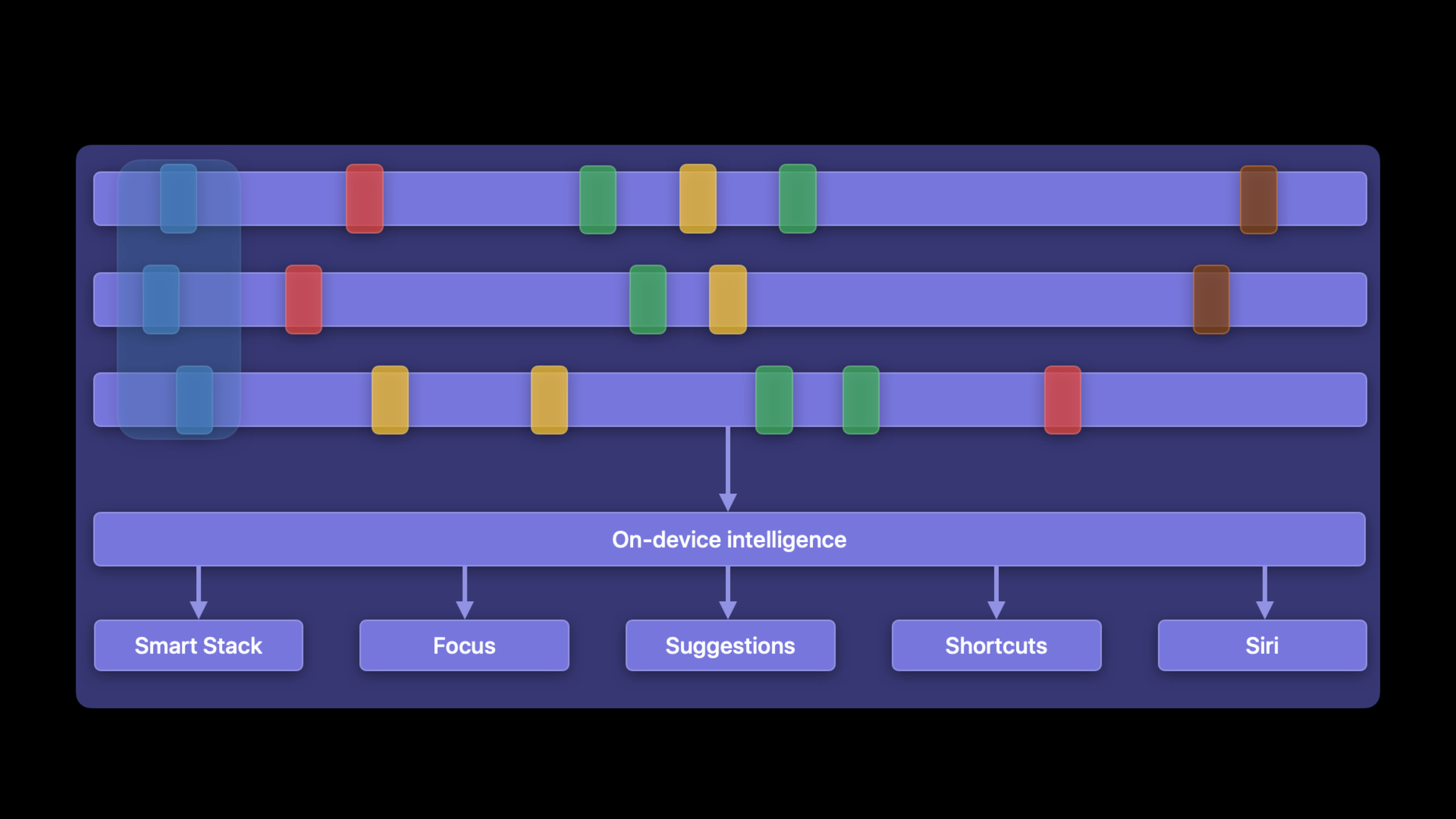
Apple allows developers to hand over repeated actions completed by users within the app to the system through Intent Donation, and the system uses these records to display related functions in Siri, Shortcuts, Focus, Smart Stack and Suggestions.
Core Content
Many apps’ key features are hidden deep within the interface.
Users check the weather every morning, order the same cup of coffee before going to work every day, and send messages to the same person every week. The app knows these behaviors, the system does not. Without the system knowing, it can’t put features in front of users in advance on the lock screen, in search, in the widget stack, or in Siri.
Previously, developers could make functions into Shortcuts actions. The problem is, the actions themselves only describe what the app can do. It does not necessarily tell the system: when this user will do it, what the parameters are, and whether this action will be repeated.
Apple is talking about Intent Donation in this session. When the user completes an operation in the App, the App creates the corresponding Intent (intent), fills in the parameters, and then passesINInteraction.donate()Leave it to the system. The system saves the operation along with its context and uses on-device intelligence to find patterns.
In this way, the Weather App not only provides the ability to “check the weather”. It also tells the system that this user often checks the weather in Cupertino in the morning. Coffee Apps don’t just provide the ability to “order coffee.” It also tells the system that this user often orders large iced latte after waking up.
The outcome of this incident was straightforward. App features can appear in Smart Stack, Siri Suggestions, Shortcuts, Focus, and Siri. Users don’t have to open the app first and find the button.
Donations must represent repeatable actions
The judgment criteria given by Apple are very strict.
An action should accelerate what the user originally wanted to do. It should be executed many times and be valuable to users in the long run. It should also be stateless and ready to execute.
“Check the weather in a certain city” is suitable for donation. “Delete Account” is not suitable for donations. The former happens repeatedly, the latter usually only happens once.
Parameters determine whether the system can recognize the pattern
The system will compare the parameters of the Intent to determine whether multiple donations are equivalent.
In the weather example, two Cupertino weather queries will be regarded as the same type of behavior. Cupertino and San Diego will be viewed as different acts. In this way, the system can separately learn the time and scene in which they appear.
The coffee example illustrates another problem. If the order date is put into the parameter combination that supports prediction, today’s large iced latte and tomorrow’s large iced latte will become two different Intents. The system will not see the “order a large iced latte every morning” mode.
The solution is: in the Intent Definition File, just putitemandsizePut in supported parameter combination. The date can be present in the Intent, but do not let it participate in the determination of predictive equivalence.
Detailed Content
Define donationable Intents
(03:28) The first step is to decide which Intent to use.
SiriKit provides built-in Intent, covering messages, appointments, media and other scenarios. If your action corresponds to an existing built-in Intent, use the built-in type first. If there is no match, create a SiriKit Intent Definition File in Xcode and define a custom Intent.
Weather example uses customCheckWeatherIntent. it contains alocationParameters, the type is customizedCity. This Intent is eligible for widgets and eligible for Siri Suggestions. Because the widget configuration requires the user to select a city,locationParameter options are provided dynamically by the App.
let intent = CheckWeatherIntent()
intent.location = weatherLocation

let interaction = INInteraction(intent: intent, response: nil)
interaction.donate { (error) in
    // Handle the error.
}
Key points:
CheckWeatherIntent()Create a custom weather query intent corresponding to the Intent Definition File in Xcode. -intent.location = weatherLocationFill in the city that the user just queried, and the system uses parameters to distinguish different operations such as Cupertino and San Diego. -INInteraction(intent: intent, response: nil)Wrap the Intent into an interaction as an object donated to the system. -interaction.donateLeave this operation to the system to save. -errorThe callback is used to handle donation failures, and the example does not expand on specific error handling.
How the system uses donations
(09:15) Once the donation is completed, these records are saved, along with the context in which the user performed the action.
The weather app donates an intent each time the user views the city’s weather. The system determines whether the records are equivalent based on the Intent parameters. Two Cupertino queries belong to the same category, two San Diego queries belong to another category.
The system then uses machine learning on the device to find behavioral patterns. An example in session is: the user often checks the weather after getting up. After the system recognizes this pattern, it can expose weather-related capabilities to the front-end function.
let intent = CheckWeatherIntent()
intent.location = weatherLocation

let interaction = INInteraction(intent: intent, response: nil)
interaction.donate { (error) in
    // Handle the error.
}
Key points:
- Create an Intent every time the user completes the actual operation, and the donation record will reflect the user’s behavior.
-
locationIt is a key parameter for the system to determine whether Intents are equivalent. - When the same parameter value appears repeatedly, the system has a chance to detect predictable patterns.
- session clearly states that machine learning and intelligent processing are completed on the device side, and Apple does not collect data that can be used to identify individuals.
Delete expired donations
(09:58) Donations are not just additions but not deletions.
If a user deletes the San Diego weather location, leaving the associated donation will result in incorrect suggestions. The system may still recommend checking the San Diego weather. Apple recommends deleting individual donations or groups of donations when the content expires.
// Donate your intent.
let interaction = INInteraction(intent: intent, response: response)
interaction.identifier = "68753A44-4D6F-1226-9C60-0050E4C00067"
interaction.groupIdentifier = "san-diego"
interaction.donate { (error) in
    // Handle the error.
}

// Delete individual donations.
INInteraction.delete(with: ["68753A44-4D6F-1226-9C60-0050E4C00067"]) { (error) in
    // Handle the error.
}

// Delete group donations.
INInteraction.delete(with: "san-diego") { (error) in
    // Handle the error.
}
Key points:
interaction.identifierSet a label for a single donation, which can be deleted later by the label. -interaction.groupIdentifierSet up a group for a group of donations, such as the same citysan-diego。INInteraction.delete(with: ["68753A44-4D6F-1226-9C60-0050E4C00067"])Delete single or multiple interactions with the specified ID. -INInteraction.delete(with: "san-diego")Delete donations in the same group.- Delete callback also returns
error, used to handle deletion failures.
Let widgets and Smart Stack use donations
(11:49) The Intent in the weather example can also be configured as a widget.
When users configure the weather widget, they can select which cities to display. After the Intent donated by the App matches the widget configuration Intent, the system can provide widget intelligence for the Smart Stack.
Smart Stack in iOS 15 supports Widget Suggestions. If the user does not have a weather widget in the stack yet, the system can suggest it to the top of the stack at the appropriate time. If the user already has a weather widget, the system can rotate to it at the appropriate time.
let intent = CheckWeatherIntent()
intent.location = weatherLocation

let interaction = INInteraction(intent: intent, response: nil)
interaction.donate { (error) in
    // Handle the error.
}
Key points:
- “Intent is eligible for widgets” in the Intent Definition File lets
CheckWeatherIntentCan be used for widget configuration. -locationParameter lets the user select a city when configuring the widget. - After the App continues to donate similar Intents, Smart Stack can use these records to determine when to display related widgets.
- Session description, more details of widget intelligence are expanded in “Add intelligence to your widgets” at WWDC 2021.
System exposure brought by built-in Intent
(13:13) Intent Donation also drives multiple system entries.
Custom intents can appear on the lock screen, in Spotlight search and Siri Suggestions widgets, and as actions in Shortcuts. Built-in intents connect to more specific system functionality.
Apple lists three built-in Intents in session:
INSendMessageIntent: Used for sharing suggestions. iOS 15 will also use the message object to determine which contacts are strongly related to the current Focus. -INGetReservationDetailsIntent: For restaurant reservations, flight check-in, and one-click navigation suggestions in Maps. -INPlayMediaIntent: iOS 15 will show media donations on the lock screen, Control Center, and the Home App’s Now Playing UI.
let interaction = INInteraction(intent: intent, response: response)
interaction.identifier = "68753A44-4D6F-1226-9C60-0050E4C00067"
interaction.groupIdentifier = "san-diego"
interaction.donate { (error) in
    // Handle the error.
}
Key points:
intentThis can be a custom Intent or one of SiriKit’s built-in Intents. -responseCan be passed in with the IntentINInteraction, the example showsresponse: responseform.- The semantics of the built-in Intent are understood by the system, so it can be connected to system experiences such as sharing suggestions, Focus, appointment reminders, and Now Playing.
-
identifierandgroupIdentifierAlso useful for built-in Intents to clean up records when content expires.
Provide unplayed lists for media content
(15:32) There is an additional entrance to the Media App.
If the user consumes recurring media content in the app, such as podcasts, TV shows, or movies, the app can useINUpcomingMediaManagerThe API provides the system with a list of media Intents that the user has not heard or seen yet, but may be of interest to. The system combines past media donations with upcoming media to generate better media recommendations.
let intent = OrderCoffeeIntent()
intent.item = item
intent.size = size
intent.date = date

let interaction = INInteraction(intent: intent, response: nil)
interaction.donate { (error) in
    // Handle the error.
}
Key points:
- This code shows the donation structure of Intent with parameters. The donation of media Intent also follows the same pattern.
-
intent.item = item、intent.size = size、intent.date = dateIndicates that the Intent can carry multiple parameters. - For media scenarios, session clearly mentions that the entry API is
INUpcomingMediaManager. - Recommendations are generated by combining historical media donations with a list of unconsumed media provided by the app.
Use parameter combinations to avoid damaging predictions
(17:13) The coffee example shows the most common mistake: putting changing timestamps into the parameter combination used for prediction.
User ordered large iced latte for three days in a row. If the supported parameter combination containsitem、sizeanddate, the system will see three different records. Dates change from day to day, records are not equivalent between records, and patterns disappear.
The correction given by Apple is: the supported parameter combination only containsitemandsize. In this way, the system will regard three days of large iced latte as an equivalent donation, and then discover the pattern of “ordering large iced latte after waking up”.
let intent = OrderCoffeeIntent()
intent.item = item
intent.size = size
intent.date = date

let interaction = INInteraction(intent: intent, response: nil)
interaction.donate { (error) in
    // Handle the error.
}
Key points:
OrderCoffeeIntent()It is a custom Intent for the Coffee App. -intent.item = itemIndicates the coffee category, such as iced latte in session. -intent.size = sizeIndicates cup shape, such as large. -intent.date = dateThe date of an order may be recorded, but should not be included in the parameter combination used to predict equivalence.- The supported parameter combination in the Intent Definition File should only contain parameters that reliably represent repeated behavior.
Core Takeaways
1. Make a weather widget that “automatically appears in the morning”
- What: After users check the weather in a certain city every morning, make the corresponding weather widget more likely to appear in the Smart Stack.
- Why it’s worth doing: Session explicitly states that donations of matching widget configuration intents can drive Smart Stack widget intelligence.
- How to get started: Create
CheckWeatherIntent, add itlocationParameters, check eligible for widgets and eligible for Siri Suggestions; called after the user checks the city weatherINInteraction.donate()。
2. Make a regular coffee suggestion
- What to do: Provide one-click order entry in Siri Suggestions or Shortcuts when users frequently order the same cup of coffee.
- Why it’s worth doing: The system looks for patterns based on repeated donations and context, but the parameters must be stable.
- How to start: Definition
OrderCoffeeIntent,reserveitemandsizeAs a prediction parameter combination; donate the Intent after the order is successfully placed; do not put the date that changes every day into the supported parameter combination.
3. Integrate Focus contact suggestions for chat apps
- What to do: When users frequently message colleagues, the help system in Work Focus suggests allowing notifications for these contacts.
- Why it’s worth doing: iOS 15 will use
INSendMessageIntentContact people in donations to determine which people are strongly related to the current Focus. - How to start: Donate after successfully sending the message
INSendMessageIntent;Set the appropriategroupIdentifier, clean up donations when a session is deleted or a contact expires.
4. Make check-out and airport reminder entrances for the reservation app
- What to do: When a restaurant reservation or flight information is coming, let the system give you a departure or check-in reminder at the appropriate time.
- Why it’s worth doing: session is explicitly mentioned
INGetReservationDetailsIntentDonations go toward restaurant reservations, flight check-ins, and Maps suggestions. - How to get started: Donate after creating an appointment
INGetReservationDetailsIntent; Used when canceling a reservationidentifierDelete the corresponding donation.
5. Provide unlistened episode suggestions for podcast apps
- What: When users open the lock screen or control center, it is easier to see the new episode of a program they have not listened to yet.
- Why it’s worth doing:
INPlayMediaIntentWill enter the Now Playing UI of iOS 15,INUpcomingMediaManagerA list of unconsumed media is available. - How to get started: Donate while playing media
INPlayMediaIntent;Maintain the user’s unplayed content list, throughINUpcomingMediaManagerprovided to the system.
Related Sessions
- Design great actions for Shortcuts, Siri, and Suggestions — Talk about how to design shortcuts actions that are useful, composable, clear, and discoverable.
- Meet Shortcuts for macOS — Talk about how macOS adopts Shortcuts and how App exposes shortcut command actions.
- Add intelligence to your widgets — Talk about Widget Suggestions, Smart Rotate, and how widgets are recommended in Smart Stack.
- Principles of great widgets — Talk about the information presentation, configuration and correlation design principles of widgets.
- Send communication and Time Sensitive notifications — Talk about iOS 15 notification system, communication notifications and focus mode related capabilities.
Comments
GitHub Issues · utterances