
Highlight
Metal extended dynamic libraries, function pointers, binary archives, private link functions, and function splicing to the new shader compilation process at WWDC21, allowing developers to reuse GPU binaries, expand the rendering pipeline at runtime, and reduce shader compilation costs.
Core Content
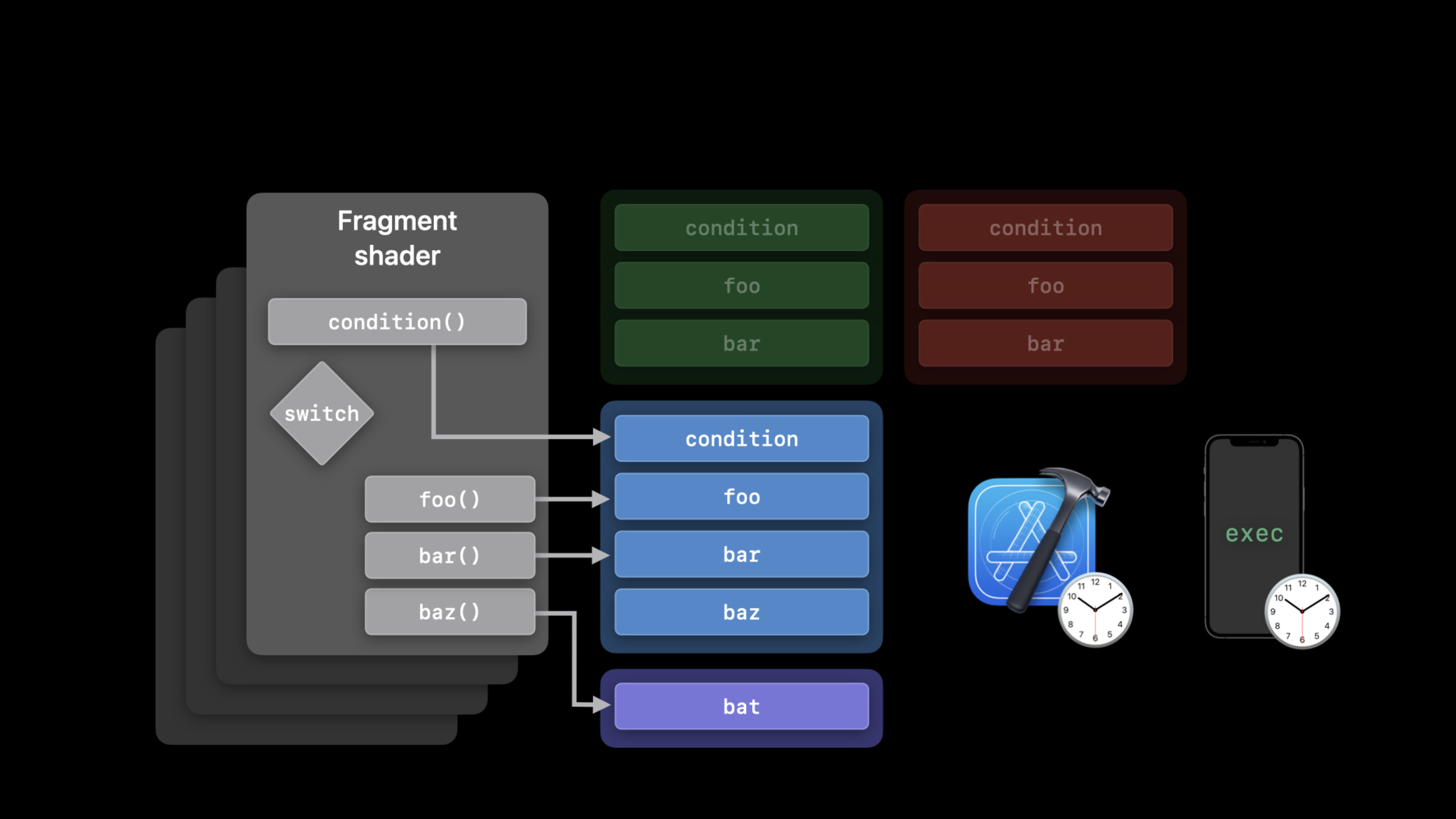
You wrote a Metal renderer. Multiple fragment shaders will call the same batch of utility functions, such asfoo()andbar(). The old approach was straightforward: code the implementation into each pipeline. As projects get larger, repeated compilations start to slow down startup and first renders.
Another problem comes from runtime configuration. Materials, filters, and user-defined effects may all change while the app is running. If the shader source code is reassembled every time there is a change, and then compiled from Metal source to AIR, users will have to wait, and it will be difficult for developers to control the cache granularity.
Apple gives several paths in this session.
Fixed tool functions can be put into the dynamic library (Dynamic Library). Then link them when the pipeline is created, and the same GPU binary can serve multiple render, tile, and compute workloads.
The call target needs to be replaced at runtime, and a function pointer and a visible function table can be used. The shader only knows the function signature, and which function is actually called is determined by the table bound to the CPU.
Compilation costs need to be reused across startups, and binary archives can be used. It saves the compilation results of pipeline and binary function pointer to disk, and directly checks the archive the next time it is started.
If you currently rely on string splicing to generate shaders, Function Stitching provides a more stable approach. You put the precompiled[[stitchable]]Functions form a directed acyclic graph, and Metal generates new functions in the AIR layer, skipping the runtime overhead of Metal frontend.
Detailed Content
Dynamic library: separate the tool functions from the pipeline
(04:44) The process of dynamic libraries starts with AIR. You can use Xcode’s Metal toolchain to generate AIR at build time or call it at runtimenewLibraryWithSource. After you get AIR, usenewDynamicLibraryCreate a dynamic library usingserializeToURLWrite to disk and use next timenewDynamicLibraryWithURLReuse.
id<MTLLibrary> airLibrary = [device newLibraryWithSource:source
                                                 options:nil
                                                   error:&error];

id<MTLDynamicLibrary> dynamicLibrary = [device newDynamicLibrary:airLibrary
                                                           error:&error];

[dynamicLibrary serializeToURL:libraryURL
                         error:&error];

id<MTLDynamicLibrary> cachedLibrary = [device newDynamicLibraryWithURL:libraryURL
                                                                  error:&error];
Key points:
newLibraryWithSourceCorresponds to the entry point compiled from source to AIR at runtime mentioned in transcript -newDynamicLibraryConvert the compiled Metal library into a dynamic library in GPU binary form -serializeToURLWrite the dynamic library to disk for subsequent startup reuse -newDynamicLibraryWithURLLoad a previously saved dynamic library from disk
(05:38) Only external functions are declared in the shader and no implementation is provided. The implementation comes from the dynamic library loaded when the pipeline is created.
// Declare external functions

extern float4 foo(FragmentInput input);
extern float4 bar(FragmentInput input);

// Use functions in shader

fragment float4 main(FragmentInput input [[stage_in]])
{
    switch(condition(input))
    {
        case 0:
            return foo(input);
        case 1:
            return bar(input);
    }
}
Key points:
extern float4 foo(...)Declare function signature, the current shader file does not provide a function body -extern float4 bar(...)Also external symbols, later resolved by the dynamic library -mainis the fragment shader, the input comes from[[stage_in]]switch(condition(input))Decide which external function to call -return foo(input)andreturn bar(input)The implementation can be replaced at runtime by loading a different dynamic library
(06:04) After adding the dynamic library to the preloaded libraries array corresponding to the stage, the symbols will be parsed in array order. Fragment, vertex, tile and other stages have corresponding attributes.
renderPipeDesc.fragmentPreloadedLibraries = @[cachedLibrary];Key points:
fragmentPreloadedLibrariesCorresponds to fragment stage- Provided by dynamic library in array
foo()、bar()This typeexternFunction implementation - transcript explicitly states that symbols are parsed in the order they are added to the array
Function pointer: Let the shader choose the call target at runtime
(09:01) The first step of a function pointer is to instantiate the callable function. To speed up pipeline creation, functions can be compiled into binary form.
// Declare a descriptor and set CompileToBinary options

MTLFunctionDescriptor* functionDescriptor = [MTLFunctionDescriptor new];
functionDescriptor.options = MTLFunctionOptionCompileToBinary;

// Backend compile the function

functionDescriptor.name = @"foo";
id<MTLFunction> foo = [library newFunctionWithDescriptor:functionDescriptor
                                                     error:&error];
Key points:
MTLFunctionDescriptorDescribe the function to be retrieved from the library -MTLFunctionOptionCompileToBinaryRequire backend compiler to generate GPU binary -functionDescriptor.name = @"foo"Specify function name -newFunctionWithDescriptor:error:Create based on descriptorMTLFunction
(09:30) When creating a pipeline descriptor, you need to tell Metal which functions the current stage may call. The AIR function and the binary function operate on different arrays.
// Provide a list of functions that the pipeline stage may call

// AIR functions

renderPipeDesc.fragmentLinkedFunctions.functions = @[foo, bar, baz];

// Binary functions

renderPipeDesc.fragmentLinkedFunctions.binaryFunctions = @[foo, bar, baz];
Key points:
fragmentLinkedFunctionsA collection of callable functions bound to the fragment stage -functionsPut functions in AIR form, and the compiler can perform static linking and optimization in the AIR layer -binaryFunctionsPut functions that have been backend compiled to shorten pipeline creation time- Transcript mentioned that if the binary function has a complex call chain, the maximum call stack depth needs to be set correctly to avoid stack overflow.
(10:47) After the pipeline is created, create a visible function table, and then put the function handle into the table.
// Create visible function table

id<MTLVisibleFunctionTable> visibleFunctionTable =
    [renderPipeline newVisibleFunctionTableWithDescriptor:tableDescriptor
                                                    stage:MTLFunctionStageFragment];

// Create function handles

id<MTLFunctionHandle> fooHandle =
    [renderPipeline functionHandleWithFunction:foo
                                         stage:MTLFunctionStageFragment];

// Insert handles into table

[visibleFunctionTable setFunction:fooHandle
                           atIndex:0];
Key points:
newVisibleFunctionTableWithDescriptor:stage:Create a function table for the specified stage -functionHandleWithFunction:stage:Get the stage-specific function handle from the pipeline -setFunction:atIndex:Write handle into the function table slot -Both table and handle are bound to a certain pipeline and a certain stage
(11:21) When rendering, the CPU side binds the function table, and the shader side uses the function table as a buffer parameter.
// Bind visible function table objects to each stage

[renderCommandEncoder setFragmentVisibleFunctionTable:visibleFunctionTable
                                        atBufferIndex:0];
// Usage in shader
fragment float4 shaderFunc(FragmentData vo[[stage_in]],
visible_function_table<float4(float3)>materials[[buffer(0)]])
{
// ...
return materials[materialSelector](coord);
}Key points:
setFragmentVisibleFunctionTable:atBufferIndex:Bind the function table to the buffer index of the fragment stage -visible_function_table<float4(float3)>Declare the signature of each function in the function table -materials[[buffer(0)]]with CPU sideatBufferIndex:0Correspond -materials[materialSelector](coord)Select function by index and call
Incremental pipeline: add binary function later
(12:20) After creating the pipeline, you may find that you need to call a new functionbat(). Recreating a second pipeline with the complete descriptor will trigger pipeline compilation. Metal allows you to first declare that this pipeline can be expanded in the future, and then quickly create a new pipeline based on the old pipeline.
// Enable incrementally adding binary functions per stage

renderPipeDesc.supportAddingFragmentBinaryFunctions = YES;

// Create render pipeline functions descriptor

MTLRenderPipelineFunctionsDescriptor extraDesc;
extraDesc.fragmentAdditionalBinaryFunctions = @[bat];

// Instantiate render pipeline state

id<MTLRenderPipelineState> renderPipeline2 =
  [renderPipeline1 newRenderPipelineStateWithAdditionalBinaryFunctions:extraDesc
                                                                 error:&error];
Key points:
supportAddingFragmentBinaryFunctions = YESDeclare the fragment stage on the original pipeline descriptor to be extensible -MTLRenderPipelineFunctionsDescriptorDescribe the new function collection -fragmentAdditionalBinaryFunctions = @[bat]Only add new binary function -newRenderPipelineStateWithAdditionalBinaryFunctions:error:based onrenderPipeline1create containsbatnew pipeline state
Binary Archive: Save the compilation results to disk
(14:15) Binary Archive has been used for pipeline at WWDC20. WWDC21 added the ability to store visible functions and intersection functions in archives. When saving the function, calladdFunctionWithDescriptor, and pass in function descriptor and source library.
[archive addFunctionWithDescriptor:functionDescriptor
                            library:library
                              error:&error];

functionDescriptor.binaryArchives = @[archive];

id<MTLFunction> foo = [library newFunctionWithDescriptor:functionDescriptor
                                                     error:&error];
Key points:
addFunctionWithDescriptor:library:error:Add the binary compilation result of the function to the archive -functionDescriptor.binaryArchives = @[archive]Let subsequent function creation check the archive first -newFunctionWithDescriptor:error:If a compiled function is found in the archive, it will be returned directly.- Transcript mentioned that archive can store render, tile, compute pipeline, and binary function pointer at the same time
(14:55) Lookup rules also affect error handling. Metal first checks the binary archive list; if it cannot be found, look againCompileToBinaryoption; if binary compilation is required, also look at the pipeline optionFailOnBinaryArchiveMiss。
functionDescriptor.options = MTLFunctionOptionCompileToBinary;
functionDescriptor.binaryArchives = @[archive];

id<MTLFunction> foo = [library newFunctionWithDescriptor:functionDescriptor
                                                     error:&error];
Key points:
binaryArchivesIs the archive list to find binary function -MTLFunctionOptionCompileToBinaryIndicates that binary form is still required after archive miss- transcript description,
FailOnBinaryArchiveMissIt will decide whether to compile at runtime or return when archive miss occurs.nil
Private link function: leave room for optimization
(17:45)linkedFunctionsinsidefunctionsandprivateFunctionsAll statically linked at the AIR layer. The difference is visibility.privateFunctionsFunction handle cannot be generated, nor can it be placed in the visible function table. They are pipeline internal implementations that the compiler can optimize more fully.
renderPipeDesc.fragmentLinkedFunctions.privateFunctions = @[foo, bar];Key points:
privateFunctionsSuitable for external functions that are only called internally by the current pipeline- They are linked statically in the AIR layer
- Cannot create function handle for private function
- transcript notes that this capability is available on all devices in macOS Monterey and iOS 15 because it works in the AIR layer
Function Stitching: Use graphs to generate runtime functions
(19:03) Function splicing generates functions from computational graphs. The graph is a Directed Acyclic Graph. Input nodes represent the parameters of the generated function, and function nodes represent function calls. The data edge represents the data flow, and the control edge represents the calling sequence.
[[stitchable]] int FunctionA(device int*, int) {…}
[[stitchable]] int FunctionC(int, int) {…}

[[stitchable]]
int ResultFunction(device int* Input0,
                   int Input1,
                   int Input2)
{
  int N0 = FunctionA(Input0, Input1);
  int N1 = FunctionA(Input0, Input2);
  int N2 = FunctionC(N0, N1);
  return N2;
}
Key points:
[[stitchable]]Marker functions can be used by the function stitching API -FunctionAandFunctionCis a splicable function that pre-exists in the library -ResultFunctionShow what Metal function the splicing result is equivalent to- Transcript explains that real stitching will generate the library directly on the AIR layer, skipping the Metal frontend
(21:32) The Objective-C side first creates the input node, then creates the function node, and finally creates the graph.
// Create input nodes

inputs[0] = [[MTLFunctionStitchingInputNode alloc] initWithArgumentIndex:0];

// Create function nodes

n0 = [[MTLFunctionStitchingFunctionNode alloc] initWithName:@"FunctionA"
                                                  arguments:@[inputs[0], inputs[1]]
                                        controlDependencies:@[]];
n1 = [[MTLFunctionStitchingFunctionNode alloc] initWithName:@"FunctionA"
                                                  arguments:@[inputs[0], inputs[2]]
                                        controlDependencies:@[]];
n2 = [[MTLFunctionStitchingFunctionNode alloc] initWithName:@"FunctionC"
                                                  arguments:@[n0, n1]
                                        controlDependencies:@[]];

// Create graph

graph = [[MTLFunctionStitchingGraph alloc] initWithFunctionName:@"ResultFunction"
                                                          nodes:@[n0, n1]
                                                     outputNode:n2
                                                     attributes:@[]];
Key points:
MTLFunctionStitchingInputNodeUse argument index to map the parameters of the generated function -MTLFunctionStitchingFunctionNodeUse function name and parameter list to represent a function call -controlDependencies:@[]Indicates that there are no additional execution order constraints here -MTLFunctionStitchingGraphSpecify the generation function name, node list, output node and attributes
(22:18) After having the graph, create a stitched library descriptor, put the splicable function and graph into it, and then take out the generated function from the new library.
// Configure stitched library descriptor

MTLStitchedLibraryDescriptor* descriptor = [MTLStitchedLibraryDescriptor new];

descriptor.functions      = @[stitchableFunctions];
descriptor.functionGraphs = @[graph];

// Create stitched function

id<MTLLibrary> lib = [device newLibraryWithDescriptor:descriptor
                                                error:&error];

id<MTLFunction> stitchedFunction = [lib newFunctionWithName:@"ResultFunction"];
Key points:
MTLStitchedLibraryDescriptorIs the entry point for creating stitched library -functionsPut stitchable functions that can be called in the graph -functionGraphsPut the function graph to be generated -newLibraryWithDescriptor:error:Generate library based on descriptor -newFunctionWithName:@"ResultFunction"Take out the stitched function, which can continue to be used in pipelines, function pointers or other stitching graphs
Core Takeaways
-
What to do: Make a runtime material system for the 3D editor. Why it’s worth doing: Function pointers let shaders pass
visible_function_tableCalling material functions and switching materials does not require rebuilding the complete pipeline. How to start: Compile different material functions intoMTLFunction,passnewVisibleFunctionTableWithDescriptor:stage:Create a table usingsetFunction:atIndex:Write handle and use it in shadermaterials[materialSelector](coord)call. -
What to do: Create a user-combinable effects chain for a filter app. Why is it worth doing: function stitching can convert precompiled
[[stitchable]]Functions are combined according to the diagram to avoid spelling Metal source strings during runtime. How to start: Write the basic filter as[[stitchable]]function, useMTLFunctionStitchingInputNodeandMTLFunctionStitchingFunctionNodeAssemble pictures and reuseMTLStitchedLibraryDescriptorGenerate function. -
What to do: Make shader tool library caching for game engines. Why it’s worth doing: Dynamic libraries can compile helper functions into independent GPU binary, which can be shared by render, tile, and compute pipelines. How to start: Compile the tool function into AIR and call
newDynamicLibraryTo generate a dynamic library, useserializeToURLDrop to disk, pass at startupnewDynamicLibraryWithURLLoad and put the preloaded libraries corresponding to the stage. -
What to do: Reduce lag when entering the scene for the first time. Why it’s worth doing: Binary Archive can save the compilation results of pipeline and binary function pointer, and reduce the shader compilation time and compilation memory cost next time it is started. How to get started: Create
MTLBinaryArchive,useaddFunctionWithDescriptor:library:error:Prefill function, write archive to disk; set when loadingfunctionDescriptor.binaryArchivesThen create the function. -
What it does: Provide shader functions for plug-in renderer support users. Why it’s worth doing: Dynamic libraries allow users to provide compiled implementations, and the main shader only retains
externDeclaration; function pointers allow the pipeline to call functions not seen at compile time. How to start: Agreed function signature, used by the main shaderexternorvisible_function_tableDeclare the call point, load the user dynamic library or binary function and bind it to the pipeline.
Related Sessions
- Explore Core Image kernel improvements — Demonstrates how the Core Image kernel uses Metal Shading Language, dynamic library, and stitchable functions.
- Explore bindless rendering in Metal — Explains argument buffers and bindless rendering, suitable for continuing to transform large renderers.
- Discover Metal debugging, profiling, and asset creation tools — Introducing Metal debugging, profiling, and asset creation tools in Xcode.
- Enhance your app with Metal ray tracing — Explain the scene, shader and rendering process of Metal ray tracing.
Comments
GitHub Issues · utterances