
Highlight
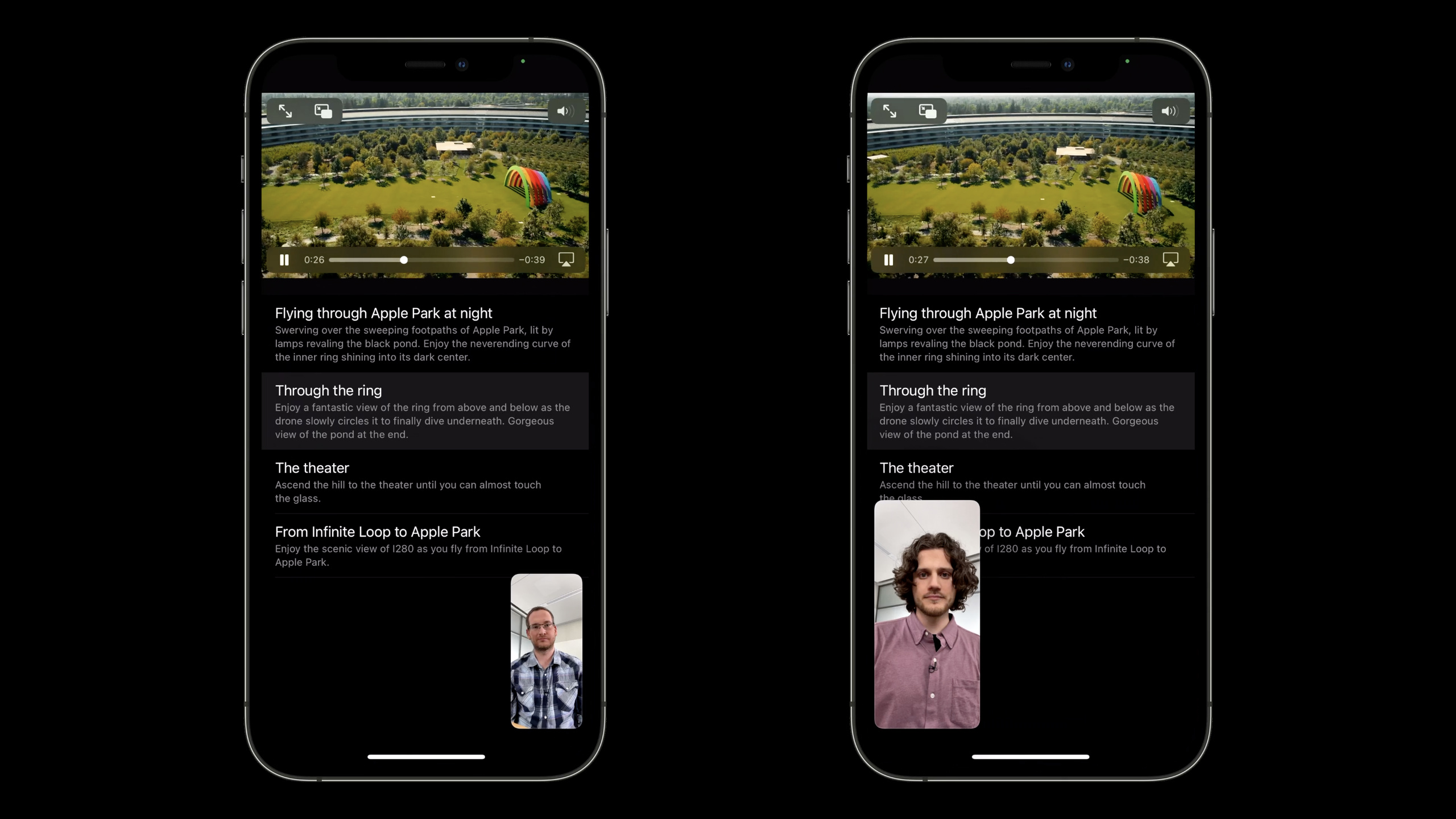
Apple has added SharePlay media synchronization capabilities to the Group Activities framework, and uses AVPlaybackCoordinator to allow developers to synchronize AVPlayer play, pause, and jump states to all devices in a FaceTime call.
Core Content
The hardest part of watching videos together remotely is never playing the video itself.
The trouble comes from synchronization. One person presses play and the other person is still buffering. One person pauses to speak while the other person continues to move forward. Someone drags the progress bar, and every device in the group has to catch up to the same position.
In the past, developers needed to handle this state themselves. The app needs to know whether the user is on a call, send playback commands to the remote device, and also handle details such as network delays, buffering, joining mid-session, and leaving the session. Media App will eventually write a small real-time collaboration system.
The solutions Apple presented at WWDC21 were Group Activities and SharePlay. The app only needs to define “what everyone is doing together” and the system takes care of sending the activity to other participants in the FaceTime call and handing the GroupSession to each device.
There is another layer of special processing for media playback. AVFoundation adds AVPlaybackCoordinator (playback coordinator). Developers putAVPlayerofplaybackCoordinatorConnect toGroupSession, transmission control commands such as play, pause, and seek will be coordinated to the same group state.
Switch from local playback to SharePlay
When a user clicks the play button, the app should not directly assume that the user wants to share.
prepareForActivation()It will allow the system to determine the current environment and user intentions. If the user is not in the FaceTime call, the app continues local playback. If the user is on a call and chooses to share, the App callsactivate(), the system creates a session and sends it to the local and remote devices.
This step solves the entrance problem. The play button is still a play button and the user does not need to learn a new path of operation.
Take over playback status from GroupSession
After the session is created, the App passesMovieWatchingActivity.sessions()Sent by the monitoring systemGroupSession。
Activities initiated natively receive sessions. The remote user also receives the session after accepting the activity. After the app gets the session, it loads the corresponding content and putsAVPlayerConnect to this session and finally calljoin()Join a live connection.
This step solves the distribution problem. App is not created directlyGroupSession, nor does it manage the remote device list by itself.
Let AVPlayer take care of synchronization details
AVPlaybackCoordinatorAVPlayer APIs that change the rate or current time will be intercepted.
When a participant presses play, the coordinator makes the local device wait before sending the command to other devices. Start playing together when all devices are ready. The same process applies to seek: after each device completes the jump, it resumes together.
This step solves the synchronization problem. Developers still call the familiarAVPlayerThe API,coordinator is responsible for turning these commands into,group actions.
Handle temporary outages for everyone
Group playback does not mean that every pause affects everyone.
When one’s alarm goes off, system audio interrupts local playback. Network lag may also occur on only one device. AVPlayerPlaybackCoordinator will create a suspension for such situations, temporarily detaching the device from the group timing.
After the interruption ends, the unit will jump to the group’s current time and resynchronize. Others don’t have to wait for this local outage.
Detailed Content
Define GroupActivity
(03:06) GroupActivity is content that users experience together. The video app can understand it as “a movie being watched together.” The framework wants to send activity data to other devices over the network, so the protocol inherits fromCodable。
protocol GroupActivity: Codable {

    /// An identifier so the system knows how to reference this activity
    static var activityIdentifier: String { get }

    /// Information that the system uses to show this activity, such as title and a preview image
    var metadata: GroupActivityMetadata { get async }
}
Key points:
GroupActivityRepresents a single piece of content within a shared experience, such as a movie or song. -CodableAllow the framework to send the properties in the activity to the other end of the network. -activityIdentifierIs the unique identifier of this activity type referenced by the system. -metadataProvide titles, previews and other information that the system UI needs to display. -get asyncUse the asynchronous read-only property form of Swift Concurrency.
Determine whether to start sharing in the play button
(04:42) After the user selects content, the App first constructs the activity and then callsprepareForActivation(). Results are returned based on FaceTime call status and user selections.
func playButtonTapped() {
    let activity = MovieWatchingActivity(movie: movie)

    Task {
        switch await activity.prepareForActivation() {
        case .activationDisabled:
            // Playback coordination isn't active. Queue movie
            // for local playback.
            self.enqueuedMovie = movie
        case .activationPreferred:
            // Activate the activity. The system enqueues the movie
            // when the activity starts.
            activity.activate()
        case .cancelled:
            // The user cancelled the operation. Nothing to perform.
            break
        default:
            break
        }
    }
}
Key points:
MovieWatchingActivity(movie: movie)Package the current movie into a group activity. -TaskUsed to perform asynchronous calls. -await activity.prepareForActivation()Let the system determine if it should be shared to FaceTime. -.activationDisabledIndicates that playback coordination is not enabled, or the user chooses to watch locally; the code is set directlyenqueuedMovie。.activationPreferredIndicates that the system recommends starting sharing; code callactivity.activate()。.cancelledIndicates that the user cancels the sharing process and the code does not perform additional operations.
Receive GroupSession
(08:31) App is not instantiated directlyGroupSession. System passedGroupActivity.sessions()The returned AsyncSequence delivers the session.
// Receiving a GroupSession from the GroupSession AsyncSequence

func listenForGroupSession() {
    Task {
        for await session in MovieWatchingActivity.sessions() {
            ...
        }
    }
}
Key points:
listenForGroupSession()Listening should start as early as possible after the app is launched. -TaskStart an asynchronous loop. -for awaitContinuously wait for the system to deliver a new session. -MovieWatchingActivity.sessions()Yes receiveGroupSessionentrance. -sessionRepresents current activity in a real-time conversation across multiple devices.
Connect AVPlayer to GroupSession
(09:03) Get itGroupSessionFinally, the key step for media apps is toAVPlayerofplaybackCoordinatorConnect to this session.
let player = AVPlayer()

...

func listenForGroupSession() {
    Task {
        for await groupSession in MovieWatchingActivity.sessions() {

            // Verify content is available, prepare for playback to begin

            player.playbackCoordinator.coordinateWithSession(groupSession)

            ...
        }
    }
}
Key points:
AVPlayer()is the player that actually plays the media content. -for await groupSessionReceive group conversations sent by the system.- Comments remind developers to first confirm that the content is available and complete preparations before playback.
-
player.playbackCoordinatorAccess the playback coordinator bound to AVPlayer. -coordinateWithSession(groupSession)Connect the player to a group session. - After the connection is completed, commands such as play, pause, and seek that change the rate or time will enter the coordination process.
(09:24) The session is initially in the waiting state. App still needs to calljoin(), and let the live connection start working. The speech explains that playback synchronization will not start until the connection is successful.
groupSession.join()Key points:
join()Let the current device join the group for real-time connection.- After joining, devices can send and receive session messages between them.
- For media playback, playback coordination does not take effect until joining the session.
Understand how AVPlaybackCoordinator intercepts playback commands
(16:17) AVPlaybackCoordinator will intercept the transport control API (transmission control API), that is, changerateorcurrentTimecall.
player.play()
player.pause()
player.seek(to: time)
Key points:
player.play()will change the player rate and the coordinator will send this intent to other participants. -player.pause()It is also a rate change and will affect devices in the group that play the same content. -player.seek(to: time)Change the current time and the coordinator will cause other devices to jump to the consistent location.- The talk emphasizes that the coordinator will only apply these states when a participant plays the same content.
(18:03) By default, the coordinator uses the URL of the AVPlayerItem to determine whether two devices are playing the same content. Only if the URLs are the same, the states will affect each other. If the URL is different, the command will not be applied to the remote player.
let item = AVPlayerItem(url: movieURL)
player.replaceCurrentItem(with: item)
Key points:
AVPlayerItem(url:)Create a play item using a URL.- The coordinator treats the same URL as the same content by default.
-
replaceCurrentItem(with:)Make the item currently playing. - The coordinator will not start applying group status until the item becomes current item.
Provide custom identification for local cache and synthetic content
(23:20) If one user plays a local cached file and another user plays a cloud URL, the default URL judgment will be invalid. AVFoundation provides a delegate entry, allowing the App to return a custom string identifier for AVPlayerItem.
func playbackCoordinator(_ playbackCoordinator: AVPlayerPlaybackCoordinator,
                         identifierFor playerItem: AVPlayerItem) -> String? {
    return movieIdentifier
}
Key points:
playbackCoordinator(_:identifierFor:)From the AVPlayerPlaybackCoordinator delegate. -playerItemIs the play item the coordinator is asking for identity.- The returned string will replace the URL and is used to determine whether the two devices are playing the same content.
-
movieIdentifierShould represent content identity, not local file path. - Speech reminder: when two projects are considered the same, they must correspond to the same piece of content at the same time point.
(24:40) Personalized ads and interstitials should not be mixed into the main content timeline. The talk suggested putting ads and other interstitials into separate players so that the timing of the main asset remains consistent. HLS content can be combined with the AVPlayerInterstitialEvent API.
let event: AVPlayerInterstitialEventKey points:
AVPlayerInterstitialEventIt is the HLS plug-in related API mentioned in the speech.- Interstitial content has its own playback period and should not change the time correspondence of the main content.
- Only when the main content time remains consistent can the coordinator bring different devices back to the same progress.
Use suspension for personal temporary separation
(31:26) Some operations should only affect this machine. The example in the speech is “I missed just a few seconds”: the local device goes back a few seconds, catches up with the group at double speed, and other devices continue to play.
class AVPlaybackCoordinator {
    func beginSuspension(for reason: AVCoordinatedPlaybackSuspension.Reason) -> AVCoordinatedPlaybackSuspension
}

class AVCoordinatedPlaybackSuspension {
    func end()
    func end(proposingNewTime newTime: CMTime)
}
Key points:
beginSuspension(for:)Temporarily removes the current participant’s coordinator from the group. -reasonTo record the reason for this breakaway, the App can be extended with a custom string constant.- returned
AVCoordinatedPlaybackSuspensionRepresents this state of disengagement. - While the suspension exists, local seek and rate changes will not affect others.
-
end()After the disengagement ends, the machine will rejoin the group at the current time and rate. -end(proposingNewTime:)When you finish leaving, you can propose a new time to the group, which is suitable for interactions such as dragging the progress bar.
(32:40) AVPlaybackCoordinator also has several auxiliary entrances. It can allow certain suspension reasons to trigger others to wait, or it can expose the status of other participants, and mark rate changes or time jumps caused by remote participants through AVPlayer notifications.
coordinator.suspensionReasonsThatTriggerWaiting
coordinator.otherParticipants
player.reasonForWaitingToPlay
player.playImmediately(atRate: rate)
Key points:
suspensionReasonsThatTriggerWaitingUsed to configure which pause reasons will cause other participants to wait. -otherParticipantsCan view other participant status, including suspension reason. -reasonForWaitingToPlayA new coordinated playback wait reason will appear. -playImmediately(atRate:)Lecture reminders can be played immediately, bypassing the wait that may cause other participants to miss content.
Custom player using AVDelegatingPlaybackCoordinator
(34:46) If the App does not use AVPlayer, you can use AVDelegatingPlaybackCoordinator. It will not observe the player status for you. Developers have to receive the play, pause, seek, and buffering commands to the delegate themselves.
let coordinator = AVDelegatingPlaybackCoordinator()Key points:
AVDelegatingPlaybackCoordinatorPlayback implementation for non-AVPlayer.- The UI should not command the custom player directly, it should hand the intent to the coordinator first.
- The coordinator decides whether it needs to wait for other participants before letting the playback object change the time or rate.
- The currently playing item needs to be identified by the developer with a string.
- Automatic suspension will not be added by the delegating coordinator, and system events require developers to start and end the suspension themselves.
Core Takeaways
-
What to do: Add a “Watch Together” button to the video app.
- Why it’s worth doing:
prepareForActivation()You can retain the original playback entrance and upgrade the playback to SharePlay during FaceTime calls. - How to start: Definition
MovieWatchingActivity, called in the play buttonprepareForActivation(), select local enqueue or based on the resultsactivate()。
- Why it’s worth doing:
-
What to do: Create a synchronous viewing function for online courses.
- Why it’s worth doing:
AVPlaybackCoordinatorIt will play, pause and seek simultaneously, making it suitable for lecturers and students to watch the same course video together. - How to start: Make the course video URL be
GroupActivitycontent data, monitoringCourseWatchingActivity.sessions(), then callplayer.playbackCoordinator.coordinateWithSession(groupSession)。
- Why it’s worth doing:
-
What to do: Add an “I missed it” personal catch-up button to sports replays.
- Why it’s worth doing:
AVCoordinatedPlaybackSuspensionAllow one participant to briefly back up and speed up without interrupting others watching. - How to start: Called when the button is clicked
beginSuspension(for:), the machine seeks to a few seconds ago and sets a higher rate, and calls it after catching up.suspension.end()。
- Why it’s worth doing:
-
What: Support SharePlay playback of locally cached videos.
- Why it’s worth doing: The URLs of cached files and cloud files are different, and the default URL identities cannot be synchronized; custom identifiers can map them to the same content.
- How to start: Implement AVPlayerPlaybackCoordinator delegate
identifierFor playerItem, returns the server content ID.
-
What to do: Make stable group sync for videos with ads.
- Why it’s worth it: Personalized in-rolls can disrupt the main content timeline, causing devices to fail to sync on different clips.
- How to start: Put the advertisement into a separate player and keep the main content consistent; continue to study the HLS scenario
AVPlayerInterstitialEvent。
Related Sessions
- Meet Group Activities — Introducing the Group Activities framework, architecture and basic concepts behind SharePlay.
- Build custom experiences with Group Activities — Explains updating GroupSession activity, observing session state, and using GroupSessionMessenger.
- Design for Group Activities — Describes the design principles and group-centric interaction of SharePlay experiences.
- Coordinate media playback in Safari with Group Activities — Shows how the Web and supporting Apps can access Group Activities for media synchronization.
- Explore dynamic pre-rolls and mid-rolls in HLS — Explain HLS dynamic pre-rolls and AVPlayerInterstitialEvent, suitable for processing advertising timelines in SharePlay.
Comments
GitHub Issues · utterances