
Highlight
Xcode 13 and Foundation have improved localized string declaration, extraction, import and syntax processing processes in iOS 15 and macOS Monterey, allowing developers to use SwiftUI,
String(localized:)、AttributedString(localized:)and formatting APIs to deliver multilingual interfaces more reliably.
Core Content
A ticket sales app button saysOrder. English users can understand it as “place an order”. When a translator sees this word, they may not know whether it is a button, a noun, a sort action, or an order status.
This is the most common trouble with localization. Developers write UI knowing the context. translator processing.stringsFile only sees one line of text. The same English word may use different word forms in different languages. Strings with quantity, gender, currency, and list also change according to the user’s language and region.
In the past, developers often concatenated strings usingString(format:)Fill in the variables and then maintain them manually.stringsand.stringsdictdocument. The code can run, but the translation quality is prone to problems. Right-to-left languages like Arabic involve numbers and variable isolation. Languages like Russian have multiple sets of plural rules. Spanish also encounters title and gender agreement.
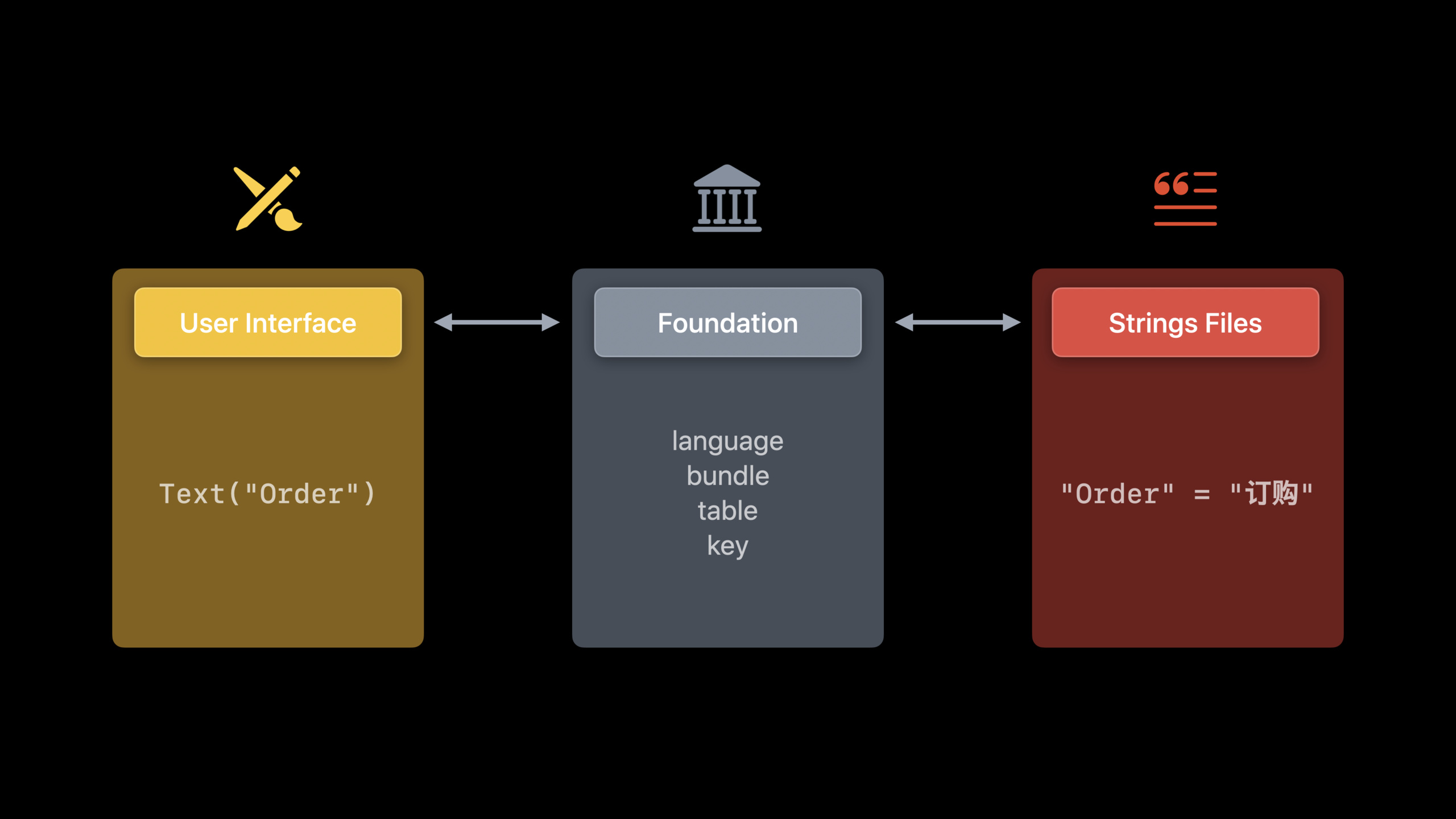
Apple split the process into three things in this session.
First, declare localizable strings directly when writing code. SwiftUIText、ButtonBy default, strings are used as localized content. Common Swift code using what’s new in iOS 15 and macOS MontereyString(localized:)。
Second, give the context to the localization system. Every string should have a comment. Complex projects can use tables to divide files, and bundles to point to the framework or expand their own resources.
Third, let Xcode 13 generate and update localization files. Export Localizations will extract content from Swift, Foundation methods, Info.plist, and resources marked as localized. Import Localizations will write the translation results back.strings、.stringsdictand other resources.
After doing this, adding languages becomes mainly a resource update and testing effort. The UI code does not need to be branched for each language.
Detailed Content
1. Declare localized strings in UI code
(03:30) Visible text in SwiftUI views participates in localization by default. In normal Swift, UIKit or AppKit code, you can useString(localized:)Explicit declaration.
import SwiftUI

struct OrderView: View {
    var body: some View {
        VStack(spacing: 12) {
            Text("Your order is ready.")

            Button("Order") {
                placeOrder()
            }

            Text(verbatim: "Sample data")
        }
    }

    private func placeOrder() {
    }
}

let title = String(localized: "Order")
Key points:
Text("Your order is ready.")Is a SwiftUI text view, strings are treated as localized content. -Button("Order")Declare the button title, which will also enter the localization process. -placeOrder()It’s a button action and has nothing to do with localization. -Text(verbatim: "Sample data")Explicitly tells SwiftUI that this text does not require translation, suitable for preview or mock data. -String(localized: "Order")Used outside of SwiftUI views, such as models, UIKit, AppKit, or functions that return strings.
(05:15) String interpolation can also participate in localization. Apple put the votes into the button title in the demo.
import SwiftUI

struct TicketOrderButton: View {
    let count = 3

    var body: some View {
        Button("Order \(count) Tickets") {
            placeOrder(count: count)
        }
    }

    private func placeOrder(count: Int) {
    }
}

let count = 3
let title = String(localized: "Order \(count) Tickets")
Key points:
let count = 3Provide runtime variables. -Button("Order \(count) Tickets")Using Swift string interpolation, buttons are replaced with real numbers when displayed. -String(localized:)Handles user-preferred variable isolation in numeric forms, plurals, and right-to-left text.- session explicitly reminds not to hand over localized strings
String(format:)deal with.
2. Leave context for the translator
(07:09) The translator processes the string one by one. When the complete interface cannot be seen, comment is the context.
import SwiftUI

struct OrderSummaryView: View {
    let ticketCount: Int

    var body: some View {
        VStack(spacing: 12) {
            Text("Order", comment: "Button: confirms concert tickets booking")

            Text("\(ticketCount) Ordered",
                 comment: "Order summary: total number of tickets ordered")
        }
    }
}
Key points:
Text("Order", comment: ...)illustrateOrderIt is a button to confirm the booking to avoid being misinterpreted as the noun “order” or a sorting action.- The first part of comment writes the position where the string appears, for example
ButtonorOrder summary. - The second part of comment writes the business action, for example
confirms concert tickets booking。 Text("\(ticketCount) Ordered", comment: ...)To explain variable meaning, translators will not see Swift variable names, only placeholders.
(06:21) Do not put similar English fragments together to save code. Different languages may require different word forms.
import Foundation

let orderNow = String(localized: "Order Now")
let orderLater = String(localized: "Order Later")
Key points:
Order Nowis a complete translatable sentence. -Order LaterIt is also an independent sentence.- session Use this example to illustrate,
OrderDifferent translations may be required in “Order now” and “Order later”. - Complete sentences give translators more context and avoid word order errors caused by runtime splicing.
3. Use table and bundle to manage string positions
(11:37) String enters by defaultLocalizable.strings. If the project grows larger, you can use a table to split it by function or page.
import SwiftUI

struct UserProfileSubtitle: View {
    let ticketCount: Int

    var body: some View {
        Text("\(ticketCount) Ordered",
             tableName: "UserProfile",
             comment: "Profile subtitle: total number of tickets ordered")
    }
}
Key points:
TextStill responsible for displaying localized strings. -tableName: "UserProfile"Specify the table where the string is located, Xcode will correspond toUserProfile.strings.- In the case of session, the French translation will be included
fr.lproj/UserProfile.strings. - comment continues to be exported with the string to help translators understand
ticketCountmeaning.
(13:49) Strings in the framework should be read from the framework’s own bundle. Otherwise, the host App will look for it in its own resources and cannot find it.
import SwiftUI

public final class AnyClassInTicketKit {
}

public enum OrderStatus {
    case pending, processing, complete, canceled, invalid(Error)

    var displayName: String {
        switch self {
        case .complete:
            return String(localized: "Complete",
                          bundle: Bundle(for: AnyClassInTicketKit.self),
                          comment: "Standalone ticket status: order finalized")
        case .pending:
            return String(localized: "Pending",
                          bundle: Bundle(for: AnyClassInTicketKit.self),
                          comment: "Standalone ticket status: order waiting to start")
        case .processing:
            return String(localized: "Processing",
                          bundle: Bundle(for: AnyClassInTicketKit.self),
                          comment: "Standalone ticket status: order being processed")
        case .canceled:
            return String(localized: "Canceled",
                          bundle: Bundle(for: AnyClassInTicketKit.self),
                          comment: "Standalone ticket status: order canceled")
        case .invalid:
            return String(localized: "Invalid",
                          bundle: Bundle(for: AnyClassInTicketKit.self),
                          comment: "Standalone ticket status: order invalid")
        }
    }
}

struct OrderStatusLabel: View {
    var body: some View {
        Text(OrderStatus.complete.displayName)
    }
}
Key points:
AnyClassInTicketKitUsed to locate the bundle where the TicketKit framework is located. -OrderStatusIt is the model that the framework exposes to the host app. -String(localized: "Complete", bundle: ...)Points to the framework’s own localized resources. -commentillustrateCompleteIt is the order status to avoid being misinterpreted as a button action. -Text(OrderStatus.complete.displayName)Let the host app directly use the localization results provided by the framework.
4. Let Xcode 13 extract, edit, and import localized directories
(14:40) Xcode 13 adds compiler support for Swift string extraction. Export Localizations reads Swift and Foundation methods to extract localized content.
import SwiftUI

struct CheckoutView: View {
    let ticketCount: Int
    let price: Decimal

    var body: some View {
        VStack(spacing: 12) {
            Text("\(ticketCount) Ordered",
                 tableName: "UserProfile",
                 comment: "Profile subtitle: total number of tickets ordered")

            Text("Total: \(price, format: .currency(code: "USD"))",
                 comment: "Order subtitle: total price of all tickets")
        }
    }
}
Key points:
Text("\(ticketCount) Ordered", tableName: ..., comment: ...)will be extracted by Xcode. -Text("Total: ...", comment: ...)It will also be extracted, and the comment will be entered into the localized directory together.- Session description Xcode will also extract the App name, privacy description in Info.plist, and resources marked as localized in the inspector.
- If the project uses a custom wrapper to wrap the localized API, it will not be extracted by default; it needs to be configured in Build Settings
Localized String Macro Namesconfiguration.
(17:43) Export and import can be done in the Xcode menu or put into CI.
xcodebuild -exportLocalizations -workspace VacationPlanet.xcworkspace -localizationPath ~/Documents
xcodebuild -importLocalizations -workspace VacationPlanet.xcworkspace -localizationPath ~/Documents/de.xcloc
Key points:
- The first line exports the localization directory and hands the strings, images, files and related contexts in the project to the translation process.
-
-workspace VacationPlanet.xcworkspaceSpecify the workspace, session mentioned that Xcode 13 already supports workspace. --localizationPath ~/DocumentsSpecify the export location. - The second line imports German
.xclocDirectory, Xcode will create or update.strings、.stringsdictand other localized resources. - These two commands can be run regularly to allow new UI strings to enter the translation process faster.
5. Localize rich text, plurals, syntax and formatted data
(18:28)AttributedString(localized:)Support Markdown syntax. Developers can localize styled text without having to manually calculate character ranges.
import Foundation

let title = AttributedString(localized: "Your order is **complete**!",
                             comment: "Ticket order confirmation title")
Key points:
AttributedString(localized:)Create Swift native rich text. -**complete**Use Markdown to bold syntax.- The entire sentence participates in localization, and formatting information can still be retained after translation.
- comment tells the translator this is the booking confirmation title.
(19:22) Plural strings containing numbers should be given to.stringsdict. The code does not need to be written in plural branches for each language.
import Foundation

func orderTitle(ticketCount: Int) -> String {
    String(localized: "Order \(ticketCount) Ticket(s)")
}
Key points:
ticketCountis the number that determines the plural form. -String(localized:)Read localized resources. -.stringsdictResponsible for mapping this key to the plurality rules of each language.- session mentions that Xcode will supplement the required plural categories by language when exporting, for example, Russian will need more rules.
(22:46) “Single, Two, All” without numbers cannot be used.stringsdictinfer. Three strings should be written clearly here.
import Foundation

func orderButtonTitle(ticketCount: Int) -> String {
    if ticketCount == 1 {
        return String(localized: "Order This Ticket")
    } else if ticketCount == 2 {
        return String(localized: "Order Both Tickets")
    } else {
        return String(localized: "Order All Tickets")
    }
}
Key points:
ticketCount == 1Corresponds to “this ticket”. -ticketCount == 2Corresponds to “two tickets”. -elseCorresponds to “all tickets”.- session gives examples in Russian,
.stringsdictofoneThe rule is not that the number is just 1, 21 and 31 may also fall into the same category.
(23:31) Foundation adds syntax consistency capabilities in iOS 15 and macOS Monterey. in Markdowninflect: trueYou can let the runtime calculate the correct word form.
import Foundation

let ticketsCount = 3
let title = AttributedString(localized: "Order ^[\(ticketsCount) Ticket](inflect: true)")
Key points:
ticketsCountis a quantitative variable. -^[...]Mark fragments that require syntactic processing. -(inflect: true)Let Foundation adjust word shapes based on runtime quantities.- session description This capability was added in iOS 15 and macOS Monterey, and currently supports some languages.
(25:45) When presenting data, avoid handwriting lists, currencies, and number formats. Use the formatter to let the system generate text by language and region.
import SwiftUI

struct CheckoutTotalView: View {
    let price: Decimal = 9.41
    let genres = ["pop", "rock", "electronic"]

    var body: some View {
        VStack(spacing: 12) {
            Text(genres.formatted(.list(type: .or)))

            Text("Total: \(price, format: .currency(code: "USD"))",
                 comment: "Order subtitle: total price of all tickets")
        }
    }
}
Key points:
genres.formatted(.list(type: .or))Let the system generate an “OR” list that matches regional conventions. -priceis the amount to be displayed. -.currency(code: "USD")Specify currency code. -Text("Total: ...", comment: ...)Put the formatted results into localized string interpolation.- session reminds developers to let the framework handle the data format and not hard-code it.
Core Takeaways
-
What to do: Add a “pseudo-language localization” check page to the app. Why it’s worth doing: Session requires that no matter how much localization investment is made, the running effect of the App in various languages must be tested. How to start: Change the key SwiftUI page to
Text、Button、String(localized:), switch languages in scheme or SwiftUI preview, check for long text, RTL and missing translations. -
What to do: Split the button copy on the order, shopping cart, and subscription pages into complete sentences. Why it’s worth doing: Apple clearly points out that concatenating strings can cause word order and word form problems in translation. How to get started: Search
+Splicing and local copy variables, putOrder Now、Order LaterChange this type of content to independentString(localized:)or SwiftUI string. -
What to do: Add comments to all short word buttons in the app. Why it’s worth doing:
OrderSuch words have different meanings in different contexts, and the comment will be given to the translator along with the export directory. How to start: FromText("...")、Button("...")、String(localized:)To start, priority is given to English words with the same verbs and nouns, and descriptions of locations and business actions are added. -
What: Leave the user-visible strings of the framework or Swift Package in the framework resources. Why it’s worth doing: The session description framework string needs to specify the bundle, otherwise Foundation will look for it from the host App. How to get started: Use within the framework
String(localized:bundle:comment:), bundle is usedBundle(for:)Positioning framework resources, exposed to the outside worlddisplayNameThis type of localized property. -
What to do: Change price, date, list and ticket display to formatting API. Why it’s worth it: Foundation’s formatter covers a large number of language and locale combinations, reducing hard-coded formatting errors. How to start: Use
.formatted(.list(type: .or))To process lists, useText("Total: \(price, format: .currency(code: "USD"))")To process the amount, use.stringsdictorAttributedString(localized:)Dealing with quantitative word forms.
Related Sessions
- Localize your SwiftUI app — Talk about the localization process of strings, styled text, images, and layout from a SwiftUI perspective.
- What’s new in Foundation — In-depth introduction
AttributedString, formatting API and syntax consistency engine. - What’s new in SwiftUI — Covers text, formatting, search, lists, and cross-platform UI updates for SwiftUI 2021.
- SwiftUI Accessibility: Beyond the basics — Use preview and accessibility APIs to check complex interfaces, suitable for use with multi-language testing.
Comments
GitHub Issues · utterances