
Highlight
Apple uses the Coffee Tracker sample app to demonstrate the gradual migration of completion handlers, Dispatch queues and callback queues to async/await, actors and MainActor, allowing existing Swift projects to obtain clearer asynchronous code and safer state isolation.
Core Content
Coffee Tracker is a watchOS sample app. The user records the coffee they drank that day, and the dial complication displays the current caffeine level.
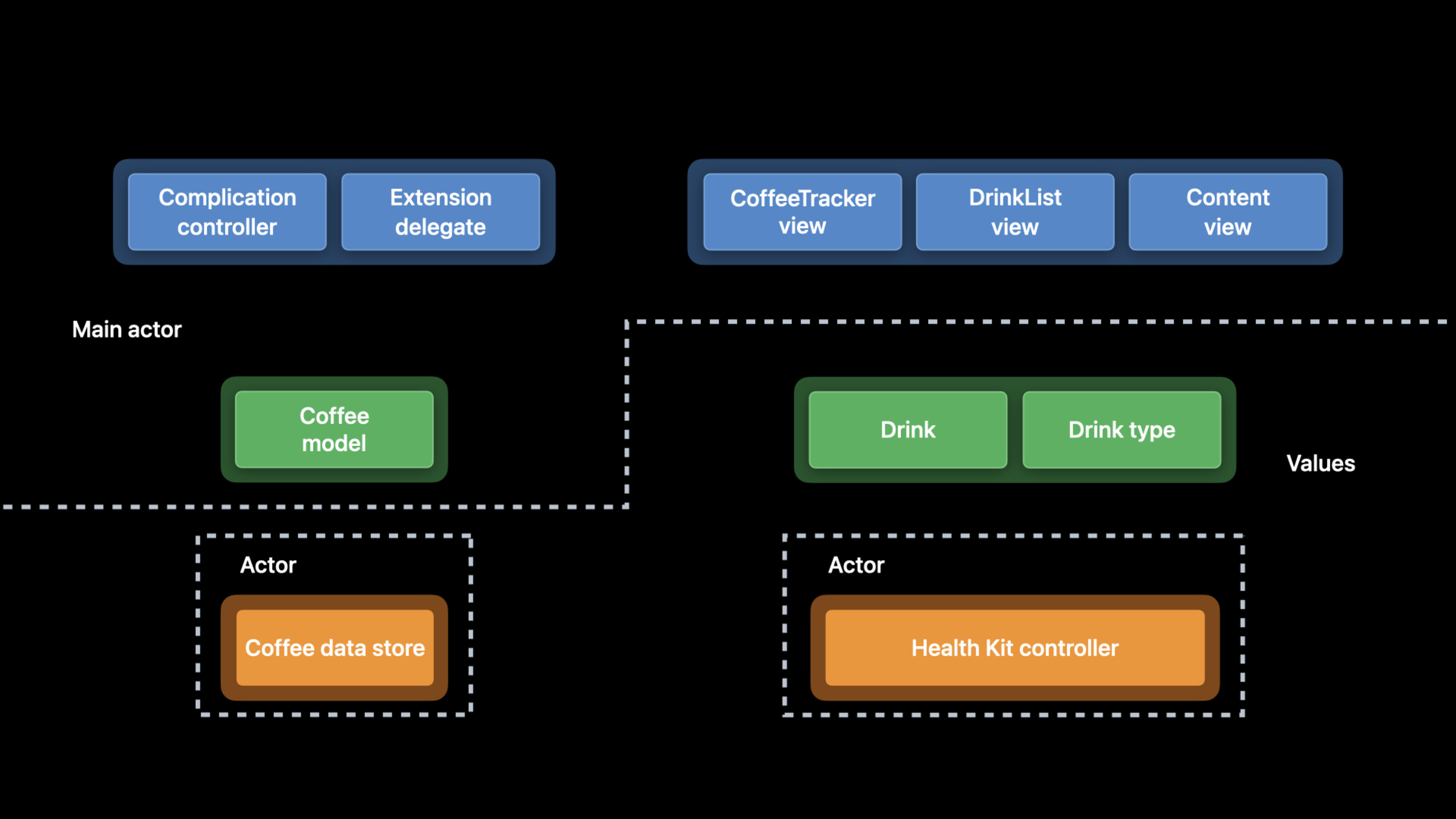
This app is small, but has concurrency issues common to real projects. The interface and model are updated in the main queue. Background I/O uses a dispatch queue. HealthKit’s completion handler may return from any queue. The code surface is divided into three layers: UI, model, and HealthKit, but the runtime is scattered across multiple execution queues.
In the past, when maintaining this kind of code, developers had to remember which queue each callback was executed in. To save HealthKit data, you need to write a completion handler. Reading HealthKit query results continues processing from the callback. Before updating the SwiftUI model, you must manually jump back to the main thread.
Apple introduced async/await (asynchronous wait), actor (actor) and MainActor (main actor) in Swift 5.5. What this speech does is very specific: not rewriting the entire app, but just migrating along the data flow of Coffee Tracker, piece by piece.
The first step is to replace the existing asynchronous API withawaitcall. The second step is to wrap the callback API, which does not yet have an async version, with a continuation. The third step is to put the shared state into the actor. Finally mark the UI model as@MainActor, letting the compiler take care of main thread isolation.
Start migrating from the underlying function
Saving caffeine samples is a good place to start. It is close to HealthKit, the call chain is short, and the scope of changes is small.
Apple firststore.saveThe completion handler version is replaced with the async version. The caller no longer passes in the closure, but directlytry awaitWait for the results. Error handling remains in the same function.
The old API can continue to exist
Project migration usually cannot be completed in one go. The speech retains the completion handler entry, marks the old method as deprecated, and then creates it internallyTaskCall the new async method.
This way, the old caller can still work. New code can directly use the async version.
actor turns concurrency boundaries into type boundaries
HealthKitController is responsible for authorizing, saving and querying HealthKit. inside it hasisAuthorized、anchoretc. status. Previously these states could be accessed simultaneously by different queues.
BundleHealthKitControllerChange toactorFinally, state access is isolated by actors. External calls to its methods requireawait. Concurrency boundaries are written on the type declaration and can be seen directly by the caller from the code.
Pass the UI model to MainActor
CoffeeData is for SwiftUIObservableObject, itscurrentDrinksWill drive the interface. This object should be updated on the main thread.
Give the speech firstupdateModel(newDrinks:deletedDrinks:)mark@MainActor, and later put the entireCoffeeDataThe type is marked as@MainActor. This way, model updates and SwiftUI bindings remain within the main execution environment.
Detailed Content
1. Replace HealthKit save callback with async/await
(07:34) HealthKitHKHealthStore.save(_:)With the async version, the saved sample can be written as sequential code. The success path and error path are in the samedo/catchin processing.
do {
    try await store.save(caffeineSample)
    self.logger.debug("\(mgCaffeine) mg Drink saved to HealthKit")
} catch {
    self.logger.error("Unable to save \(caffeineSample) to the HealthKit store: \(error.localizedDescription)")
}
Key points:
doWraps asynchronous calls that may throw errors. -try await store.save(caffeineSample)Wait for HealthKit to finish saving the sample. -self.logger.debugOnly executed after successful save. -catchCatch save failed errors. -error.localizedDescriptionWrite logs to facilitate locating the cause of HealthKit save failure.
(09:38) The function itself also needs to become async. The caller knows by the function signature that it will hang.
public func save(drink: Drink) async {Key points:
publicKeep the original access level. -func save(drink: Drink)still receive aDrink。asyncIndicates that the function can be called internallyawait, the caller must also useawait。
(10:15) The synchronization context cannot be directlyawait, a task needs to be created.
Task { await self.healthKitController.save(drink: drink) }Key points:
Task { ... }Create a new asynchronous task. -awaitWait for the actor or async function to finish saving. -self.healthKitController.save(drink: drink)Reuse the newly migrated async method.
2. Add async alternative entry to the old completion handler
(12:13) During the migration process, the old API can be retained. Apple’s approach is to mark the old method as deprecated and call the new async method internally.
@available(*, deprecated, message: "Prefer async alternative instead")
public func requestAuthorization(completionHandler: @escaping (Bool) -> Void ) {
    Task {
        let result = await requestAuthorization()
        completionHandler(result)
    }
}
Key points:
@available(*, deprecated, message: "Prefer async alternative instead")Remind callers to use the async version instead. -completionHandlerKeep the old calling form. -TaskAllow async methods to be called inside synchronized methods. -let result = await requestAuthorization()Call the new authorization function. -completionHandler(result)Bridge the async result back to the old callback.
(14:55) The new authorization function returns directlyBool. The caller no longer has to read the result in the closure.
public func requestAuthorization() async -> Bool {
    guard isAvailable else { return false }

    do {
        try await store.requestAuthorization(toShare: types, read: types)
        self.isAuthorized = true
        return true
    } catch let error {
        self.logger.error("An error occurred while requesting HealthKit Authorization: \(error.localizedDescription)")
        return false
    }
}
Key points:
async -> BoolIndicates that the function is completed asynchronously and returns whether the authorization is successful. -guard isAvailable else { return false }First deal with the situation where the device does not support HealthKit. -try await store.requestAuthorization(toShare: types, read: types)Request HealthKit authorization. -self.isAuthorized = trueRecord the authorization success status. -catch let errorCatching authorization errors.- Log and return on failure
false。
3. Use continuation to wrap HealthKit queries without async version
(17:43)HKAnchoredObjectQueryStill using completion handler. Used herewithCheckedThrowingContinuationConvert callback results into async return values.
private func queryHealthKit() async throws -> ([HKSample]?, [HKDeletedObject]?, HKQueryAnchor?) {
    return try await withCheckedThrowingContinuation { continuation in
        // Create a predicate that only returns samples created within the last 24 hours.
        let endDate = Date()
        let startDate = endDate.addingTimeInterval(-24.0 * 60.0 * 60.0)
        let datePredicate = HKQuery.predicateForSamples(withStart: startDate, end: endDate, options: [.strictStartDate, .strictEndDate])

        // Create the query.
        let query = HKAnchoredObjectQuery(
            type: caffeineType,
            predicate: datePredicate,
            anchor: anchor,
            limit: HKObjectQueryNoLimit) { (_, samples, deletedSamples, newAnchor, error) in

            // When the query ends, check for errors.
            if let error = error {
                continuation.resume(throwing: error)
            } else {
                continuation.resume(returning: (samples, deletedSamples, newAnchor))
            }
        }
        store.execute(query)
    }
}
Key points:
async throwsIndicates that the query will hang or may throw an error. -withCheckedThrowingContinuationCreate an error-throwing continuation. -endDateandstartDateLimit samples to the last 24 hours. -HKQuery.predicateForSamplesConstruct HealthKit query conditions. -HKAnchoredObjectQueryQuery new samples, deleted samples and new anchors. -if let error = errorFailed to process query. -continuation.resume(throwing: error)Handle callback errors to the async caller. -continuation.resume(returning: (samples, deletedSamples, newAnchor))Return query results. -store.execute(query)Start a HealthKit query.
(20:17) After packaging is completed, the upper-layer loading function can be written in order: query, update anchor, convert data, and update model.
@discardableResult
public func loadNewDataFromHealthKit() async -> Bool {

    guard isAvailable else {
        logger.debug("HealthKit is not available on this device.")
        return false
    }

    logger.debug("Loading data from HealthKit")

    do {
        let (samples, deletedSamples, newAnchor) = try await queryHealthKit()

        // Update the anchor.
        self.anchor = newAnchor

        // Convert new caffeine samples into Drink instances.
        let newDrinks: [Drink]
        if let samples = samples {
            newDrinks = self.drinksToAdd(from: samples)
        } else {
            newDrinks = []
        }

        // Create a set of UUIDs for any samples deleted from HealthKit.
        let deletedDrinks = self.drinksToDelete(from: deletedSamples ?? [])

        // Update the data on the main queue.
        await MainActor.run {
            // Update the model.
            self.updateModel(newDrinks: newDrinks, deletedDrinks: deletedDrinks)
        }
        return true
    } catch {
        self.logger.error("An error occurred while querying for samples: \(error.localizedDescription)")
        return false
    }
}
Key points:
@discardableResultAllows the caller to ignore the return value. -guard isAvailablePrevent devices that don’t support HealthKit from continuing. -try await queryHealthKit()Wait for the newly wrapped query function to return. -self.anchor = newAnchorSave the position for the next incremental query. -drinksToAdd(from:)Convert HealthKit samples toDrink。drinksToDelete(from:)Convert deleted records into UUID collections. -await MainActor.runSwitch model updates to the main execution environment. -catchLog query failure and returnfalse。
4. Use @MainActor to fix the UI model update position
(25:09)updateModel(newDrinks:deletedDrinks:)The data used for display is modified. mark it@MainActorFinally, the caller does not have to write by handMainActor.runWrap the entire update logic.
@MainActor
private func updateModel(newDrinks: [Drink], deletedDrinks: Set<UUID>) {
Key points:
@MainActorIsolate this method to the main actor. -privateRepresentation methods are only used within the type. -newDrinksIt is a drink list converted from the new sample in HealthKit. -deletedDrinksIs a collection of UUIDs corresponding to deleted samples in HealthKit.
(26:43) Only one line is reserved at the calling pointawait。
await self.updateModel(newDrinks: newDrinks, deletedDrinks: deletedDrinks)Key points:
awaitIndicates that calls may cross actor boundaries. -self.updateModelWill be executed on the main actor.- The call site no longer manages main queue switching directly.
(50:03) When the entire UI model should be used on the main thread, the entire type can be marked.
@MainActor
class CoffeeData: ObservableObject {
Key points:
@MainActorAct on the entireCoffeeDataOn type. -CoffeeDataInstance method and property access defaults to the main actor. -ObservableObjectBinds to SwiftUI, suitable for placement in the main actor.
5. Change HealthKitController to actor
(29:24)HealthKitControllerManage HealthKit related state. Change the type declaration toactorFinally, its internal mutable state is protected by actor serialization.
actor HealthKitController {Key points:
actorDefine an isolation-protected reference type. -HealthKitControllerInternal state cannot be accessed at will by external synchronization.- External calls to actor-isolated methods usually require
await。
(34:01) The old completion handler method does not need to access the actor isolation state and can be marked asnonisolated. This way the old entry does not require the caller to wait across actors.
@available(*, deprecated, message: "Prefer async alternative instead")
nonisolated public func requestAuthorization(completionHandler: @escaping (Bool) -> Void ) {
    // ...
}

@available(*, deprecated, message: "Prefer async alternative instead")
nonisolated public func loadNewDataFromHealthKit(completionHandler: @escaping (Bool) -> Void = { _ in }) {
    // ...
}
Key points:
nonisolatedIndicates that this method is not isolated to actor instances.- Two old methods are still marked deprecated.
- Can be created inside the method body
Task, and then call the actor’s async method. - This writing method serves for gradual migration and retains the old caller.
6. Use CoffeeDataStore actor to isolate disk read and write status
(36:20) The speech then changed the disk reading and writing fromCoffeeDataTear it out and put it in a private actor.
private actor CoffeeDataStore {

}
Key points:
private actorOnly used within the current file or scope. -CoffeeDataStoreSpecially responsible for loading and saving beverage data.- Disk I/O related state separated from UI model.
(38:37)savedValueMove into the actor to determine whether the data has really changed.
private var savedValue: [Drink] = []Key points:
private varIs the actor’s internal mutable state. -[Drink]Saves the last drink list written to disk.- initial value
[]Indicates that no drinks have been saved yet.
(39:00) The file path is also put inCoffeeDataStore, allowing storage details to be concentrated in one type.
private var dataURL: URL {
    get throws {
        try FileManager
            .default
            .url(for: .documentDirectory,
                 in: .userDomainMask,
                 appropriateFor: nil,
                 create: false)
            // Append the file name to the directory.
            .appendingPathComponent("CoffeeTracker.plist")
    }
}
Key points:
private var dataURL: URLCalculate plist file path. -get throwsIndicates that obtaining the path may throw an error. -FileManager.default.urlFind the user documentation directory. -.appendingPathComponent("CoffeeTracker.plist")Append application data file name.
(45:26) After the saving logic is moved into the actor,savedValueand file writing are performed within the same isolation domain.
// Begin saving the drink data to disk.
func save(_ currentDrinks: [Drink]) {

    // Don't save the data if there haven't been any changes.
    if currentDrinks == savedValue {
        logger.debug("The drink list hasn't changed. No need to save.")
        return
    }

    // Save as a binary plist file.
    let encoder = PropertyListEncoder()
    encoder.outputFormat = .binary

    let data: Data

    do {
        // Encode the currentDrinks array.
        data = try encoder.encode(currentDrinks)
    } catch {
        logger.error("An error occurred while encoding the data: \(error.localizedDescription)")
        return
    }

    // Save the data to disk as a binary plist file.
    do {
        // Write the data to disk.
        try data.write(to: self.dataURL, options: [.atomic])

        // Update the saved value.
        self.savedValue = currentDrinks

        self.logger.debug("Saved!")
    } catch {
        self.logger.error("An error occurred while saving the data: \(error.localizedDescription)")
    }
}
Key points:
func save(_ currentDrinks: [Drink])Receives the list of drinks in the current UI model. -if currentDrinks == savedValueAvoid writing the same data repeatedly. -PropertyListEncoder()Create plist encoder. -encoder.outputFormat = .binarySpecify a binary plist. -try encoder.encode(currentDrinks)Encode the array asData。try data.write(to: self.dataURL, options: [.atomic])Write to file atomically. -self.savedValue = currentDrinksThe cache value is updated after the write is successful.- two
catchHandle encoding failures and writing failures separately.
7. Use async to initialize the loading data stream
(48:01)CoffeeDataThe loading process can now be strung together: read disk data from the actor, clean up expired drinks, update the model, request HealthKit authorization, and then load new data.
func load() async {
    var drinks = await store.load()

    // Drop old drinks
    drinks.removeOutdatedDrinks()

    // Assign loaded drinks to model
    currentDrinks = drinks

    // Load new data from HealthKit.
    let success = await self.healthKitController.requestAuthorization()
    guard success else {
        logger.debug("Unable to authorize HealthKit.")
        return
    }

    await self.healthKitController.loadNewDataFromHealthKit()
}
Key points:
func load() asyncIndicates that the loading process will hang. -await store.load()fromCoffeeDataStoreThe actor reads disk data. -drinks.removeOutdatedDrinks()Delete expired drinks. -currentDrinks = drinksUpdate model data used by SwiftUI. -await self.healthKitController.requestAuthorization()Request HealthKit authorization. -guard success elseReturn early when authorization fails. -await self.healthKitController.loadNewDataFromHealthKit()Pull new HealthKit data.
(49:08) Initializers cannot be directly marked as async. for speechTaskStart loading.
Task { await load() }Key points:
TaskStart asynchronous work during initialization. -await load()Call the loading process just now.- After the UI model is created, data loading continues within the task.
8. Replace completion handler in background refresh
(52:18) watchOS background task processing function can also be createdTask, using async methods to check for HealthKit updates. After the task is completed, call the system API to mark the completion of the background task.
// Check for updates from HealthKit.
let model = CoffeeData.shared

Task {
    let success = await model.healthKitController.loadNewDataFromHealthKit()

    if success {
        // Schedule the next background update.
        scheduleBackgroundRefreshTasks()
        self.logger.debug("Background Task Completed Successfully!")
    }

    // Mark the task as ended, and request an updated snapshot, if necessary.
    backgroundTask.setTaskCompletedWithSnapshot(success)
}
Key points:
let model = CoffeeData.sharedGet the shared UI model. -TaskStart asynchronous background refresh logic. -await model.healthKitController.loadNewDataFromHealthKit()Pull new data from HealthKit. -if successOnly schedule the next background refresh on success. -scheduleBackgroundRefreshTasks()Continue the watchOS background refresh rhythm. -backgroundTask.setTaskCompletedWithSnapshot(success)Notify the system that the task has ended.
Core Takeaways
1. Perform progressive async/await migration for existing apps
- What to do: Start with a low-level service close to the system framework and change the completion handler method to an async method.
- Why it’s worth doing: The speech showed that the old method can be retained, and the new method gradually replaces the call chain internally, without changing the entire project at once.
- How to get started: Pick one
save、loadorrequestAuthorizationThis kind of small function is addedasyncversion; used internally by old completion handler methodsTaskCall the new version and add@available(*, deprecated, message: "Prefer async alternative instead")。
2. The package does not yet have an async version of the callback API
- What to do: Wrap the system APIs in the project that still rely on completion handlers into async functions.
- Why it’s worth doing:
HKAnchoredObjectQueryThe example shows that continuation can turn the callback result intotry await, the upper-level business logic will be smoother. - How to start: Write a private helper, e.g.
queryHealthKit() async throws;existwithCheckedThrowingContinuationCreate the original query in; on successresume(returning:), when failedresume(throwing:)。
3. Put cache and file reading and writing into actors
- What: Create a private actor for local caching, plist/JSON file reading and writing, and last saved values.
- Why it’s worth doing:
CoffeeDataStoreBundlesavedValueanddataURLAll are included in the same actor to reduce the background state in the UI model. - How to start: New
private actor DataStore;BundlesavedValue, file URL,save(_:)、load()Move in; use externallyawait store.save(value)andawait store.load()call.
4. Mark the SwiftUI model with @MainActor
- What to do: Put the driver interface
ObservableObjector its update method marked as@MainActor. - Why it’s worth doing: CoffeeData’s
currentDrinksWill trigger SwiftUI update, put it after MainActor, the calling place will no longer be scatteredDispatchQueue.main.asyncorMainActor.run. - How to start: First let me modify it
@Publishedattribute method addition@MainActor;If the entire model is UI-oriented, then@MainActoronto the class declaration.
5. Rewrite the asynchronous link of the background task
- What to do: Change watchOS background refresh, push processing, scheduled synchronization and other entrances to
Task+ async service calls. - Why it’s worth doing: The ExtensionDelegate in the speech retains the system callback entry, uses the async method internally to load HealthKit data, and finally ends the background task according to the system requirements.
- How to start: Create in delegate method
Task; in taskawaitCall the model or service; schedule the next task after success; finally call the system’s completion API.
Related Sessions
- Meet async/await in Swift — Understand async functions, await calls, and error handling from the language level.
- Protect mutable state with Swift actors — Explain how actor isolation protects mutable state.
- Explore structured concurrency in Swift — Explain task structure, cancellation propagation and concurrent task organization.
- Discover concurrency in SwiftUI — Demonstrates the use of Swift concurrent update interface in SwiftUI applications.
- Swift concurrency: Behind the scenes — Learn how the Swift concurrency runtime schedules tasks.
Comments
GitHub Issues · utterances