
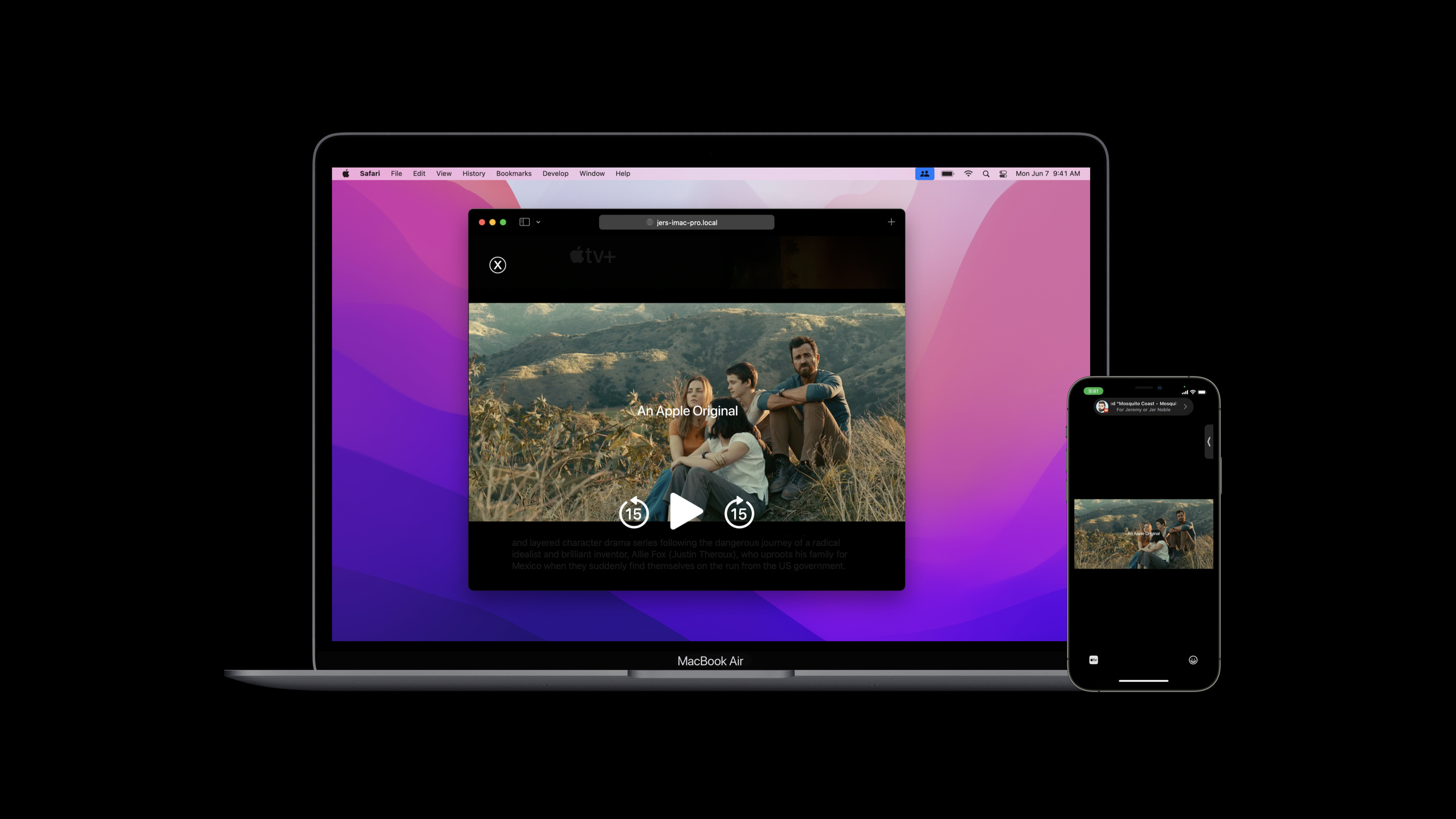
Highlight
Safari 15 brings the synchronized playback capabilities of SharePlay to web pages through the Media Session API and Coordinator extension, allowing Mac users to join the same media playback in FaceTime without installing the App Store app.
Core Content
You already have an iPhone video app. Users can watch movie trailers together in FaceTime because the app is already connected to Group Activities.
The problem lies with Mac users.
Your service also has a website. Mac users can view the same piece of content when they open Safari, but in the past web pages were only responsible for local playback. It doesn’t know there are other people in FaceTime, and it can’t synchronize actions such as play, pause, and drag progress to other devices.
This can make the experience disconnected. People on the iPhone launch Watch Together, and people on the Mac have to find web pages, find movie sources, and manually align the playback time.
Safari 15 adds this link to the web page.
In the first step, the native App is provided in the metadata of Group ActivityfallbackURL. This URL points to specific content on the website. Once the Mac user accepts the invitation, Safari will open this URL.
In the second step, the web page accesses the Media Session API. It tells Safari the title, cover, playback status, and progress of the current media, and returns system controls such as playback, pause, and jump to the web page for processing.
In the third step, Safari isnavigator.mediaSessionAdd a Coordinator. The web page joins the SharePlay session through it, sends the local user’s playback intentions to other devices, and receives the playback intentions from other devices.
In this way, a shared playback initiated from the iPhone can be dropped on the Safari web page. The web page still plays its own<video>, but playback commands are coordinated by the Coordinator.
Detailed Content
Prepare content URLs that can be opened by Safari
(02:50)
Safari cannot join a Group Activities session out of thin air. When a native app initiates sharing, it needs to be provided in activity metadatafallbackURL。
This URL cannot just point to the homepage of the website. It must be able to target the specific content to be played. The example in the speech is a movie trailer website with the URLcontentIdentifier。
import Foundation
import GroupActivities

struct WatchTogether: GroupActivity {
    var contentIdentifier: String

    func metadata() async -> GroupActivityMetadata {
        var metadata = GroupActivityMetadata()
        metadata.fallbackURL = URL(string: "https://example.com/title/\(contentIdentifier)")
        return metadata
    }
}
Key points:
import GroupActivitiesIntroducing the framework behind SharePlay. -WatchTogetherobeyGroupActivity, representing a shareable viewing event. -contentIdentifierSaves the identifier of the current media content. -metadata()Returns the metadata for this sharing event. -fallbackURLPoints to a specific content page on the website.- Safari will load this URL when Mac users accept the invitation.
This step solves the entrance problem. After Safari can open the correct web page, the web page also needs to let the browser understand what is currently playing.
Use Media Session to expose playback status and system control
(05:29)
Media Session is a standard web API. The web page uses it to tell the browser the title, cover, playback status, duration and progress of the current media.
After Safari gets this information, it can hand it over to the system’s Now Playing. When the user clicks play or pause in the macOS menu bar, Safari will call the handler registered on the web page.
const video = document.querySelector('video');
const myPlayer = {
  titleString: 'The Mosquito Coast — Trailer',
  artworkURL: '/artwork/trailer.jpg'
};

if (navigator.mediaSession) {
  navigator.mediaSession.setActionHandler('play', () => video.play());
  navigator.mediaSession.setActionHandler('pause', () => video.pause());
  navigator.mediaSession.setActionHandler('seekto', details => {
    video.currentTime = details.seekTime;
  });
}

let updateMediaSessionState = function() {
  if (!navigator.mediaSession) {
    return;
  }

  let playbackState = video.paused ? 'paused' : 'playing';
  navigator.mediaSession.playbackState = playbackState;

  let positionState = {
    duration: video.duration,
    playbackRate: video.playbackRate,
    position: video.currentTime
  };
  navigator.mediaSession.setPositionState(positionState);
};

for (let event of ['playing', 'pause', 'durationchange', 'ratechange', 'timeupdate']) {
  video.addEventListener(event, updateMediaSessionState);
}

if (navigator.mediaSession) {
  navigator.mediaSession.metadata = new MediaMetadata({
    title: myPlayer.titleString,
    artwork: [{ src: myPlayer.artworkURL }]
  });
}
Key points:
document.querySelector('video')Find the video element on the page. -navigator.mediaSessionUsed to determine whether the browser supports Media Session. -setActionHandler('play', ...)Connect the system play button tovideo.play()。setActionHandler('pause', ...)Connect the system pause button tovideo.pause()。setActionHandler('seekto', ...)Receive the jump time passed in by the system and update itvideo.currentTime。playbackStateSynchronize the play or pause status of the web page to the browser. -setPositionState()Synchronize the duration, playback speed, and current position to the browser. -MediaMetadataProvide a title and cover for Now Playing display.
This step allows the web page to be controlled by the system. The next step is to extend these controls to other devices in the same SharePlay session.
Use Coordinator to join SharePlay for synchronous playback
(09:32)
Safari 15 adds new features to Media Sessioncoordinator. It is used by web pages to join existing sessions, send playback intents, and receive playback status changes from other devices.
The presentation highlighted three limitations.
First, Coordinator is still an experimental web API, and the interface may change. Second, it was only implemented in Safari at the time. Third, web pages can join existing sessions, but the GroupSession needs to be initiated from an iPhone, iPad, or macOS app.
const video = document.querySelector('video');
const controls = {
  inSessionIcon: document.querySelector('#in-session-icon'),
  playButton: document.querySelector('#play-button'),
  pauseButton: document.querySelector('#pause-button'),
  timeline: document.querySelector('#timeline')
};

navigator.mediaSession.addEventListener('coordinatorchange', () => {
  let coordinator = navigator.mediaSession.coordinator;

  if (coordinator) {
    coordinator.join();
  }

  controls.inSessionIcon.hidden = !coordinator;
});

controls.inSessionIcon.addEventListener('click', () => {
  let coordinator = navigator.mediaSession.coordinator;

  if (coordinator && coordinator.state === 'joined') {
    coordinator.leave();
  }
});

controls.playButton.addEventListener('click', () => {
  let coordinator = navigator.mediaSession.coordinator;

  if (coordinator) {
    coordinator.play();
  } else {
    video.play();
  }
});

controls.pauseButton.addEventListener('click', () => {
  let coordinator = navigator.mediaSession.coordinator;

  if (coordinator) {
    coordinator.pause();
  } else {
    video.pause();
  }
});

controls.timeline.addEventListener('change', event => {
  let coordinator = navigator.mediaSession.coordinator;

  if (coordinator) {
    coordinator.seekTo(event.target.value);
  } else {
    video.currentTime = event.target.value;
  }
});
Key points:
coordinatorchangeTriggered when the Coordinator’s available status changes. -navigator.mediaSession.coordinatorGet the current coordinator. -coordinator.join()Let the web page join this shared playback session. -controls.inSessionIcon.hiddenDisplay status icons depending on whether you are in a session.- When clicking the session icon, if the status is
joined, callleave()quit. - Play button priority call
coordinator.play(), the Coordinator notifies all devices to start playing. - Pause button is called first
coordinator.pause(), the Coordinator notifies all devices to suspend. - Called first when the progress bar changes
coordinator.seekTo(), synchronize the jump intention to the session. - When there is no coordinator, the code falls back to local
videocontrol.
The coordinator communicates with other devices in the session, handles playback state changes, resolves conflicts, and waits for everyone to be ready. After preparation is completed, it will call the previously registered Media Session action handler to start or pause local playback.
Minimum access order
(07:32)
The access path for this session is very short, but the order cannot be messed up.
First let the native app send out thefallbackURLshared activities. Then let the web page use Media Session to expose state and control to Safari. Finally, use Coordinator to transform the web button into a synchronous play button.
function playFromControl() {
  let coordinator = navigator.mediaSession && navigator.mediaSession.coordinator;

  if (coordinator) {
    coordinator.play();
    return;
  }

  video.play();
}
Key points:
navigator.mediaSession && navigator.mediaSession.coordinatorCheck both Media Session and Coordinator.- When there is a Coordinator, the user’s playback action enters the shared session.
- Without Coordinator, the playback action only affects the local web page.
- This branch allows the same set of web controls to serve both normal playback and SharePlay playback.
Core Takeaways
1. Add a web-side SharePlay entrance to the video app
- What to do: The user initiates watching together in the iPhone App, and the Mac user accepts the invitation and directly enters Safari to play the same episode.
- Why is it worth doing: in session
fallbackURLand Coordinator allow web pages to join sessions initiated by native apps. - How to start: In
GroupActivityMetadataSet a link to the content details pagefallbackURL, web page accessnavigator.mediaSessionandnavigator.mediaSession.coordinator。
2. Make a trailer and watch the list together
- What to do: Friends watch a movie trailer together in FaceTime. One party drags the progress or pauses, and the other person’s picture changes simultaneously.
- Why it’s worth it: Coordinator support
play()、pause()、seekTo()This type of playback intent is synchronized. - How to start: First make each trailer a stable URL, and then call the coordinator method first in the button event of the web player.
3. Add Now Playing control to the audio website
- What: Podcast or music web pages display titles, cover art, and respond to playback pauses in Now Playing in the macOS menu bar.
- Why it’s worth doing: Media Session can expose playback state, position state and metadata.
- How to start: for
play、pause、seektoregistersetActionHandler(), called after listening to audio element eventssetPositionState()。
4. Add SharePlay status prompt to web player
- What to do: After the player enters the sharing session, a session icon is displayed, and the user clicks to exit the session.
- Why is it worth doing: Use the example in the session
coordinatorchangeControl icon display and useleave()quit. - How to start: Monitoring
navigator.mediaSessionofcoordinatorchangeevent, based oncoordinatorWhether there is a switching UI.
5. The same set of players supports both local playback and shared playback
- What to do: When ordinary users click play, it will be played locally. When SharePlay users click play, it will be synchronized to everyone.
- Why it’s worth doing: The web page can be checked in the event handler
navigator.mediaSession.coordinator, select the control path according to the session state. - How to start: Unify the play, pause, and progress bar events and call them first in the branch
coordinator.play()、coordinator.pause()、coordinator.seekTo(), otherwise operate<video>。
Related Sessions
- Meet Group Activities — Understand the basic model of SharePlay, GroupActivity, and shared experiences from a framework level.
- Design for Group Activities — Learn how to design application flows into shared experiences for multiple people in FaceTime.
- Build custom experiences with Group Activities — Build custom real-time collaboration beyond media synchronization with GroupSessionMessenger.
- Coordinate media experiences with Group Activities — Coordinate playback in native media apps with Group Activities and AVFoundation.
- Design for Safari 15 — Understand the design and web capability changes of Safari 15, and adapt to the web experience.
Comments
GitHub Issues · utterances