
Highlight
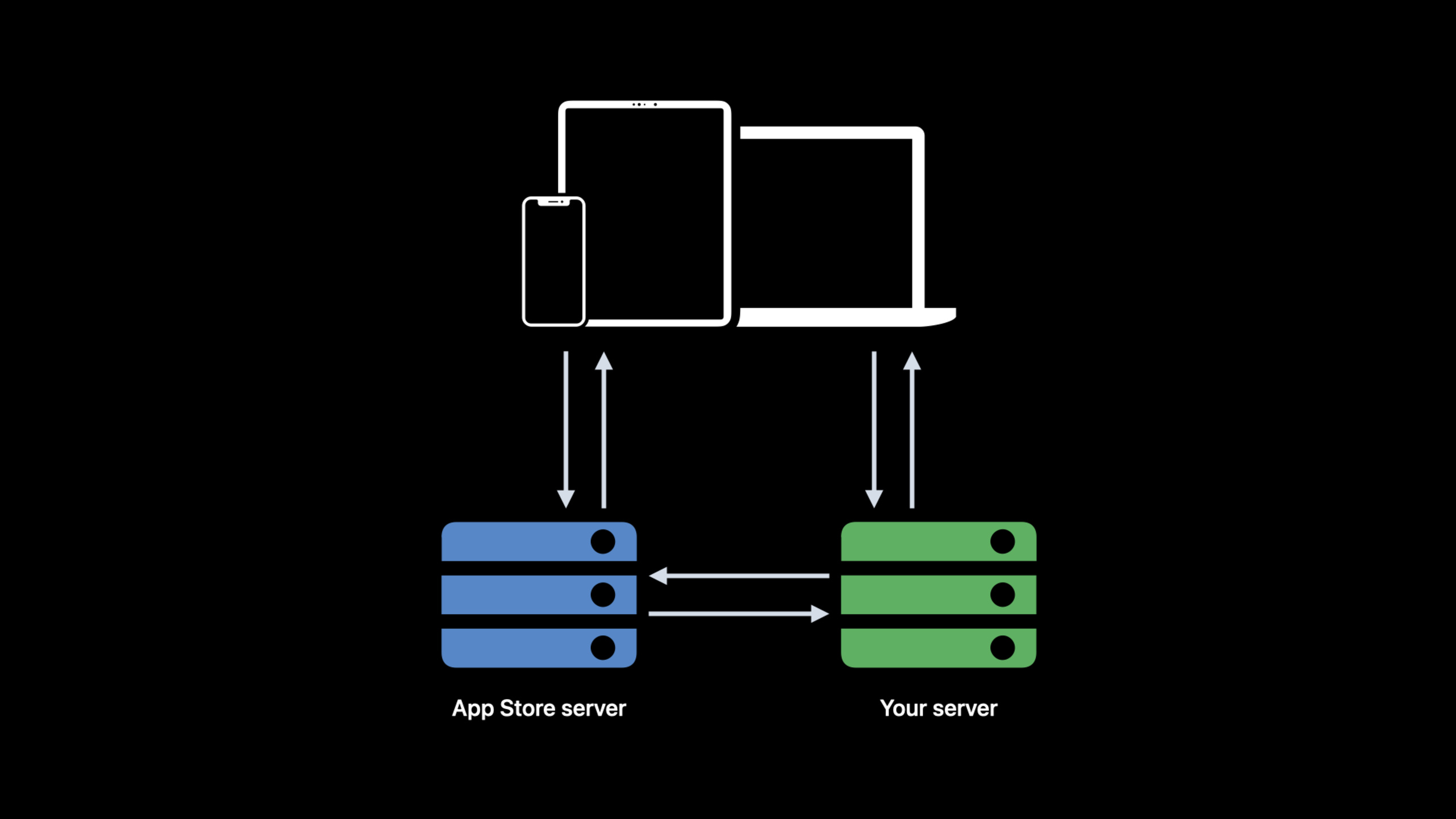
App Store Server API supports active query of transaction history, subscription status and refund information; Server Notifications V2 covers 20+ event types; new Family Sharing support and sandbox environment improvements are added.
Core Content
Your app has in-app purchases. After the user purchases, the client sends the receipt to the server for verification. But the user may purchase while offline, or the client request fails. How do you ensure that the purchase record on the server is complete?
The App Store Server API and Server Notifications V2 allow you to actively pull data instead of passively waiting for the client to report it.
Detailed Content
App Store Server API
(01:14)
Server API is a set of RESTful interfaces that your server can call after JWT authentication.
Query transaction history:
GET https://api.storekit.itunes.apple.com/inApps/v1/history/{originalTransactionId}Returns the user’s complete transaction history, including all renewals, upgrades, downgrades, and refunds.
Check subscription status:
GET https://api.storekit.itunes.apple.com/inApps/v1/subscriptions/{originalTransactionId}Returns the detailed status of the current subscription, including expiration time, automatic renewal status, discount type, etc.
(02:30)
Key points:
- use
originalTransactionIdQuery, nottransactionId originalTransactionIdunchanged throughout the subscription lifecycle- Return signature data in JWS (JSON Web Signature) format
- Need to verify signature to ensure data comes from Apple
Server Notifications V2
(04:00)
The notification types of V2 have been expanded from 10 in V1 to 20+, covering all key events in the subscription life cycle:
| Notification Type | Description |
|---|---|
SUBSCRIBED | New Subscription |
RENEWAL | Automatic renewal successful |
DID_CHANGE_RENEWAL_STATUS | User turns on/off automatic renewal |
DID_CHANGE_RENEWAL_PREF | User upgrade/downgrade subscription |
EXPIRED | Subscription expired |
REFUND | Refund |
REFUND_DECLINED | Refund refused |
CONSUMPTION_REQUEST | Request consumption data |
REVOKE | Home Sharing revoked |
(05:15)
Key points:
- V2 notifications contain richer information
- All notifications are in JWS format
- Need to verify signature
- If a non-200 is returned, Apple will try again in a few days
Verify JWS signature
(06:30)
The data returned by the Server API and notifications are in JWS format, and the signature needs to be verified:
import CryptoKit

func verifyJWS(_ jwsString: String) throws -> Transaction {
    // 1. Split the JWS into its three parts
    let parts = jwsString.split(separator: ".")
    guard parts.count == 3 else { throw VerificationError.invalidFormat }

    // 2. Parse the header and get the certificate
    let headerData = base64Decode(String(parts[0]))
    let header = try JSONDecoder().decode(JWSHeader.self, from: headerData)

    // 3. Get the public key from Apple and validate the certificate chain
    let certificate = try validateCertificateChain(header.x5c)

    // 4. Verify the signature
    let signedData = Data((parts[0] + "." + parts[1]).utf8)
    let signature = base64Decode(String(parts[2]))
    let isValid = certificate.publicKey.isValidSignature(signature, for: signedData)

    guard isValid else { throw VerificationError.invalidSignature }

    // 5. Parse the payload
    let payloadData = base64Decode(String(parts[1]))
    return try JSONDecoder().decode(Transaction.self, from: payloadData)
}(07:45)
Key points:
- JWS contains three parts: header, payload, and signature.
- Obtain root certificate verification certificate chain from Apple
- Verify signatures to ensure data has not been tampered with
- Parse the payload to obtain transaction information
Family Sharing
(09:00)
iOS 15 supports Family Sharing with in-app purchases. After the user purchases, family members can access it automatically at no additional cost.
In the Server API, you can passinAppOwnershipTypeField distinction:
PURCHASED:Users purchase by themselvesFAMILY_SHARED: Obtained via Home Sharing
When home sharing is revoked, the server receivesREVOKEnotify.
(10:15)
Key points:
inAppOwnershipTypeDistinguish between buying and sharingREVOKENotification indicating that sharing was revoked- Need to handle shared user access rights
- Suitable for subscriptions and non-consumable in-app purchases
Sandbox environment improvements
(11:30)
New features in the sandbox environment:
- Test Subscription Acceleration: The subscription period in the sandbox is compressed (1 year = 1 hour)
- TEST REFUND: The refund process can be simulated in the sandbox
- Test Family Sharing: Family Sharing can be tested in the sandbox
- TEST OFFER: Can test introductory offer and promotional offer in sandbox
(12:45)
Key points:
- The sandbox subscription cycle is accelerated to facilitate testing and renewal
- Sandbox supports refund testing
- Sandbox supports family sharing testing
- Test accounts are managed in App Store Connect
Core Takeaways
-
Use Server API to actively synchronize purchase status. Don’t just rely on client reporting, the server pulls it regularly to ensure data consistency. Entrance API:
GET /inApps/v1/history/{originalTransactionId}。 -
Use Server Notifications V2 to respond to status changes in real time. 20+ event types cover the entire subscription life cycle. Entrance API: Configure the server URL to receive JWS notifications.
-
Verify the signature of all JWS data. Prevent man-in-the-middle attacks and data tampering. Entrance API: Apple root certificate + JWS signature verification.
-
Support Family Sharing. distinguish
PURCHASEDandFAMILY_SHARED,deal withREVOKEnotify. Entrance API:inAppOwnershipType+REVOKEnotify. -
Test the complete purchase process in the sandbox. Quickly test renewals, upgrades, downgrades, and refunds with accelerated subscription cycles. Entrance API: App Store Connect sandbox test account.
Related Sessions
- Support customers and handle refunds — Customer support and refund processing
- Meet StoreKit 2 — StoreKit 2 new features
- Meet in-app events on the App Store — App Store in-app events
Comments
GitHub Issues · utterances