
Highlight
macOS Monterey introduces MailKit, allowing developers to use the App Extension architecture to add writing assistance, incoming processing, content interception and email security capabilities to Mail, solving the problem of old Mail plug-ins becoming ineffective with system updates.
Core Content
Many teams’ email rules are not in Mail.
Common requirements for corporate emails are very specific: confidential project emails need to check recipients, project emails need to be automatically marked, remote images in marketing emails need to be intercepted, and the corporate certificate system needs to take over signature and encryption. In the past, if they wanted to deeply transform Mail, developers would write Mail plug-ins. The plug-in relies on Mail’s internal implementation and is prone to failure after system updates.
Apple provides MailKit (Mail extension framework) in macOS Monterey. It is built on the App Extension architecture and uses the same infrastructure as Safari app extensions and Share Sheet extensions. Extensions are placed in signed Mac apps and can also be distributed to the App Store with existing apps.
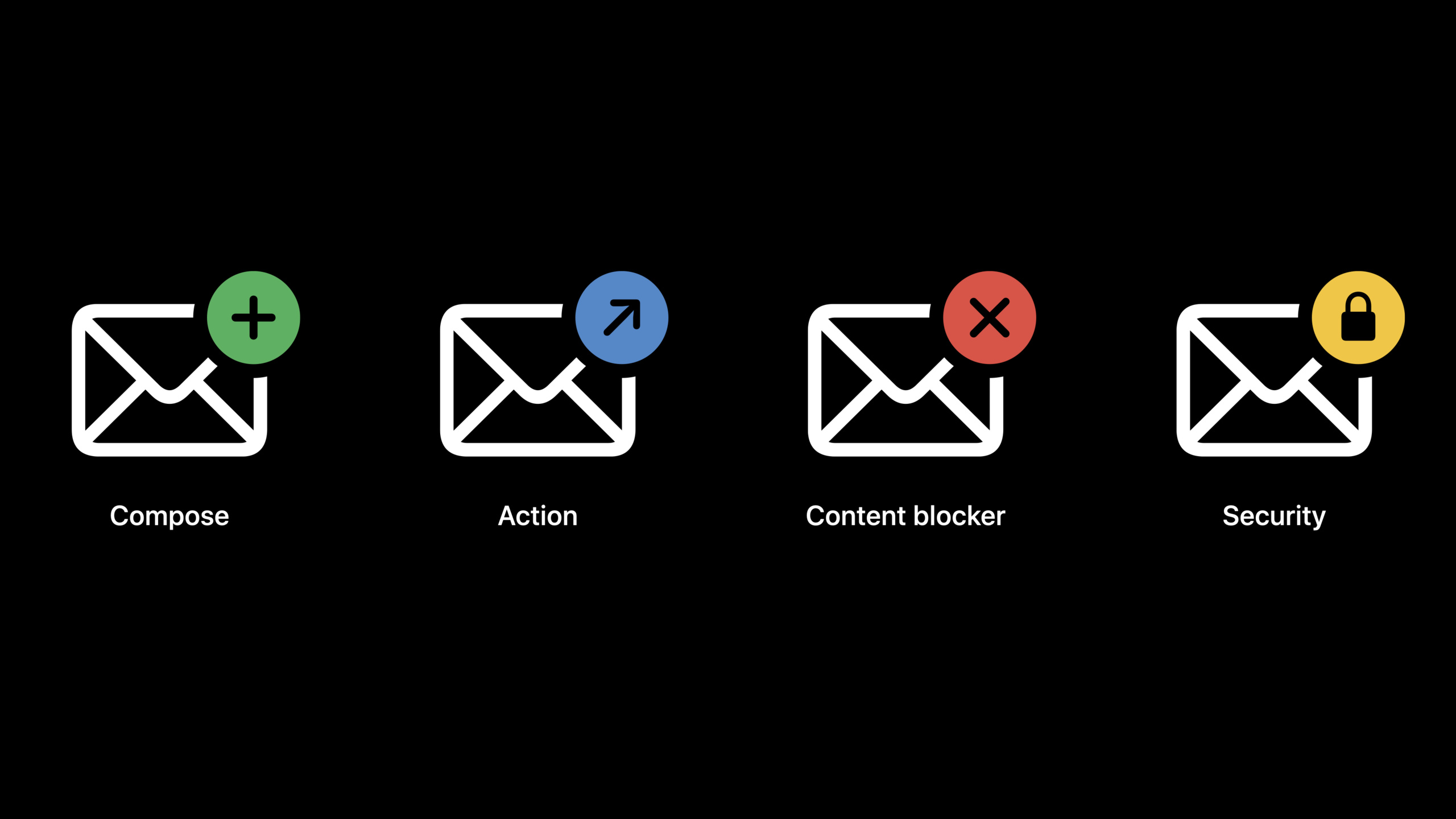
This session provides four types of entrances. The Compose extension handles the writing process, the Action extension handles newly received emails, the Content Blocker extension reuses WebKit content blocking rules, and the Message Security extension handles signing, encryption, and decryption.
The example in the talk is an enterprise confidentiality extension. When you write a letter, it checks the recipient against the project; when you receive it, it marks the Mars project email in red; and when you open the email, it shows that it has been extended decryption. All operations occur within Mail’s native interface.
Detailed Content
MailKit extension entry
(00:27) MailKit fromMEExtensionstart. The extended principal class implements this protocol and then returns the corresponding handler according to its capabilities. The four capabilities mentioned in the speech are all called by Mail through this entrance.
import MailKit

class MailExtension: NSObject, MEExtension {
    func handlerForContentBlocker() -> MEContentBlocker {
        return ContentBlocker.shared
    }

    func handlerForMessageActions() -> MEMessageActionHandler {
        return MessageActionHandler.shared
    }

    func handler(for session: MEComposeSession) -> MEComposeSessionHandler {
        return ComposeSessionHandler()
    }

    func handlerForMessageSecurity() -> MEMessageSecurityHandler {
        return MessageSecurityHandler.shared
    }
}
Key points:
import MailKitIntroducing Mail extension related protocols and types.MailExtensioninheritNSObject, and realizeMEExtension。handlerForContentBlocker()Returns the content interception handler. Mail will read the rules when displaying the email content.handlerForMessageActions()Returns the incoming handling handler, which Mail calls when it downloads new mail.handler(for:)receive aMEComposeSession, each compose window has an independent session, so the example returns a newComposeSessionHandler。handlerForMessageSecurity()Returns the email security handler responsible for signing, encryption, decryption, and certificate views.
Compose extension: Check the recipient when writing a letter
(04:31) The Compose extension can do four things in the composition window: verify the recipient address, provide additional views, set additional headers, and report errors before sending. The privacy extension in Speech uses this to check if the recipient belongs to the current project.
import MailKit

class ComposeSessionHandler: NSObject, MEComposeSessionHandler {
    func mailComposeSessionDidBegin(_ session: MEComposeSession) {
        // Perform any setup necessary for handling the compose session.
    }

    func mailComposeSessionDidEnd(_ session: MEComposeSession) {
        SpecialProjectHandler.sharedHandler.selectedSpecialProject = nil
    }

    func annotateAddressesForSession(_ session: MEComposeSession) async -> [MEEmailAddress: MEAddressAnnotation] {
        var annotations: [MEEmailAddress: MEAddressAnnotation] = [:]

        for address in session.mailMessage.allRecipientAddresses {
            if !SpecialProjectHandler.verifiedEmails.contains(address) {
                let message = "\(SpecialProjectHandler.bannedDomain) is not a valid domain"
                let annotation = MEAddressAnnotation.error(withLocalizedDescription: message)
                annotations[address] = annotation
            }
        }

        return annotations
    }
}
Key points:
MEComposeSessionHandlerLet the extension participate in the compose window lifecycle.mailComposeSessionDidBegin(_:)Called when a new compose window is opened, suitable for initializing the current window state.mailComposeSessionDidEnd(_:)Called at the end of compose, the example clears the currently selected item.annotateAddressesForSession(_:)Called when the recipient address is edited.session.mailMessage.allRecipientAddressesProvide all recipient addresses for the current message.MEAddressAnnotation.error(withLocalizedDescription:)Create an error label that Mail will display on the address token. -The return value is[MEEmailAddress: MEAddressAnnotation], the key is the address that needs to be marked, and the value is the mark that Mail wants to display.
(07:53) The Compose extension can also display custom UI in the compose window. This UI must come fromMEExtensionViewControllersubclass.
func viewController(for session: MEComposeSession) -> MEExtensionViewController {
    return ComposeSessionViewController(
        nibName: "ComposeSessionViewController",
        bundle: Bundle.main
    )
}

func additionalHeaders(for session: MEComposeSession) -> [String: [String]] {
    guard let project = SpecialProjectHandler.sharedHandler.selectedSpecialProject else {
        return [:]
    }
    return [SpecialProjectHandler.specialProjectsHeader: [project.rawValue]]
}
Key points:
viewController(for:)Returns the Mail controller in which to embed the compose window.ComposeSessionViewControlleris a custom UI that the example uses to select special items.additionalHeaders(for:)Return extra headers when sending emails.- Return an empty dictionary to indicate that the current email does not require additional headers.
- The value of header is a string array. In the example, the project name is written into
SpecialProjectHandler.specialProjectsHeader。
Action extension: Automatically process new emails when they arrive
(08:38) The Action extension runs when Mail downloads new messages. It can change the read status and flag, move it to system mailboxes such as Junk, Trash, Archive, etc., and also set colors for emails in the mailing list.
import MailKit

class MessageActionHandler: NSObject, MEMessageActionHandler {
    static let shared = MessageActionHandler()

    func decideAction(for message: MEMessage) async -> MEMessageActionDecision? {
        if SpecialProjectHandler.SpecialProject.allCases.first(where: { message.subject.contains($0.rawValue) }) != nil {
            return MEMessageActionDecision.action(.setBackgroundColor(.yellow))
        }

        if message.rawData == nil {
            return MEMessageActionDecision.invokeAgainWithBody
        }

        if let projects = message.headers?[SpecialProjectHandler.specialProjectsHeader] {
            if projects.contains(SpecialProjectHandler.SpecialProject.marsRemoteOffice.rawValue) {
                return MEMessageActionDecision.action(.flag(.purple))
            } else if projects.contains(SpecialProjectHandler.SpecialProject.apSpaceShuttle.rawValue) {
                return MEMessageActionDecision.action(.flag(.green))
            }
        }

        if let rawData = message.rawData,
           let text = String(data: rawData, encoding: .utf8),
           SpecialProjectHandler.SpecialProject.allCases.first(where: { text.contains($0.rawValue) }) != nil {
            return MEMessageActionDecision.action(.flag(.red))
        }

        return nil
    }
}
Key points:
MEMessageActionHandlerReceive new messages downloaded by Mail.decideAction(for:)returnMEMessageActionDecision?, telling Mail what action to perform.- Used in the first paragraph
message.subjectCheck the theme and set the yellow background by hitting the project name. message.rawData == nilIndicates that there is currently only a partial header and no complete text.MEMessageActionDecision.invokeAgainWithBodyRequire Mail to pull the complete body and header and then call the handler again.message.headersRead custom headers written by the Compose extension..flag(.purple)、.flag(.green)、.flag(.red)Set different flags for emails.- return
nilIndicates that this email will not be processed.
Content Blocker: Reuse Safari content blocking rules
(11:23) Mail’s message content view is based on WebKit. The Content Blocker extension can integrate content rules into Mail’s WebKit configuration to prevent resource loading based on URLs in HTML and other conditions. The talk clearly states that the rule syntax is the same as Safari content blockers.
import MailKit

class ContentBlocker: NSObject, MEContentBlocker {
    static let shared = ContentBlocker()

    func contentRulesJSON() -> Data {
        guard let url = Bundle.main.url(
            forResource: "ContentBlockerRules",
            withExtension: "json"
        ) else { return Data() }

        guard let data = try? Data(contentsOf: url) else { return Data() }

        return data
    }
}
Key points:
MEContentBlockerProvides Mail content blocking rules.contentRulesJSON()Returns JSONDatacoding.- Example reads from app bundle
ContentBlockerRules.json。 - Returns null if file cannot be found or read fails
Data, Mail has no rules available. - The rule format follows Safari content blockers, and existing Safari rules can be migrated to Mail extension.
The rules file itself is JSON.
[
    {
        "action": {
            "type": "block"
        },
        "trigger": {
            "url-filter": "webkit.svg",
            "resource-type": ["image", "style-sheet"],
            "if-domain": "example.com"
        }
    }
]
Key points:
action.typeset toblock, indicating that loading is prevented after a hit.trigger.url-filterMatch resources using URL rules.resource-typeLimit the resource type, here match images and style sheets.if-domainLimit the page domain name, this is only forexample.comTake effect.
Message Security: Takes over signing, encryption and decryption
(12:57) The Message Security extension handles email security. When sending, it tells Mail whether the current email can be signed and encrypted; after clicking send, it receives RFC822 message data and returns signed or encrypted RFC822 data. When receiving, Mail hands the encoded RFC822 data to the extension, and the extension returns the decoded email.
import MailKit

class MessageSecurityHandler: NSObject, MEMessageSecurityHandler {
    static let shared = MessageSecurityHandler()

    func encodingStatus(
        for message: MEMessage,
        composeContext: MEComposeContext
    ) async -> MEOutgoingMessageEncodingStatus {
        let invalidRecipients = message.allRecipientAddresses.filter({ address in
            return !SpecialProjectHandler.verifiedEmails.contains(address)
        })

        if !invalidRecipients.isEmpty {
            return MEOutgoingMessageEncodingStatus(
                canSign: false,
                canEncrypt: false,
                securityError: MessageSecurityError.unverifiedEmails(emailAdresses: invalidRecipients),
                addressesFailingEncryption: invalidRecipients
            )
        } else {
            let encoder = MockEncoder.sharedInstance
            let encodingStatus = encoder.securityStatus(for: message)
            return encodingStatus
        }
    }

    func encode(_ message: MEMessage, composeContext: MEComposeContext) async -> MEMessageEncodingResult {
        return MockEncoder.sharedInstance.encodedMessage(for: message, context: composeContext)
    }
}
Key points:
MEMessageSecurityHandlerIs the email security handler protocol.encodingStatus(for:composeContext:)Called when the sender or recipient changes, used to drive lock and certificate icon states.message.allRecipientAddressesProvides a list of current recipients.MEOutgoingMessageEncodingStatusReturns whether it can be signed, whether it can be encrypted, error information and the address where encryption failed.encode(_:composeContext:)Called when the email is sent.- Examples leave the real coding work to
MockEncoder.sharedInstance.encodedMessage(for:context:)。
(16:05) The decoding process occurs while viewing the email. If the extension can handle the email, it returnsMEDecodedMessage; If no processing is required, return quicklynil。
func decodedMessage(forMessageData data: Data) -> MEDecodedMessage? {
    let decoder = ExampleDecoder.sharedInstance

    if decoder.shouldDecodeMessage(withData: data) {
        return decoder.decodedMessage(from: data)
    }

    return nil
}

func extensionViewController(signers messageSigners: [MEMessageSigner]) -> MEExtensionViewController? {
    let controller = ExampleSigningViewController.sharedInstance
    controller.signers = messageSigners
    return controller
}
Key points:
decodedMessage(forMessageData:)Receives encoded RFC822 data.shouldDecodeMessage(withData:)Determine first whether the extension needs to be processed to avoid irrelevant emails being slowed down.decodedMessage(from:)Returns the decrypted or de-signed email data, as well as the signature and encryption status.extensionViewController(signers:)Returns the certificate information UI.messageSignersFrom the signer information returned when decoding the extension, Mail will pass it back to the certificate view.
Core Takeaways
-
What to do: Add project-level recipient verification to corporate emails. Why it’s worth doing: Compose extension can return when the user edits the address
MEAddressAnnotation, the error is displayed directly on the Mail address token. How to start: Create Mail Extension target, check Compose Session Handler, andannotateAddressesForSession(_:)read insession.mailMessage.allRecipientAddresses, use the enterprise permission table to generate annotations. -
What to do: Automatically mark project emails with different colors or flags. Why it’s worth doing: Action extension runs before new emails enter the inbox, and users will already see the classification results when they open Mail. How to get started: Implementation
MEMessageActionHandler.decideAction(for:), check firstmessage.subjectandmessage.headers, return when text is neededMEMessageActionDecision.invokeAgainWithBody。 -
What to do: Block remote tracking images in emails. Why it’s worth doing: Content Blocker extension uses the rule format of Safari content blockers, and existing WebKit rules can be reused. How to get started: Implementation
MEContentBlocker.contentRulesJSON(), put the JSON rules that block remote image domain names into the app bundle. -
What to do: Integrate the enterprise certificate system into the Mail sending process. Why it’s worth doing: The Message Security extension can return the signature and encryption status based on the current recipient, and Mail will feedback it to the user with a lock and certificate icon. How to get started: Implementation
encodingStatus(for:composeContext:)Check certificate availability and thenencode(_:composeContext:)Returns the encoded RFC822 data. -
What to do: Provide a custom certificate details page for encrypted emails. Why it’s worth doing: Mail allows extension returns
MEExtensionViewControllerDisplay signer or message context, enterprises can display internal certificate fields. How to start: Return signer information when decoding emails, implementextensionViewController(signers:)And fill in the signer data into the custom view.
Related Sessions
- Meet Safari Web Extensions on iOS — Learn about the cross-device extension model of Safari Web Extensions to compare how WebKit content blocking rules are reused in Safari and Mail.
- Sync files to the cloud with FileProvider on macOS — FileProvider also uses the extension architecture to integrate third-party services into the system-level experience.
- Meet TestFlight on Mac — Mail extension is distributed with Mac apps, and TestFlight on Mac can be used for external testing of the extension.
- Distribute apps in Xcode with cloud signing — Mail extension needs to be put into the signed Mac app. The cloud signing process can reduce the cost of certificate configuration before distribution.
Comments
GitHub Issues · utterances