
Highlight
iOS 15 allows Nearby Interaction to support compatible third-party UWB accessories. Developers can use NINearbyAccessoryConfiguration to obtain precise distance and direction updates from accessories, solving the problem of difficulty in determining close spatial relationships through Bluetooth and other channels.
Core Content
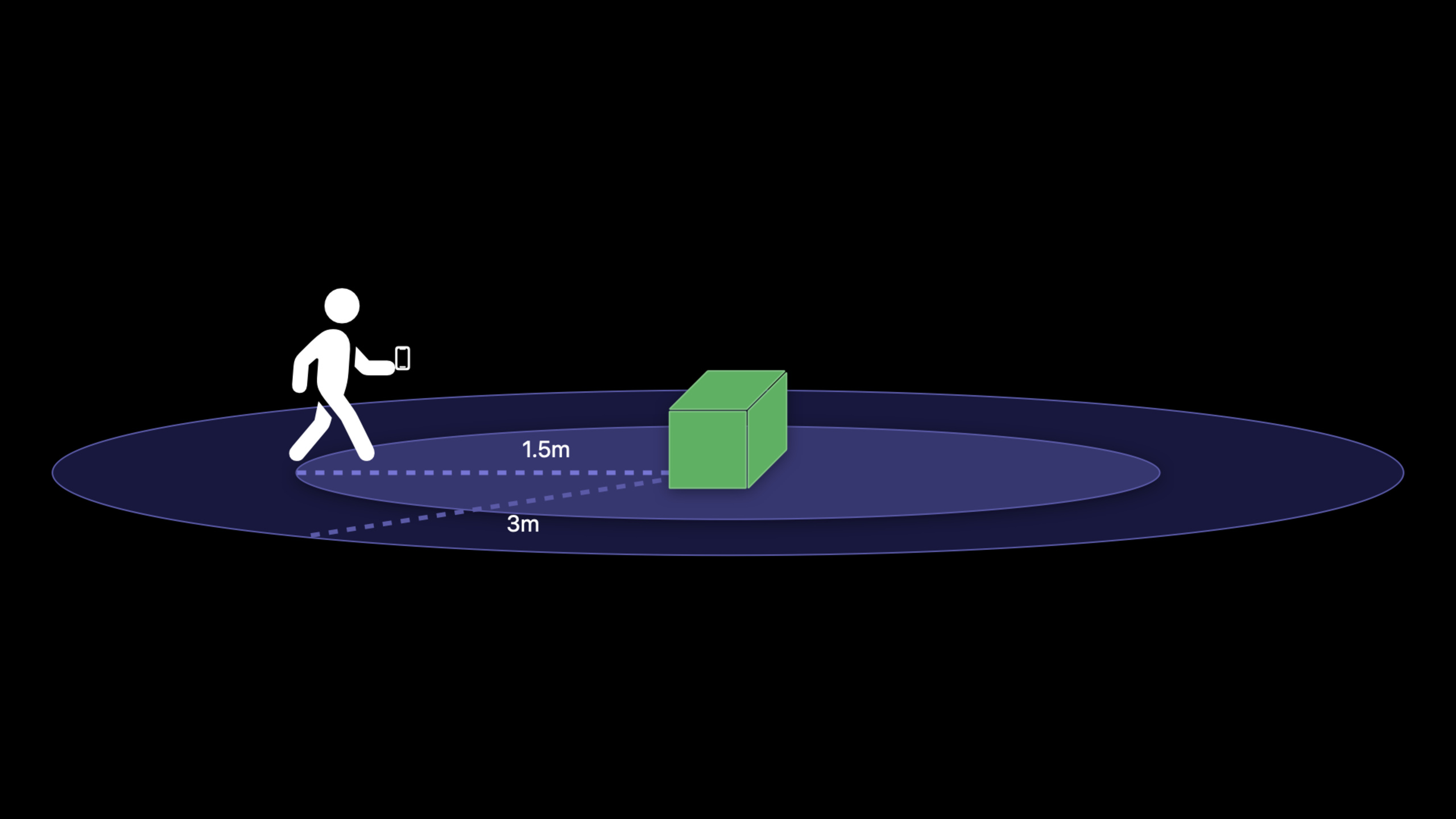
You make a smart speaker, toolbox label, or showroom installation. When the user walks 3 meters closer, the App wants to display basic controls; when the user walks 1.5 meters closer, the App wants to open a more precise operation interface.
It was difficult to be steady before. Bluetooth can take care of connecting and transmitting data, but it’s not suitable for determining a user’s precise location in a room. Network connections can also exchange status, but there is no way to tell the app which direction the user is standing on the accessory.
Nearby Interaction in iOS 14 already allows two iPhones equipped with U1 chips to exchange distance and direction information. The problem is, third-party accessories cannot join this session directly.
iOS 15 fills this gap. Apple NewNINearbyAccessoryConfiguration, allowing compatible third-party UWB (Ultra Wideband) hardware to interoperate with the iPhone’s U1 chip.
This capability does not replace Bluetooth or networking. The app still needs a data channel to pass configuration data between the iPhone and the accessory. Nearby Interaction is responsible for the UWB ranging session, and the data channel is responsible for initiating and coordinating the session.
Accessory Configuration Data is generated first. App created upon receiptNINearbyAccessoryConfigurationand startNISession. Then the system generates Shareable Configuration Data through delegate, and the App must send it back to the accessory as soon as possible. After the configuration on both sides is completed, the App will receiveNINearbyObjectUpdated to include distance and, if supported by hardware, direction.
Detailed Content
1. Permissions changed from one-time authorization to period-of-use authorization
(02:59) The Nearby Interaction permission in iOS 14 is only allowed once per app life cycle. The next time the user re-enters the relevant process, they may see the prompt again.
(03:34) The prompt for iOS 15 is changed to “While using the App” authorization. The system will run the app for the first timeNISessionA prompt will pop up automatically. After the user accepts or declines, the prompt will not appear again. Afterwards, users can modify permissions in Settings.
<key>NSNearbyInteractionUsageDescription</key>
<string>Shows distance-related controls when you are near the accessory.</string>
Key points:
NSNearbyInteractionUsageDescriptionis the purpose description in Info.plist.- The system will display this text in the Nearby Interaction permission prompt.
- first run
NISessionThe time points should correspond to clear user actions, such as “connect accessory” or “start searching.” - When permissions are insufficient,
NISessionIt will be invalid due to permission-related errors. The App should explain the reason and guide the user to modify it in Settings.
2. Create NINearbyAccessoryConfiguration with accessory data
(08:43) The third-party accessory will first send the Accessory Configuration Data to the App through Bluetooth, local network or secure Internet connection. This data is generated in a specified format by U1-compatible UWB hardware.
(10:45) After App receives the data, it uses it to createNINearbyAccessoryConfiguration. If the data format is invalid, initialization will throw an error.
import Foundation
import NearbyInteraction

final class AccessoryStore {
    private var namesByToken: [NIDiscoveryToken: String] = [:]

    func setupAccessory(configurationData: Data, name: String) throws -> NINearbyAccessoryConfiguration {
        let configuration = try NINearbyAccessoryConfiguration(data: configurationData)
        namesByToken[configuration.accessoryDiscoveryToken] = name
        return configuration
    }

    func name(for token: NIDiscoveryToken) -> String? {
        namesByToken[token]
    }
}
Key points:
import NearbyInteractionIntroducing the Nearby Interaction framework.setupAccessory(configurationData:name:)Receive the configuration data and accessory name sent by the accessory.try NINearbyAccessoryConfiguration(data:)Verify data format and generate accessory session configuration.configuration.accessoryDiscoveryTokenIs the frame filled accessory discovery logo.namesByTokenAssociate the discovery logo with the accessory name and receive it laterNINearbyObjectCorrect accessory names can be displayed when updating.- method returns
NINearbyAccessoryConfiguration, the caller can use it to startNISession。
3. Start NISession and send Shareable Configuration Data back to the accessory
(13:02) After the App creates the configuration, then createNISession, set delegate, and callrun(_:)。
(13:19) Accessories also require Shareable Configuration Data from Nearby Interaction. The system will pass it to the App through the delegate callback added in iOS 15. The app must send the accessory to the accessory through the original data channel as soon as possible. Excessive delay will cause the session to time out.
import Foundation
import NearbyInteraction

protocol AccessoryConnection {
    func send(_ data: Data)
}

final class AccessorySessionController: NSObject, NISessionDelegate {
    private let session = NISession()
    private let configuration: NINearbyAccessoryConfiguration
    private let connection: AccessoryConnection

    init(configuration: NINearbyAccessoryConfiguration, connection: AccessoryConnection) {
        self.configuration = configuration
        self.connection = connection
        super.init()
        session.delegate = self
    }

    func start() {
        session.run(configuration)
    }

    func session(
        _ session: NISession,
        didGenerateShareableConfigurationData shareableConfigurationData: Data,
        for object: NINearbyObject
    ) {
        connection.send(shareableConfigurationData)
    }
}
Key points:
AccessoryConnectionAbstract data channel, which can be implemented by Bluetooth, LAN or other secure connection.NISession()Create a Nearby Interaction session.session.delegate = selfLet the controller receive frame callbacks.session.run(configuration)Start a session with accessory configuration.didGenerateShareableConfigurationDataProvide Shareable Configuration Data.connection.send(shareableConfigurationData)Send the data back to the accessory as is.for object: NINearbyObjectIndicate which accessory this data belongs to, which is critical when multiple accessories are running in parallel.
4. Handle timeouts and retry while configuration is still valid
(15:25) If Shareable Configuration Data does not deliver accessories in time, the session may time out. Nearby Interaction will passdidRemovedelegate callback notification app.
(15:44) App can check the reason for removal. if the reason is.timeout, and the App determines that the accessory is still nearby, it can rerun the session with the same configuration. The cache configuration is only effective when the accessory-side session has not been terminated.
import NearbyInteraction

final class RetryController: NSObject, NISessionDelegate {
    private let session: NISession
    private let configuration: NINearbyAccessoryConfiguration
    private var retryCount = 0

    init(session: NISession, configuration: NINearbyAccessoryConfiguration) {
        self.session = session
        self.configuration = configuration
        super.init()
    }

    func session(
        _ session: NISession,
        didRemove nearbyObjects: [NINearbyObject],
        reason: NINearbyObject.RemovalReason
    ) {
        guard reason == .timeout else { return }
        guard shouldRetry() else { return }

        retryCount += 1
        session.run(configuration)
    }

    private func shouldRetry() -> Bool {
        retryCount < 3
    }
}
Key points:
didRemove nearbyObjectsIndicates that one or more nearby objects have been removed.reason == .timeoutCorresponds to the session timeout scenario.shouldRetry()Place the app’s own judgment logic, such as the number of retries and whether the accessory notifies the user to stop.retryCount += 1Record the current number of retries to avoid infinite retries.session.run(configuration)Start the session again with the same configuration.- If the accessory side session has been terminated, the App needs to re-obtain the Accessory Configuration Data and then go through the complete startup process.
5. Update driving area function with distance
(19:24) After the iPhone and accessories are configured, the App willdidUpdatereceiveNINearbyObjectrenew. Updates include distance and, if the hardware supports it, direction.
(20:26) The scene in the talk defines two areas: a 1.5 meter radius and a 3 meter radius. Function A is enabled when the user enters the 3-meter area, and function B is enabled when the user enters the 1.5-meter area. Apple recommends smoothing the distance to avoid rapid UI jumps when the user moves suddenly or stands on the edge.
import NearbyInteraction

final class DistanceZoneController: NSObject, NISessionDelegate {
    private var lastSmoothedDistance: Float?

    func session(_ session: NISession, didUpdate nearbyObjects: [NINearbyObject]) {
        guard let object = nearbyObjects.first else { return }
        guard let distance = object.distance else { return }

        let smoothedDistance = getSmoothedDistance(distance)

        if smoothedDistance < 1.5 {
            enableFunctionalityB()
        } else if smoothedDistance < 3.0 {
            enableFunctionalityA()
        }
    }

    private func getSmoothedDistance(_ distance: Float) -> Float {
        guard let previous = lastSmoothedDistance else {
            lastSmoothedDistance = distance
            return distance
        }

        let alpha: Float = 0.3
        let smoothed = alpha * distance + (1 - alpha) * previous
        lastSmoothedDistance = smoothed
        return smoothed
    }

    private func enableFunctionalityA() {
        // Functionality after the user enters the 3-meter zone.
    }

    private func enableFunctionalityB() {
        // Functionality after the user enters the 1.5-meter zone.
    }
}
Key points:
didUpdate nearbyObjectsIs the distance and direction update portal.nearbyObjects.firstTake out the accessory object of this update.object.distanceis the distance provided by the frame, in meters.getSmoothedDistance(_:)Smooth distances to reduce UI jitter near boundaries.smoothedDistance < 1.5Corresponding to the closer area, function B is triggered.smoothedDistance < 3.0Corresponding to larger areas, function A is triggered.- When multiple accessories are running in parallel, a session can be created and run for each accessory.
Core Takeaways
-
What to do: Add “Close Display Control Panel” to the smart speaker. Why it’s worth it: Nearby Interaction can provide accurate distance to accessories, so apps don’t have to rely on Bluetooth signal strength to guess whether the user is approaching. How to start: Let the speaker send Accessory Configuration Data via Bluetooth, which the App can use
NINearbyAccessoryConfiguration(data:)start upNISession,existdidUpdateDisplay the control panel with a 3 meter threshold. -
What to do: Perform a “close confirmation” of the warehouse tool label. Why it’s worth doing: UWB distance is suitable for determining whether the user is really standing next to the target accessory to reduce misoperations. How to get started: Maintain for each tag
accessoryDiscoveryTokenmapping to names, inobject.distanceWhen less than 1.5 meters, the “Confirm Access” button is displayed. -
What to do: Make an exhibition hall app that automatically switches content when users approach exhibits. Why it’s worth doing: The 1.5-meter and 3-meter area models in the speech can be directly turned into exhibit explanation levels: the summary is shown in the distance and the operation is shown in the distance. How to start: Each exhibit is equipped with a compatible UWB accessory; the App creates a session for each accessory; in
didUpdatePress the distance threshold to switch the page status. -
What to do: Add a recoverable timeout retry to the accessory connection process. Why it’s worth doing: Sending Shareable Configuration Data too slowly will cause the session to time out. Retrying can reduce the number of user reconnections. How to get started: Implementation
session(_:didRemove:reason:),whenreason == .timeoutAnd when the number of retries does not exceed the limit, use the cachedNINearbyAccessoryConfigurationcall againsession.run(_:)。 -
What to do: Design clear Nearby Interaction permission entry in the app. Why it’s worth it: iOS 15 only works the first time
NISessionWhen the permission prompt pops up, unclear timing will reduce the probability of user authorization. How to start: Putsession.run(_:)Place it after the “Start finding accessories” button in Info.plistNSNearbyInteractionUsageDescriptionThe purpose of distance sensing is explained in .
Related Sessions
- Design for spatial interaction — Learn how to convert distance and direction into spatial interaction that users can understand.
- Explore UWB-based car keys — Learn how UWB enables access, unlocking, and personalization in car key scenarios.
- Meet the Location Button — Comparing low-friction location authorization design in iOS 15.
- Connect Bluetooth devices to Apple Watch — Refer to the Bluetooth accessory connection method to understand the data channels required for Nearby Interaction.
Comments
GitHub Issues · utterances