
Highlight
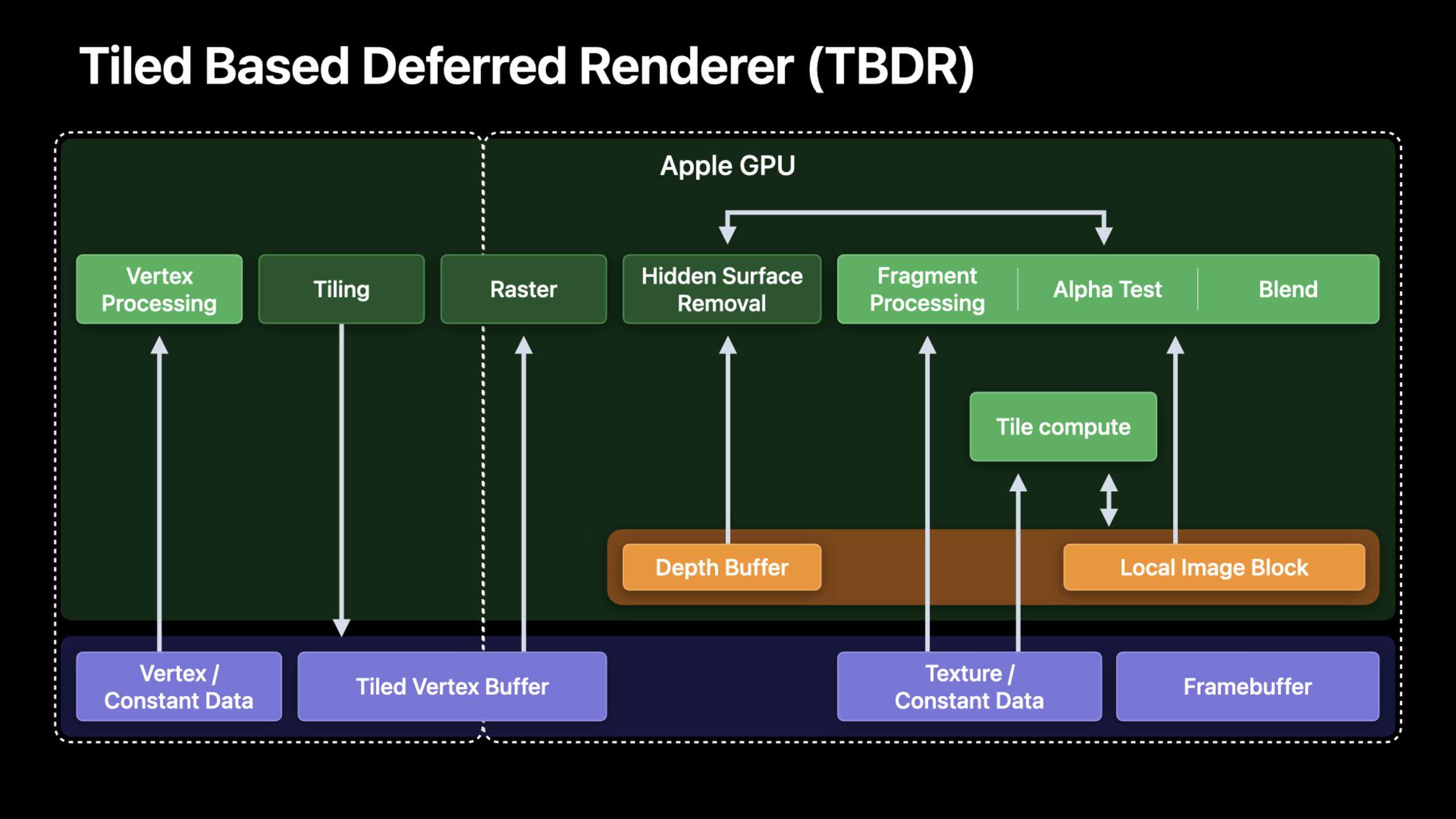
Apple Silicon’s unified memory architecture makes CPU-GPU zero-copy data transmission possible; tile shading and memoryless attachment under the TBDR architecture allow the image filter pipeline to be executed entirely in on-chip tile memory, significantly reducing memory bandwidth.
Core Content
Your image processing application takes a frame from the camera, applies a series of filters, and displays the result. On a discrete GPU, each step involves copying data from CPU memory to GPU memory, and passing textures back and forth between filters. These copies consume a lot of time and battery.
Apple Silicon changes that. The CPU and GPU share the same physical memory, and data does not need to be copied.
Detailed Content
Advantages of unified memory architecture
(00:52)
All components of Apple Silicon (CPU, GPU, Neural Engine, Media Engine) access the same system memory through a unified memory interface.
This means:
- use
MTLBufferThe created buffer can be directly read and written by the CPU and used directly by the GPU. IOSurfaceandCVPixelBufferTransfer between CPU and GPU without copying- Each step of the image processing pipeline can be operated in place
// CVPixelBuffer obtained from the camera
let pixelBuffer: CVPixelBuffer = ...

// Create a Metal texture directly, with zero copy
let texture = CVMetalTextureCacheCreateTextureFromImage(
    allocator: kCFAllocatorDefault,
    textureCache: textureCache,
    sourceImage: pixelBuffer,
    textureAttributes: nil,
    pixelFormat: .bgra8Unorm,
    width: width,
    height: height,
    planeIndex: 0
)(02:30)
Key points:
CVMetalTextureCacheCreate a texture that shares memory with the pixel buffer- No data copy between CPU-GPU
- The entire processing pipeline is executed on the GPU
- Suitable for real-time camera filter scenes
Tile Shading: Processed in Tile memory
(03:45)
The TBDR architecture of Apple GPUs divides the image into small tiles, and each tile is processed in on-chip tile memory. The bandwidth of tile memory is an order of magnitude higher than main memory.
For image processing, this means that multiple filters can be combined into a single render pass, with intermediate results remaining in tile memory.
// Traditional approach: one compute pass per filter, writing back to main memory
kernel void blurPass1(...) { ... }  // Writes to main memory
kernel void blurPass2(...) { ... }  // Writes to main memory
kernel void sharpen(...) { ... }    // Writes to main memory

// Optimized approach: tile shader, keeping intermediate results in tile memory
[[kernel]] void imageProcessingTileShader(
    texture2d<float> source [[texture(0)]],
    device ImageProcessingParams* params [[buffer(0)]],
    uint2 gid [[thread_position_in_grid]]
) {
    // Read the source image
    float4 color = source.read(gid);

    // Apply multiple filters, keeping data in tile memory
    color = applyBlur(color, params->blurRadius);
    color = applySharpen(color, params->sharpenAmount);
    color = applyColorAdjust(color, params->brightness, params->contrast);

    // Write only the final result back to main memory
    destination.write(color, gid);
}(05:20)
Key points:
- tile shader executes in tile memory
- Combine multiple filters into one kernel
- Intermediate results are not written out to main memory
- Dramatically reduce memory bandwidth
Memoryless Attachment
(10:53)
The intermediate attachment in the render pass can be marked as memoryless, which only exists in tile memory and is not written to main memory.
let descriptor = MTLRenderPassDescriptor()

// Intermediate G-Buffer attachment, memoryless
descriptor.colorAttachments[0].texture = intermediateTexture
descriptor.colorAttachments[0].storeAction = .dontCare  // Do not write back to main memory
intermediateTexture.storageMode = .memoryless

// Final output attachment
descriptor.colorAttachments[1].texture = outputTexture
descriptor.colorAttachments[1].storeAction = .store // Write back to main memory(10:53)
Key points:
.memorylessstorage mode only exists in tile memory.dontCarestore action does not write to main memory- Suitable for G-Buffer and intermediate processing results
- for final output
.storesave
Uber-Shader Optimization
(12:25)
Image processing applications often have many filter combinations. If you write a separate shader for each combination, the number of shaders will explode. uber-shader handles all filters with conditional branches, but causes register pressure.
Solution: Use function constants to determine enabled filters at compile time.
[[function_constant(0)]] const bool enableBlur = false;
[[function_constant(1)]] const bool enableSharpen = false;
[[function_constant(2)]] const bool enableVignette = false;

fragment float4 imageFilterFragment(...) {
    float4 color = source.sample(sampler, uv);

    if (enableBlur) {
        color = applyBlur(color, uv);
    }
    if (enableSharpen) {
        color = applySharpen(color, uv);
    }
    if (enableVignette) {
        color = applyVignette(color, uv);
    }

    return color;
}(13:32)
Key points:
- function constants are determined at compile time
- Unenabled filter codes are removed
- Reduce register pressure
- Need to create pipeline state for each combination
Image processing filter chart
(23:02)
Complex image processing applications need to manage dependencies between filters. A typical filter diagram:
Input Image → Blur → Blend with Original → Sharpen → Color Adjust → Output
                ↑___________________________|
On Apple Silicon, this image can be done with a single render pass:
// Set up the render pass, using memoryless for all intermediate results
let descriptor = MTLRenderPassDescriptor()
descriptor.colorAttachments[0].storeAction = .dontCare
descriptor.colorAttachments[0].texture.storageMode = .memoryless

// Encode all filters as a single render command
encoder.setRenderPipelineState(uberPipeline)
encoder.setFragmentTexture(input, index: 0)
encoder.setFragmentBytes(&filterParams, length: ...)
encoder.drawPrimitives(...)(23:02)
Key points:
- Analyze filter dependencies to find steps that can be combined
- Use memoryless attachment for intermediate results
- for final output
.store - Reduce render pass switching and memory bandwidth
Core Takeaways
-
Use CVMetalTextureCache to implement zero-copy camera filters. The pixel buffer obtained from the camera is directly converted into Metal texture, and the entire processing pipeline is completed on the GPU. Entrance API:
CVMetalTextureCacheCreateTextureFromImage。 -
Combine multiple filters into a single tile shader. Intermediate results remain in tile memory, only final results are written. Entrance API:
[[kernel]] tileShader。 -
Use memoryless storage for the intermediate attachment. G-Buffers and temporary textures do not need to be persisted to main memory. Entrance API:
texture.storageMode = .memoryless+storeAction = .dontCare。 -
Use function constants to optimize uber-shader. Compile dedicated shaders based on currently enabled filter combinations to reduce register pressure. Entrance API:
[[function_constant(N)]]。 -
Redesign data flow when migrating from discrete GPU. Apple Silicon does not require CPU-GPU copying, simplifying the original complex design to minimize copying. Entrance API: Unified Memory +
MTLStorageMode.shared。
Related Sessions
- Optimize high-end games for Apple GPUs — Apple GPU TBDR architecture game optimization
- Explore Core Image kernel improvements — Core Image Metal kernel new way of writing
- Discover Metal debugging, profiling, and asset creation tools — Xcode 13 Metal debugging tools
Comments
GitHub Issues · utterances