
Highlight
Metal ray tracing adds three new capabilities: emitting rays directly from the render pipeline (no compute pass required), intersection query instead of intersector objects for inline intersection, and motion blur and extended limits to support production-level rendering.
Core Content
You want to add ray tracing effects to your render, such as reflections or shadows. Last year’s API required you to create an additional compute pass, write the G-Buffer data out to memory, and then read it back for light tracing. This increases memory bandwidth overhead and interrupts the rendering pipeline.
This year Metal allows you to emit rays directly from the render pipeline without leaving the render pass.
Detailed Content
Emit rays from the Render Pipeline
(02:21)
Last year’s workflow: render pass → compute pass (ray tracing) → may need to open another render pass. Intermediate data is passed back and forth in memory.
This year’s workflow: emit light directly within a render pass, and the intermediate data remains in tile memory.
Setting method:
// Define the intersection function
[[intersection(triangle, triangle_data, instancing)]]
bool sphereIntersection(...)

// Link the function in the render pipeline descriptor
let linkedFunctions = MTLLinkedFunctions()
linkedFunctions.functions = ["sphereIntersection"]
renderPipelineDescriptor.fragmentLinkedFunctions = linkedFunctions
// Create the intersection function table
let functionTable = renderPipelineState.makeIntersectionFunctionTable(
descriptor: tableDescriptor,
stage: .fragment
)
// Populate the table
let functionHandle = renderPipelineState.functionHandle(
name: "sphereIntersection",
stage: .fragment
)
functionTable.setFunction(functionHandle, index: 0)(04:48)
Key points:
- linked functions added to the fragment stage of the render pipeline
makeIntersectionFunctionTableNewstageparameter- function handle is also stage-specific -Buffer index bound to render encoder
Emit rays in the fragment shader:
fragment float4 rayTracedFragment(...) {
    // Bind the acceleration structure and intersection function table
    intersector<instancing, triangle_data> intersector;
    intersector.set_acceleration_structure(accelerationStructure);
    intersector.set_intersection_function_table(intersectionFunctionTable);

    // Emit a ray
    ray ray;
    ray.origin = worldPosition;
    ray.direction = reflect(viewDirection, normal);

    auto intersection = intersector.intersect(ray, primitiveAccelerationStructure);

    // Shade using the intersection result
    return shadeIntersection(intersection);
}(05:57)
Key points:
- Both acceleration structure and function table are bound to render encoder
- Used in shader in the same way as compute kernel
- You can use tile memory optimization to avoid writing out G-Buffer
Intersection Query: More flexible ray traversal
(07:23)
Last year’s intersector object encapsulated complete traversal logic. For simple custom intersections (such as alpha test), creating a complete intersection function may be too heavy.
The intersection query allows you to control the traversal process inline in the shader:
// Use an intersection query for alpha testing
intersection_query<instancing, triangle_data> query;
query.reset(ray, accelerationStructure, intersectionFunctionTable);

while (query.next()) {
    switch (query.get_candidate_type()) {
        case intersection_query::candidate_type::triangle: {
            // Get triangle intersection information
            float2 barycentrics = query.get_candidate_triangle_barycentric_coord();
            float distance = query.get_candidate_ray_distance();

            // Sample the alpha texture
            float alpha = sampleAlphaTexture(barycentrics, distance);

            // If the alpha test passes, commit the intersection
            if (alpha > 0.5) {
                query.commit_triangle_intersection();
            }
            break;
        }
        default:
            break;
    }
}

// Get the final intersection
if (query.get_committed_intersection_type() == ...)(10:36)
Key points:
query.next()Traverse all candidate intersection pointsget_candidate_type()Determine intersection type- Custom logic determines whether
commit_triangle_intersection() - Query after the traversal is completed
get_committed_intersection_type()
Choose intersector or intersection query:
| Scenario | Recommended solution |
|---|---|
| Have existing intersector code | Continue to use intersector |
| Port query code from other APIs | Use intersection query |
| Simple custom intersection (such as alpha test) | intersection query |
| Complex custom intersection logic | intersector |
| Performance sensitive, need to compare | Try both |
(12:21)
User Instance ID and Instance Transform
(13:52)
The new API allows you to specify a custom ID for each instance and read the instance’s transformation matrix in the intersection.
// Set the user instance ID
let instanceDescriptor = MTLAccelerationStructureMotionInstanceDescriptor()
instanceDescriptor.userID = 42 // Custom value
instanceDescriptor.transformationMatrix = transform
// Read it in the intersection function
uint userID = intersection.user_instance_id;
float4x4 transform = intersection.instance_transform;(14:48)
Key points:
user_instance_idis a 32-bit custom value- Can be used to index material tables and encode custom data
instance_transformDirectly read the transformation matrix of instance- No need to maintain external mapping tables yourself
Extended Limits: Larger scenes
(18:29)
Production-grade scenarios may exceed the default acceleration structure limits. extended limits mode adds the following upper limits:
- primitive quantity
- geometry quantity
- number of instances
- mask size
How to enable:
// Enable it when building the acceleration structure
let descriptor = MTLPrimitiveAccelerationStructureDescriptor()
descriptor.usage = .extendedLimits

// Mark it in the shader
intersector<extended_limits, instancing> intersector;(19:18)
Key points:
- extended limits may affect performance
- Enable only when needed
- Both acceleration structure and intersector must be marked
Motion Blur: Motion blur
(19:39)
Real camera exposure is not instantaneous. Blur occurs when objects move during the exposure. Metal now supports simulating this effect in ray tracing.
Principle: Each ray randomly samples a time value, and Metal performs the intersection in the scene state at the corresponding time point.
// Generate a random time value within the exposure interval
float time = randomInRange(exposureStart, exposureEnd);

// Pass the time together with the ray to the intersector
ray.time = time;
auto intersection = intersector.intersect(ray, accelerationStructure);(22:38)
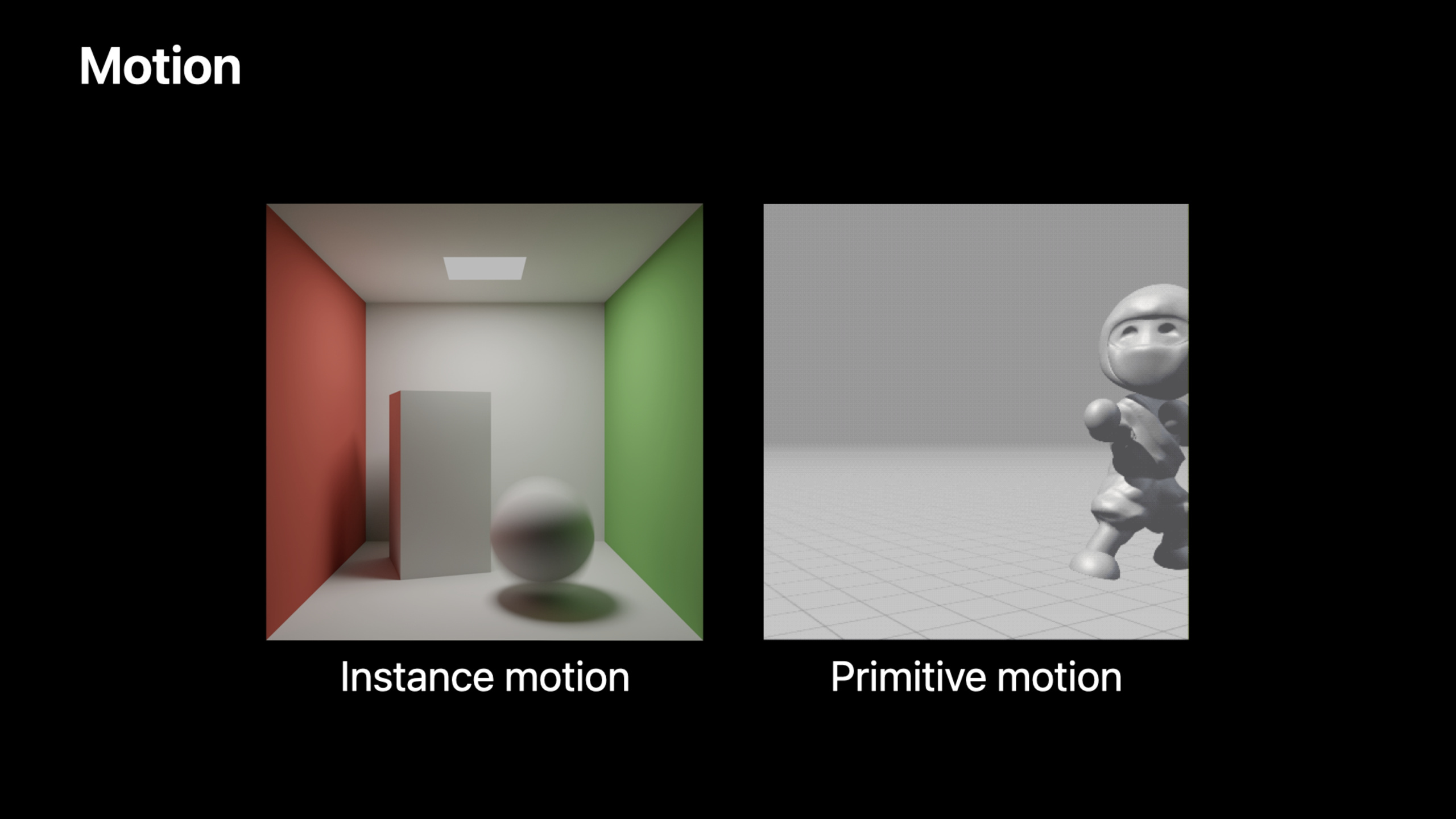
Two animations are supported:
Instance motion: Rigid transformation of the entire object. Low cost and suitable for translation/rotation.
// Provide keyframe transformation matrices
let motionDescriptor = MTLAccelerationStructureMotionInstanceDescriptor()
motionDescriptor.motionTransformsStartIndex = 0
motionDescriptor.motionTransformsCount = 2
Primitive motion: Each vertex moves independently. High cost, suitable for deformation animation (such as character skinning).
// Provide a vertex buffer for each keyframe
let keyframeData = MTLMotionKeyframeData(buffer: vertexBuffer, offset: 0)
let geometryDescriptor = MTLMotionTriangleGeometryDescriptor()
geometryDescriptor.vertexBuffers = [keyframeData0, keyframeData1](25:56)
Key points:
- instance motion is faster than primitive motion
- Both animations can be used at the same time
- Metal automatically interpolates between keyframes
- mark in shader
instance_motionorprimitive_motion
Core Takeaways
-
Do light tracing reflection directly from the render pipeline. No longer need to pass back and forth between compute pass and G-Buffer, taking advantage of tile memory optimization. Entrance API:
renderPipelineDescriptor.fragmentLinkedFunctions+ intersector in fragment shader。 -
Use intersection query to do alpha test. A few lines of code replace the complete intersection function, suitable for simple custom intersections. Entrance API:
intersection_query+commit_triangle_intersection()。 -
Simplify material lookup with user instance ID. Encode the material index directly into the instance ID and read it directly from the intersection. Entrance API:
MTLAccelerationStructureMotionInstanceDescriptor.userID。 -
Enable extended limits for production rendering. Large scenes require larger acceleration structure constraints. Entrance API:
descriptor.usage = .extendedLimits。 -
Use motion blur to enhance realism. Each ray samples a random time value, and Metal automatically handles the interpolation. Entrance API:
ray.time+instance_motion/primitive_motiontag。
Related Sessions
- Explore hybrid rendering with Metal ray tracing — Ray tracing and rasterization hybrid rendering
- Optimize high-end games for Apple GPUs — Apple GPU TBDR architecture game optimization
- Discover Metal debugging, profiling, and asset creation tools — Xcode 13 Metal debugging and performance analysis tools
Comments
GitHub Issues · utterances