
Highlight
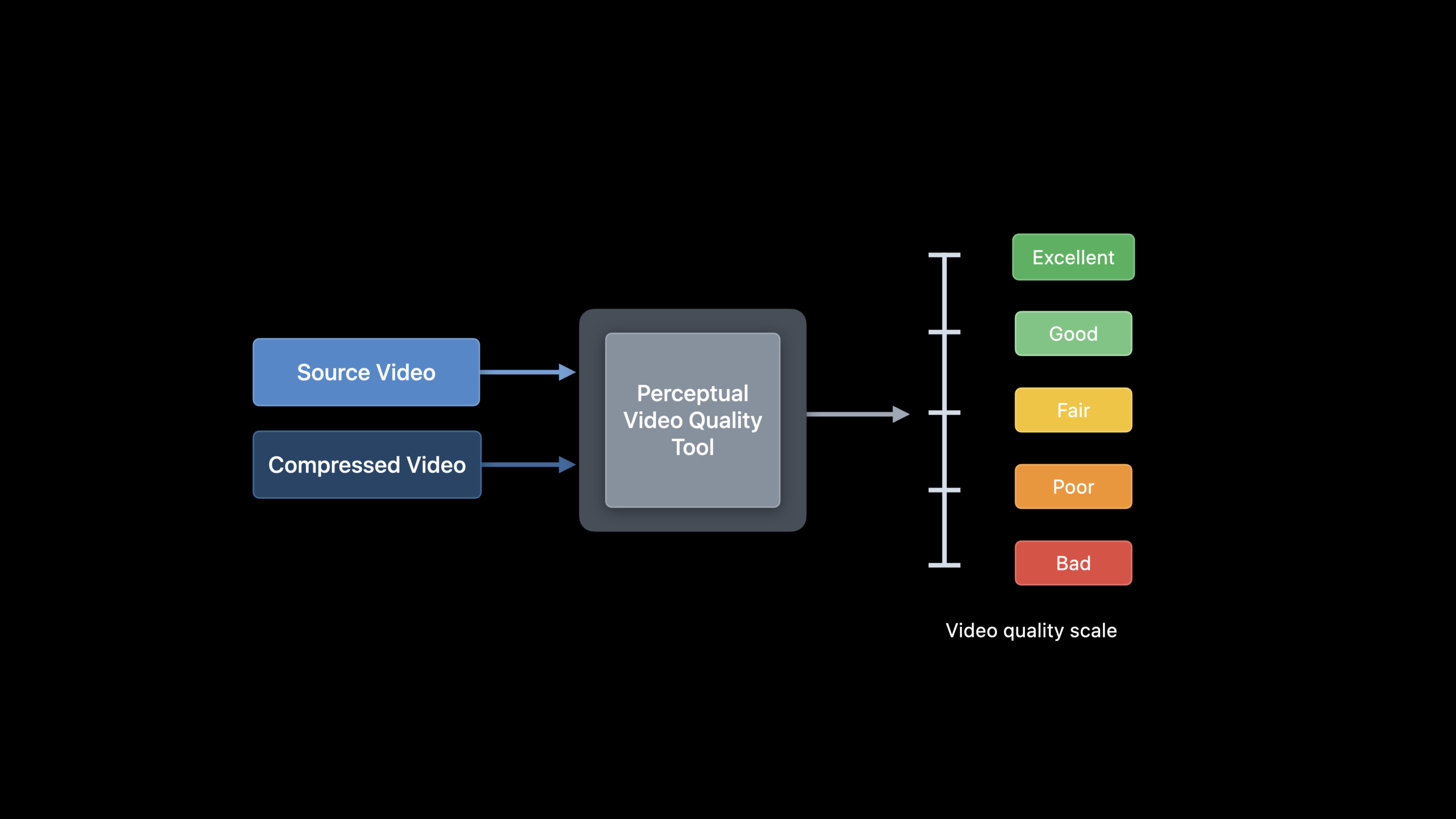
Apple released Advanced Video Quality Tool (AVQT), a macOS command line tool that uses Metal GPU acceleration to calculate the perceived quality score (1-5 points) of compressed video. It supports SDR and HDR formats, and 1080p video analysis speed can reach 175fps.
Core Content
You compress a batch of videos and prepare them for distribution to users via HLS. How do you know whether the compressed quality is good enough?
The traditional approach is to have humans watch and rate. This method is accurate, but not scalable. A video platform may have thousands of videos, and manual scoring is unrealistic.
Another option is to use objective metrics such as PSNR or SSIM. But there’s a problem with these two metrics: they perform inconsistently across different content types. A sports video and a cartoon, with the same PSNR score, may have completely different qualities perceived by the human eye.
Apple’s solution is AVQT.
Detailed Content
What is AVQT?
(00:54)
AVQT is a macOS command line tool. It takes two inputs: the original video and the compressed video, and outputs a quality score between 1 and 5. The higher the score, the better the perceived quality.
It supports all AVFoundation-compatible video formats, including SDR, HDR10, HLG, and Dolby Vision.
Why AVQT is more reliable than PSNR
(04:02)
Apple gives a comparative example.
The first video is a sports clip. The compressed version looks of good quality, with a PSNR of around 35 and an AVQT score of 4.4.
The second video is a close-up of a human face. The compressed version has noticeable artifacts on the face, but the PSNR is again around 35. AVQT gives it a score of 2.5, indicating poor quality.
PSNR gives the same score to both videos, but the human eye perceives them completely differently. AVQT scores are closer to human judgment.
Apple verified the accuracy of AVQT on two public datasets:
- Waterloo IVC 4K: 20 source videos, 480 compressed videos, covering 4 resolutions and 2 encoding standards
- VQEG HD3: 9 source videos, 72 compressed videos, 1080p resolution
AVQT exhibits high PCC (Pearson Correlation Coefficient) and low RMSE (Root Mean Square Error) on both datasets, meaning the prediction scores are highly consistent with human subjective ratings.
Calculation speed
(07:58)
AVQT uses Metal to offload pixel-level calculations to the GPU. Analysis speed for 1080p video is 175fps.
For a 10-minute, 24fps 1080p video, AVQT completes the quality assessment in 1.5 minutes.
You don’t need to manually decode the video into its original pixel format. AVQT handles all preprocessing steps internally.
Viewing environment awareness
(08:55)
Viewing distance and screen size affect the human eye’s perception of video quality. The same video, viewed at a distance of 1.5 times the screen height, has different quality than when viewed at a distance of 3 times the screen height.
AVQT acceptedviewing-distanceanddisplay-resolutionparameters to include the viewing environment into the scoring calculation.
avqt reference.mov compressed.mov --output scores.csv \
--viewing-distance 3.0 --display-resolution 3840x2160(09:24)
Key points:
reference.movis the original high quality videocompressed.movis the compressed video to be evaluated--outputSpecify output CSV file--viewing-distanceIn multiples of screen height--display-resolutionSpecify display resolution- The default segment length is 6 seconds
Use AVQT to optimize HLS code rate
(12:54)
Hierarchical encoding of HLS requires choosing an appropriate bitrate for each resolution. Apple gives recommended values in the HLS Authoring Specification, but these are initial goals. Different content has different encoding complexity, and the optimal code rate is also different.
AVQT can be used as a feedback tool to help you find the optimal bitrate for each layer:
- Encode the source video with the recommended bitrate and generate HLS layering
- Use AVQT to compare the source video and the encoded layer to get the quality score
- If the score is lower than the threshold, adjust the code rate and re-encode
- Repeat until the quality is up to standard
Apple gave a specific example. 2160p layered, encoded at 11.6 Mbps, had an AVQT score of over 4.5 (close to Excellent) for the animation clips, but only about 3.5 for the sports clips. After increasing the bitrate of the sports clip by 10%, the AVQT score exceeded 4.5.
# Step 1: Encode with the initial bitrate
# Step 2: Run AVQT
avqt source.mov tier_2160p.mov --output tier_scores.csv

# Step 3: Analyze the score, adjust the bitrate, and re-encode
# Step 4: Run AVQT again to verify(14:45)
Key points:
- 2160p layered with quality threshold set to 4.5
- Animation content meets the standard at 11.6 Mbps -Sports content requires higher bit rates
- After the code rate is increased by 10%, sports content also meets the standard
- This process can be automated to batch process content libraries
Core Takeaways
-
Integrate AVQT into the video publishing pipeline. AVQT is automatically run after each encoding is completed, and recoding or an alarm is triggered when the score is lower than the threshold. Entrance API:
avqtCommand line tools +--outputCSV output. -
Create bitrate profiles for different content types. The optimal bit rates for animation, sports, and natural scenery are different. After batch testing with AVQT, create separate HLS rate tables for each content type. Entrance API:
avqt+ different--segment-durationand--temporal-poolingconfiguration. -
Deploy quality monitoring in the background of the video platform. Regularly samples the quality of published videos to detect quality degradation due to encoder updates or source file issues. Entrance API:
avqt+ Scheduled tasks. -
Optimize the score combined with the viewing environment. If your application is mainly viewed on the small screen of a mobile phone, you can use a larger viewing distance parameter and accept a slightly lower bit rate. Entrance API:
--viewing-distance+--display-resolution。 -
Use frame-level scores to locate quality problem segments. AVQT output contains a score for each frame, pinpointing periods in the video when quality suddenly drops. Entrance API:
avqtThe frame level scores column in the output CSV file.
Related Sessions
- What’s new in AVFoundation — AVFoundation asynchronous property loading new API and subtitle file creation
- Explore low-latency video encoding with VideoToolbox — VideoToolbox low-latency H.264 hardware encoding
- Edit and play back HDR video with AVFoundation — AVFoundation HDR video editing and playback
Comments
GitHub Issues · utterances