
Explore HLS variants in AVFoundation
Highlight
iOS 15
AVAssetVariantThe API allows applications to read variant properties - bitrate, resolution, HDR type, audio format - directly from the master playlist, eliminating the need to manually parse the playlist text. In the download scenario,NSPredicatedrivenAVAssetVariantQualifierLet variant selection evolve from “several fixed options” to “arbitrary combination of conditions”.
Core Content
The HLS master playlist contains multiple variant streams, each with different resolutions, bitrates, codecs, and HDR settings. In the past, apps that wanted to display badges like “4K Dolby Vision” or “Dolby Atmos” needed to manually parse the playlist text, which was error-prone and difficult to maintain.
Introduced in iOS 15AVAssetVariantExpose variant information as a structured API.AVAssetVariant.VideoAttributesandAVAssetVariant.AudioAttributesVideo and audio attributes are encapsulated separately and the application can read them directly. In the download scenario,AVAssetVariantQualifierCooperateNSPredicateIt implements flexible variant filtering and supports any combination of conditions such as bit rate limit, HDR preference, lossless audio, etc.
Detailed Content
Variant Checking API
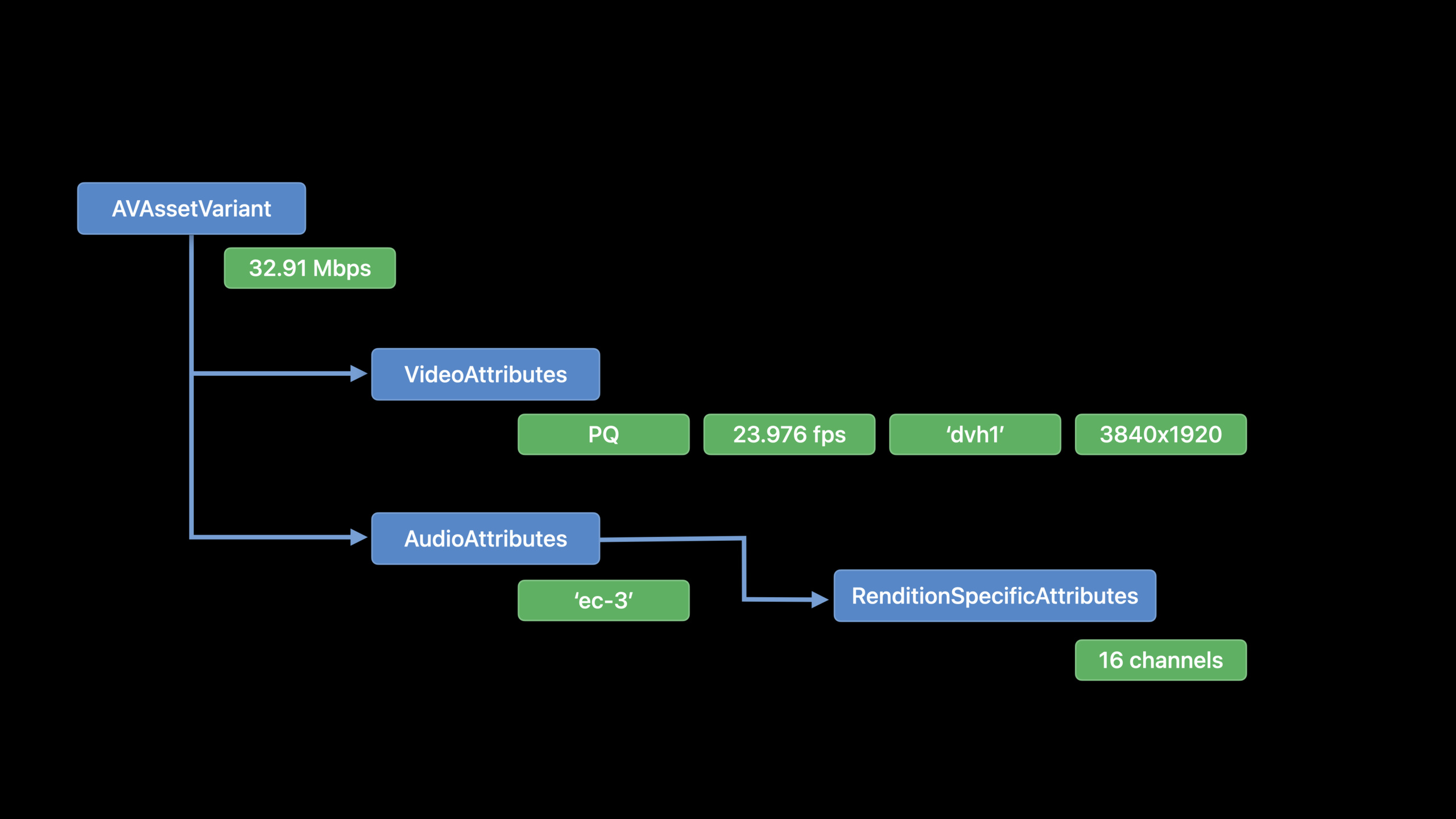
Take a typical master playlist as an example (00:40):
#EXTM3U
#EXT-X-VERSION:7
#EXT-X-INDEPENDENT-SEGMENTS

#EXT-X-MEDIA:TYPE=AUDIO,NAME="English",GROUP-ID="stereo",LANGUAGE="en",DEFAULT=YES,AUTOSELECT=YES,CHANNELS="2",URI="en_stereo.m3u8"
#EXT-X-MEDIA:TYPE=AUDIO,NAME="French",GROUP-ID="stereo",LANGUAGE="fr",DEFAULT=NO,AUTOSELECT=YES,CHANNELS="2",URI="fr_stereo.m3u8"
#EXT-X-MEDIA:TYPE=AUDIO,NAME="English",GROUP-ID="atmos",LANGUAGE="en",DEFAULT=YES,AUTOSELECT=YES,CHANNELS="16/JOC",URI="en_atmos.m3u8"
#EXT-X-MEDIA:TYPE=AUDIO,NAME="French",GROUP-ID="atmos",LANGUAGE="fr",DEFAULT=NO,AUTOSELECT=YES,CHANNELS="16/JOC",URI="fr_atmos.m3u8"

#EXT-X-STREAM-INF:BANDWIDTH=14516883,VIDEO-RANGE=SDR,CODECS="avc1.64001f,mp4a.40.5",AUDIO="stereo",FRAME-RATE=23.976,RESOLUTION=1920x1080
sdr_variant.m3u8

#EXT-X-STREAM-INF:BANDWIDTH=34516883,VIDEO-RANGE=PQ,CODECS="dvh1.05.06,ec-3",AUDIO="atmos",FRAME-RATE=23.976,RESOLUTION=3840x1920
dovi_variant.m3u8
This playlist comes in two variants: SDR + Stereo (1080p), and Dolby Vision + Dolby Atmos (4K).
Starting from iOS 15, these properties can be read directly using the API:
let asset = AVURLAsset(url: masterPlaylistURL)

// Get all variants
for variant in asset.variants {
    let bitrate = variant.peakBitRate

    if let videoAttrs = variant.videoAttributes {
        let resolution = videoAttrs.presentationSize  // CGSize
        let frameRate = videoAttrs.frameRate
        let videoRange = videoAttrs.videoRange  // .sdr, .hdr, .pq, .hlg
    }

    if let audioAttrs = variant.audioAttributes {
        let channelCount = audioAttrs.channelCount
        let formatIDs = audioAttrs.formatIDs
    }
}
Apps can display badges (such as “4K”, “Dolby Vision”, “Dolby Atmos”) on the UI based on these properties without manually parsing the playlist.
Variant selection in download scenario
HLS offline downloads are supported starting in 2016. Prior to iOS 15, variant selection was implemented through limited downloadTask options - HDR switch, lossless audio switch, and a few fixed options.
Introduced in iOS 15AVAssetVariantQualifier,useNSPredicateExpressing variant preferences (03:38):
// Bitrate cap: prefer variants below 5 Mbps
let peakBitRateCap = NSPredicate(format: "peakBitRate < %d", 5_000_000)
let peakBitRateCapQualifier = AVAssetVariantQualifier(predicate: peakBitRateCap)

// HDR preference: select only PQ (Dolby Vision) variants
let hdrOnlyPredicate = NSPredicate(
    format: "videoAttributes.videoRange == %@",
    argumentArray: [AVVideoRange.pq]
)
let hdrOnlyQualifier = AVAssetVariantQualifier(predicate: hdrOnlyPredicate)
Combining multiple conditions (04:46):
let compoundPredicate = NSPredicate(
    format: "videoAttributes.videoRange == %@ && peakBitRate < %d",
    argumentArray: [AVVideoRange.pq, 5_000_000]
)
let variantPref = AVAssetVariantQualifier(predicate: compoundPredicate)
Content Configuration
AVAssetDownloadContentConfigurationTying variation preferences and media selections together (04:46):
let myMediaSelections: [AVMediaSelection] = [
    enAudioMS,   // English audio
    frAudioMS,   // French audio
    enLegibleMS  // English subtitles
]

let contentConfig = AVAssetDownloadContentConfiguration()
contentConfig.variantQualifiers = [variantPref]
contentConfig.mediaSelections = myMediaSelections
Download Configuration
AVAssetDownloadConfigurationIs the root interface for downloading configurations (06:29):
let asset = AVURLAsset(url: masterPlaylistURL)
let dwConfig = AVAssetDownloadConfiguration(asset: asset, title: "my-title")

// Primary content config: HDR + below 5 Mbps + English/French audio + English subtitles
dwConfig.primaryContentConfiguration.variantQualifiers = [varQf]
dwConfig.primaryContentConfiguration.mediaSelections = [enAudioMS, frAudioMS, enLegibleMS]

// Auxiliary content config: lossless English audio
let auxVarPref = NSPredicate(
    format: "%d IN audioAttributes.formatIDs",
    argumentArray: [kAudioFormatAppleLossless]
)
let auxVarQf = AVAssetVariantQualifier(predicate: auxVarPref)
let auxContentConfig = AVAssetDownloadContentConfiguration()
auxContentConfig.variantQualifiers = [auxVarQf]
auxContentConfig.mediaSelections = [enAudioMS]

dwConfig.auxiliaryContentConfigurations = [auxContentConfig]
dwConfig.optimizesAuxiliaryContentConfigurations = trueoptimizesAuxiliaryContentConfigurations(Default true) When letting AVFoundation select a lossless variant, ensure that its video rendition is the same as primary to avoid repeated video downloads.
Create download task
let session = AVAssetDownloadURLSession(
    configuration: .background(withIdentifier: "my-background-session"),
    assetDownloadDelegate: myDelegate,
    delegateQueue: .main
)

let downloadTask = session.makeAssetDownloadTask(downloadConfiguration: dwConfig)
downloadTask.resume()

// Download progress is observable starting in iOS 15
let progress = downloadTask.progress  // KVO-observable
Directly specify the variant
For business logic that is difficult to express using predicates, variants can be specified directly (08:10):
let myVariant: AVAssetVariant = ...  // Selected from asset.variants
let variantQf = AVAssetVariantQualifier(variant: myVariant)
dwConfig.primaryContentConfiguration.variantQualifiers = [variantQf]
NOTE: Variants specified directly must be playable on the downloading device.
Core Takeaways
-
Use AVAssetVariant instead of manually parsing playlist: The structured API is more reliable than text parsing, and automatically adapts to Apple’s new attribute fields.
-
Use NSPredicate to combine any filter conditions: Attributes such as the upper limit of bit rate, HDR type, resolution, audio format, and number of channels can be used as predicate conditions, and the combination method is flexible.
-
Primary + Auxiliary configuration optimizes download size: Primary configuration contains complete video + audio + subtitles, and Auxiliary only supplements additional audio or subtitle tracks. turn on
optimizesAuxiliaryContentConfigurationsAvoid repeated downloading of videos. -
Use NSProgress to display download progress: iOS 15 and up
AVAssetDownloadTask.progressIt is KVO-observable and can be bound directly to UIProgressView. -
Verify device compatibility before downloading: When specifying a variant directly, confirm that the codec and resolution of the target variant are supported on the downloading device. HDR content will not play on SDR devices.
Related Sessions
- WWDC2021 10140 - HLS Dynamic Ad Insertion Exploration — Variant handling of HLS Interstitials
- WWDC2021 10142 - HLS Seamless Media Transition — Variant switching for continuous playback of multiple resources
- WWDC2020 10049 - HLS offline download — HLS download basics
- WWDC2021 10159 - Core Image Kernel improvements — HDR content processing
Comments
GitHub Issues · utterances