
#HLS Dynamic Ad Insertion Exploration
Highlight
HLS Interstitials refers to ads as independent resources through the master playlist and no longer uses DISCONTINUITY to splice them. It supports inserting ads at any point in time, delayed binding of creatives, early return of live broadcast scenes, and native support for AirPlay and picture-in-picture.
Core Content
Inserting ads into HLS streams has always been a hassle. Server-side splicing requires the advertising segments and content segments to be sewn together before the playlist is generated, which cannot achieve dynamic decision-making; the client-side dual player solution requires manual coordination of buffering and view hierarchy, and AirPlay and picture-in-picture are difficult to support.
The introduction of HLS Interstitials at WWDC2021 changes this completely. Ads are referenced as independent resources through the master playlist, and the player automatically coordinates buffering, switching, and navigation restrictions between the main content and ads. Advertisements can be inserted at any point in time, support late binding and rebinding, and are natively compatible with AirPlay and picture-in-picture.
Detailed Content
Pain points of traditional solutions
Server-side ad insertion using the DISCONTINUITY tag (00:41):
- Static solution: the advertising segments must be spliced before the playlist is generated.
- Delayed binding cannot be implemented: the user cannot decide on the ad content until they are close to the ad mark
- Constrained by segment boundaries: Ad tags need to be split when the ad tag falls in the middle of a content segment
- Encoding match: Ads require the same quality level and encoding parameters as the feature film
- Live broadcast scenario: The packager needs to output segment by segment for the entire advertising period
Client dual player solution (01:55):
- One player plays host content, the other plays ads
- Manual coordination of buffering is required, and ad prefetching will affect the adaptive bitrate performance of the feature film.
- AirPlay and Picture-in-Picture are difficult to implement
Core design of HLS Interstitials
HLS Interstitials treats ads as independently schedulable resources (02:37):
- Advertisements are no longer spliced with DISCONTINUITY, but referenced through master playlist
- Supports dynamic late binding and rebinding
- Ads can be inserted anywhere in the program timeline, regardless of segment boundaries
- AVKit has built-in support for tvOS navigation restrictions
- Native support for AirPlay and Picture-in-Picture, ads are streamed with AirPlay sessions
- Player automatically coordinates buffering and system resources between main content and ads
Playback process
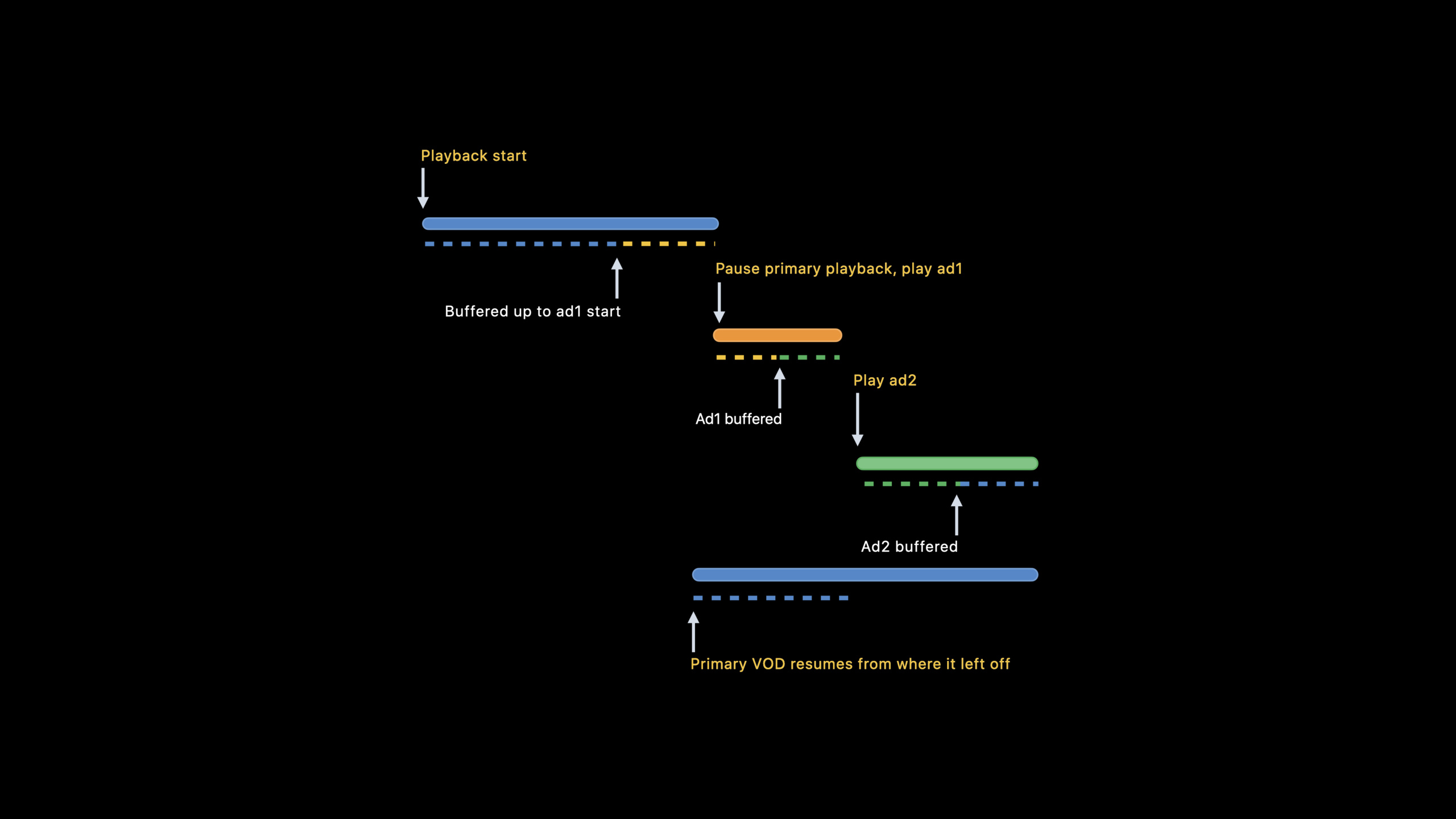
On-demand scene (03:36): The main content is played until the advertisement mark is paused, the advertisements are played in sequence, and resumed from the pause point after completion.
Live broadcast scene (04:21): After the advertisement is played, the player jumps forward for the duration of the advertisement and rejoins the edge of the live broadcast, keeping in sync with the live broadcast.
Buffering strategy (04:01): The player first buffers the main content to the starting point of the first ad, then pre-buffers the first ad, then pre-buffers the second ad, and finally resumes buffering the main content to ensure seamless switching.
Server-side ad insertion: DATERANGE tag
useEXT-X-DATERANGETag Definition Advertisement (04:38):
#EXT-X-DATERANGE:CLASS="com.apple.hls.interstitial",\
ID="ad-1",\
START-DATE="2021-06-07T10:00:05Z",\
DURATION=15,\
X-ASSET-URI="https://cdn.example.com/ad1/master.m3u8",\
X-RESUME-OFFSET=0
Key attributes:
| Properties | Function |
|---|---|
CLASS | Fixed valuecom.apple.hls.interstitial |
ID | Uniquely identifies events |
START-DATE | The start time of the ad on the main timeline |
DURATION | Advertising duration |
X-ASSET-URI | URI of ad master playlist |
X-RESUME-OFFSET | The offset of the main content recovery position relative to START-DATE |
X-RESUME-OFFSETValue strategy (05:21):
- Set to 0: On-demand scene, resume from pause
- Omitted: Live broadcast scene, jump forward according to the advertising duration, and rejoin the edge of the live broadcast
- Set to ad duration: Skip inline ads
Back-to-back ads via the same START-DATE (06:00):
#EXT-X-DATERANGE:CLASS="com.apple.hls.interstitial",ID="ad-1",START-DATE="...",DURATION=15,X-ASSET-URI="ad1.m3u8"
#EXT-X-DATERANGE:CLASS="com.apple.hls.interstitial",ID="ad-2",START-DATE="...",DURATION=15,X-ASSET-URI="ad2.m3u8"
Lazy binding: X-ASSET-LIST
useX-ASSET-LISTsubstituteX-ASSET-URIImplementing lazy binding (06:26): JSON objects are fetched while buffering, allowing for last-minute decisions on ad content:
{
  "ASSETS": [
    { "URI": "https://cdn.example.com/ad1/master.m3u8", "DURATION": 15 },
    { "URI": "https://cdn.example.com/ad2/master.m3u8", "DURATION": 15 }
  ]
}
Live broadcast returns early
X-PLAYOUT-LIMITImplement early return of live broadcast scenes (06:55). For example, breaking news needs to interrupt advertising:
#EXT-X-DATERANGE:CLASS="com.apple.hls.interstitial",\
ID="live-ad",\
START-DATE="...",\
DURATION=15,\
X-ASSET-URI="...",\
X-PLAYOUT-LIMIT=12
Ads can play for up to 12 seconds before returning to live, even if the creative itself is 15 seconds long.
Navigation restrictions
X-RESTRICTControlling user navigation behavior (08:13):
| value | behavior |
|---|---|
jump | Prevent users from seeking from before the ad to after the ad |
skip | Prevent ads from playing at non-standard rates (prevent fast-forward skipping) |
AVKit on tvOS automatically enforces these restrictions. When using other platforms or using custom players, the application needs to implement it by itself.
Client API
AVPlayerInterstitialEventMonitor: Monitor advertising events inserted by the server (08:56)
let player = AVPlayer(url: movieURL)  // Contains EXT-X-DATERANGE tags
let observer = AVPlayerInterstitialEventMonitor(primaryPlayer: player)

NotificationCenter.default.addObserver(
    forName: AVPlayerInterstitialEventMonitor.currentEventDidChangeNotification,
    object: observer,
    queue: .main
) { _ in
    self.updateUI(observer.currentEvent, observer.interstitialPlayer)
}AVPlayerInterstitialEvent: Describes a single interstitial event (09:50)
class AVPlayerInterstitialEvent {
    var primaryItem: AVPlayerItem? { get }      // Primary content
    var identifier: String { get }               // Event ID
    var time: CMTime { get }                     // Media start time
    var date: Date? { get }                      // Date start point
    var templateItems: [AVPlayerItem] { get }    // Ad creative templates
    var restrictions: Restrictions { get }       // Navigation restrictions
    var resumptionOffset: CMTime { get }         // Resume offset
    var playoutLimit: CMTime { get }             // Playout limit
    var userDefinedAttributes: [AnyHashable: Any] { get }  // Custom attributes
}AVPlayerInterstitialEventController: Client-side programmatic ad insertion (11:40)
let player = AVPlayer(url: movieURL)  // Pure content without ads
let controller = AVPlayerInterstitialEventController(primaryPlayer: player)

let adPodTemplates = [AVPlayerItem(url: ad1URL), AVPlayerItem(url: ad2URL)]
let event = AVPlayerInterstitialEvent(
    primaryItem: player.currentItem,
    time: CMTime(seconds: 10, preferredTimescale: 1),
    templateItems: adPodTemplates,
    restrictions: [],
    resumptionOffset: .zero,
    playoutLimit: .invalid
)

controller.events = [event]
player.currentItem?.translatesPlayerInterstitialEvents = true
translatesPlayerInterstitialEvents = trueLet AVKit place navigation markers on the timeline and enforce navigation restrictions on tvOS.
tvOS demo effect
- Unlimited ads: The timeline displays ad markers, a countdown appears during playback, and users can choose to skip (13:02)
- Skip restriction: There is no skip option during playback, you must watch it in its entirety (13:34)
- Jump restriction: When the user attempts to seek to skip an ad, the play head is automatically attached to the ad mark, and seek is continued only after the ad is played (13:57)
Core Takeaways
-
Replace DISCONTINUITY with DATERANGE: The new solution references ads as independent resources, makes the playlist more concise, and supports dynamic decision-making and rebinding.
-
Set resume offset to 0 for on-demand video, and omit this attribute for live broadcast: On-demand video resumes from the pause point, and the live broadcast automatically jumps to the edge of the live broadcast to maintain synchronization.
-
Use X-ASSET-LIST to implement delayed binding: The advertising decision service is only called when buffering, and the most appropriate advertisement can be selected in real time based on user portraits.
-
X-PLAYOUT-LIMIT responds to unexpected live broadcast scenarios: sudden exciting moments of sports events, news breaks and other scenarios, use playout limit to interrupt advertising in advance and return to live broadcast.
-
Custom attributes transfer advertising metadata: Define custom attributes such as beacon URL and advertising ID in DATERANGE, and pass
userDefinedAttributesObtained on the client and used for advertising effectiveness tracking.
Related Sessions
- WWDC2021 10187 - Build custom experiences with Group Activities — Media sharing in SharePlay
- WWDC2021 10225 - Use Group Activities to coordinate media experiences — Simultaneous playback by multiple people
- WWDC2021 10189 - Group Activities in Safari — SharePlay support on the web
- WWDC2021 10159 - Core Image Kernel improvements — Video processing performance optimization
Comments
GitHub Issues · utterances