
Explore account-driven User Enrollment
Highlight
iOS 15’s account-driven User Enrollment allows users to directly enter their work account in settings to complete MDM registration without downloading a description file. The registration process introduces service discovery, web authentication and session token mechanisms. The MDM server can require users to re-authenticate at any time, providing unprecedented security for BYOD scenarios.
Core Content
There is a core contradiction in the BYOD (Bring Your Own Device) scenario: users own the devices and organizations need to protect the data. Traditional User Enrollment requires users to download the enrollment profile from Safari and then install it manually in settings - many steps, easy to interrupt, and poor user experience.
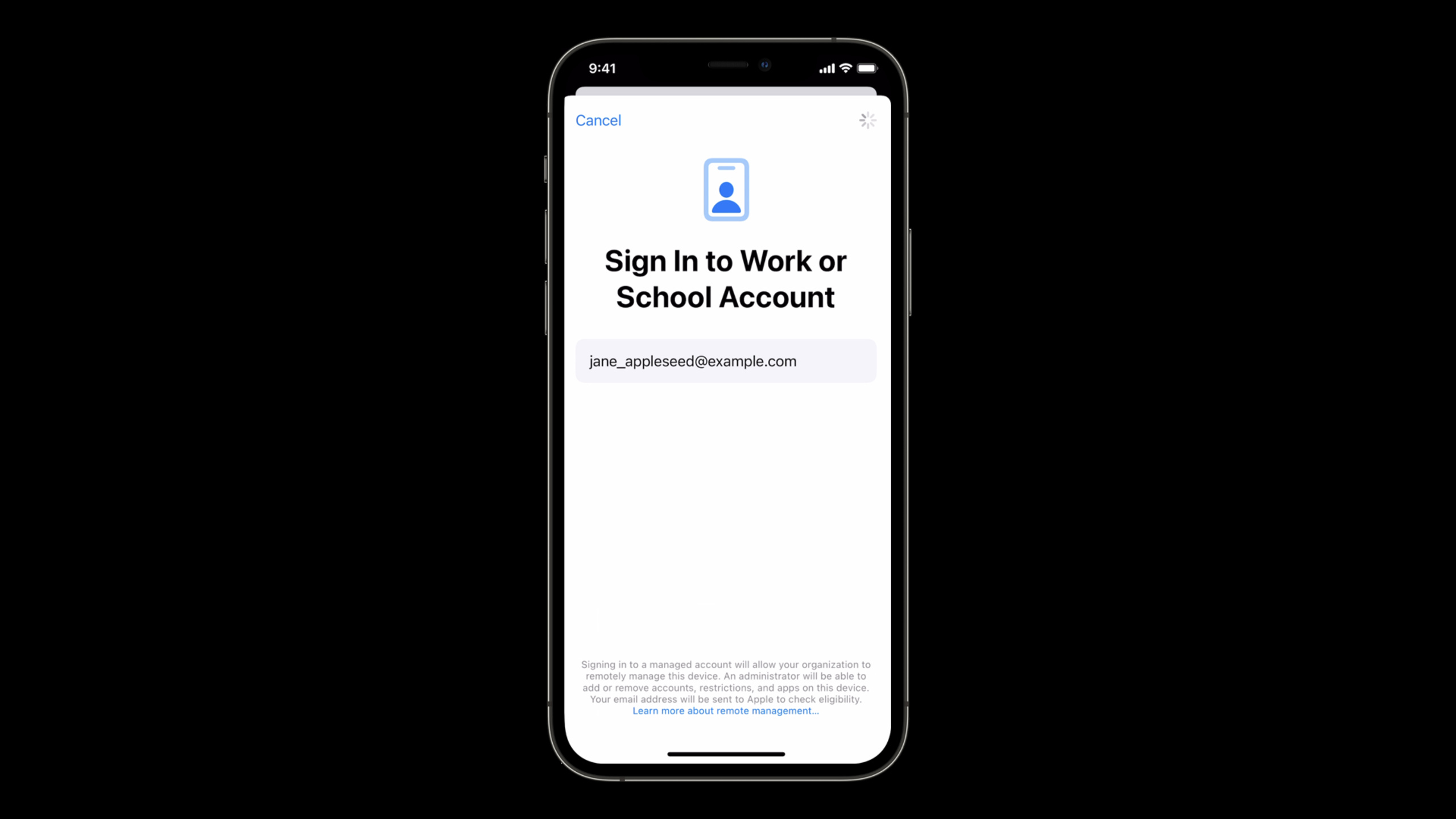
iOS 15 and macOS Monterey introduce account-driven User Enrollment. The user directly clicks “Log in to work or school account” in “Settings > VPN and Device Management”, enters the organization ID, and the system automatically discovers the MDM server through the domain name, and completes the registration after passing Web authentication. The entire process does not require downloading any description files, and the authentication process can integrate with the enterprise’s existing SSO and identity providers.
Detailed Content
The three core components of User Enrollment
User Enrollment is designed around three components (01:00):
- Managed Apple ID: An Apple ID owned and managed by the organization, supports Azure AD federated authentication, and provides access to Apple services such as iCloud
- Data Separation: Create independent APFS volumes when registering, use different encryption keys, and physically isolate management data from personal content
- Limited management capabilities: MDM can only control organizational content. It cannot access personal data, personal apps or unique device identifiers, and it cannot remotely wipe entire devices.
The device is not considered supervised and the user retains full control over personal data.
Enhancements to Managed Apple ID and Managed Apps
iOS 15 redesigns the Managed Apple ID experience in Settings (03:03). Manage accounts now appear at the top of settings, so users can clearly see which parts are managed by the organization and which are personal content.
Managed Apple ID adds iCloud Drive support (03:38):
- Show as new location in Files app on iOS/iPadOS
- Appears as an additional location in Finder on macOS
- Document browser applications automatically gain access permissions
- Comply with Managed Open-In restrictions
macOS Monterey extends managed apps support to User Enrollment (04:48):
- Application data is stored on separate volumes
- Automatically wipe data containers when uninstalling or unregistering
- Managed apps using CloudKit automatically use the associated Managed Apple ID
- need to be in
InstallApplicationAdd to the commandInstallAsManagedkey
Managed Open-In adds a new clipboard control (05:41) that prevents data from being pasted on both sides of managed boundaries. You can also specify required apps to be automatically installed during registration without additional confirmation from the user.
Four steps of Account-Driven registration process
The new registration process has four components (07:32):
1. Service Discovery
User enters organization identifier (format:[email protected]), the device extracts the domain name part and constructs a well-known URL:https://domain.com/.well-known/com.apple.remotemanagement(08:23)。
The device sends a GET request to this URL, expecting JSON back:
{
  "Version": "1.0.0",
  "BaseURL": "https://mdm.company.com/enroll"
}Version: Inform the device server of the registration types supportedBaseURL: URL of the MDM server registration endpoint
2. User Authentication
The device POSTs a plist containing the device properties to the registration endpoint (09:10). The server returns HTTP 401 Unauthorized, triggering the authentication process. 401 response must containWWW-Authenticate header:
WWW-Authenticate: Bearer method="apple-as-web", url="https://mdm.company.com/auth"method: fixed valueapple-as-web, indicating the use of the AuthenticationServices web login flowurl: HTTPS URL of the authentication endpoint
Device starts AuthenticationServices web login (10:43). Web content can be a simple username/password form, or it can be redirected to an enterprise SSO or third-party IdP for multi-factor authentication.
3. Session Token
After the authentication is completed, the server returns HTTP redirect, and the Location header uses a fixed custom scheme (11:33):
Location: x-com.apple.remotemanagement?access-token=opaque-token-valueDevice extractionaccess-tokenAs a session token, resend the original POST request, this time withAuthorizationThe token is carried in the header:
Authorization: Bearer opaque-token-value4. Enrollment
The server verifies the token and returns the enrollment profile. The iOS 15 profile contains two new keys (12:21):
AssignedManagedAppleID: The associated Managed Apple ID, the user must successfully authenticate the account to complete the registrationEnrollmentMode: Fixed value indicating the BYOD type, the device verifies that the value matches the current pattern
After successful registration, all subsequent MDM requests areAuthorizationThe session token is carried in the header.
Ongoing Authentication
iOS 15 introduces continuous authentication capabilities (14:45), the MDM server can require users to re-authenticate at any time:
- The server validates the session token for each request
- When the token expires, the server returns 401 +
WWW-Authenticateheader - The device prompts the user to re-authenticate through the notification center.
- The user clicks the notification and enters the AuthenticationServices Web login flow again.
- After successful authentication, a new token is obtained, and the device automatically retries previously failed requests.
If authentication fails, the server can remove sensitive payloads or deregister entirely (17:56).
Important difference: In traditional profile-based enrollment, the 401 response triggers deregistration; in account-driven enrollment, the 401 response triggers re-authentication. Cancellation of registration still needs to be sentRemoveProfileOrder.
Data cleaning when canceling registration
Unregistering performs a complete cleanup (18:43):
- MDM unregistration
- Managed account removal
- Managed data deletion
- Data detachment volume erasure
Core Takeaways
-
Deploy well-known service discovery files: in the organization domain name
/.well-known/com.apple.remotemanagementPath managed JSON, allowing devices to automatically discover MDM servers. This is the first step in account-driven registration. -
Integrated enterprise identity provider: Utilize AuthenticationServices web login flow to support complex authentication scenarios such as SSO and MFA. The authentication endpoint can be the MDM server itself, or it can redirect to a third-party IdP.
-
Implement session token verification logic: Add expiration policy and re-authentication rules for session tokens on the server side. Sensitive payloads are only delivered when the token is valid, enhancing security in BYOD scenarios.
-
Update MDM payload to include new key: Make sure enrollment profile contains
AssignedManagedAppleIDandEnrollmentMode, missing any key will cause registration failure. -
Distinguish the processing logic of 401 responses: 401 of account-driven enrollment triggers re-authentication instead of de-registration. If you really need to cancel registration, use
RemoveProfileOrder.
Related Sessions
- WWDC2021 10130 - New features for managing Apple devices — User Enrollment related managed apps and clipboard control
- WWDC2021 10131 - Getting Started with Declarative Device Management — Declarative management currently only supports User Enrollment
- WWDC2021 10129 - Managing software updates in your organization — Software update policy for BYOD devices
- WWDC2021 10137 - Improved MDM assignment for Apps and Books — App assignment for Managed Apple IDs
Comments
GitHub Issues · utterances