
Explore Swift structured concurrency
Highlight
Structured concurrency uses “task tree” to manage the concurrency life cycle: the parent task must wait for all sub-tasks to be completed before it can end, sub-task errors propagate upward, and cancellation operations take effect cascading from parent to child.
async lethandle a fixed amount of concurrency,TaskGroupHandling dynamic amounts of concurrency, both are safer and easier to reason about than manually managing threads.
Core Content
Concurrent code has a long-standing problem that plagues developers: control flow is scattered all over the place. Nested completion handlers, GCD calls scattered across different methods, manual management of thread lifecycles - these unstructured concurrency patterns make code difficult to understand and maintain.
Swift 5.5’s structured concurrency draws on the ideas of structured programming. likegotoIt was eliminated because it destroyed the code structure, and unstructured concurrency also needs to be replaced by clearer abstractions. The core mechanism is the “task tree”: each task has a clear parent task, the life cycle of the subtask is managed by the parent task, and errors and cancellations are propagated along the tree structure.
Detailed Content
From unstructured to structured
Traditional completion handler code is unstructured (01:57). The thumbnail acquisition function calls itself recursively, and error handling is spread across multiple closures:
func fetchThumbnails(for ids: [String], completion handler: @escaping ([String: UIImage]?, Error?) -> Void) {
    guard let id = ids.first else { return handler([:], nil) }
    let request = thumbnailURLRequest(for: id)
    let dataTask = URLSession.shared.dataTask(with: request) { data, response, error in
        guard let response = response, let data = data else {
            return handler(nil, error)
        }
        UIImage(data: data)?.prepareThumbnail(of: thumbSize) { image in
            guard let image = image else {
                return handler(nil, ThumbnailFailedError())
            }
            fetchThumbnails(for: Array(ids.dropFirst())) { thumbnails, error in
                // Recursively process the remaining IDs...
            }
        }
    }
    dataTask.resume()
}
The async/await version is structured (02:56). The execution order of the code is the reading order, and errors passthrowsUnified communication:
func fetchThumbnails(for ids: [String]) async throws -> [String: UIImage] {
    var thumbnails: [String: UIImage] = [:]
    for id in ids {
        let request = thumbnailURLRequest(for: id)
        let (data, response) = try await URLSession.shared.data(for: request)
        try validateResponse(response)
        guard let image = await UIImage(data: data)?.byPreparingThumbnail(ofSize: thumbSize) else {
            throw ThumbnailFailedError()
        }
        thumbnails[id] = image
    }
    return thumbnails
}
async let: fixed-width concurrency
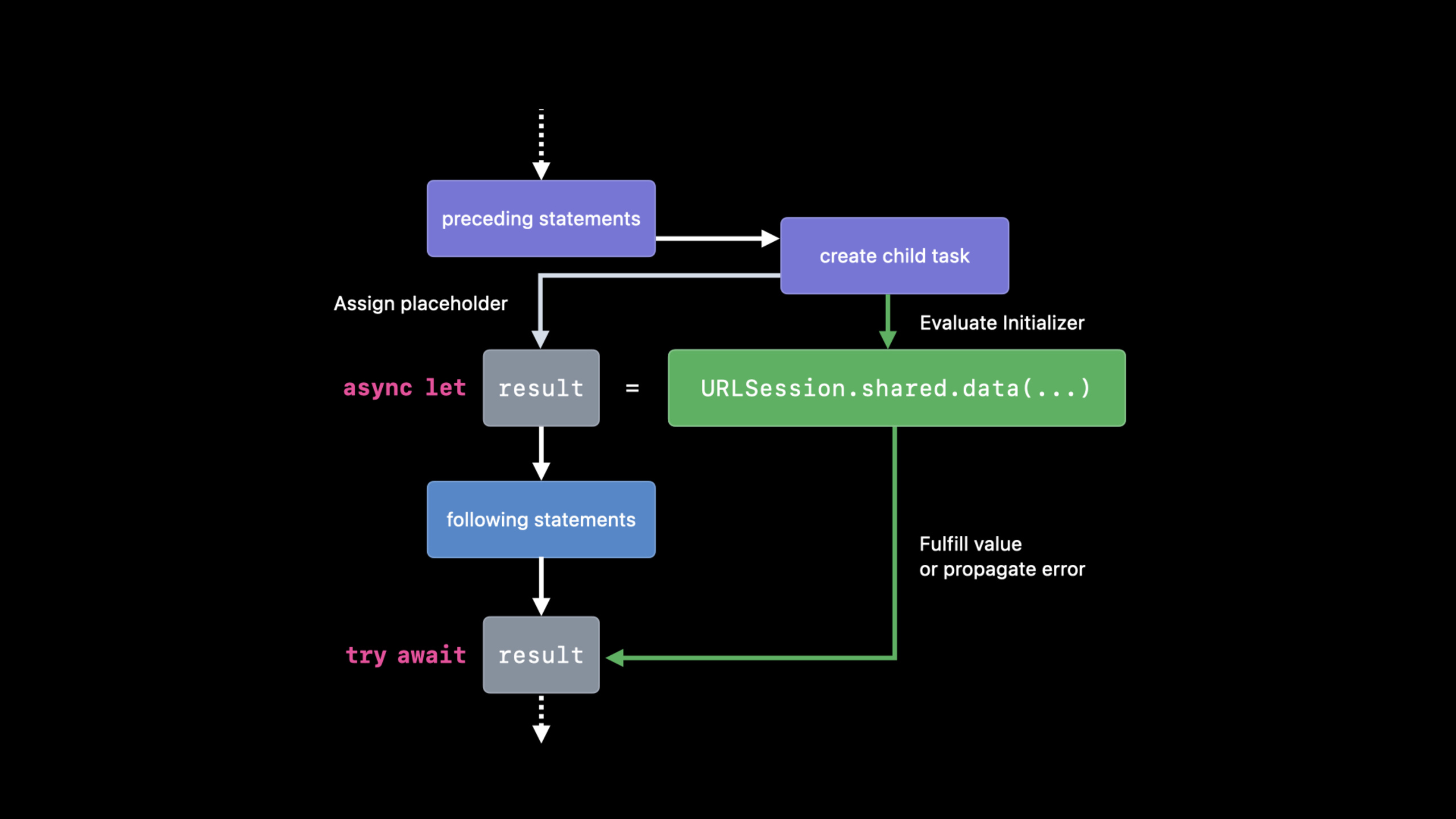
When you need to initiate multiple independent asynchronous requests at the same time, useasync let(07:59). It creates concurrent subtasks, but the number of subtasks is determined at compile time:
func fetchOneThumbnail(withID id: String) async throws -> UIImage {
    let imageReq = imageRequest(for: id)
    let metadataReq = metadataRequest(for: id)

    async let (data, _) = URLSession.shared.data(for: imageReq)
    async let (metadata, _) = URLSession.shared.data(for: metadataReq)

    guard let size = parseSize(from: try await metadata),
          let image = try await UIImage(data: data)?.byPreparingThumbnail(ofSize: size)
    else {
        throw ThumbnailFailedError()
    }
    return image
}twoasync letStatements start executing at the same time.try await metadataandawait datais the hanging point, but the two requests are initiated in parallel.async letSuitable for scenarios with a fixed number of concurrencies (13:13).
TaskGroup: Dynamic width concurrency
When the number of concurrency cannot be determined at runtime, useTaskGroup(13:58). For example, get thumbnails in batches:
func fetchThumbnails(for ids: [String]) async throws -> [String: UIImage] {
    var thumbnails: [String: UIImage] = [:]
    try await withThrowingTaskGroup(of: (String, UIImage).self) { group in
        for id in ids {
            group.async {
                return (id, try await fetchOneThumbnail(withID: id))
            }
        }
        // Get results in completion order
        for try await (id, thumbnail) in group {
            thumbnails[id] = thumbnail
        }
    }
    return thumbnails
}NoticewithThrowingTaskGroupAfter the closure returns, all subtasks must have completed.for try awaitConsume results in order of completion, not in order of submission.
Task canceled
Cancellation in structured concurrency is cooperative. Subtasks respond to cancellation in two ways (11:46):
Calling an API that throws a cancellation error:
func fetchThumbnails(for ids: [String]) async throws -> [String: UIImage] {
    var thumbnails: [String: UIImage] = [:]
    for id in ids {
        try Task.checkCancellation()  // If already cancelled, throw CancellationError
        thumbnails[id] = try await fetchOneThumbnail(withID: id)
    }
    return thumbnails
}
Or check the cancellation status manually (12:16):
func fetchThumbnails(for ids: [String]) async throws -> [String: UIImage] {
    var thumbnails: [String: UIImage] = [:]
    for id in ids {
        if Task.isCancelled { break }
        thumbnails[id] = try await fetchOneThumbnail(withID: id)
    }
    return thumbnails
}Task.checkCancellation()Suitable for regular calls in loops;Task.isCancelledSuitable for scenarios that require custom cleaning logic.
Unstructured tasks
Some scenarios require breaking away from the constraints of the task tree, such as asynchronous operations triggered by UI events. useTaskCreating unstructured tasks (20:39):
@MainActor
class MyDelegate: UICollectionViewDelegate {
    func collectionView(_ view: UICollectionView, willDisplay cell: UICollectionViewCell, forItemAt item: IndexPath) {
        let ids = getThumbnailIDs(for: item)
        Task {
            let thumbnails = await fetchThumbnails(for: ids)
            display(thumbnails, in: cell)
        }
    }
}
Unstructured tasks require manual lifecycle management. Storing task references for subsequent cancellation (22:11):
@MainActor
class MyDelegate: UICollectionViewDelegate {
    var thumbnailTasks: [IndexPath: Task<Void, Never>] = [:]

    func collectionView(_ view: UICollectionView, willDisplay cell: UICollectionViewCell, forItemAt item: IndexPath) {
        let ids = getThumbnailIDs(for: item)
        thumbnailTasks[item] = Task {
            defer { thumbnailTasks[item] = nil }
            let thumbnails = await fetchThumbnails(for: ids)
            display(thumbnails, in: cell)
        }
    }

    func collectionView(_ view: UICollectionView, didEndDisplay cell: UICollectionViewCell, forItemAt item: IndexPath) {
        thumbnailTasks[item]?.cancel()  // Cancel when the cell leaves the screen
    }
}
Detached Task
Task.detachedCreate a completely independent task that does not inherit any context from the current task (24:09). Suitable for truly independent background work:
Task.detached(priority: .background) {
    writeToLocalCache(thumbnails)
}
Task groups can also be created inside Detached tasks (24:57):
Task.detached(priority: .background) {
    withTaskGroup(of: Void.self) { g in
        g.async { writeToLocalCache(thumbnails) }
        g.async { log(thumbnails) }
        g.async { ... }
    }
}
Core Takeaways
-
Prefer structured concurrency:
async letandTaskGroupThe life cycle is managed automatically by the compiler and runtime, and error propagation and decascading are automatic. unstructuredTaskOnly used in necessary scenarios such as UI callbacks. -
async letbetter thanTaskGroupScenario: When the number of concurrency is fixed and known,async letThe syntax is cleaner and compiler checking is stricter. Only used when the number of subtasks changes dynamicallyTaskGroup。 -
Implement collaborative cancellation: Long-running asynchronous operations must be checked regularly
Task.isCancelledor callTask.checkCancellation(). This is a “courtesy” of structured concurrency and the key to avoiding unnecessary calculations. -
use
deferClean up unstructured tasks: StorageTaskWhen quoting, use at the beginning of the task bodydefer { thumbnailTasks[item] = nil }Ensure that the dictionary is automatically cleaned after the task is completed to prevent memory leaks. -
Use with caution
Task.detached: It is out of the task tree, cancellation will not be cascaded, and errors will not be caught by the parent task. Only used for truly independent background work (such as log writing, cache persistence).
Related Sessions
- WWDC2021 10132 - async/await in Swift — async/await syntax basics
- WWDC2021 10133 - Protect mutable state with Swift Actors — Cooperation of Actors and Structured Concurrency
- WWDC2021 10019 - Concurrency in SwiftUI — Using Task and async/await in SwiftUI
- WWDC2021 10058 - Understanding AsyncSequence — The combination of asynchronous sequence and structured concurrency
Comments
GitHub Issues · utterances