
async/await in Swift
Highlight
async/await makes writing asynchronous code as intuitive as synchronous code. A thumbnail acquisition function that originally required 20 lines of nested closures only requires 6 lines of linear code using async/await, and error handling is passed
throwsNatural communication, no longer need to judge at all levelserror != nil。
Core Content
Asynchronous programming is an unavoidable topic in daily development, but writing methods based on completion handlers have a common problem: the code expands exponentially as the number of asynchronous steps increases. A network request, an image decoding, and a round of thumbnail generation - three steps of operations are nested. The indentation is bottomless, error handling is scattered in every corner, and a branch may be missed if you are not careful.
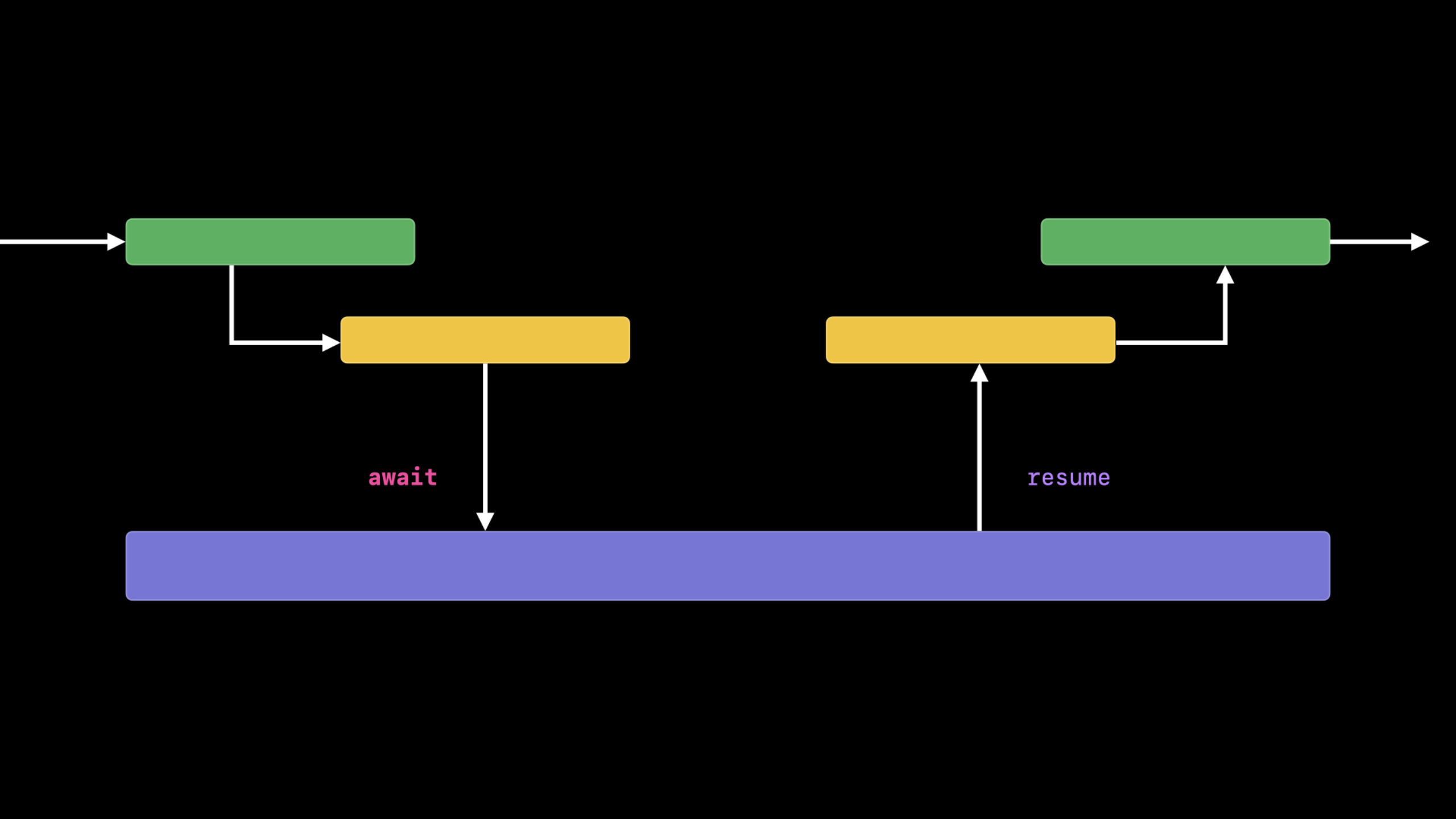
The introduction of async/await in Swift 5.5 fundamentally changes this situation. The core idea is simple: useasyncMark asynchronous functions withawaitSuspend the current execution flow to wait for the result, and the compiler is responsible for managing thread switching and state saving. The code reads like synchronous logic but executes non-blockingly.
Detailed Content
From Completion Handler to async/await
Take a function that gets thumbnails as an example. Traditional completion handler writing (03:43):
func fetchThumbnail(for id: String, completion: @escaping (UIImage?, Error?) -> Void) {
    let request = thumbnailURLRequest(for: id)
    let task = URLSession.shared.dataTask(with: request) { data, response, error in
        if let error = error {
            completion(nil, error)
        } else if (response as? HTTPURLResponse)?.statusCode != 200 {
            completion(nil, FetchError.badID)
        } else {
            guard let image = UIImage(data: data!) else {
                completion(nil, FetchError.badImage)
                return
            }
            image.prepareThumbnail(of: CGSize(width: 40, height: 40)) { thumbnail in
                guard let thumbnail = thumbnail else {
                    completion(nil, FetchError.badImage)
                    return
                }
                completion(thumbnail, nil)
            }
        }
    }
    task.resume()
}
This code has 20 lines, error handling is scattered in three places, and each branch must be called manuallycompletion. Use insteadResultAlthough types (08:00) make error handling more standardized, the amount of code has not been reduced:
func fetchThumbnail(for id: String, completion: @escaping (Result<UIImage, Error>) -> Void) {
    // ... same nested structure, except completion(.failure(error)) replaces completion(nil, error)
}
The async/await version (08:30) condenses the same logic into 6 lines:
func fetchThumbnail(for id: String) async throws -> UIImage {
    let request = thumbnailURLRequest(for: id)
    let (data, response) = try await URLSession.shared.data(for: request)
    guard (response as? HTTPURLResponse)?.statusCode == 200 else { throw FetchError.badID }
    let maybeImage = UIImage(data: data)
    guard let thumbnail = await maybeImage?.thumbnail else { throw FetchError.badImage }
    return thumbnail
}
Key changes:
asyncMark the function as asynchronous,throwsandasyncnatural combinationawaitSuspends the current execution and the thread is released to do other work- Error passed
throwsPropagating upwards eliminates the need to manually handle each branch - The execution order of the code is the reading order, from left to right, top to bottom
Asynchronous properties
UIKitprepareThumbnailThere are two versions: synchronous and asynchronous. can beUIImageDefine an asynchronous computed property (13:15):
extension UIImage {
    var thumbnail: UIImage? {
        get async {
            let size = CGSize(width: 40, height: 40)
            return await self.byPreparingThumbnail(ofSize: size)
        }
    }
}
Use directlyawait image.thumbnail, as natural as accessing normal properties.
Asynchronous sequence
When processing batch data, async/await andforLoops combined to form asynchronous sequences (14:17):
for await id in staticImageIDsURL.lines {
    let thumbnail = await fetchThumbnail(for: id)
    collage.add(thumbnail)
}
let result = await collage.draw()staticImageIDsURL.linesis aAsyncSequence, each iterationawaitRead the next line. The entire loop is executed sequentially, but each timeawaitThe thread will be released.
Test asynchronous code
Testing completion handler style code requiresXCTestExpectation(21:22):
func testFetchThumbnails() throws {
    let expectation = XCTestExpectation(description: "mock thumbnails completion")
    self.mockViewModel.fetchThumbnail(for: mockID) { result, error in
        XCTAssertNil(error)
        expectation.fulfill()
    }
    wait(for: [expectation], timeout: 5.0)
}
The async/await version (21:56) can be called directly:
func testFetchThumbnails() async throws {
    XCTAssertNoThrow(try await self.mockViewModel.fetchThumbnail(for: mockID))
}
Calling asynchronous functions from synchronous code
SwiftUIonAppearIs the synchronization context and needs to be createdTaskto call an asynchronous function (22:30):
struct ThumbnailView: View {
    @ObservedObject var viewModel: ViewModel
    var post: Post
    @State private var image: UIImage?

    var body: some View {
        Image(uiImage: self.image ?? placeholder)
            .onAppear {
                Task {
                    self.image = try? await self.viewModel.fetchThumbnail(for: post.id)
                }
            }
    }
}
Bridging existing API: CheckedContinuation
For third-party APIs that do not yet provide an async version, usewithCheckedThrowingContinuationPackaging (26:59):
// Existing completion handler API
func getPersistentPosts(completion: @escaping ([Post], Error?) -> Void) { ... }

// Wrap as an async version
func persistentPosts() async throws -> [Post] {
    return try await withCheckedThrowingContinuation { continuation in
        self.getPersistentPosts { posts, error in
            if let error = error {
                continuation.resume(throwing: error)
            } else {
                continuation.resume(returning: posts)
            }
        }
    }
}
For delegate callback mode, store the continuation as an instance variable (31:44):
class ViewController: UIViewController {
    private var activeContinuation: CheckedContinuation<[Post], Error>?

    func sharedPostsFromPeer() async throws -> [Post] {
        try await withCheckedThrowingContinuation { continuation in
            self.activeContinuation = continuation
            self.peerManager.syncSharedPosts()
        }
    }
}

extension ViewController: PeerSyncDelegate {
    func peerManager(_ manager: PeerManager, received posts: [Post]) {
        self.activeContinuation?.resume(returning: posts)
        self.activeContinuation = nil  // Prevent calling resume multiple times
    }
}
Asynchronous API in SDK
The iOS 15 SDK provides async alternatives for a number of existing APIs (25:56). For example, ClockKit’s complication data source:
extension ComplicationController: CLKComplicationDataSource {
    func currentTimelineEntry(for complication: CLKComplication) async -> CLKComplicationTimelineEntry? {
        let date = Date()
        let thumbnail = try? await self.viewModel.fetchThumbnail(for: post.id)
        guard let thumbnail = thumbnail else { return nil }
        return self.createTimelineEntry(for: thumbnail, date: date)
    }
}
Core Takeaways
-
Prioritize migration of “assembly logic”: First change the top-level function that calls multiple asynchronous operations to async/await, and the underlying tool functions can gradually follow. This way the scope of changes is minimal and the benefits are maximal.
-
use
withCheckedContinuationWrapping legacy APIs: For third-party libraries or internal APIs that have not yet been updated, use continuations to bridge them. Note that the callback is called immediatelyresume, don’t insert extra logic in the middle. -
Test code directly benefits: async/await makes asynchronous test code and synchronous test code written in the same way, no longer needed
XCTestExpectationandwait(for:timeout:)。 -
Pay attention to the async alternative version of the SDK: Starting from iOS 15, URLSession, Core Data, ClockKit, etc. all provide async APIs. When migrating, give priority to using the native async version instead of packaging it yourself.
-
TaskIt is a bridge from synchronization to asynchronous: inonAppear、IBActionIn other synchronization contexts, useTask { }Create an asynchronous execution environment.Task.initInheriting the current actor context is the correct choice in most cases.
Related Sessions
- WWDC2021 10134 - Exploring Structured Concurrency in Swift — An in-depth explanation of Tasks, TaskGroups, and structured concurrency
- WWDC2021 10019 - Concurrency in SwiftUI — Specific application of async/await in SwiftUI
- WWDC2021 10017 - Core Data Concurrency and Swift — How Core Data adapts to the new concurrency model
- WWDC2021 10216 - ARC in Swift — Object Lifecycle and Concurrency Safety
Comments
GitHub Issues · utterances