
Highlight
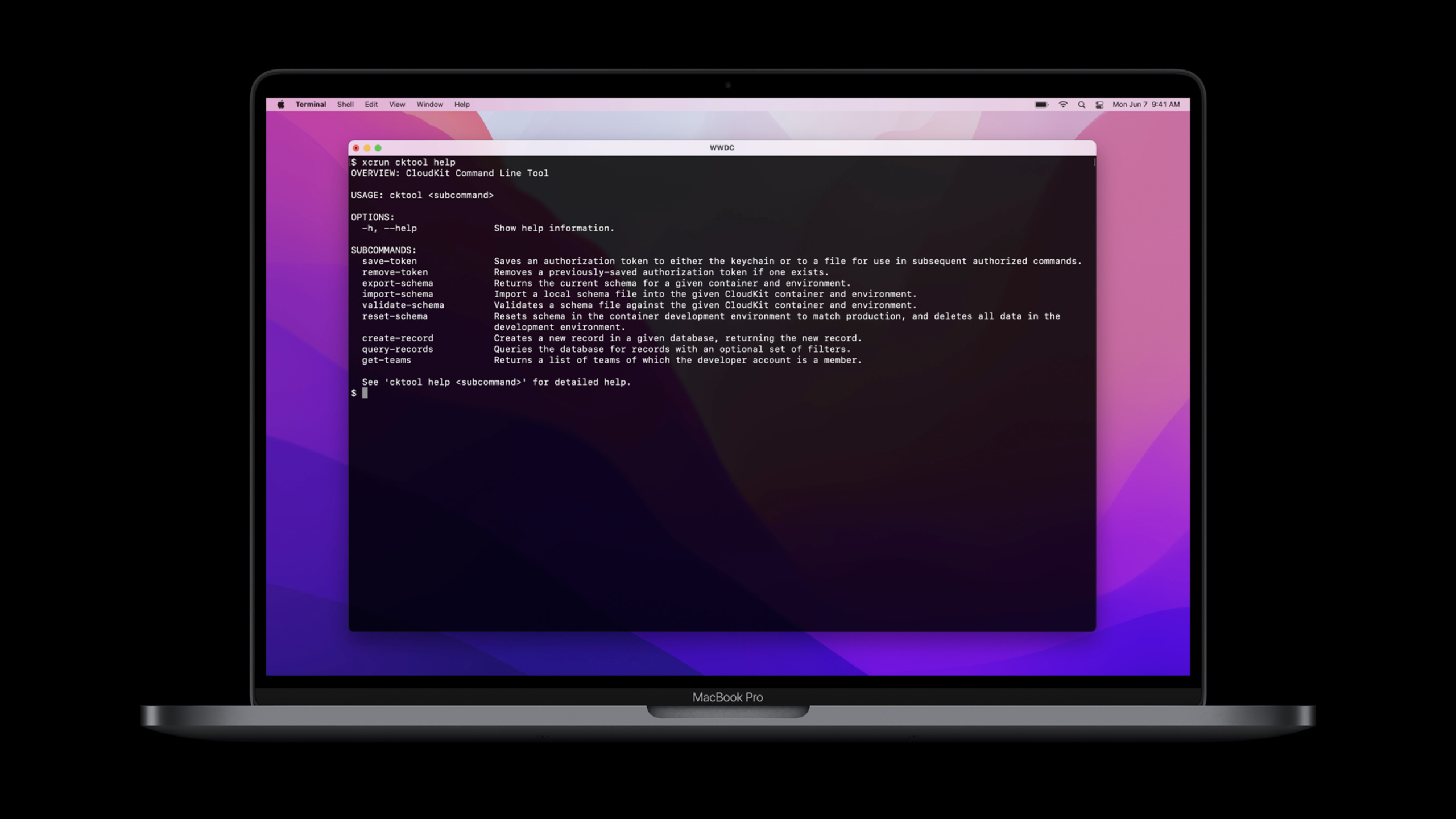
Apple added cktool and the CloudKit declarative Schema language to Xcode 13, allowing developers to automatically reset the CloudKit container, import Schema, and write sample data before testing, solving the problem of unstable cloud integration test environments.
Core Content
Integration testing of CloudKit applications is most afraid of server state drift.
The local code has changed the data model, and the Schema in the CloudKit container may still be stuck at the old version. The first run of the test will create data, and the second run will read the records left last time. Developers end up spending time cleaning the console, synchronizing fields, and rebuilding sample data, and the testing itself becomes a secondary task.
Apple presented two tools at WWDC21. The first one iscktool, installed with Xcode 13, viaxcrunAccess CloudKit from the command line. It can import and export Schemas and create and query records. The second is CloudKit schema language (CloudKit Schema language), which writes the container structure as a text file and can be submitted to version control together with the application code.
This way, CloudKit test environments can be prepared by scripts. Before starting the test, the script first clears the development environment, then imports the Schema file in the project, and finally writes fixed sample data. Xcode’s Test pre-action will execute this script before the test runs. The test faces the same container status every time, and the cause of failure is easier to locate.
Convert console operation to script operation
In the past, the CloudKit Console was suitable for manual viewing and modification of containers. It can complete Schema management, but it is not suitable for continuous integration process. It is also difficult for team members to see CloudKit Schema changes from Git diff.
cktoolPut these operations on the command line. Exporting Schema is a command, and importing Schema is also a command. You can directly pass JSON when creating test records. Developers do not need to open a browser or manually click on the console before testing.
Change from implicit server state to text file
Schema language writes record types, fields, indexes and permissions in.ckdbin the file. This file is placed in the project directory and reviewed together with the Swift code.
When the application’s data model changes, Schema changes also enter the same commit. The test script imports this file. Server status comes from text declarations in the repository, and teams no longer rely on someone remembering to go to the console and change fields.
Detailed Content
Authorize cktool
(02:21)cktoolConnect directly to the CloudKit server and require authorization before use. CloudKit provides two types of tokens for it. Management tokens are used for container configuration, such as importing and exporting schemas. User token is used to write data to the application container’s private or public database.
xcrun cktool save-token --type management

xcrun cktool save-token --type user

xcrun cktool get-teams
Key points:
xcrun cktoolCall the CloudKit command line tools installed by Xcode 13. -save-token --type managementSave the management token for configuration operations such as Schema import and export. -save-token --type userSave user token for accessing container data.- The token will be safely stored in macOS Keychain.
-
get-teamsReturns the list of Apple Developer teams to which the current developer account belongs. Subsequent commands require the team id.
Export CloudKit Schema
(03:45) If there is already a Schema under development in the container, it can be exported to a file first and then submitted to the source code repository. The file name exported in the lecture isschema.ckdb。
xcrun cktool export-schema \
  --team-id XYZ1234567 \
  --container-id iCloud.com.WWDC21.Example \
  --environment development \
  --output-file schema.ckdb
Key points:
export-schemaExport the schema from the CloudKit container. ---team-id XYZ1234567Designate an Apple Developer team. ---container-id iCloud.com.WWDC21.ExampleSpecify the CloudKit container to operate on. ---environment developmentSelect a development environment. The speech emphasized that record types and custom fields in the development environment can be added and deleted. ---output-file schema.ckdbWrite the exported Schema into a text file for easy inclusion in version control.
Create test records
(04:07)cktoolData can also be written. Lecture using JSON to represent aBookrecord, and then create it into a public database.
xcrun cktool create-record \
  --team-id XYZ1234567 \
  --container-id iCloud.com.WWDC21.Example \
  --environment development \
  --database-type public \
  --record-type Book \
  --fields-json '{
       "title": { "type": "stringType", "value": "Treasure Island" },
       "pageCount": { "type": "int64Type", "value": 304 }
    }'
Key points:
create-recordCreate a record in the CloudKit server. ---database-type publicSpecifies writing to a public database. ---record-type BookThe specified record type must be consistent with the record type in the container schema. ---fields-jsonUse JSON to describe field values. -titleThe type isstringType, the value isTreasure Island。pageCountThe type isint64Type, the value is304。
Integrate CloudKit preparation steps into Xcode testing
(05:05) The lecture puts three types of operations into the Test pre-action of the Xcode scheme: resetting the container, importing the Schema file in the project, and creating sample records.cktoolCommands are executed synchronously, and failure of the previous command will prevent subsequent commands from continuing to run.
xcrun cktool reset-schema \
    --team-id XYZ1234567 \
    --container-id iCloud.com.WWDC21.Example

xcrun cktool import-schema \
    --team-id XYZ1234567 \
    --container-id iCloud.com.WWDC21.Example \
    --environment development \
    --file $PROJECT_DIR/Example/CloudKitSchema.ckdb

xcrun cktool create-record \
    --team-id XYZ1234567 \
    --container-id iCloud.com.WWDC21.Example \
    --environment development \
    --database-type public \
    --record-type Book \
    --fields-json '{
       "title": { "type": "stringType", "value": "Great Expectations" },
       "pageCount": { "type": "int64Type", "value": 544 },
       "description": { "type": "stringType", "value": "Depiction of the education of an orphan nicknamed Pip" },
       "publishedOn": { "type": "timestampType", "value": "1860-12-01T03:23:07.415Z" },
       "reviewStatus": { "type": "int64Type", "value": 1 }
    }'
Key points:
reset-schemaReset the Schema of the specified CloudKit container, suitable for cleaning up the development environment before testing. -import-schemaput in the project.ckdbSchema files are sent to the CloudKit server. -$PROJECT_DIR/Example/CloudKitSchema.ckdbUse the Xcode build setting to locate the Schema file within the project.- the second
create-recordwrite a more completeBookSample records. -publishedOnusetimestampType, the value is an ISO time string. -reviewStatususeint64Type, the value is1. - After this script is placed in Test pre-action, the same set of CloudKit states will be prepared before each test is run.
Read Schema language files
(05:51) Schema files describe CloudKit’s record types, fields, indexes, and security roles. Examples from the talk defineBookRecord type.
DEFINE SCHEMA
     RECORD TYPE Book (
        "___createTime" TIMESTAMP,
        "___createdBy"  REFERENCE,
        "___etag"       STRING,
        "___modTime"    TIMESTAMP,
        "___modifiedBy" REFERENCE,
        "___recordID"   REFERENCE QUERYABLE,
        description     STRING,
        pageCount       INT64,
        publishedOn     TIMESTAMP,
        reviewStatus    INT64,
        // A single-line comment, for humans
        title           STRING QUERYABLE,
        GRANT WRITE TO "_creator",
        GRANT CREATE TO "_icloud",
        GRANT READ TO "_world"
     );
Key points:
DEFINE SCHEMAStart a CloudKit Schema declaration. -RECORD TYPE BookDefine a file namedBookrecord type. -"___createTime"、"___createdBy"、"___etag"、"___modTime"、"___modifiedBy"、"___recordID"is a system field created by CloudKit for each record type. -description、pageCount、publishedOn、reviewStatus、titleIt is an application custom field. -TIMESTAMP、REFERENCE、STRING、INT64is the field data type. -QUERYABLECreate a queryable index for the field, in the example___recordIDandtitleThe index is declared. -// A single-line comment, for humansIs a comment for the team to read and will be ignored when the CloudKit server processes the file. -GRANT WRITE TO "_creator"Allow the record creator to write. -GRANT CREATE TO "_icloud"Allow authenticated iCloud users to create records. -GRANT READ TO "_world"Allow all users to read.
Remember the Schema evolution rules of the production environment
(07:14) Schema files make modifications faster, but CloudKit’s production environment rules have not changed. Record types can be added and deleted in the development environment, and custom fields can also be added and deleted. Once a record type is promoted to production, it cannot be deleted or renamed. Custom fields that have been promoted to the production environment cannot be deleted or renamed.
Development environment:
- Add and remove record types
- Add and remove custom fields

Production environment:
- Promote new record types
- Add new fields to existing record types
- Cannot delete or rename promoted record types
- Cannot delete or rename promoted custom fields
- Can add and remove indexes
- Can modify security role settings
Key points:
- The development environment is suitable for rapid iteration of Schema.
- The production environment retains the old record types and fields so that the CloudKit server can still understand the data used by the older version of the application.
- Destructive Schema changes can appear in the development environment and cannot be promoted to the production environment.
- Index and security role settings can still be modified in production environments.
Core Takeaways
-
What to do: Add a reproducible integration test environment to CloudKit App. Why it’s worth doing:
cktoolAbility to import Schema and create sample data before testing, avoiding tests that rely on manually prepared server state. How to start: Putreset-schema、import-schema、create-recordWrite the Test pre-action of the Xcode scheme, and use the Schema file path$PROJECT_DIR。 -
What to do: Incorporate CloudKit Schema into Git code review. Why it’s worth doing:
.ckdbDocumentation can describe record types, fields, indexes, and permissions, and teams can review data model changes the same way they review Swift code. How to start: Use firstxcrun cktool export-schema --environment development --output-file schema.ckdbExport the existing Schema and add the file to the project. -
What to do: Prepare fixed cloud sample data for UI testing. Why it’s worth doing:
create-recordSupports writing to public database using JSON, and the test can stably read the same set of records. How to start: Write a set of test scenarios for each--fields-json, create the required CloudKit records one by one in the test pre-end script. -
What to do: Create a CloudKit Schema migration checklist for the team. Why it’s worth doing: Promoted record types and custom fields cannot be deleted or renamed in the production environment. Checking in advance can reduce deployment failures. How to get started: Add it to your PR template
.ckdbChange items, check whether they contain breaking changes, index changes, and security role changes. -
What to do: Split management tokens and user tokens for continuous integration. Why it’s worth doing: Management token only handles container configuration, User token only handles data writing, and the permission boundaries are clearer. How to start: Use it on this machine first
save-token --type managementandsave-token --type userAfter completing the authorization, the test script is organized into segments according to configuration operations and data operations.
Related Sessions
- Meet CloudKit Console — Learn to use CloudKit Console to view databases, modify Schema, and deploy container changes.
- What’s new in CloudKit — Learn about async/await, encrypted fields, and Zone Sharing in WWDC21 CloudKit.
- Build apps that share data through CloudKit and Core Data — Continue to learn the implementation path of sharing data between Core Data and CloudKit.
- Showcase app data in Spotlight — Learn how Core Data data enters the Spotlight search index.
Comments
GitHub Issues · utterances