
Highlight
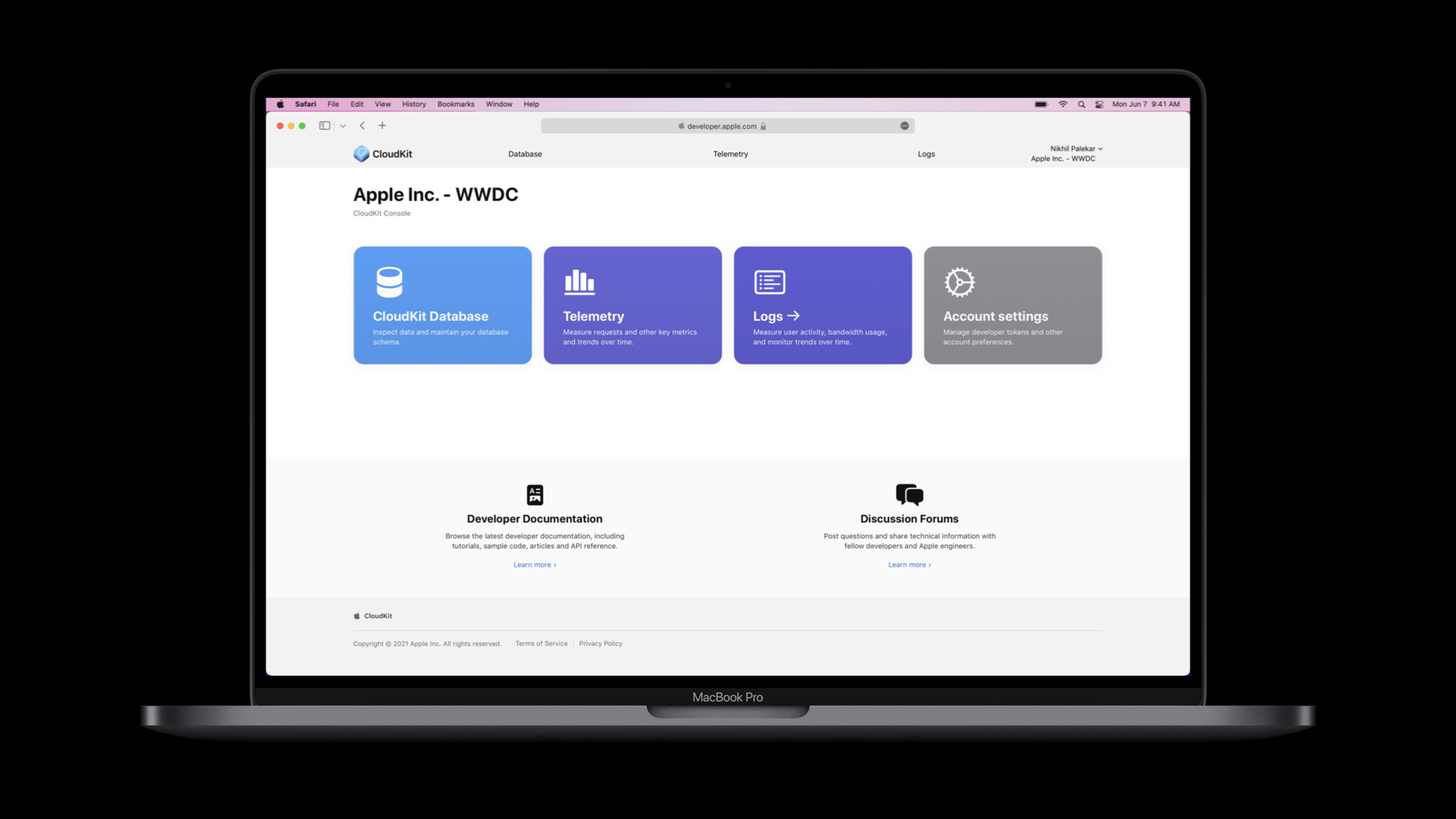
Apple launches CloudKit Console, allowing developers to manage CloudKit Schema, query records, deploy production changes, view Telemetry and Logs in the browser, reducing the cost of debugging synchronized data and troubleshooting online problems.
Core Content
After developers put data into CloudKit (iCloud database service), the real troublesome work often happens before and after going online.
During the development phase, you need to confirm that the new record type has been written into the development environment, the field types are not filled in incorrectly, and the index can support queries.Before going online, you also need to push the Schema from the development environment to the production environment and confirm that this deployment will not destroy the old client.After going online, users report that synchronization failed. You need to know whether the request has reached CloudKit and whether the number of errors has increased after the new version is released.
In the past these actions were scattered across different views.When locating a problem, developers must first find the container, then switch to the environment, then check the records, and finally check the logs or indicators.CloudKit Console puts these actions into a unified interface: Database is responsible for Schema and logging, Telemetry is responsible for aggregating metrics, and Logs is responsible for request-level troubleshooting.
Apple’s changes this time do not introduce a new client framework.It changes the CloudKit developer workbench.For apps using CloudKit, this can directly shorten the cycle of “writing data - verifying data - deploying Schema - observing online behavior”.
Detailed Content
Manage Schema: Record Type, Fields and Indexes
(01:24) The CloudKit database is located inside a Container.Each container has two environments: Development (development environment) and Production (production environment).Developers can use just-in-time schema creation in the development environment or define data models in the Console.
(02:21) Record Type defines the CloudKit data structure.The Schema page of the Console allows you to view record types, fields, and indexes.In the speech example, the developer isauthorField adds sortable index for alphabetical sorting.
There is no Code tab for this session.The following script organizes the configuration in the Console into a runnable data structure to facilitate verification of each step.The Console itself accomplishes these operations through the web page.
const bookRecordType = {
  name: "Book",
  fields: [
    { name: "title", type: "String" },
    { name: "author", type: "String" }
  ],
  indexes: [
    { field: "author", type: "sortable" }
  ]
};

const sortableFields = bookRecordType.indexes
  .filter((index) => index.type === "sortable")
  .map((index) => index.field);

console.log(`${bookRecordType.name} can sort by: ${sortableFields.join(", ")}`);
Key points:
name: "Book"Corresponds to the Record Type in the Console.fieldsList the fields included in the record type; when adding fields in the speech, you need to enter the field name and select the type.authorIs the field used for sortable index in the lecture.indexesRepresents the index created in the Console; the speech mentioned that when creating an index, you need to select a field and one of three index types.filter((index) => index.type === "sortable")Check before simulation goes online: Which fields support sorting.
Use Query Builder to verify development environment records
(03:35) Record browsing in the Database app follows a left-to-right process: first select Database, then Zone, and finally Select Record Type.After selecting the context, the record list is displayed on the left and the record details are displayed in the middle.
(04:02) Query Builder can add filter conditions to find target records.Queries can be saved and directly reused later when development continues.Console URLs can also point to specific functions, and developers can add record views to Safari bookmarks.
const savedQuery = {
  environment: "Development",
  database: "Public",
  zone: "_defaultZone",
  recordType: "Book",
  filters: [
    { field: "author", operator: "equals", value: "Octavia Butler" }
  ]
};

function describeQuery(query) {
  const filterText = query.filters
    .map((filter) => `${filter.field} ${filter.operator} ${filter.value}`)
    .join(" AND ");

  return `${query.environment}/${query.database}/${query.zone}/${query.recordType}: ${filterText}`;
}

console.log(describeQuery(savedQuery));
Key points:
environment: "Development"Corresponds to the process of verifying data in the development environment in the speech.database、zone、recordTypeCorresponds to the three levels of Console selection from left to right.filtersCorresponds to the filter conditions in Query Builder.describeQueryTurn a query into readable text and simulate manual checking before saving the query.- The actual query is executed in the CloudKit Console web page, and this script is used to record the query conditions agreed by the team.
Deploy Schema: look at diff first, then enter the production environment
(05:08) When the Schema in the development environment is ready, clickDeploy Schema ChangesYou will enter the change view.This view shows the difference between the current schema of the production environment and the changes to be deployed in the development environment.
(05:33) Production environment changes cannot be reversed.The purpose of the diff view is to allow developers to confirm that only expected changes will make it into the production environment.CloudKit also verifies update integrity to avoid breaking old clients.
const productionSchema = {
  recordTypes: {
    Book: {
      fields: ["title"],
      indexes: []
    }
  }
};

const developmentSchema = {
  recordTypes: {
    Book: {
      fields: ["title", "author"],
      indexes: ["author:sortable"]
    }
  }
};

const changes = {
  addedFields: developmentSchema.recordTypes.Book.fields
    .filter((field) => !productionSchema.recordTypes.Book.fields.includes(field)),
  addedIndexes: developmentSchema.recordTypes.Book.indexes
    .filter((index) => !productionSchema.recordTypes.Book.indexes.includes(index))
};

console.log(JSON.stringify(changes, null, 2));
Key points:
productionSchemaIndicates the current production environment status.developmentSchemaRepresents the state of the development environment ready for deployment.addedFieldsFind out which fields will be added to the production environment.addedIndexesFind the index that will be added to the production environment.JSON.stringify(changes, null, 2)Output diff-like results to remind developers to confirm each item before clicking deploy.
Use Telemetry and Logs to troubleshoot online behavior
(05:46) After Schema is deployed, the Telemetry app (telemetry tool) displays key metrics of the App’s interaction with the CloudKit database.Metrics listed in the talk include Request Rate, Server Latency, Error Count, and Average Request Size.These charts support filtering to observe changes in app behavior over time.
(06:20) Logs app (logging tool) provides more detailed request processing output.It can be used in the development phase to verify requests and in production environments to investigate issues.
const telemetry = [
  { version: "1.0", requestRate: 120, serverLatencyMs: 80, errorCount: 2, averageRequestSizeKb: 14 },
  { version: "1.1", requestRate: 160, serverLatencyMs: 95, errorCount: 18, averageRequestSizeKb: 15 }
];

const previous = telemetry[0];
const current = telemetry[1];

const errorIncrease = current.errorCount - previous.errorCount;
const needsLogReview = errorIncrease > 10;

console.log({
  version: current.version,
  errorIncrease,
  needsLogReview
});
Key points:
telemetryUse the four metrics listed in the talk: request rate, server latency, number of errors, average request size.versionCorresponds to the observation scenario of “whether the new version behaves abnormally” in the speech.errorIncreaseUsed to determine whether the number of errors increases after new versions.needsLogReviewIndicates that the next step should be to enter the Logs app to view request level details.- Telemetry gives trends and Logs are used to see how requests are actually being processed by CloudKit.
Core Takeaways
-
What to do: Make a CloudKit rollout checklist for the team. Why it’s worth doing: Console’s diff view can display Schema changes from development environment to production environment. Production changes cannot be reversed. How to start: Make a list of the Record Type, fields and indexes to be deployed each time, and click
Deploy Schema ChangesConfirm item by item before comparing with diff. -
What to do: Save Query Builder queries for common debugging scenarios. Why it’s worth doing: The speech showed the process of saving queries and reusing them in subsequent development, which is suitable for repeatedly verifying the same type of test records. How to start: Set the context by Database, Zone, Record Type, then add filter conditions for key fields, and bookmark the result page or function URL.
-
What to do: Create a CloudKit Telemetry observation window for new version releases. Why it’s worth doing: Telemetry can display request rate, server latency, number of errors, and average request size, which is suitable for checking whether the new version changes the database interaction behavior. How to start: Check the Error Count and Server Latency after publishing; if the indicators increase, then enter the Logs app to check the request processing details in the same time period.
-
What to do: Add the development environment write verification to the function development process. Why it’s worth doing: Console can directly view the record details in the development environment and confirm the content actually written by the App to CloudKit. How to start: Every time you add a new Record Type, first write test data in the Development environment, then use Query Builder to filter the target record and check the field values.
-
What to do: Conduct a pre-go-live review of the Public Database’s security roles. Why it’s worth doing: The talk mentioned that Public Database’s security roles have a new UI for managing access to public database records. How to start: Open the security roles page in the Schema management phase, check whether the read and write permissions meet product expectations, and then deploy to Production.
Related Sessions
- What’s new in CloudKit — Learn about the new capabilities of CloudKit in 2021, suitable for viewing with the CloudKit Console.
- Automate CloudKit tests with cktool and declarative schema — Use command line and declarative Schema to automate testing to complement the manual operation process of the Console.
- Build apps that share data through CloudKit and Core Data — Explain the application architecture of Core Data and CloudKit sharing data.
- Sync files to the cloud with FileProvider on macOS — Shows another cloud synchronization scenario, focusing on the file-level synchronization solution.
Comments
GitHub Issues · utterances