
Highlight
Foundation introduces Swift’s native AttributedString and new formatting API in iOS 15 and macOS Monterey (
.formatted()) and an automatic syntax consistency engine that greatly simplifies internationalization, localization, and rich text processing.
Core Content
The Dilemma of Rich Text Processing
The Foundation framework provides basic functions for all apps and frameworks, of which internationalization/localization is required by every app.This year marks Foundation’s biggest update ever in terms of internationalization.
Rich text processing has always been a pain point in iOS development.NSAttributedStringIt is a reference type, not Swift’s native value type.It is inconsistent with Swift String’s character counting behavior and does not support localization.Developers need to manually handle complex range calculations, which are prone to errors.
AttributedString: Swift native rich text
(02:05) iOS 15 introduces newAttributedStringStructures, designed specifically for Swift:
- Value type: can be safely copied, passed, and stored as attributes
- Consistent character count: Uses the same character count logic as Swift String
- Native Localization: Full support for localized strings
- Type safety: properties use the correct type (such as SwiftUI’s Font)
- Codable support: can be safely serialized and deserialized
Refactoring of formatting API
(17:28) OldDateFormatter、NumberFormatterClasses are relatively heavyweight and require creating instances, configuring styles, and handling threading issues.New API calls directly on types.formatted()Method, concise and thread-safe.
Automatic syntax consistency engine
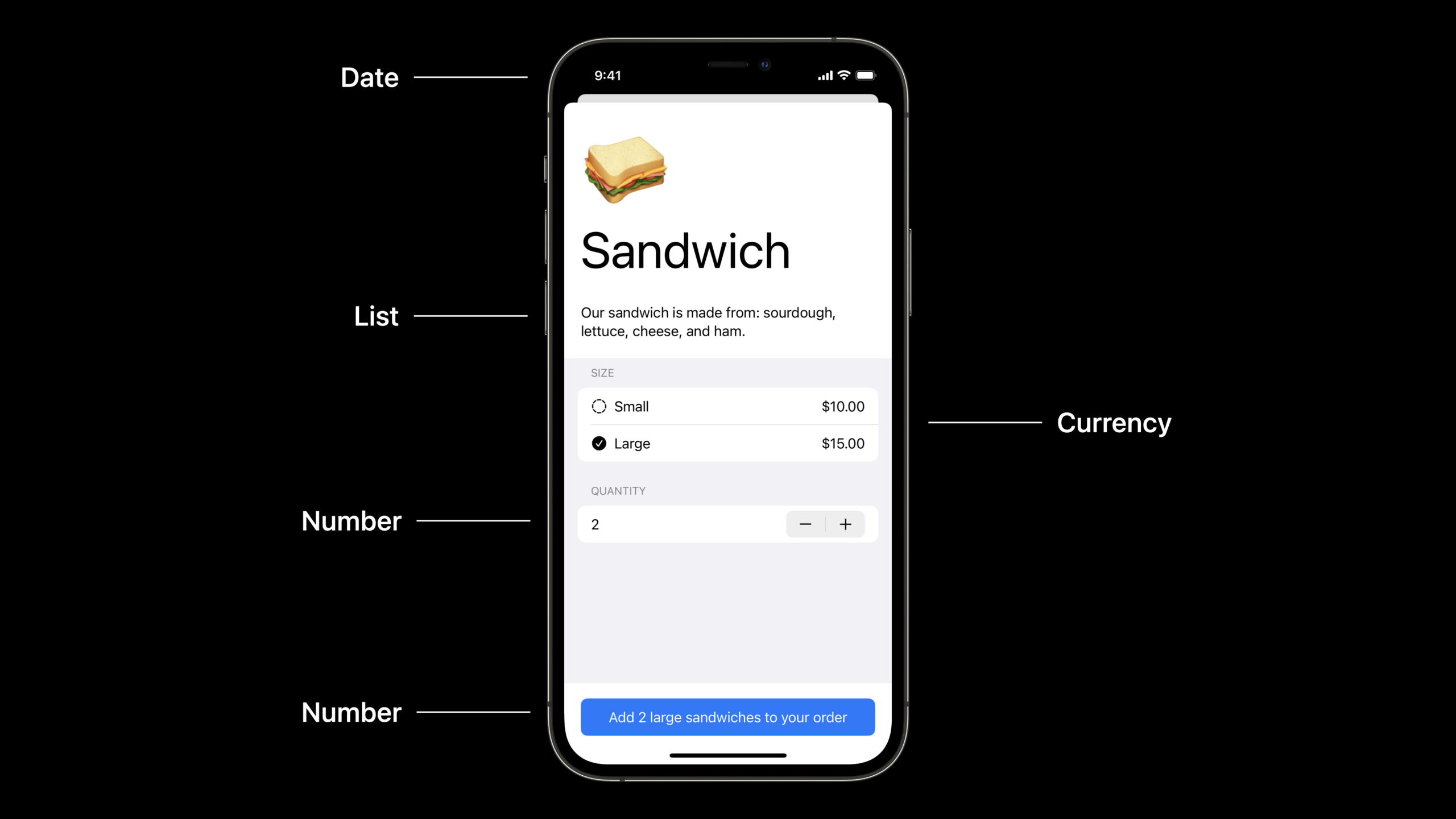
(29:41) One of the most troublesome issues in multi-language applications is syntax consistency.For example, if the user selects “2 large salads” in the English interface, when switching to Spanish, “2 ensaladas grandes” should be displayed instead of “2 grandes ensaladas”.It used to be necessary to prepare multiple versions of strings for each language.
New automatic syntax consistency engine passedinflect: trueParameters handle these issues automatically.
Detailed Content
AttributedString Basics
(02:50) Create an AttributedString and set the attributes:
func attributedStringBasics(important: Bool) {
    var thanks = AttributedString("Thank you!")
    thanks.font = .body.bold()

    var website = AttributedString("Please visit our website.")
    website.font = .body.italic()
    website.link = URL(string: "http://www.example.com")

    var container = AttributeContainer()
    if important {
        container.foregroundColor = .red
        container.underlineColor = .primary
    } else {
        container.foregroundColor = .primary
    }

    thanks.mergeAttributes(container)
    website.mergeAttributes(container)

    print(thanks)
    print(website)
}
Key points:
AttributedStringIt is a structure and needs to be usedvarModification can modify attributes- Properties are set directly on the instance, such as
font、link、foregroundColor AttributeContainerIs a collection of attributes that can be merged into strings in batchesmergeAttributesWill merge all properties of the container into the target string
Create AttributedString from Markdown
(07:29) Use the localized parameter to create localized AttributedStrings from Markdown:
func prompt(for document: String) -> String {
    String(localized: "Would you like to save the document "\(document)"?")
}

func attributedPrompt(for document: String) -> AttributedString {
    AttributedString(localized: "Would you like to save the document "\(document)"?")
}
Key points:
AttributedString(localized:)Will parse Markdown format (bold, italics, links)- Interpolation
\()Correct placement of localization parameters is automatically handled - Markdown syntax
_means italics,**means bold,[text](url)Represents a link
Custom Markdown properties
(10:42) Custom properties can be defined and set via Markdown syntax:
enum RainbowAttribute : CodableAttributedStringKey, MarkdownDecodableAttributedStringKey {
    enum Value : String, Codable {
        case plain
        case fun
        case extreme
    }

    public static var name = "rainbow"
}
Markdown syntax^[an attribute](rainbow: 'extreme')Will be parsed as a custom attribute.
Key points:
CodableAttributedStringKeyProtocol enables properties to be serializedMarkdownDecodableAttributedStringKeyProtocol makes properties parsable from Markdown^[text](key: 'value')Is the Markdown syntax for custom attributes
Date formatting
(17:28) New.formatted()The API makes date formatting extremely easy:
func formattingDates() {
    let date = Date.now

    let formatted = date.formatted()
    // example: "6/7/2021, 9:42 AM"

    let onlyDate = date.formatted(date: .numeric, time: .omitted)
    // example: "6/7/2021"

    let onlyTime = date.formatted(date: .omitted, time: .shortened)
    // example: "9:42 AM"
}
Key points:
formatted()Automatically format using the current locale.numeric、.omitted、.shortenedSimplify configuration with predefined styles- Thread safe, no need to create formatter instance
Complex date format
(18:36) Use the Fluent API to build complex formats:
func formattingDatesMoreExamples() {
    let date = Date.now

    let formatted = date.formatted(.dateTime.year().day().month())
    // example: "Jun 7, 2021"

    let formattedWide = date.formatted(.dateTime.year().day().month(.wide))
    // example: "June 7, 2021"

    let logFormat = date.formatted(.iso8601)
    // example: "20210607T164200Z"

    let fileNameFormat = date.formatted(.iso8601.year().month().day().dateSeparator(.dash))
    // example: "2021-06-07"
}
Key points:
.dateTimeStart building the format and chain calling.year()、.month()etc..wide、.numericand other parameters to control the style of each part.iso8601Provides standardized date format
Date range formatting
(20:30) Format date range:
func formattingIntervals() {
    let now = Date.now
    let later = now + TimeInterval(5000)

    let range = (now..<later).formatted()
    // example: "6/7/21, 9:42 – 11:05 AM"

    let timeDuration = (now..<later).formatted(.timeDuration)
    // example: "1:23:20"

    let components = (now..<later).formatted(.components(style: .wide))
    // example: "1 hour, 23 minutes, 20 seconds"

    let relative = later.formatted(.relative(presentation: .named, unitsStyle: .wide))
    // example: "in 1 hour"
}
Key points:
- The date range will intelligently merge the same parts (such as month, day, and year are only displayed once)
.timeDurationDisplay duration length.componentsShow component breakdown.relativeShow relative time description
Number formatting
(25:30) Number formatting is equally concise:
func formattingNumbersWithStyles() {
    let percent = 25
    let percentFormatted = percent.formatted(.percent)
    // percentFormatted is "25%"

    let scientific = 42e9
    let scientificFormatted = scientific.formatted(.number.notation(.scientific))
    // scientificFormatted is "4.2E10"

    let price = 29
    let priceFormatted = price.formatted(.currency(code: "usd"))
    // priceFormatted is "$29.00"
}
Key points:
.percent、.currency、.number.notationWait for predefined styles- Automatically handle locale-related formats (such as currency symbol position)
- Thread safe, no need to create formatter instance
SwiftUI TextField integration
(26:05) SwiftUI TextField directly supports formatting:
struct ReceiptTipView: View {
    @State var tip = 0.15

    var body: some View {
        HStack {
            Text("Tip")
            Spacer()
            TextField("Amount",
                      value: $tip,
                      format: .percent)
        }
    }
}
Key points:
- TextField
formatParameters directly accept formatting styles .percentAutomatically handles percent sign input and display -Bound values remain as numeric types, no manual conversion is required
Automatic syntax consistency
(29:41)inflect: trueThe automatic parameter processing syntax is consistent:
func addToOrderEnglish() {
    let quantity = 2
    let size = "large"
    let food = "salad"

    let message = AttributedString(localized: "Add ^[\(quantity) \(size) \(food)](inflect: true) to your order")
    print(message)
}
Key points:
^[...](inflect: true)Markup requires syntactically consistent text- The system will automatically adjust the order and form of words according to the current language
- Supports consistent grammar for numerals, adjectives, and nouns
Core Takeaways
-
Replace NSAttributedString with AttributedString: Use it directly in new projects
AttributedString, which automatically handles localization and Markdown parsing.When used with SwiftUI’s Text view, no bridging is required. -
Replace Formatter class with .formatted(): Use new ones for date, number, currency formatting
.formatted()API.The code is simpler, there is no need to consider thread safety and instance management, and the performance is better. -
Use Markdown to define localized strings: in
.stringsUse Markdown syntax (bold, italics, links) directly in the file,AttributedString(localized:)will be parsed automatically.This reduces formatting logic in the code. -
Reduce translation effort with automatic syntax consistency: Used in multilingual apps
inflect: trueParameters to allow the system to automatically process the grammatical consistency of numerals and adjectives.This can significantly reduce the number of string variations that need to be translated. -
TextField directly binds numeric types: Using TextField in SwiftUI
formatParameters are bound to numeric values instead of manually handling string conversions..percent、.currencyand other styles available out of the box.
Related Sessions
- What’s new in SwiftUI — New features of SwiftUI, used with AttributedString
- Discover concurrency in UIKIt and macOS — UIKit concurrent updates
- Text and display in SwiftUI — SwiftUI text rendering
Comments
GitHub Issues · utterances