
Highlight
iOS 15 adds new URLSession
data(for:)、upload(for:from:)、download(from:)、bytes(from:)Other native async methods support handling authentication challenges through task-specific delegates, while introducing AsyncSequence for incrementally receiving response bodies.
Core Content
Why introduce the async/await version of URLSession?
A common network request code has three problems using completion handler:
- Control flow jumps around: Create task → resume → jump to completionHandler → jump to completionHandler of main queue
- Thread safety trap: Three execution contexts are involved (caller queue, session delegate queue, main queue), and the compiler cannot help detect data races.
- Difficulty in error handling: completionHandler may be called twice,
UIImage(data:)Return optional but no corresponding error
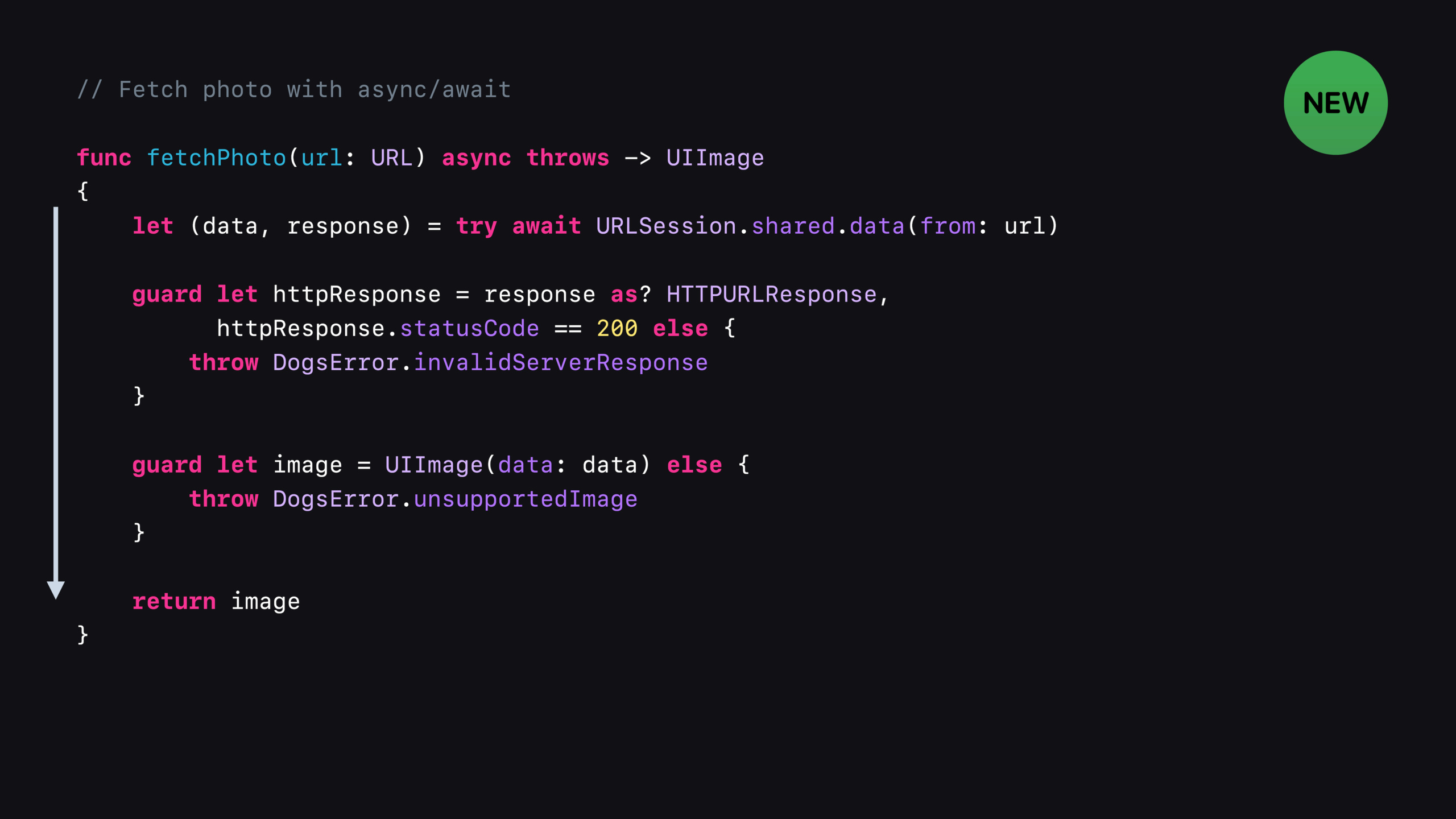
After changing to async/await, the control flow is executed linearly from top to bottom. All codes run in the same concurrency context. There is no need to worry about threading issues and incorrect use.throwProcessing, the compiler will force processing of optional.
async method of URLSession
New async methods in iOS 15 and macOS Monterey include:
data(from:)/data(for:): Get data, equivalent to data task convenience methodupload(for:from:): Upload data or files, equivalent to upload taskdownload(from:)/download(for:): Download files to disk, not automatically deleted, need to be moved or deleted manuallybytes(from:)/bytes(for:):returnAsyncBytes, used to receive response body incrementally
All methods support native Swifttry-catchError handling and Task cancellation.
Handling incremental responses: URLSession.bytes
data、upload、downloadThe methods all wait for the complete response body to arrive before returning.If incremental processing is required (e.g. SSE, streaming JSON), usebytesmethod.
bytes(from:)Returns immediately after the response headers arrive, and the response body ends withAsyncSequence<UInt8>Form incremental delivery.AsyncBytessupplylinesTransformation that parses the response body line by line.
Task-specific Delegate
The delegate model of URLSession provides callbacks such as authentication challenges and metrics.The new async method no longer exposes the underlying task. How to handle authentication challenges for specific tasks?
The answer is to pass a task-specific delegate parameter to the async method.This delegate only handles events for that specific task and is strongly referenced by the task until completion or failure.
If both session delegate and task delegate implement the same method, the implementation of task delegate takes precedence.Note: Background URL Session does not support task-specific delegates.
Swift Concurrency cancellation mechanism
TaskThe types arecancel()method, but be aware of Swift Concurrency’sTaskandURLSessionTaskThey are completely different concepts, just with similar names.
Cancellation is collaborative - callcancel()After that, the code is at the next suspend point (e.g.await) checks the cancellation status and throwsCancellationError。
Detailed Content
Get the async version of the photo
(02:52)
func fetchPhoto(url: URL) async throws -> UIImage
{
    let (data, response) = try await URLSession.shared.data(from: url)

    guard let httpResponse = response as? HTTPURLResponse,
          httpResponse.statusCode == 200 else {
        throw WoofError.invalidServerResponse
    }

    guard let image = UIImage(data: data) else {
        throw WoofError.unsupportedImage
    }

    return image
}
Key points:
data(from:)return(Data, URLResponse)tuple- use
guardCheck the status code, if it does not match thethrowmistake UIImage(data:)Return optional, must be processednilCondition- The whole function is
async throws, use when callingtry await
URL Request version of data method
(03:45)
let (data, response) = try await URLSession.shared.data(from: url)
guard let httpResponse = response as? HTTPURLResponse,
      httpResponse.statusCode == 200 else {
    throw MyNetworkingError.invalidServerResponse
}
Key points:
data(for:)acceptURLRequestParameters, you can configure HTTP headers, methods, etc.- The response check mode is the same: guard cast + check status code
Upload files
(04:03)
var request = URLRequest(url: url)
request.httpMethod = "POST"

let (data, response) = try await URLSession.shared.upload(for: request, fromFile: fileURL)
guard let httpResponse = response as? HTTPURLResponse,
      httpResponse.statusCode == 201 else {
    throw MyNetworkingError.invalidServerResponse
}
Key points:
upload(for:fromFile:)Upload from disk file, suitable for large files- A successful upload usually returns 201 Created, check the corresponding status code
- Also
upload(for:from:)version, fromDataupload
Download file
(04:21)
let (location, response) = try await URLSession.shared.download(from: url)
guard let httpResponse = response as? HTTPURLResponse,
      httpResponse.statusCode == 200 else {
    throw MyNetworkingError.invalidServerResponse
}

try FileManager.default.moveItem(at: location, to: newLocation)
Key points:
download(from:)Returns a temporary file URL that needs to be manually moved to the target location- The old version of the convenience method will automatically delete the file, but the new version will not
- Be sure to delete or move temporary files after processing is complete
Task canceled
(04:44)
let task = Task {
    let (data1, response1) = try await URLSession.shared.data(from: url1)
    let (data2, response2) = try await URLSession.shared.data(from: url2)
}

task.cancel()
Key points:
Task { }Create structured concurrency task, returnTask.Handlecancel()in the nextawaitClick to take effect, throwCancellationError- if the first
awaithas been returned, cancellation will not affect the second request, and both serial requests will complete
Incrementally receive response body
(07:53)
let (bytes, response) = try await URLSession.shared.bytes(from: Self.eventStreamURL)
guard let httpResponse = response as? HTTPURLResponse, httpResponse.statusCode == 200 else {
    throw WoofError.invalidServerResponse
}
for try await line in bytes.lines {
    let photoMetadata = try JSONDecoder().decode(PhotoMetadata.self, from: Data(line.utf8))
    await updateFavoriteCount(with: photoMetadata)
}
Key points:
bytes(from:)return(URLSession.AsyncBytes, URLResponse)tupleAsyncBytes.linesaccording to\nSplit the response body and returnAsyncSequence<String>for try awaitProcess each row in a loop, suitable for SSE and streaming JSON scenariosawait updateFavoriteCountCall another async function to update the UI
Task-specific Delegate handles authentication
(11:20)
class AuthenticationDelegate: NSObject, URLSessionTaskDelegate {
    private let signInController: SignInController

    init(signInController: SignInController) {
        self.signInController = signInController
    }

    func urlSession(
        _ session: URLSession,
        task: URLSessionTask,
        didReceive challenge: URLAuthenticationChallenge
    ) async -> (URLSession.AuthChallengeDisposition, URLCredential?) {
        if challenge.protectionSpace.authenticationMethod == NSURLAuthenticationMethodHTTPBasic {
            do {
                let (username, password) = try await signInController.promptForCredential()
                return (.useCredential,
                        URLCredential(user: username, password: password, persistence: .forSession))
            } catch {
                return (.cancelAuthenticationChallenge, nil)
            }
        } else {
            return (.performDefaultHandling, nil)
        }
    }
}
How to use:
let delegate = AuthenticationDelegate(signInController: signInController)
let (data, response) = try await URLSession.shared.data(for: request, delegate: delegate)
Key points:
- The delegate method itself can be
async, supports await calls - The delegate is strongly referenced by the task and does not need to be held manually
- For HTTP Basic authentication, a login box can pop up to obtain credentials
- return
(useCredential, credential)Tell the session to continue the request using the credentials
Core Takeaways
- Migrate existing network layer to async/await
- What to do: Change all completion handler-based network request methods to async throws versions
- Why it’s worth doing: code readability is greatly improved, error handling is safer, and thread safety bugs are reduced
- How to start: Start with the most commonly used request method and put
completionHandler: @escaping (Result<T, Error>) -> VoidChange toasync throws -> T.The entry API isURLSession.data(for:)
- Access to bytes API for real-time update interface
- What to do: Use
URLSession.bytes(from:)Alternative polling or WebSocket handling for SSE/streaming interfaces - Why is it worth doing: Incrementally receive the response body, lower memory usage and smaller delay
- How to get started: Check existing SSE interfaces with
bytes.linesParse by line, infor try awaitProcess each message in a loop
- Use task-specific delegate to simplify authentication logic
- What to do: Create a dedicated delegate class for requests that require special authentication instead of dispatching with task ID in the global delegate
- Why is it worth doing: Putting delegate logic and request logic together makes it easier to maintain.
- How to start: Implementation
URLSessionTaskDelegate,existdata(for:delegate:)Pass in the instance.The delegate method can be marked asasync
- Optimize the memory usage of file download
- What: Use for large file downloads
download(from:)instead ofdata(from:) - Why it’s worth doing:
dataLoad the entire response body into memory,downloadWrite to temporary file, memory usage is constant - How to start: Change all pictures and video downloads to
download, use after downloading is completeFileManager.moveItemMove to target location
Related Sessions
- Meet async/await in Swift — Introduction to Swift async/await
- Accelerate networking with HTTP/3 and QUIC — In-depth explanation of HTTP/3 and QUIC protocols
- Meet AsyncSequence — How to use AsyncSequence
- Protect mutable state with Swift actors — Concurrency safety mechanism of Swift Actor
Comments
GitHub Issues · utterances