
Highlight
iOS 15 and macOS Monterey enable HTTP/3 by default, and URLSession can be automatically upgraded without modifying the code; at the same time, Network.framework has added QUIC transport layer support, allowing developers to use NWConnectionGroup to build custom multiplexing protocols.
Core Content
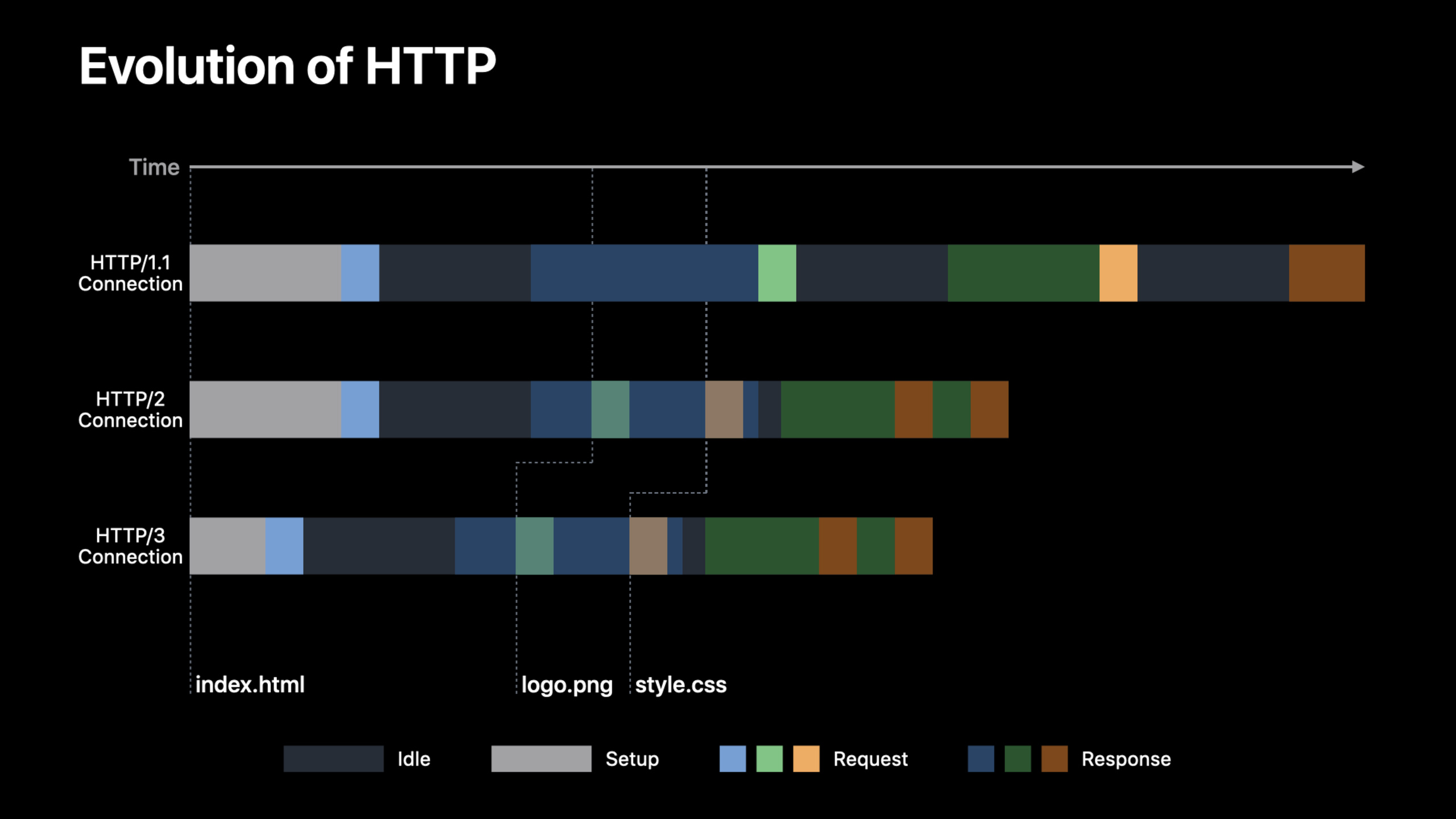
Evolution of HTTP protocol: from HTTP/1 to HTTP/3
Every time you request a resource, you have to go through four steps: establishing a connection, sending the request, waiting for processing, and receiving a response.If multiple resources are requested at the same time, HTTP/1 needs to establish a separate connection for each resource, and a lot of time is wasted in connection establishment.
An improvement to HTTP/1 is to reuse a single connection, but requests must be sent serially, and the next one cannot be sent until the previous response is completed. This is head-of-line blocking.Browsers mitigate this by opening multiple parallel connections, but this creates inefficient network behavior for both the client and the server.
HTTP/2 multiplexes multiple streams on a single TCP connection, requests can be issued earlier, and data from different streams can be interleaved.Idle wait time is significantly reduced.
HTTP/3 further improves on this basis: connections are established faster and requests can be issued earlier.More importantly, HTTP/3 streams are independent of each other - all HTTP/2 streams share a TCP connection, and network packet loss may affect all streams; in HTTP/3, packet loss only affects the corresponding stream, and data from other streams can be delivered normally.
QUIC: The underlying engine of HTTP/3
QUIC is an IETF-standardized reliable transport protocol based on the same concepts of TCP but provides end-to-end encryption, multiplexed streams, and authentication.Security is built on TLS 1.3.
QUIC’s core advantages:
- Faster handshake: QUIC relies on TLS 1.3 to complete the secure handshake, without the need for TCP’s three-way handshake, reducing the handshake time to a single round trip
- No head-of-line blocking: Multiplexed streams are the core concept of QUIC and will not be blocked like TCP
- Better packet loss recovery: QUIC endpoints can transmit more complex packet collection information to the peer, are not restricted by TCP, and have stronger connection packet loss recovery capabilities
- Connection Migration: Allows connections to seamlessly switch between different network interfaces (such as cellular to Wi-Fi) without re-establishing the session
HTTP/3 in URLSession
iOS 15 and macOS Monterey enable HTTP/3 by default.Applications that use URLSession do not need to modify the code and can be used automatically after the server turns on HTTP/3.
Supported versions include the upcoming HTTP/3 RFC and the earlier Draft 29.
How can I confirm that my application is using HTTP/3?
Xcode 13’s Instruments adds a new HTTP Traffic inspection tool, which directly connects to URLSession without additional configuration.You can view the HTTP version and response headers for each request.
server passedAlt-SvcThe response header declares HTTP/3 support:
Alt-Svc: h3=":443"; ma=2592000URLSession will remember this information for subsequent connections, called “service discovery”.The more recommended way is to configure HTTPS resource records in DNS, usingh3The string declares HTTP/3 so that the first connection establishes HTTP/3.
If you are sure your server supports HTTP/3 and want to speed up the discovery process, you can setassumesHTTP3Capableproperty.This allows the HTTP stack to assume that the server supports HTTP/3, but does not guarantee that it will be used - the network may block HTTP/3, or the server actually does not support it, in which case it will automatically fall back to HTTP/2.
HTTP/3 priority model
HTTP/2’s priority scheme was rarely respected by servers because of its complexity. HTTP/3 removed the old model in favor of a simpler scheme based on HTTP headers.For priorityurgencyParameters (0-7) and optionalincrementalParameters specified.
The API of URLSession remains unchanged, still usingpriorityTo set the priority of attributes, useprefersIncrementalDeliveryEnable incremental delivery.The default priority is 3.URLSession infers incremental delivery based on whether convenience APIs such as async data methods are used.
Dynamically adjusting resource prioritization is also supported.For example, you can preload photos with low priority first, and then increase the priority when the user slides to the corresponding area.
QUIC support in Network.framework
HTTP/3 is based on QUIC, but QUIC’s capabilities are not limited to HTTP.If your application exchanges non-request/response data, needs multiplexed streams to share the underlying transport context, or implements a custom protocol (such as P2P communication, RPC calls), you can use the QUIC transport directly.
In iOS 15 and macOS Monterey,NWProtocolQUICJoin Network.framework.Creating a QUIC connection is similar to other protocols:
let connection = NWConnection(
    host: "example.com",
    port: 443,
    using: .quic(alpn: ["myproto"])
)

connection.stateUpdateHandler = { newState in
    switch newState {
    case .ready:
        print("Connected using QUIC!")
    default:
        break
    }
}

connection.start(queue: queue)
Once a connection is established, data is sent and received in the same way as otherNWConnectionsame.
NWConnectionGroup manages multiplexed streams
A QUIC tunnel multiplexes multiple unidirectional or bidirectional QUIC streams over the underlying transport context.Streams can be created by any endpoint, can send data concurrently and be interleaved with other streams, and have states similar to traditional TCP streams.
NWMultiplexGroupis a new type that manages this type of connection:
let descriptor = NWMultiplexGroup(to: .hostPort(host: "example.com", port: 443))
let group = NWConnectionGroup(with: descriptor, using: .quic(alpn: ["myproto"]))

group.stateUpdateHandler = { newState in
    switch newState {
    case .ready:
        print("Group ready!")
    default:
        break
    }
}

group.start(queue: queue)
Create a new outbound stream:
let connection = NWConnection(from: group)Receive inbound streams initiated by remote endpoints:
group.newConnectionHandler = { newConnection in
    newConnection.stateUpdateHandler = { newState in
        // Handle stream states
    }
    newConnection.start(queue: queue)
}
Server receives QUIC tunnel
useNWListenerWhen running the server, you can passnewConnectionGroupHandlerReceive new QUIC tunnel:
listener.newConnectionGroupHandler = { group in
    group.stateUpdateHandler = { newState in
        // Handle tunnel states
    }
    group.newConnectionHandler = { stream in
        // Set up and start new incoming streams
    }
    group.start(queue: queue)
}
Access QUIC metadata
passNWProtocolQUIC.MetadataStream information can be obtained and modified:
if let metadata = connection.metadata(definition: NWProtocolQUIC.definition)
                             as? NWProtocolQUIC.Metadata {
    print("QUIC Stream ID is \(metadata.streamIdentifier)")

    // Set application error before cancelling
    metadata.applicationError = 0x100
    connection.cancel()
}
Debugging QUIC connections
Set environment variables to output qlog files when debugging.qlog is a standardized log format proposed by the IETF, which contains richer QUIC connection information than traditional packet capture.After the test is completed, download the application container in the Devices window of Xcode to obtain the qlog file, and then use open source visualization tools to analyze it.
Detailed Content
Create QUIC connection
(13:20)
let connection = NWConnection(
    host: "example.com",
    port: 443,
    using: .quic(alpn: ["myproto"])
)

connection.stateUpdateHandler = { newState in
    switch newState {
    case .ready:
        print("Connected using QUIC!")
    default:
        break
    }
}

connection.start(queue: queue)
Key points:
.quic(alpn:)Parameter specifies ALPN (Application Layer Protocol Negotiation) stringstateUpdateHandlerMonitor connection status changes,.readyIndicates that the connection has been establishedstart(queue:)Starts a connection on the specified queue
Establish QUIC tunnel
(15:08)
let descriptor = NWMultiplexGroup(to: .hostPort(host: "example.com", port: 443))
let group = NWConnectionGroup(with: descriptor, using: .quic(alpn: ["myproto"]))

group.stateUpdateHandler = { newState in
    switch newState {
    case .ready:
        print("Connected using QUIC!")
    default:
        break
    }
}

group.start(queue: queue)
Key points:
NWMultiplexGroupis the descriptor of the QUIC tunnelNWConnectionGroupManage multiple flows that share an underlying QUIC tunnel- The state handler tracks tunnel state, not individual flows
Management flow
(15:45)
// Create new outgoing stream
let connection = NWConnection(from: group)

// Receive incoming streams
group.newConnectionHandler = { newConnection in
    newConnection.stateUpdateHandler = { newState in
        // Handle stream states
    }
    newConnection.start(queue: queue)
}
Key points:
NWConnection(from: group)Create new outbound flow from groupnewConnectionHandlerHandle inbound flows initiated by remote endpoints- Each stream manages its own state independently
Access QUIC metadata
(17:22)
if let metadata = connection.metadata(definition: NWProtocolQUIC.definition)
                             as? NWProtocolQUIC.Metadata {
    print("QUIC Stream ID is \(metadata.streamIdentifier)")

    // Set application error before cancelling
    metadata.applicationError = 0x100
    connection.cancel()
}
Key points:
streamIdentifierGet QUIC stream IDapplicationErrorUsed to report application layer errors to the peer before closing the stream- Metadata is only valid if modified before the connection is cancelled.
Core Takeaways
- Enable HTTP/3 for the server
- What to do: Enable HTTP/3 on a CDN or self-built server to automatically get a faster network experience for iOS 15+ users
- Why it’s worth doing: URLSession is enabled by default, and users can enjoy the advantages of 0-RTT handshake, no head-of-line blocking, connection migration, etc. without updating the application.
- How to start: CDN users should check the HTTP/3 switch of the service provider; use nginx 1.25+ or Cloudflare quiche for self-built servers.Configure DNS HTTPS records and
Alt-Svcresponse header
- Use Instruments to verify that HTTP/3 is effective
- What to do: Use Xcode 13’s HTTP Traffic Instrument to confirm that the app is actually using HTTP/3
- Why it’s worth doing: HTTP/3 relies on service discovery, and the first connection may still go through HTTP/2.Need to verify whether the configuration is correct
- How to start: Select the Network profiling template, record the application run, check the HTTP Version column and
Alt-Svcresponse header
- Connect QUIC for real-time communication applications
- What: Build custom protocols using Network.framework’s QUIC support, replacing proprietary TCP-based protocols
- Why it’s worth doing: QUIC provides built-in TLS 1.3, multiplexing, and connection migration, which is more reliable than self-developed TCP-based protocols.
- How to start: Use
NWConnectionGroup+NWMultiplexGroupManage QUIC tunnels and streams.set upQUIC.OptionsConfigure transmission parameters
- Realize connection migration-friendly long connections
- What: Leverage QUIC’s connection migration capabilities to keep apps connected when switching between Wi-Fi and cellular networks
- Why it’s worth doing: Traditional TCP connections will be disconnected when the network switches and need to be re-handshaked.QUIC’s connection ID mechanism allows seamless migration
- How to start: Use
NWConnection+.quic()Replaces existing TCP connection.No additional code required, Network.framework handles migration automatically
Related Sessions
- Use async/await with URLSession — Use async/await in URLSession to simplify network code
- Reduce networking delays for your app — Strategies to reduce application network delays
- Meet async/await in Swift — Introduction to Swift async/await
Comments
GitHub Issues · utterances