
Highlight
The Apple Pay payment sheet for iOS 15 is completely rewritten with SwiftUI, adding APIs such as coupon codes, shipping date ranges, and read-only delivery addresses; Wallet supports batch downloading of multiple passes and automatic hiding of expired passes.
Core Content
You are building an e-commerce app.The user selects the product, clicks to purchase, and the Apple Pay payment sheet pops up.This process can already be run on iOS 14, but there are several pain points:
- The user forgets to enter the discount code and can only cancel the payment, return to the shopping cart, enter the discount code, and reinitiate payment.
- You can only write a text description for the delivery time, and the precise date range cannot be displayed.
- The pick-up address and the delivery address are mixed together, and the user may change them by mistake.
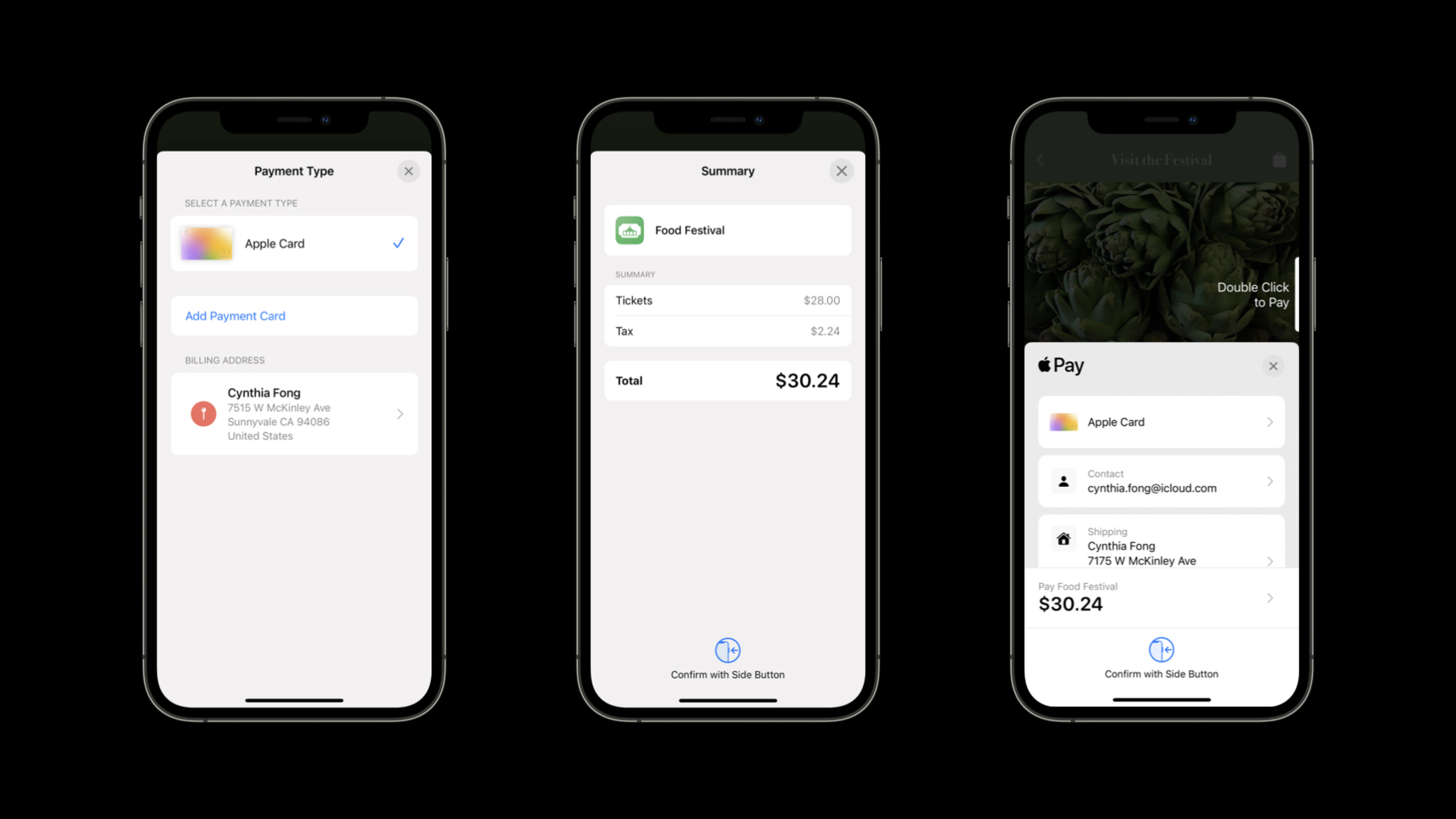
Apple Pay in iOS 15 has redesigned the payment sheet, rewritten it from the bottom up with SwiftUI, and added a number of new APIs to solve these pain points.
Wallet has also been updated: you can now download multiple passes at one time, and expired tickets will be automatically hidden and will no longer clutter the user’s Wallet.
Detailed Content
Multi-pass batch download
(01:39)
In the past, when adding passes from the web page, only one pass could be added at a time.iOS 15 supports batch downloads:
- put multiple
.pkpassFiles are packaged into zip - Change the file extension to
.pkpasses - Set MIME type to
application/vnd.apple.pkpasses
After the user clicks the download link, Wallet will process all passes at once.
Key points:
- Suitable for multiple scenarios such as movie tickets, concert tickets, etc.
- You only need to change the file format and MIME type, the server logic remains unchanged
Expired passes are automatically hidden
(02:28)
Wallet now automatically hides expired passes to keep the interface clean.The judgment logic is based on three fields:
expirationDateearlier than current daterelevantDateMore than one day before the current datevoidedis set totrue
Key points:
- Make sure these three fields of pass are set correctly
- Users can still find hidden passes in the “Expired” category
- Don’t rely on users to manually delete old passes
Payment sheet new design
(05:04)
The Apple Pay sheet for iOS 15 has been completely rewritten in SwiftUI, with clearer vision and smoother interaction.Specific improvements:
- Simplified process for new users to add cards and addresses
- Old users can add new cards directly in the payment sheet without jumping.
- Error message redesigned to be more clear
- Added summary view to display product details, discounts, and subtotals
- The application icon is now displayed on the summary view (web payment displays the Web Clip icon)
Key points:
- The new design takes effect automatically without modifying the code
- It is recommended to set the Web Clip icon for web payment (2x and 3x, placed in the root directory of the website)
- iOS 15 notification icon becomes larger, PKPass icon requires a minimum of 38x38 @1x
Shipping date range
(07:40)
NewdateComponentsRangeAttribute, you can display the precise delivery or pick-up time in the payment sheet:
let shippingMethod = PKShippingMethod(
    label: "Standard Shipping",
    amount: 10.00
)

let calendar = Calendar.current
let today = Date()
let shippingStart = calendar.date(byAdding: .day, value: 3, to: today)!
let shippingEnd = calendar.date(byAdding: .day, value: 7, to: today)!

shippingMethod.dateComponentsRange = PKDateComponentsRange(
    start: calendar.dateComponents([.year, .month, .day], from: shippingStart),
    end: calendar.dateComponents([.year, .month, .day], from: shippingEnd)
)
Key points:
- use
DateComponentsrather than simpleDate, built-in time zone and calendar support - Can display “Estimated delivery in 3-7 days” or “Pick up tomorrow at 14:00”
- The web version of Apple Pay has a corresponding JavaScript API
Read only shipping address
(09:36)
In the self-pickup scenario, the address is fixed (such as a certain store) and should not be allowed to be modified by the user.iOS 15 supports setting read-only addresses:
let address = CNMutablePostalAddress()
address.street = "1 Infinite Loop"
address.city = "Cupertino"
address.state = "CA"
address.postalCode = "95014"

let contact = PKContact()
contact.postalAddress = address

paymentRequest.shippingContact = contact
paymentRequest.shippingType = .storePickup
paymentRequest.shippingContactEditingMode = .enabled
paymentRequest.requiredShippingContactFields = [.postalAddress]
Key points:
shippingContactEditingModeset to.enabled, the address the user sees is read-only- Suitable for self-pickup, fixed pick-up points and other scenarios
- Web version passed
shippingContactEditingModeFields achieve the same effect
Coupon Code
(10:46)
Users can enter the discount code directly into the payment sheet without canceling the payment process.Implementation method:
// Enable coupon support
paymentRequest.supportsCouponCode = true
paymentRequest.couponCode = "WELCOME10" // Optional: prefill

// Handle coupon code changes
default func paymentAuthorizationController(
    _ controller: PKPaymentAuthorizationController,
    didChangeCouponCode couponCode: String,
    handler: @escaping (PKPaymentRequestCouponCodeUpdate) -> Void
) {
    if couponCode == "FESTIVAL" {
        // Valid coupon code; update the total
        let updatedItems = applyDiscount(couponCode)
        handler(PKPaymentRequestCouponCodeUpdate(
            paymentSummaryItems: updatedItems
        ))
    } else if couponCode.isEmpty {
        // Empty code; restore the original price
        handler(PKPaymentRequestCouponCodeUpdate(
            paymentSummaryItems: originalItems
        ))
    } else {
        // Invalid coupon code; show an error
        let error = PKPaymentRequest.paymentCouponCodeInvalidError(
            withLocalizedDescription: "Invalid coupon code"
        )
        handler(PKPaymentRequestCouponCodeUpdate(
            errors: [error],
            paymentSummaryItems: originalItems,
            shippingMethods: shippingMethods
        ))
    }
}
Key points:
supportsCouponCode = trueEnable function- use
didChangeCouponCodeDelegate method real-time verification - supply
paymentCouponCodeInvalidErrorandpaymentCouponCodeExpiredErrorTwo error types - It is recommended to pre-populate known valid discount codes to reduce user input
New JavaScript payment button
(04:23)
Apple Pay on the Web adds a new pure JavaScript payment button that supports all current button types and styles:
const button = document.createElement('apple-pay-button');
button.setAttribute('buttonstyle', 'black');
button.setAttribute('type', 'plain');
button.setAttribute('locale', 'zh-CN');
Key points: -Button size and style can be customized
- The style prefix is
apple-pay- - Supports all existing button types (Buy, Donate, Set Up, etc.)
Core Takeaways
-
Add coupon input in the payment sheet to the e-commerce app.Forgetting to enter a discount code is one of the main reasons for shopping cart abandonment.iOS 15
supportsCouponCodeAllow users to complete input without leaving the payment process.Entrance API:PKPaymentRequest.supportsCouponCode+PKPaymentAuthorizationControllerDelegate.didChangeCouponCode。 -
Show exact shipping time range.”Estimated delivery in 3-5 days” builds user trust better than “ship as soon as possible”.use
PKDateComponentsRangeSet the start and end dates, and the payment sheet will be automatically formatted and displayed.Entrance API:PKShippingMethod.dateComponentsRange。 -
Set a read-only address for the pickup scenario.If the user chooses store pickup, do not let him change the address in the payment sheet.use
shippingContact+shippingContactEditingModeLock address.Entrance API:PKPaymentRequest.shippingContact+.shippingContactEditingMode。 -
Issue event tickets in batches.Multiple tickets are issued at one time for music festivals, cinemas, exhibitions and other scenes.Bundle
.pkpassThe file is packaged into.pkpasses, the user downloads all tickets at once.Entrance API: zip +.pkpassesextension +application/vnd.apple.pkpassesMIME type。 -
Set Web Clip icon to enhance web payment trust.The web version of Apple Pay now displays the website icon on the payment sheet.Place 120x120 and 180x180 icons in the root directory of the website, and Apple Pay will automatically obtain them.Entrance API:
<link rel="apple-touch-icon">or root directoryapple-touch-icon.png。
Related Sessions
- Meet StoreKit 2 — StoreKit 2 new Swift API supports in-app purchases and subscription management
- Support customers and handle refunds — StoreKit 2 customer support and refund handling
- Build custom experiences with Wallet — Build custom experiences with Wallet in depth
- What’s new in Safari and WebKit — New features in Safari and WebKit, including Apple Pay on the Web improvements
Comments
GitHub Issues · utterances