
Highlight
The PHASE framework introduces geometric information into the audio engine, supporting volumetric sound sources, occlusions, and material properties, allowing sound to automatically propagate and attenuate based on scene geometry, eliminating the need to manually mix multiple point sound sources.
Core Content
The long-term pain points of game audio
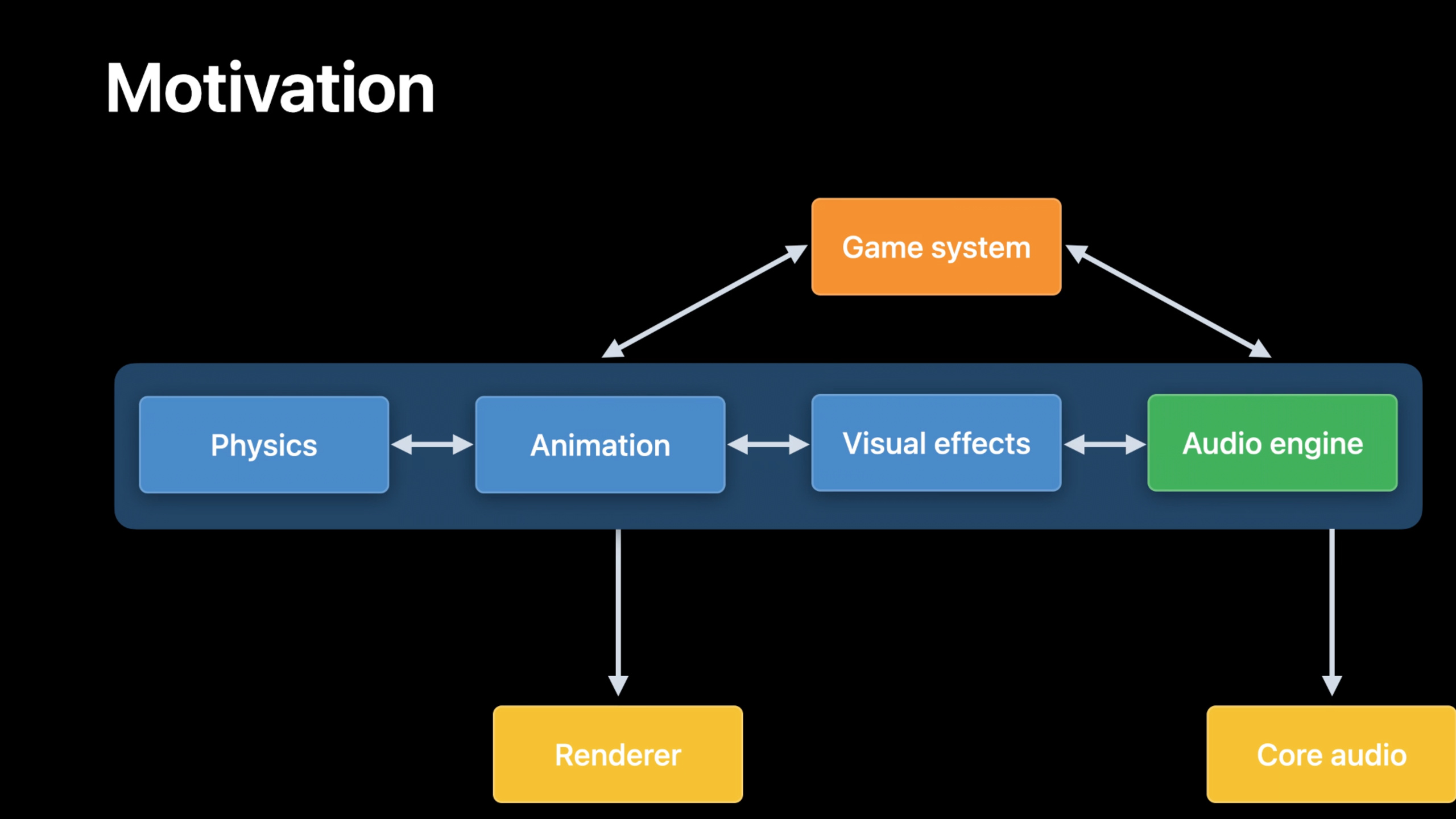
In traditional game development, the audio subsystem runs separately from subsystems such as physics, animation, and visual effects.Audio is usually produced through third-party middleware and is not aware of the game simulation state.Sound designers need to pre-bake audio assets and manually tune them to make the sound effects match the game screen.Once the visual scene changes, the audio system needs to be reworked to maintain consistency.(01:00)
In terms of spatial audio, the traditional approach is to place multiple point sound sources in the scene, determine the filtering and mixing ratios through techniques such as ray tracing, and manually mix each sound source.When the scene changes, this tuning process needs to be started all over again.(02:40)
PHASE How to change game audio
PHASE (Physical Audio Spatialization Engine) is a new spatial audio framework that closely connects the audio system with other subsystems.(01:36)
Volume Sound Source.PHASE allows sound sources to be defined as geometric shapes (such as spheres, cubes, meshes) rather than individual points.The audio engine automatically manages the spread of sound within the volume, eliminating the need for developers to manually mix multiple point sources.(02:27)
Geometric Occlusion.Occlusions (e.g., walls, obstacles) can also be defined as geometric shapes, and acoustic material properties (e.g., wood, metal, glass) can be assigned.PHASE automatically calculates how sound is attenuated and filtered by obstructions.(02:38)
Device Consistency.PHASE delivers a consistent spatial audio experience across all supported Apple devices, eliminating the need for manual tuning for different platforms.(02:07)
Detailed Content
PHASE core concepts
The PHASE framework is built around the following core concepts:
- Engine: The core object of the audio engine, manages the entire audio session
- Sound Asset: Audio file resource, which can be registered in the engine
- Sound Event: Playable sound event, defined by Sound Event Asset
- Source: Sound source, which can be defined as a volume shape
- Listener: Listener, representing the player or user’s ear position and orientation
- Occluder: Occluder, a geometry that blocks the propagation of sound
- Material: Acoustic material, which defines the sound absorption characteristics of the obstruction
- Spatial Pipeline: Spatial processing pipeline, including direct path transmission and reverberation
Create PHASE Engine
Create PHASE Engine and register audio resources: (18:31)
import PHASE

// Create an engine in automatic update mode
let engine = PHASEEngine(updateMode: .automatic)

// Get the audio file URL from the app bundle
let audioFileUrl = Bundle.main.url(forResource: "DrumLoop_24_48_Mono",
                                    withExtension: "wav")!

// Register the audio file resource
// Name it "drums", load it into resident memory, and apply dynamic normalization before playback
let soundAsset = try engine.assetRegistry.registerSoundAsset(
    url: audioFileUrl,
    identifier: "drums",
    assetType: .resident,
    channelLayout: nil,
    normalizationMode: .dynamic
)
Key points:
updateMode: .automaticIndicates that the engine automatically manages updates, suitable for most scenarios.residentType loads audio into resident memory, suitable for frequently played soundsnormalizationMode: .dynamicApply dynamic normalization to ensure consistent volume during playbackidentifierIs the unique identifier of the resource, which is subsequently referenced through it
Create Sound Event Asset
Sound Event Asset defines the sound processing flow, from sampler to mixer: (20:47)
// Create a channel layout from the mono layout tag
let channelLayout = AVAudioChannelLayout(layoutTag: kAudioChannelLayoutTag_Mono)!

// Create a channel mixer from the channel layout
let channelMixerDefinition = PHASEChannelMixerDefinition(channelLayout: channelLayout)

// Create a sampler node and connect it to the channel mixer below
let samplerNodeDefinition = PHASESamplerNodeDefinition(
    soundAssetIdentifier: "drums",
    mixerDefinition: channelMixerDefinition
)

// Set the sampler playback mode to loop
samplerNodeDefinition.playbackMode = .looping

// Set the calibration mode to relative sound pressure level with a 0 dB level
samplerNodeDefinition.setCalibrationMode(.relativeSpl, level: 0)

// Register the sound event resource and name it "drumEvent"
let soundEventAsset = try engine.assetRegistry.registerSoundEventAsset(
    rootNode: samplerNodeDefinition,
    identifier: "drumEvent"
)
Key points:
PHASEChannelMixerDefinitionDefines how audio is mixed to the output channelsPHASESamplerNodeDefinitionIs the node that plays the audio file.loopingLet the audio play in a loop, suitable for background music or ambient sounds.relativeSplCalibration mode represents relative sound pressure level, 0 dB is the reference levelrootNodeIs the root of the node tree and can build complex audio processing graphs
Start and stop playback
Create a Sound Event and start the engine: (22:21)
// Create a Sound Event from the Sound Event Asset
let soundEvent = try PHASESoundEvent(engine: engine,
                                      assetIdentifier: "drumEvent")

// Start the engine
// This starts the audio I/O thread internally
try engine.start()

// Start the sound event
try soundEvent.start()
Clean up resources: (23:05)
// Stop and invalidate the sound event
soundEvent.stopAndInvalidate()

// Stop the engine
// This stops the audio I/O thread internally
engine.stop()

// Unregister the sound event resource
engine.assetRegistry.unregisterAsset(identifier: "drumEvent", completionHandler: nil)

// Unregister the audio file
engine.assetRegistry.unregisterAsset(identifier: "drums", completionHandler: nil)

// Destroy the engine
engine = nil
Key points:
start()Start the audio IO thread and start audio processingstop()Stop audio IO threadstopAndInvalidate()Stop playback and release event resources- Unregister resources in reverse order when cleaning
Spatial pipeline configuration
Create a spatialized pipeline to achieve spatial audio effects: (25:14)
// Create the spatialization pipeline
let spatialPipelineOptions: PHASESpatialPipeline.Options = [
    .directPathTransmission,
    .lateReverb
]
let spatialPipeline = PHASESpatialPipeline(options: spatialPipelineOptions)!
spatialPipeline.entries[PHASESpatialCategory.lateReverb]!.sendLevel = 0.1
engine.defaultReverbPreset = .mediumRoom

// Create the spatial mixer
let spatialMixerDefinition = PHASESpatialMixerDefinition(spatialPipeline: spatialPipeline)

// Set distance model parameters
let distanceModelParameters = PHASEGeometricSpreadingDistanceModelParameters()
distanceModelParameters.fadeOutParameters = PHASEDistanceModelFadeOutParameters(
    cullDistance: 10.0
)
distanceModelParameters.rolloffFactor = 0.25
spatialMixerDefinition.distanceModelParameters = distanceModelParameters

// Create a sampler node and connect it to the spatial mixer
let samplerNodeDefinition = PHASESamplerNodeDefinition(
    soundAssetIdentifier: "drums",
    mixerDefinition: spatialMixerDefinition
)

// Enable looped playback
samplerNodeDefinition.playbackMode = .looping

// Set the calibration level to 12 dB
samplerNodeDefinition.setCalibrationMode(.relativeSpl, level: 12)

// Set the culling option to sleep
samplerNodeDefinition.cullOption = .sleepWakeAtRealtimeOffset

// Register the sound event
let soundEventAsset = try engine.assetRegistry.registerSoundEventAsset(
    rootNode: samplerNodeDefinition,
    identifier: "drumEvent"
)
Key points:
.directPathTransmissionEnable direct path transfer.lateReverbEnable post reverbsendLevelControls the level of the signal sent to the reverbcullDistanceIs the elimination distance, beyond which the sound stops playingrolloffFactorControls the slope of distance decay.sleepWakeAtRealtimeOffsetPut distant sound sources to sleep and automatically wake up when approaching
Set listener and sound source
Create a listener: (27:05)
// Create the listener
let listener = PHASEListener(engine: engine)

// Set the listener transform matrix to the origin with no rotation
listener.transform = matrix_identity_float4x4

// Attach the listener to the root object of the engine scene graph
// This activates the listener in the simulation
try engine.rootObject.addChild(listener)
Create a volumetric sound source: (27:46)
import ModelIO

// Create an icosahedron mesh
let mesh = MDLMesh.newIcosahedron(withRadius: 0.0142,
                                   inwardNormals: false,
                                   allocator: nil)

// Create a shape from the mesh
let shape = PHASEShape(engine: engine, mesh: mesh)

// Create a volumetric sound source from the shape
let source = PHASESource(engine: engine, shapes: [shape])

// Move the sound source 2 meters in front of the listener and rotate it back toward the listener
var sourceTransform: simd_float4x4
sourceTransform.columns.0 = simd_make_float4(-1.0, 0.0, 0.0, 0.0)
sourceTransform.columns.1 = simd_make_float4(0.0, 1.0, 0.0, 0.0)
sourceTransform.columns.2 = simd_make_float4(0.0, 0.0, -1.0, 0.0)
sourceTransform.columns.3 = simd_make_float4(0.0, 0.0, 2.0, 1.0)
source.transform = sourceTransform

// Attach the sound source to the engine scene graph
try engine.rootObject.addChild(source)
Key points:
PHASEListenerRepresents the listener’s position and orientationPHASESourceis the sound source, you can use one or morePHASEShapedefine its volumetransformis a 4x4 transformation matrix containing position, rotation and scale- Both the sound source and the listener need to be added to the scene graph to participate in the spatial calculation
Set the occlusion
Create occluders and materials: (29:15)
// Create a box mesh
let boxMesh = MDLMesh.newBox(
    withDimensions: simd_make_float3(0.6096, 0.3048, 0.1016),
    segments: simd_uint3(repeating: 6),
    geometryType: .triangles,
    inwardNormals: false,
    allocator: nil
)

// Create a shape from the mesh
let boxShape = PHASEShape(engine: engine, mesh: boxMesh)

// Create a material
// Here we use the cardboard preset
let material = PHASEMaterial(engine: engine, preset: .cardboard)

// Set the material on the shape
boxShape.elements[0].material = material

// Create an occluder from the shape
let occluder = PHASEOccluder(engine: engine, shapes: [boxShape])

// Move the occluder 1 meter in front of the listener
// This places the occluder between the sound source and the listener
var occluderTransform: simd_float4x4
occluderTransform.columns.0 = simd_make_float4(-1.0, 0.0, 0.0, 0.0)
occluderTransform.columns.1 = simd_make_float4(0.0, 1.0, 0.0, 0.0)
occluderTransform.columns.2 = simd_make_float4(0.0, 0.0, -1.0, 0.0)
occluderTransform.columns.3 = simd_make_float4(0.0, 0.0, 1.0, 1.0)
occluder.transform = occluderTransform

// Attach the occluder to the engine scene graph
try engine.rootObject.addChild(occluder)
Key points:
PHASEOccluderIt is the geometry that blocks the propagation of sound.PHASEMaterialDefine the acoustic properties of the occlusion- Default materials include
.cardboard、.brick、.concrete、.glass、.metal、.woodwait - Material affects the attenuation and spectral characteristics of sound when it is blocked
Start spatial sound event
Associate sound sources and listeners with spatial mixers: (30:33)
// Associate the sound source and listener with the spatial mixer
let mixerParameters = PHASEMixerParameters()
mixerParameters.addSpatialMixerParameters(
    identifier: spatialMixerDefinition.identifier,
    source: source,
    listener: listener
)

// Create the sound event
let soundEvent = try PHASESoundEvent(
    engine: engine,
    assetIdentifier: "drumEvent",
    mixerParameters: mixerParameters
)
Key points:
PHASEMixerParametersDefine mixer parametersaddSpatialMixerParametersAssociate sound sources and listeners with spatial mixers- Sound events calculate spatialization effects based on the relative positions of the sound source and listener
Advanced Example: Footstep Sound System
Demonstrates building a complex footsteps sound system that supports randomization, terrain switching, humidity, and clothing friction sounds.(31:28)
Example 1: Mono footsteps
let footstep_wood_sampler_1 = PHASESamplerNodeDefinition(
    soundAssetIdentifier: "footstep_wood_clip_1",
    mixerDefinition: channelMixerDefinition
)
Example 2: Randomize footsteps
// Create two sampler nodes
let footstep_wood_sampler_1 = PHASESamplerNodeDefinition(
    soundAssetIdentifier: "footstep_wood_clip_1",
    mixerDefinition: channelMixerDefinition
)
let footstep_wood_sampler_2 = PHASESamplerNodeDefinition(
    soundAssetIdentifier: "footstep_wood_clip_2",
    mixerDefinition: channelMixerDefinition
)

// Create a random node
// The higher the weight, the more likely it is to be selected
let footstep_wood_random = PHASERandomNodeDefinition()
footstep_wood_random.addSubtree(footstep_wood_sampler_1, weight: 2)
footstep_wood_random.addSubtree(footstep_wood_sampler_2, weight: 1)
Key points:
PHASERandomNodeDefinitionRandomly select child nodes to playweightParameter controls selection probability- Randomization avoids repetition and enhances realism
Example 3: Terrain switching
// Create a gravel-footstep random node
let footstep_gravel_sampler_1 = PHASESamplerNodeDefinition(
    soundAssetIdentifier: "footstep_gravel_clip_1",
    mixerDefinition: channelMixerDefinition
)
let footstep_gravel_sampler_2 = PHASESamplerNodeDefinition(
    soundAssetIdentifier: "footstep_gravel_clip_2",
    mixerDefinition: channelMixerDefinition
)

let footstep_gravel_random = PHASERandomNodeDefinition()
footstep_gravel_random.addSubtree(footstep_gravel_sampler_1, weight: 2)
footstep_gravel_random.addSubtree(footstep_gravel_sampler_2, weight: 1)

// Create a terrain string metaparameter
let terrain = PHASEStringMetaParameterDefinition(value: "creaky_wood")

// Create a terrain switch node
let terrain_switch = PHASESwitchNodeDefinition(
    switchMetaParameterDefinition: terrain
)
terrain_switch.addSubtree(footstep_wood_random, switchValue: "creaky_wood")
terrain_switch.addSubtree(footstep_gravel_random, switchValue: "soft_gravel")
Key points:
PHASEStringMetaParameterDefinitionDefine string metaparametersPHASESwitchNodeDefinitionSelect which subtree to play based on meta parameter value- Terrain sounds can be switched at runtime by modifying meta parameters
Example 4: Humidity Mix
// Create a water-sound random node
let splash_sampler_1 = PHASESamplerNodeDefinition(
    soundAssetIdentifier: "splash_clip_1",
    mixerDefinition: channelMixerDefinition
)
let splash_sampler_2 = PHASESamplerNodeDefinition(
    soundAssetIdentifier: "splash_clip_2",
    mixerDefinition: channelMixerDefinition
)

let splash_random = PHASERandomNodeDefinition()
splash_random.addSubtree(splash_sampler_1, weight: 9)
splash_random.addSubtree(splash_sampler_2, weight: 7)

// Create a wetness numeric metaparameter
let wetness = PHASENumberMetaParameterDefinition(
    value: 0.5,
    minimum: 0,
    maximum: 1
)

// Create a wetness blend node
let wetness_blend = PHASEBlendNodeDefinition(
    blendMetaParameterDefinition: wetness
)
wetness_blend.addRangeForInputValues(
    belowValue: 1,
    fullGainAtValue: 0,
    fadeCurveType: .linear,
    subtree: terrain_switch
)
wetness_blend.addRangeForInputValues(
    aboveValue: 0,
    fullGainAtValue: 1,
    fadeCurveType: .linear,
    subTree: splash_random
)
Key points:
PHASENumberMetaParameterDefinitionDefine numeric element parametersPHASEBlendNodeDefinitionBlend multiple child nodes based on meta parameter values- Humidity from 0 (dry) to 1 (completely wet), mix of dry footsteps and water sounds
Example 5: Adding clothing friction sounds
// Create a clothing-rustle random node
let noisy_clothing_sampler_1 = PHASESamplerNodeDefinition(
    soundAssetIdentifier: "gortex_clip_1",
    mixerDefinition: channelMixerDefinition
)
let noisy_clothing_sampler_2 = PHASESamplerNodeDefinition(
    soundAssetIdentifier: "gortex_clip_2",
    mixerDefinition: channelMixerDefinition
)

let noisy_clothing_random = PHASERandomNodeDefinition()
noisy_clothing_random.addSubtree(noisy_clothing_sampler_1, weight: 3)
noisy_clothing_random.addSubtree(noisy_clothing_sampler_2, weight: 5)

// Create a container node
let actor_container = PHASEContainerNodeDefinition()
actor_container.addSubtree(wetness_blend)
actor_container.addSubtree(noisy_clothing_random)
Key points:
PHASEContainerNodeDefinitionContainer node, which can play multiple child nodes at the same time- Terrain footsteps and clothing friction sounds will be played at the same time
- Built a complete sound system that supports randomization, terrain switching, humidity and clothing sounds
Core Takeaways
-
What: Build a dynamic footsteps system for the game
-
Why it’s worth doing: PHASE’s random nodes, switching nodes, and hybrid nodes can build complex dynamic sound systems that automatically adjust according to terrain, humidity, and other conditions.
-
How to get started: Create multiple sound samplers using
PHASERandomNodeDefinitionRandomize, usePHASESwitchNodeDefinitionTo switch terrain, usePHASEBlendNodeDefinitionMix sounds under different conditions -
What: Achieve realistic occlusion and reverb effects
-
Why it’s worth doing: PHASE supports geometric occlusion and material attributes. Sound will be blocked by walls and produce different attenuation characteristics according to the material, improving immersion.
-
How to start: Use
PHASEOccluderDefine the occlusions in the scene, specifying for each occlusionPHASEMaterial, set the engine’s reverb preset to.mediumRoomor.largeHall -
What to do: Construct volumetric sound sources to achieve environmental sound effects
-
Why it’s worth doing: Traditional point sound sources require manual mixing of multiple points to simulate the sound of a large area. PHASE’s volumetric sound source automatically manages the propagation of sound from the geometric body.
-
How to start: Use
MDLMeshTo create a spherical or cubic mesh, usePHASEShapepackage, pass onPHASESourceas a volumetric sound source -
What: Implement distance-aware audio culling
-
Why it’s worth doing: Distant sounds do not need to be played. Eliminating them can save CPU resources and improve performance.
-
How to get started: Settings
PHASEGeometricSpreadingDistanceModelParametersofcullDistance, set the sampler’scullOptionfor.sleepWakeAtRealtimeOffset -
What: Create contextualized spatial audio experiences
-
Why it’s worth doing: PHASE unifies the sound source, listener and occlusion object in the scene graph, and automatically calculates the spatialization effect when moving the listener or sound source
-
How to get started: Create
PHASEListenerand multiplePHASESource, added to the engine’s scene graph, updating theirtransformproperty
Related Sessions
- Explore game audio with AVAudioEngine — Learn to use AVAudioEngine to build a game audio system
- Advances in Audio Codec — New advances in audio codecs
- What’s new in Camera Capture — New features in camera capture
- Explore Metal performance improvements — Metal performance optimization
Comments
GitHub Issues · utterances