
Highlight
ResearchKit is linked with CareKit, allowing developers to complete questionnaire creation, data collection and progress tracking within a few lines of code, eliminating the need for patients to go to the clinic to fill out paper questionnaires.
Core Content
From paper questionnaire to digital follow-up
When doing clinical research or patient follow-up, the biggest headache is data collection.Researchers need to design questionnaires, print and distribute them, collect them, and sort them out, while patients have to queue up at the clinic to fill them out.The entire process is inefficient and error-prone.
The solution provided by Apple is a combination of ResearchKit + CareKit.ResearchKit is responsible for rendering professional questionnaires and active tasks (such as measuring joint mobility), and CareKit is responsible for managing task schedules and persisting data.The two are connected through a simple conversion mechanism.
Multi-question form: Complete multiple assessments at once
(01:46)
Jamie’s physical therapy app collects two pieces of data every day: pain levels and sleep duration.ResearchKitORKFormStepMultiple questions can be placed on the same page to reduce user steps.
Use one for each questionORKFormItemdefinition, throughORKScaleAnswerFormatRendered as a slider.Pain scores ranged from 1-10 and sleep duration ranged from 0-12 hours.The slider is more intuitive than the filled-in circles of the paper questionnaire and is easier for users to accept.
Data flow: from questionnaire answers to CareKit results
(04:12)
After ResearchKit completes the questionnaire, it will return aORKTaskResult, which is a nested structure.The root node is the task result, the sub-nodes correspond to each form step, and further down are the answers to each question.
Developers need to write a conversion function to extract specific values from the nested results and package them intoOCKOutcomeValue, stored in CareKit’s local database.Once saved successfully, CareKit will automatically update the completion ring and task card status on the interface.
Dynamic schedule: Rehabilitation tasks that decrease over time
(10:01)
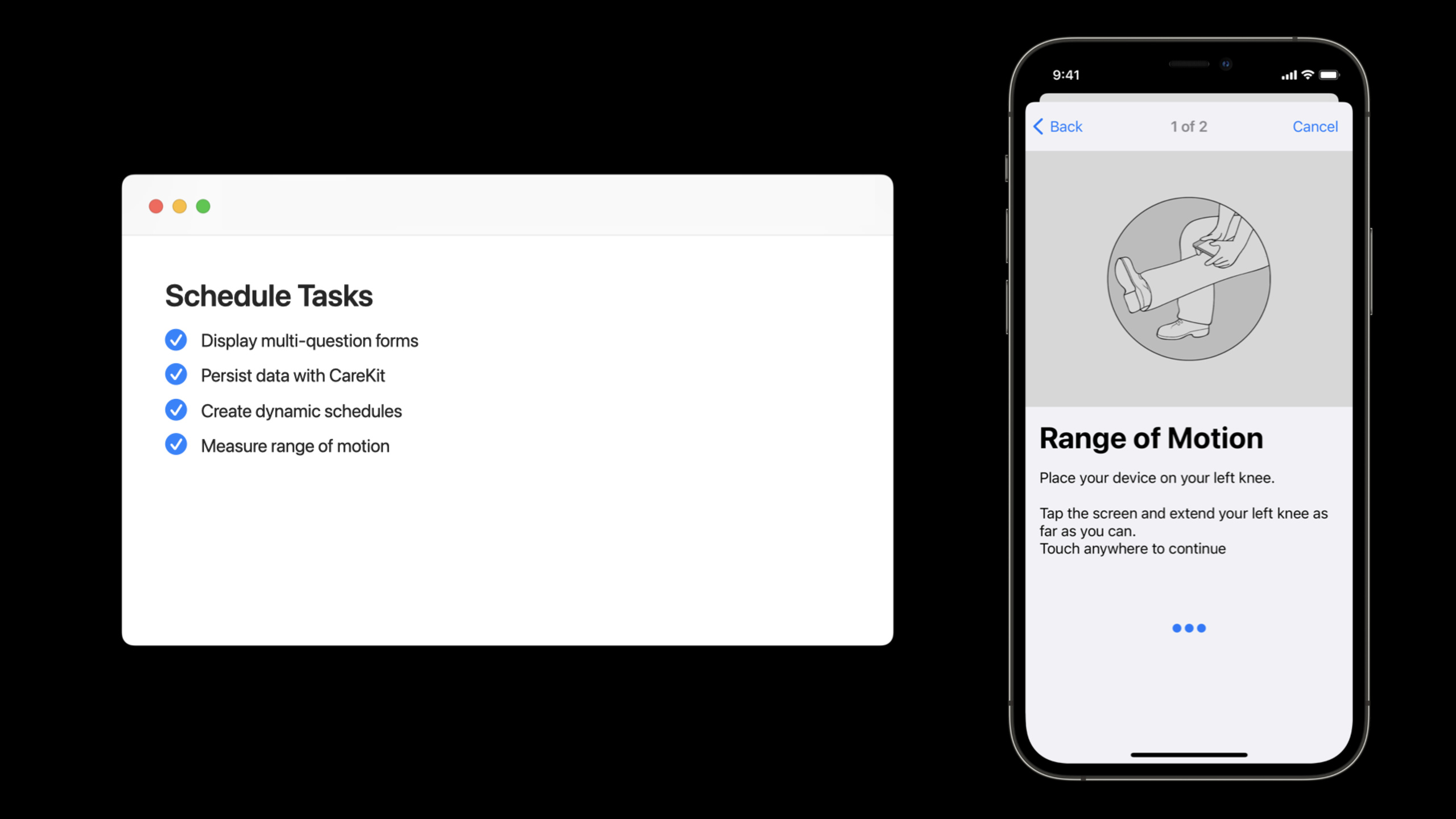
The frequency of rehabilitation sessions usually decreases over time.Jamie’s request is that range of motion measurements be taken daily for the first week, then once a week, and then completely stopped after one month.
CareKitOCKScheduleElementThis composite schedule is supported.Developers can define multiple schedule elements, each element has an independent start time, end time and repeat interval, and then useOCKSchedule.composingCombine them into a complete schedule.
Active Task: Complete Medical Measurements at Home
(12:00)
ResearchKit has built-in joint range of motion (Range of Motion) measurement tasks.The user places the device on the knee according to the on-screen prompts and completes the flexion and extension movements, and the system automatically calculates the activity angle through the sensor.This originally needed to be done in a clinic with the assistance of a therapist, but now patients can measure it themselves at home.
Detailed Content
Create a multi-question form
import ResearchKit

func createCheckInSurvey() -> ORKTask {
    // Define the pain question
    let painItem = ORKFormItem(
        identifier: "pain",
        text: "How much pain are you experiencing?",
        answerFormat: ORKScaleAnswerFormat(
            maximumValue: 10,
            minimumValue: 1,
            defaultValue: 5,
            step: 1,
            vertical: false,
            maximumValueDescription: "Severe",
            minimumValueDescription: "None"
        )
    )
    painItem.isOptional = false

    // Define the sleep question
    let sleepItem = ORKFormItem(
        identifier: "sleep",
        text: "How many hours of sleep did you get?",
        answerFormat: ORKScaleAnswerFormat(
            maximumValue: 12,
            minimumValue: 0,
            defaultValue: 7,
            step: 1,
            vertical: false,
            maximumValueDescription: "12+ hours",
            minimumValueDescription: "None"
        )
    )
    sleepItem.isOptional = false

    // Create the form step
    let formStep = ORKFormStep(
        identifier: "checkin.form",
        title: "Daily Check-In",
        text: "Please answer the following questions."
    )
    formStep.formItems = [painItem, sleepItem]
    formStep.isOptional = false

    // Assemble into an ordered task
    return ORKOrderedTask(identifier: "checkin", steps: [formStep])
}
Key points:
ORKScaleAnswerFormatCreate slider inputs, more suitable for numerical questionnaires than text boxesisOptional = falseEnsure questions cannot be skipped and ensure data integrityORKFormStepCombine multiple questions into one page to reduce user steps
Parse ResearchKit results and convert to CareKit data
import CareKit
import ResearchKit

func extractCheckInOutcomes(
    task: OCKAnyTask,
    result: ORKTaskResult
) -> [OCKOutcomeValue] {
    // Find the form step result from the root result
    guard let formResult = result.stepResult(forStepIdentifier: "checkin.form"),
          let questionResults = formResult.results as? [ORKScaleQuestionResult]
    else {
        return []
    }

    var outcomes: [OCKOutcomeValue] = []

    // Extract the pain score
    if let painResult = questionResults.first(where: { $0.identifier == "pain" }),
       let painValue = painResult.scaleAnswer {
        let painOutcome = OCKOutcomeValue(painValue.doubleValue)
        painOutcome.kind = "pain"
        outcomes.append(painOutcome)
    }

    // Extract sleep duration
    if let sleepResult = questionResults.first(where: { $0.identifier == "sleep" }),
       let sleepValue = sleepResult.scaleAnswer {
        let sleepOutcome = OCKOutcomeValue(sleepValue.doubleValue)
        sleepOutcome.kind = "sleep"
        outcomes.append(sleepOutcome)
    }

    return outcomes
}
Key points:
ORKTaskResultIt is a nested structure and needs to be passedstepResult(forStepIdentifier:)Search down layer by layerOCKOutcomeValueofkindThe attribute is used to subsequently retrieve data by type and is recommended to always be set.- Each question result needs to match the corresponding
identifierto correctly extract
Create a composite schedule
import CareKit

func createRangeOfMotionSchedule() -> OCKSchedule {
    let calendar = Calendar.current
    let thisMorning = calendar.startOfDay(for: Date())
    let nextWeek = calendar.date(byAdding: .day, value: 7, to: thisMorning)!
    let nextMonth = calendar.date(byAdding: .month, value: 1, to: thisMorning)!

    // Week 1: once per day
    let dailyElement = OCKScheduleElement(
        start: thisMorning,
        end: nextWeek,
        interval: DateComponents(day: 1),
        text: "Daily measurement",
        targetValues: [],
        duration: .allDay
    )

    // From week 2 through the end of the month: once per week
    let weeklyElement = OCKScheduleElement(
        start: nextWeek,
        end: nextMonth,
        interval: DateComponents(day: 7),
        text: "Weekly measurement",
        targetValues: [],
        duration: .allDay
    )

    // Combine the two schedule elements
    return OCKSchedule.composing([dailyElement, weeklyElement])
}
Key points:
OCKScheduleElementDefine repetition rules within a time intervalintervaluseDateComponents, supporting multiple granularities such as day, week, month, etc.OCKSchedule.composingCombine multiple elements so that the time intervals between elements do not overlap.- Exceed
endTasks disappear automatically after the date, no need to manually clean up
Using ResearchKit’s built-in range of motion tasks
import ResearchKit

func createRangeOfMotionTask() -> ORKTask {
    var predefinedTask = ORKOrderedTask.kneeRangeOfMotionTask(
        withIdentifier: "rom.left.knee",
        limbOption: .left,
        intendedUseDescription: nil,
        options: [.excludeConclusion]
    )

    // Add a custom completion prompt
    let completionStep = ORKCompletionStep(identifier: "completion")
    completionStep.title = "Great job!"
    completionStep.text = "Keep up the good work with your physical therapy."
    predefinedTask.appendSteps([completionStep])

    return predefinedTask
}
Key points:
ORKOrderedTask.kneeRangeOfMotionTaskis a predefined medical measurement task in ResearchKitlimbOption: .leftSpecify the measurement of the left leg,excludeConclusionRemove default completion prompt- Custom steps can be added to make the prompts more suitable for specific application scenarios.
Core Takeaways
-
What to do: Create a home follow-up app for patients with chronic diseases to replace paper diaries Why it’s worth doing: ResearchKit’s forms and active tasks standardize data collection, and CareKit’s calendar system automates follow-up planning. How to start: From
ORKFormStepStart by designing a daily questionnaire, useOCKScheduleManage reminder frequency -
What to do: Add joint mobility or gait analysis functions to health apps Why it’s worth doing: ResearchKit has a variety of built-in medical measurement tasks, so developers don’t need to implement sensor algorithms themselves. How to start: Call
ORKOrderedTask.kneeRangeOfMotionTaskorORKOrderedTask.walkingTask,passORKTaskResultExtract measurement data -
What: Construct a rehabilitation training program that supports tapered frequency Why it’s worth it: CareKit’s composite schedule can be used with multiple
OCKScheduleElementSplice together any complex timing rules How to start: Define multiple schedule elements and set differentstart、endandinterval,useOCKSchedule.composingmerge -
What to do: Connect ResearchKit questionnaire data with HealthKit Why it’s worth doing: Pain scores, sleep quality and other data can be written into HealthKit to form a complete picture with other health data How to start: In
extractCheckInOutcomesAdd HealthKit writing logic, useHKQuantityTypeSave value
Related Sessions
- Build a research and care app, part 1: Getting started — The first part of the Code-along series, building onboarding and consent processes
- Build a research and care app, part 3: Visualize progress — Part 3 of the Code-along series, using CareKit to visualize recovery progress
- What’s new in HealthKit — New features of HealthKit, data interoperability with CareKit
Comments
GitHub Issues · utterances