
Highlight
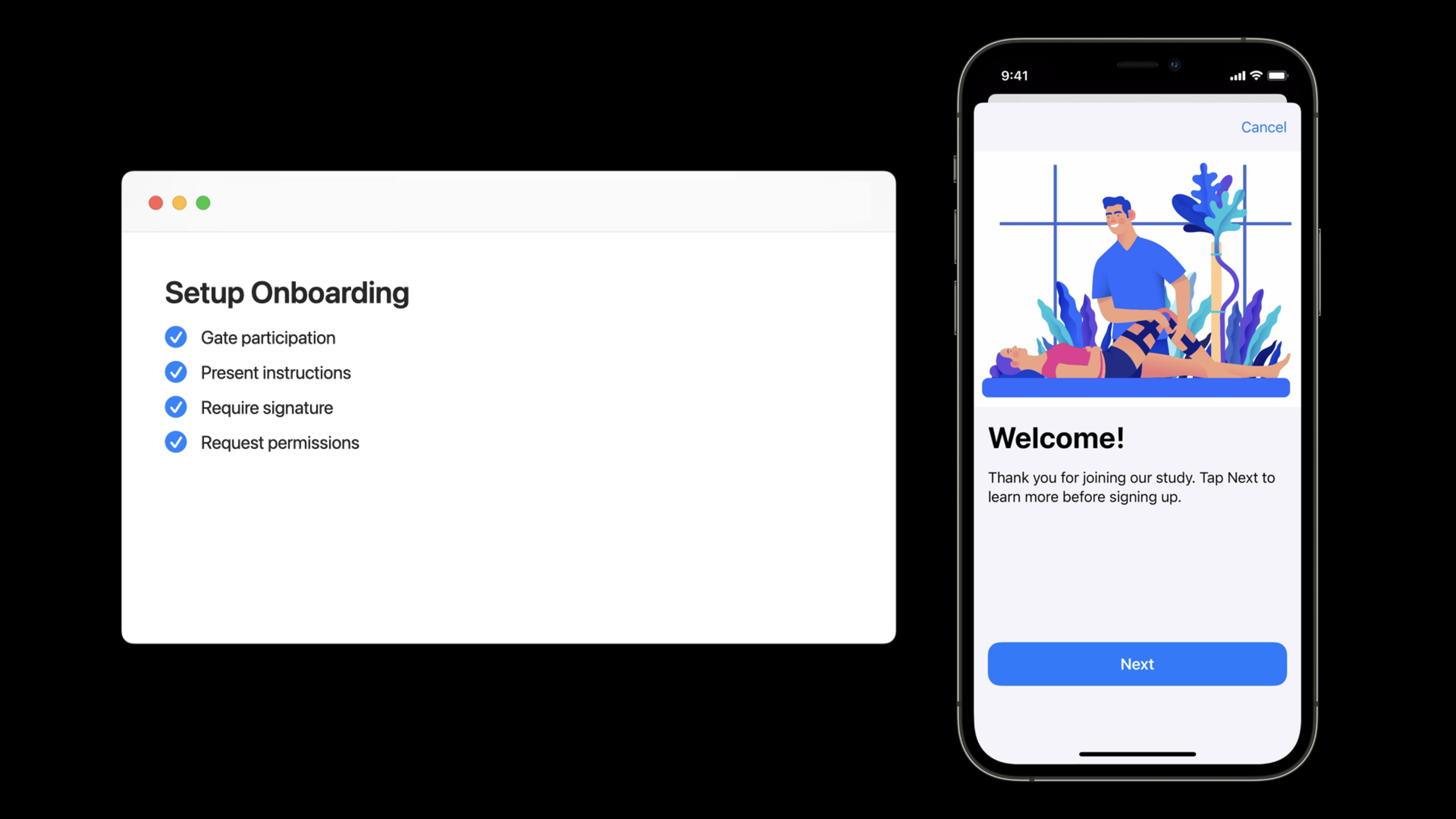
ResearchKit and CareKit are used together to embed the ResearchKit survey process in the CareKit task card to achieve gated onboarding of “informed consent must be completed to access the Care plan”, while supporting unified requests for HealthKit, notification and device movement permissions.
Core Content
Two core requirements for healthcare research applications: collecting participant data (ResearchKit) and ongoing management of care plans (CareKit).In the past, these two frameworks were often used separately, and iOS 15 starts to show how to combine them.
The specific scenario is this: a physical therapy research app (called Recover) helps participants perform rehabilitation exercises after knee surgery.New users must complete informed consent before they can see specific rehabilitation tasks.This process is implemented in ResearchKit, but embedded in CareKit’s interface.
Key design points:
- Onboarding tasks are displayed repeatedly every day until completed
- Other tasks will not appear in the Care Feed until completed
- Signatures and permission requests are integrated into one process
Persisting Onboarding tasks in CareKit Store
(05:39)
First create a CareKit task in AppDelegate and persist it to the Store:
// Create a daily repeating schedule
let dailySchedule = OCKSchedule.dailyAtTime(
    hour: 8, minutes: 0,
    start: Date(), end: nil,
    text: "Please complete this before 8 AM each day"
)

// Create the task
let onboardingTask = OCKTask(
    id: TaskID.onboarding,
    title: "Consent and onboarding",
    carePlanUUID: UUID(),
    schedule: dailySchedule
)
onboardingTask.instructions = "Please read and agree to the study terms"
onboardingTask.impactsAdherence = false  // Does not affect the completion ring

// Persist to the Store
store.addTaskAndWait(onboardingTask) { result in
    switch result {
    case .success:
        print("Onboarding task added successfully")
    case .failure(let error):
        print("Failed to add onboarding task: \(error)")
    }
}
Key points:
OCKSchedule.dailyAtTimeCreate daily recurring scheduleimpactsAdherence = falseLet this task not count towards completion- The task ID must be unique and used for subsequent queries
Check Onboarding completion status
(07:20)
In CareFeedViewController, decide which tasks to display based on whether onboarding is completed:
func checkIfOnboardingIsComplete(completion: @escaping (Bool) -> Void) {
    let query = OCKOutcomeQuery()
    query.taskIDs = [TaskID.onboarding]

    store.fetchOutcomes(query: query) { outcomes, error in
        guard error == nil else {
            completion(false)
            return
        }

        // If an outcome is found, the task is complete
        completion(!(outcomes?.isEmpty ?? true))
    }
}

// Use in the prepare method
override func prepareListViewController(
    _ listViewController: OCKListViewController,
    for date: Date
) {
    checkIfOnboardingIsComplete { [weak self] isComplete in
        guard let self = self else { return }

        if isComplete {
            // Show all tasks
            self.appendAllTasks(to: listViewController, for: date)
        } else {
            // Show only onboarding tasks
            self.appendOnboardingTask(to: listViewController)
        }
    }
}
Key points:
OCKOutcomeQueryQuery task completion records- No outcome means the user has not finished yet
- The query is asynchronous and needs to be handled in the completion handler
Create a ResearchKit Onboarding survey
(09:31)
Create a five-step onboarding process in Surveys.swift:
func createOnboardingSurvey() -> ORKTask {
    // Step 1: welcome page
    let welcomeStep = ORKInstructionStep(
        identifier: "onboarding.welcome"
    )
    welcomeStep.title = "Welcome to the Recover study"
    welcomeStep.detailText = "The goal of this study is to support post-surgical recovery"
    welcomeStep.image = UIImage(named: "welcome_header")

    // Step 2: informed explanation (icon-based bullet list)
    let consentStep = ORKInstructionStep(
        identifier: "onboarding.consent"
    )
    consentStep.title = "Informed Consent"
    consentStep.detailText = "Participating in this study requires you to understand the following information"

    // Use SF Symbols as bullets
    let healthDataItem = ORKBodyItem(
        text: "You will be asked to share health data",
        detailText: nil,
        image: UIImage(systemName: "heart.fill"),
        learnMoreItem: nil,
        bulletPoint: true
    )

    let tasksItem = ORKBodyItem(
        text: "You need to complete assigned recovery tasks",
        detailText: nil,
        image: UIImage(systemName: "checkmark.circle.fill"),
        learnMoreItem: nil,
        bulletPoint: true
    )

    let signatureItem = ORKBodyItem(
        text: "You need to provide a signature to indicate consent",
        detailText: nil,
        image: UIImage(systemName: "signature"),
        learnMoreItem: nil,
        bulletPoint: true
    )

    let privacyItem = ORKBodyItem(
        text: "Your data will be stored securely",
        detailText: "All data is encrypted",
        image: UIImage(systemName: "lock.fill"),
        learnMoreItem: nil,
        bulletPoint: true
    )

    consentStep.bodyItems = [
        healthDataItem,
        tasksItem,
        signatureItem,
        privacyItem
    ]

    // Step 3: signature (HTML informed consent form)
    let signatureStep = ORKWebViewStep(
        identifier: "onboarding.signature",
        html: getConsentDocumentHTML()
    )
    signatureStep.showSignatureAfterContent = true

    // Step 4: permission request
    let healthTypesToWrite: Set<HKSampleType> = [
        HKObjectType.quantityType(forIdentifier: .stepCount)!
    ]
    let healthTypesToRead: Set<HKSampleType> = [
        HKObjectType.quantityType(forIdentifier: .activeEnergyBurned)!
    ]

    let healthPermission = ORKHealthKitPermissionType(
        typesToWrite: healthTypesToWrite,
        typesToRead: healthTypesToRead
    )

    let notificationPermission = ORKNotificationPermissionType()
    let motionPermission = ORKMotionActivityPermissionType()

    let permissionsStep = ORKRequestPermissionsStep(
        identifier: "onboarding.permissions"
    )
    permissionsStep.permissionTypes = [
        healthPermission,
        notificationPermission,
        motionPermission
    ]

    // Step 5: completion page
    let completionStep = ORKCompletionStep(
        identifier: "onboarding.completion"
    )
    completionStep.title = "Thank you for participating"
    completionStep.detailText = "You can now start using the Recover app"

    // Assemble into an ordered task
    return ORKOrderedTask(
        identifier: "onboarding",
        steps: [
            welcomeStep,
            consentStep,
            signatureStep,
            permissionsStep,
            completionStep
        ]
    )
}
Key points:
ORKInstructionStepUsed to display descriptive textORKBodyItemSupport SF Symbol as bullet symbolORKWebViewStepofshowSignatureAfterContent = trueShow signature box- New in iOS 15
ORKNotificationPermissionTypeandORKMotionActivityPermissionType
Display ResearchKit surveys in CareKit
(11:59)
Use the newly introducedOCKSurveyTaskViewController:
func appendOnboardingTask(
    to listViewController: OCKListViewController
) {
    // Create the event query
    let eventQuery = OCKEventQuery(
        for: Date(),
        taskIDs: [TaskID.onboarding]
    )

    // Create the survey task view controller
    let surveyVC = OCKSurveyTaskViewController(
        taskID: TaskID.onboarding,
        eventQuery: eventQuery,
        storeManager: storeManager,
        survey: createOnboardingSurvey(),
        resultHandler: { result in
            // Convert ResearchKit results into CareKit outcome values
            let dateAnswer = result.results?.first(where: {
                $0.identifier == "onboarding.completion"
            }) as? ORKDateQuestionResult

            let outcomeValue = OCKOutcomeValue(
                dateAnswer?.dateAnswer ?? Date()
            )

            return [outcomeValue]
        }
    )

    surveyVC.delegate = self

    // Create the task card and add it to the list
    let card = OCKSimpleTaskView(
        taskID: TaskID.onboarding,
        eventQuery: eventQuery,
        owner: self
    )
    card.controller = surveyVC

    listViewController.appendView(card)
}
Key points:
OCKSurveyTaskViewControllerDesigned specifically for displaying ResearchKit surveys in CareKitresultHandlerThe closure is responsible for converting ResearchKit results into CareKit outcomes -Set delegate to listen for completion event
Process Onboarding completion and refresh the interface
(12:49)
Implement the delegate method to refresh the feed when the user completes onboarding:
extension CareFeedViewController: OCKSurveyTaskViewControllerDelegate {
    func surveyTaskViewController(
        _ viewController: OCKSurveyTaskViewController,
        didFinish task: ORKTask,
        with result: TaskResult
    ) {
        // Check whether it completed successfully (the user did not cancel)
        guard case .success = result else {
            return
        }

        // Reload the feed and show other tasks
        reload()
    }

    func surveyTaskViewController(
        _ viewController: OCKSurveyTaskViewController,
        didCancel task: ORKTask
    ) {
        // The user canceled; no special handling is needed
    }
}
Key points:
reload()Refresh the entire calendar page- After completion, the onboarding card no longer displays and other tasks start to appear.
- Cancellation by the user is not considered completed, and onboarding will still be displayed next time it is opened.
Detailed Content
HTML informed consent form format
The HTML document required for the signing step should contain the complete legal text:
func getConsentDocumentHTML() -> String {
    return """
    <!DOCTYPE html>
    <html>
    <head>
        <meta charset="utf-8">
        <meta name="viewport" content="width=device-width, initial-scale=1.0">
        <style>
            body { font-family: -apple-system; padding: 20px; }
            h1 { color: #007aff; }
            .section { margin: 20px 0; }
        </style>
    </head>
    <body>
        <h1>Recover Study Informed Consent Form</h1>

        <div class="section">
            <h2>1. Study Purpose</h2>
            <p>This study evaluates the effect of physical therapy on recovery after knee surgery.</p>
        </div>

        <div class="section">
            <h2>2. Data Collection</h2>
            <p>We will collect your health data, including daily step count, active energy, and more.</p>
        </div>

        <div class="section">
            <h2>3. Privacy Protection</h2>
            <p>All data is encrypted and accessible only to the study team.</p>
        </div>

        <div class="section">
            <h2>4. Voluntary Participation</h2>
            <p>You may leave the study at any time without affecting any medical care.</p>
        </div>
    </body>
    </html>
    """
}
Key points:
- Use HTML5 standard format
- Can inline CSS styles
- The signature box will automatically appear below the content
HealthKit permission type description
When requesting HealthKit permissions, you need to explicitly specify the type you want to read and write:
| Category | Common types | Usage |
|---|---|---|
| Sports data | stepCount、distanceWalkingRunning | Activity statistics |
| Physical fitness index | activeEnergyBurned、basalEnergyBurned | Calorie consumption |
| Health Indicators | heartRate、bloodPressure | Physiological indicators |
| Sleep data | sleepAnalysis | Sleep quality |
Key points:
- Request only required data types
- Clearly state the purpose of each data in the informed consent form
- Users can revoke permissions at any time in settings
Core Takeaways
- gated onboarding for medical research
- What to do: User must complete informed consent to access the main features of the App
- Why it’s worth doing: Medical research must obtain explicit consent from participants, otherwise there are legal risks.Gated onboarding ensures each user has read the consent form
- How to start: Use ResearchKit to create a consent process, and query the outcome status in CareKit to control content display
- Use SF Symbol to optimize the readability of information notes
- What to do: In
ORKInstructionStepofbodyItemsUse SF Symbol instead of normal bullets in - Why it’s worth it: Medical/legal texts are often difficult to understand, visual elements can aid understanding and reduce user abandonment rates
- How to get started: Create
ORKBodyItemwhen passed inUIImage(systemName:)
- Integrated HealthKit, notifications and motion permission requests
- What to do: Request all required permissions in one go during the onboarding process
- Why it’s worth doing: Dispersed permission requests interrupt the user experience, unified requests make more sense in the context of informed consent
- How to start: Use
ORKRequestPermissionsStepcombinationORKHealthKitPermissionType、ORKNotificationPermissionType、ORKMotionActivityPermissionType
- Make a verifiable electronic signature
- What to do: Use
ORKWebViewStepCollect user signatures and save them in CareKit outcome - Why it’s worth it: Electronic signatures are legally binding and more formal than a simple “I agree” button
- How to start:
showSignatureAfterContent = true+ HTML consent document
- Guide a personalized rehabilitation plan
- What to do: Ask the user about their recovery goals at the end of onboarding, and then customize CareKit tasks based on the goals.
- Why it’s worth it: Personalized care plans can significantly improve user engagement and recovery outcomes
- How to start: Add a completion step before
ORKFormStepCollect user preferences, store them in outcome and use them for task scheduling
Related Sessions
- Build a research and care app, part 2: Schedule tasks — Part 2 explains how to use CareKit to schedule rehabilitation tasks
- Build a research and care app, part 3: Visualize progress — Part 3 explains data visualization and progress tracking
- What’s new in ResearchKit and CareKit — ResearchKit and CareKit’s annual update summary
- Create charts and insights with CareKit — Detailed explanation of CareKit chart function
Comments
GitHub Issues · utterances