
Highlight
iOS 15 introduces Recurring Leaderboards, which are automatically reset according to developer-defined cycles (hourly, daily, weekly). Players can view the rankings of the current cycle and historical cycles, and the system automatically manages the occurrence life cycle.
Core Content
Traditional rankings are permanent, and new players can never catch up with early players.The game can only make its own temporary activity rankings, which has complex logic and requires server support.
iOS 15’s recurring leaderboards let the system do this for you.Configure once in App Store Connect, and the system creates new occurrences on a regular basis.For example, the daily ranking list: a new round will automatically start at 0:00 every day, the data of the previous day is archived, and players can still view the historical rankings within 30 days.
This solves several practical problems:
- New players have a fair chance to compete every cycle
- You don’t need to develop your own rankings to do regular activities
- Players can see their progress or regression across cycles
Configure in App Store Connect
(06:59)
Go to App Store Connect → Your App → Features → Game Center → Leaderboards → Click “+” → Select Recurring Leaderboard.
Basic configuration fields:
| Field | Description | Example |
|---|---|---|
| Reference Name | Name used internally by App Store Connect | DailyHighScore |
| Leaderboard ID | ID referenced in the code | daily_high_score |
| Score Format Type | Score display format | Integer, Time, Money |
| Score Submission Type | Which score to take when submitting multiple times | Best (highest score) or Most Recent |
| Sort Order | Sort by | High to Low (high score first) |
| Score Range | Valid score range | Minimum value 0, maximum value 200 |
** Exclusive fields for cycle rankings: **
| Field | Description |
|---|---|
| Start Date and Time | The start time of the first occurrence (UTC) |
| Duration | The duration of a single occurrence |
| Restarts Every | How often new occurrences are created |
Key points:
Restarts EveryMust ≥Duration, ensuring occurrences do not overlap- If you want to loop continuously without any interval, set
Restarts Every = Duration - Cannot select a time in the past as the start time
Localization configuration:
Configure information for at least one language:
- Display Name: The name displayed in the Game Center UI
- Score Format: Thousands separator (comma or period)
- Score Format Suffix: Score unit (such as “points”)
- Leaderboard Image: Optional but recommended to upload to enhance brand recognition
Authenticate local players
(10:35)
Before using any Game Center features, local players need to be authenticated:
func authenticateLocalPlayer() {
    GKLocalPlayer.local.authenticateHandler = { viewController, error in
        if let viewController = viewController {
            // Need to show the sign-in UI
            self.present(viewController, animated: true)
        } else if GKLocalPlayer.local.isAuthenticated {
            // Authentication succeeded
            print("Authenticated successfully")
        } else {
            // Authentication failed
            print("Authentication failed: \(error?.localizedDescription ?? "unknown")")
        }
    }
}
Key points:
- exist
applicationDidFinishLaunchingWithOptionscall in authenticateHandlerIt is global and only set once- Authentication is asynchronous and the system login interface may pop up.
Submit scores to the recurring leaderboard
(11:16)
There are two submission methods: class methods and instance methods.
Class method (recommended for simple scenarios):
func submitScore(_ score: Int) {
    GKLeaderboard.submitScore(score,
                              leaderboard: "DailyHighScore",
                              playerScope: .global,
                              timeScope: .allTime)
}
Key points:
- Scores will be submitted to the currently active occurrence
- If there is no active occurrence, the submission will fail
timeScopeFor looping leaderboards must be.allTime
Instance method (make sure not to span occurrences):
func submitScoreSafely(_ score: Int) {
    // Load the current occurrence first
    GKLeaderboard.loadLeaderboards(IDs: ["DailyHighScore"]) { leaderboards, error in
        guard let leaderboard = leaderboards?.first else { return }

        // Submit in the completion handler
        leaderboard.submitScore(score,
                                playerScope: .global,
                                timeScope: .allTime)
    }
}
Key points:
- load first
GKLeaderboardExample and submit again - Ensure scores are submitted to the same occurrence
- Suitable for scenarios with extremely high timeliness requirements (such as hourly challenges)
Display Game Center system rankings
(12:57)
@IBAction func showLeaderboardVC(_ sender: UIButton) {
    let vc = GKGameCenterViewController(leaderboardID: "DailyHighScore",
                                       playerScope: .global,
                                       timeScope: .allTime)
    vc.gameCenterDelegate = self
    present(vc, animated: true)
}

extension TitleScreenViewController: GKGameCenterViewControllerDelegate {
    func gameCenterViewControllerDidFinish(_ gameCenterViewController: GKGameCenterViewController) {
        gameCenterViewController.dismiss(animated: true)
    }
}
Key points:
playerScopehave.global(global) and.friendsOnly(Friends only) Two types- Cycling ranking list
timeScopefixed to.allTime - accomplish
gameCenterViewControllerDidFinishprocessing closed
Show real-time rankings
(16:19)
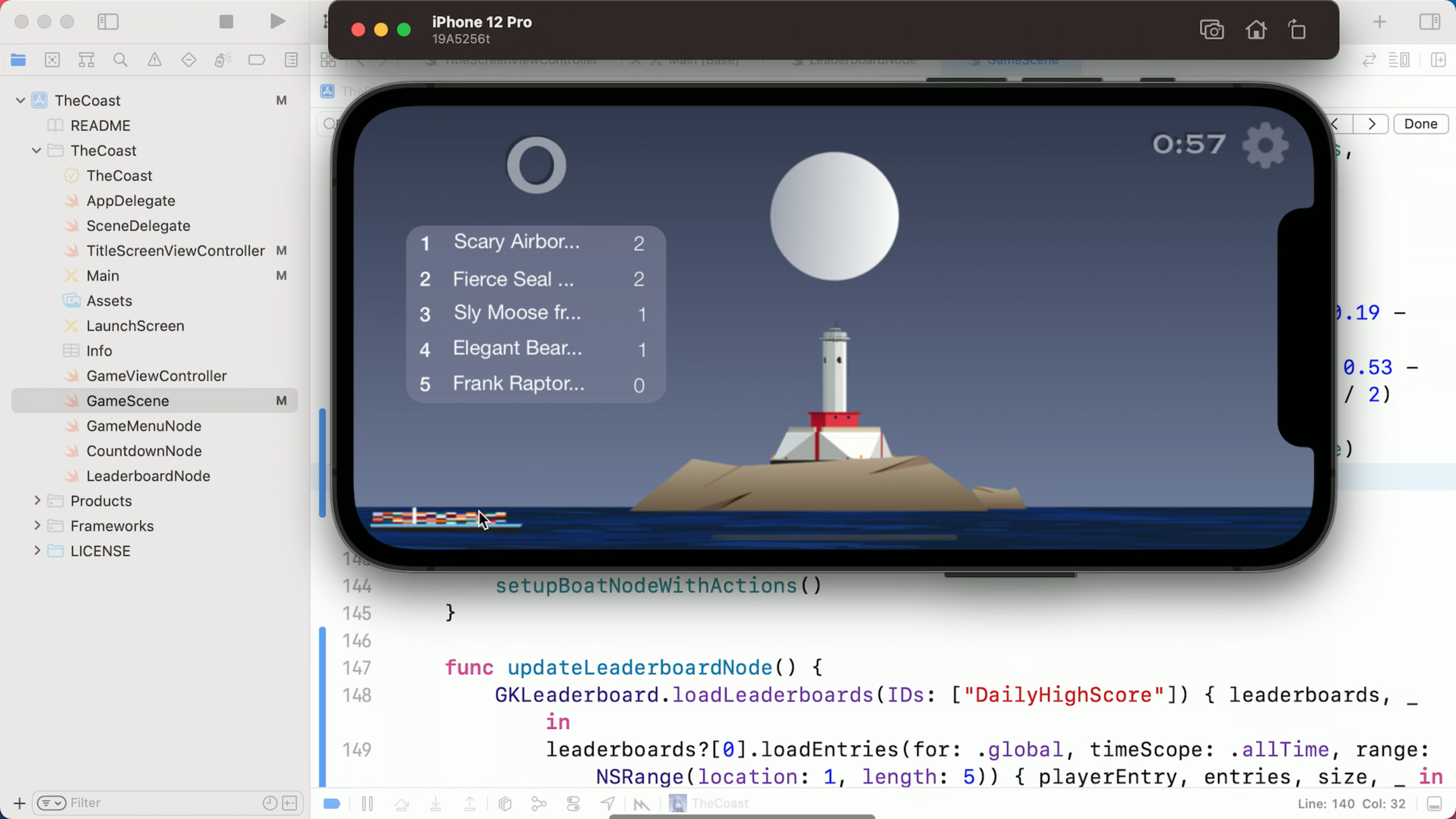
Displays the current real-time ranking of the top 5 during the game:
func updateLeaderboardNode() {
    // Load the leaderboard
    GKLeaderboard.loadLeaderboards(IDs: ["DailyHighScore"]) { leaderboards, error in
        guard let leaderboard = leaderboards?.first else { return }

        // Load the top 5 entries
        leaderboard.loadEntries(for: .global,
                              timeScope: .allTime,
                              range: NSRange(location: 1, length: 5)) { entries, error in
            guard let entries = entries else { return }

            // Convert to a custom Entry structure
            let leaderboardEntries = entries.1.map { entry in
                LeaderboardEntry(name: entry.player.displayName,
                               score: entry.score)
            }

            // Update the UI
            self.leaderboardNode?.updateEntries(leaderboardEntries)
        }
    }
}

// Call this on every score update
func submitScore(_ score: Int) {
    GKLeaderboard.submitScore(score,
                              leaderboard: "DailyHighScore",
                              playerScope: .global,
                              timeScope: .allTime)

    // Update the live leaderboard
    updateLeaderboardNode()
}
Key points:
loadEntries(for:timeScope:range:)ofrangeParameter controls the ranking range obtainedentriesis a tuple(totalPlayerCount, entryArray)- exist
submitScoreCalled in completion to keep the rankings updated in real time
Compare current and historical rankings
(21:01)
Use Swift async/await to simplify cross-cycle ranking comparisons:
func addRankToGameMenu() async {
    do {
        // Load the current occurrence
        let leaderboard = try await GKLeaderboard.loadLeaderboards(IDs: ["DailyHighScore"]).first

        // Load the current rank and previous rank concurrently
        async let currentEntries = leaderboard?.loadEntries(for: .global,
                                                           timeScope: .allTime)
        async let previousLeaderboard = leaderboard?.loadPreviousOccurrence()
        async let previousEntries = previousLeaderboard?.loadEntries(for: .global,
                                                                     timeScope: .allTime)

        // Wait for the results
        let (_, currentPlayerEntries) = try await currentEntries ?? ([], [])
        let (_, previousPlayerEntries) = try await previousEntries ?? ([], [])

        // Extract the local player rank
        let currentRank = currentPlayerEntries.first?.rank
        let previousRank = previousPlayerEntries.first?.rank

        // Show the rank change
        gameMenuNode.addRankNode(currentRank: currentRank,
                                 previousRank: previousRank)

    } catch {
        print("Error loading ranks: \(error.localizedDescription)")
    }
}

// Call this when the game ends
func timeIsUp() {
    // ...
    Task {
        await addRankToGameMenu()
    }
}
Key points:
loadPreviousOccurrence()Load the most recently ended occurrenceasync letImplement concurrent loading and improve performance- Players can view historical occurrence data within 30 days
Detailed Content
How the looping leaderboard works
The system automatically creates occurrences according to the configured period:
Start Date: June 11, 9:00 AM
Duration: 1 day
Restarts Every: 1 day

Occurrence 1: June 11, 9:00 AM → June 12, 9:00 AM
Occurrence 2: June 12, 9:00 AM → June 13, 9:00 AM
Occurrence 3: June 13, 9:00 AM → June 14, 9:00 AM
...
Key points:
- Each occurrence is an independent leaderboard instance
- Scores cannot be submitted after the occurrence expires
- Expired occurrence data is retained for 30 days
Use of Context parameters
submitScoremethod supportcontextParameters, used to store game-specific information:
let context = 0  // can be any integer
GKLeaderboard.submitScore(score,
                          leaderboard: "DailyHighScore",
                          playerScope: .global,
                          timeScope: .allTime,
context: context)contextCommon uses of:
- Record the character/difficulty used when submitting scores
- Mark special events (such as double score periods)
- Verify score legitimacy
Error handling
Common errors and their causes:
GKErrorInvalidPlayer: Player is not authenticatedGKErrorInvalidScope:timeScopeSetting errorGKErrorInvalidArgument: The score exceeds the configured valid rangeGKErrorAuthenticationFailed: Network problem or authentication failure
Core Takeaways
- Do daily challenge activities
- What to do: A new ranking list will be opened at 0:00 every day for 24 hours. The theme can be “Highest Combo”, “Fastest Clearance”, etc.
- Why it’s worth doing: Fixed period activities can cultivate players’ habits, and daily activity will form a natural peak.Looping ranking list with zero server cost
- How to start: App Store Connect configures a 24-hour cycle ranking list, and displays the countdown and current ranking in the game
- Make a season-based arena
- What to do: A new season ranking will be opened every month, and rewards will be issued based on the ranking at the end of the season.
- Why it’s worth doing: The season system allows players to have clear participation goals and time pressure, which can stimulate competition more than permanent rankings.
- How to start:
Duration = 30 days, used at the end of the seasonloadPreviousOccurrenceRead champion data and distribute rewards
- Visualize cross-cycle progress
- What to do: At the end of the game, show the player’s ranking compared to the previous period: “Up 15” or “Down 3”
- Why it’s worth doing: Allowing players to see their own growth trajectory gives them a greater sense of accomplishment than simply displaying their current rankings.
- How to start: Comparison
loadEntriesthe current occurrence of andloadPreviousOccurrenceranking
- Friend Relay Ranking
- What to do: The theme of the weekly rankings is “Brush points with friends”, calculate the total score or the highest score of friends
- Why it’s worth doing: Social incentives are more effective than pure competition. Players will actively invite friends to participate.
- How to start: Use Friends API to get the friend list, and then
playerScope: .friendsOnlyShown in the rankings
- Do limited time challenge mode
- WHAT TO DO: Start a 15-minute speed challenge every hour to see who can score the most within the time limit
- Why it’s worth doing: High-frequency, short-cycle activities can significantly increase user stickiness, and players will come back on time to participate.
- How to start:
Duration = 15 minutes,Restarts Every = 1 hour, the game displays the countdown to the next challenge
Related Sessions
- What’s new in Game Center: Widgets, friends, and multiplayer improvements — Game Center new features for the year
- Support real-time and turn-based multiplayer with Game Center — Detailed explanation of multiplayer game technology
- Tap into Game Center: Leaderboards, achievements, and multiplayer — The Complete Guide to Leaderboards and Achievements (2020)
Comments
GitHub Issues · utterances