
Highlight
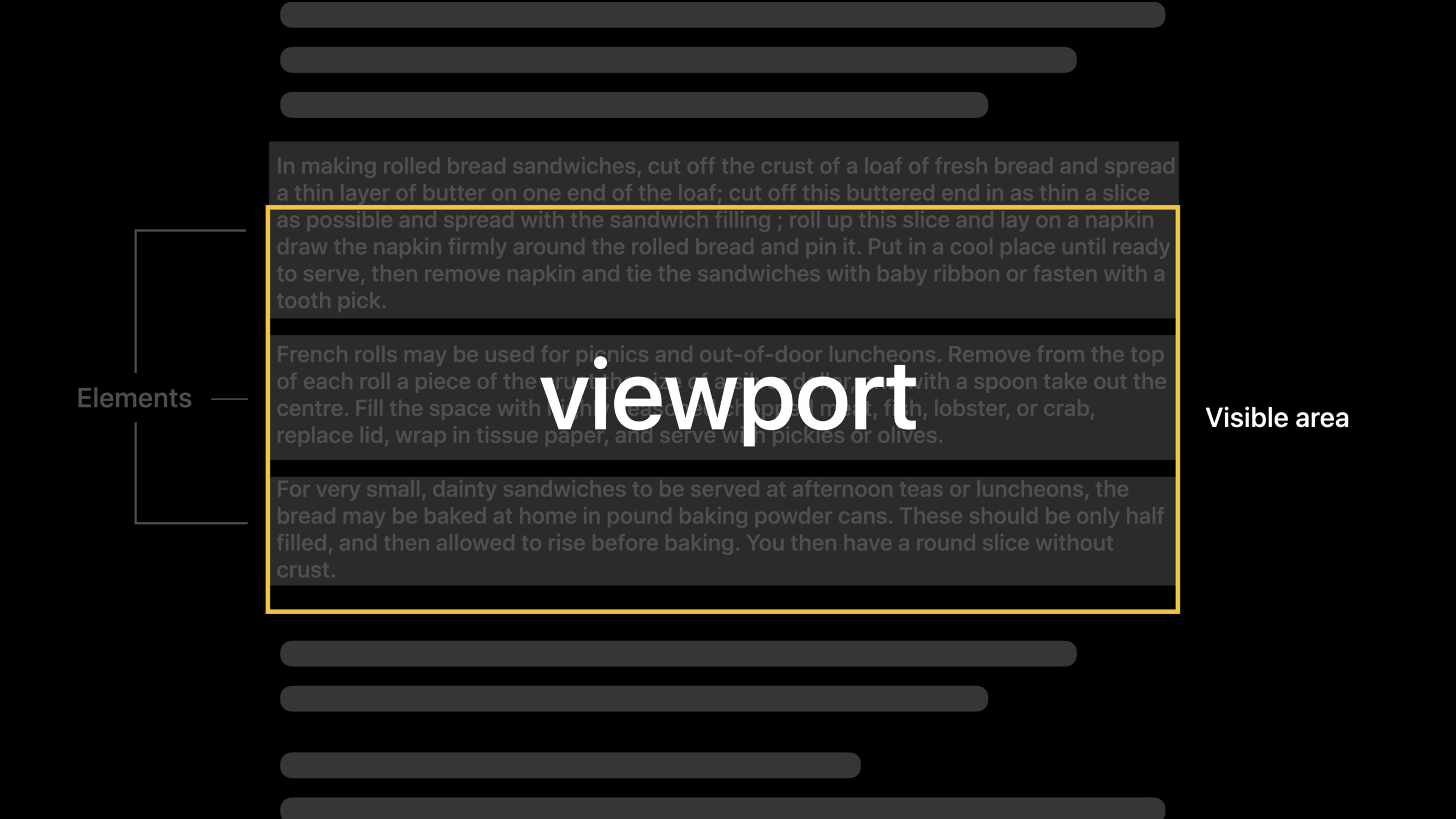
TextKit 2 is Apple’s next-generation text engine, based on three core design principles: correctness (abstracting glyph processing), safety (emphasis on value semantics), and performance (viewport-based layout and rendering).
Core Content
TextKit 1 started with OpenStep, over 20 years old.It drives text display on all Apple platforms, but is constrained by its original design and struggles to integrate well with modern technology.TextKit 2 in Big Sur has quietly powered many of the text components in the system.
TextKit 2 and TextKit 1 coexist, both built on Foundation, Quartz, and Core Text.It retains the MVC design: views have new versions and more components in UIKit/AppKit, model layer and controller layer.
Three core design principles: Correctness abstract glyph processing, Safety emphasize value semantics, and Performance use viewport-based layout and rendering.
Detailed Content
Responsive layout update
(32:22)
func textViewportLayoutControllerWillLayout(_ controller: NSTextViewportLayoutController) {
    contentLayer.sublayers = nil
    CATransaction.begin()
}
Key points:
textViewportLayoutControllerWillLayoutCalled before layout starts- Clear the sublayer and start a new CATransaction
- Prepare for layout updates
func textViewportLayoutController(_ controller: NSTextViewportLayoutController,
                                  configureRenderingSurfaceFor textLayoutFragment: NSTextLayoutFragment) {
    let (layer, layerIsNew) = findOrCreateLayer(textLayoutFragment)
    if !layerIsNew {
        let oldPosition = layer.position
        layer.updateGeometry()
        if oldPosition != layer.position {
            animate(layer, from: oldPosition, to: layer.position)
        }
    }
    contentLayer.addSublayer(layer)
}
Key points:
configureRenderingSurfaceForConfigure rendering surfaces for each layout fragment- Can track existing layers and only update position changes
- Animated position changes to provide a smooth visual experience
func textViewportLayoutControllerDidLayout(_ controller: NSTextViewportLayoutController) {
    CATransaction.commit()
    updateSelectionHighlights()
    updateContentSizeIfNeeded()
    adjustViewportOffsetIfNeeded()
}
Key points:
textViewportLayoutControllerDidLayoutCalled after layout is complete- Submit CATransaction to update selection highlighting, content size, etc. -Complete layout cycle
Override text attribute display
(33:47)
func textContentStorage(_ textContentStorage: NSTextContentStorage, textParagraphWith range: NSRange) -> NSTextParagraph? {
    var paragraphWithDisplayAttributes: NSTextParagraph? = nil

    let originalText = textContentStorage.textStorage!.attributedSubstring(from: range)
    if originalText.attribute(.commentDepth, at: 0, effectiveRange: nil) != nil {
        let displayAttributes: [NSAttributedString.Key: AnyObject] = [
            .font: commentFont,
            .foregroundColor: commentColor
        ]
        let textWithDisplayAttributes = NSMutableAttributedString(attributedString: originalText)
        let rangeForDisplayAttributes = NSRange(location: 0, length: textWithDisplayAttributes.length - 2)
        textWithDisplayAttributes.addAttributes(displayAttributes, range: rangeForDisplayAttributes)

        paragraphWithDisplayAttributes = NSTextParagraph(attributedString: textWithDisplayAttributes)
    }
    return paragraphWithDisplayAttributes
}
Key points:
textParagraphWithMethod allows overriding display properties without modifying the original text storage- Suitable for scenarios where you need to temporarily change the style but do not want to pollute the original data
- return
niluse the original paragraph when
Hide specific elements
(34:06)
func textContentManager(_ textContentManager: NSTextContentManager,
                        shouldEnumerate textElement: NSTextElement,
                        with options: NSTextElementProviderEnumerationOptions) -> Bool {
    if !showComments {
        if let paragraph = textElement as? NSTextParagraph {
            let commentDepthValue = paragraph.attributedString.attribute(.commentDepth, at: 0, effectiveRange: nil)
            if commentDepthValue != nil {
                return false
            }
        }
    }
    return true
}
Key points:
shouldEnumerateDetermine whether to enumerate specific elements to participate in layout- return
falseLayout and rendering of this element will be skipped - Functions such as showing/hiding comments can be realized
Generate custom layout fragments
(34:28)
func textLayoutManager(_ textLayoutManager: NSTextLayoutManager,
                       textLayoutFragmentFor location: NSTextLocation,
                       in textElement: NSTextElement) -> NSTextLayoutFragment {
    let index = textLayoutManager.offset(from: textLayoutManager.documentRange.location, to: location)
    let commentDepthValue = textContentStorage!.textStorage!.attribute(.commentDepth, at: index, effectiveRange: nil) as? NSNumber

    if commentDepthValue != nil {
        let layoutFragment = BubbleLayoutFragment(textElement: textElement, range: textElement.elementRange)
        layoutFragment.commentDepth = commentDepthValue!.uintValue
        return layoutFragment
    } else {
        return NSTextLayoutFragment(textElement: textElement, range: textElement.elementRange)
    }
}
Key points:
textLayoutFragmentForAllows returning custom layout fragments for specific locations- Different fragment types can be returned based on text attributes
- Custom fragments can achieve special rendering effects (such as bubbles)
Draw bubble background
(34:58)
override func draw(at renderingOrigin: CGPoint, in ctx: CGContext) {
    ctx.saveGState()
    let bubblePath = createBubblePath(with: ctx)
    ctx.addPath(bubblePath)
    ctx.setFillColor(bubbleColor.cgColor)
    ctx.fillPath()
    ctx.restoreGState()

    super.draw(at: renderingOrigin, in: ctx)
}
Key points:
- In customization
NSTextLayoutFragmentOverriding in subclassesdrawmethod - First draw a custom background (such as bubbles) and then call
super.drawdraw text - use
CGPath(roundedRect:cornerWidth:cornerHeight:)Create a rounded rectangular path
Switch NSTextView to TextKit 2
(37:26)
var scrollView: NSScrollView!
var containerSize = CGSize.zero
var textContainer = NSTextContainer()
var textContentStorage = NSTextContentStorage()

override func viewDidLoad() {
    super.viewDidLoad()

    scrollView = NSScrollView(frame: view.bounds)
    view.addSubview(scrollView)

    setUpScrollView(scrollsHorizontally: false)
}

func setUpTextContainer(scrollsHorizontally: Bool) {
    let contentSize = scrollView.contentSize
    if scrollsHorizontally {
        containerSize = NSSize(width: CGFloat.greatestFiniteMagnitude, height: CGFloat.greatestFiniteMagnitude)
        textContainer.containerSize = containerSize
        textContainer.widthTracksTextView = false
    } else {
        containerSize = NSSize(width: contentSize.width, height: CGFloat.greatestFiniteMagnitude)
        textContainer.containerSize = containerSize
        textContainer.widthTracksTextView = true
    }
}

func setUpTextView(scrollsHorizontally: Bool) {
    let textLayoutManager = NSTextLayoutManager()
    textLayoutManager.textContainer = textContainer

    textContentStorage.addTextLayoutManager(textLayoutManager)

    let textView = NSTextView(frame: scrollView.contentView.bounds, textContainer: textLayoutManager.textContainer)

    textView.isEditable = true
    textView.isSelectable = true
    textView.textStorage?.append(NSAttributedString(string: "Text content..."))
    scrollView.documentView = textView
}
Key points:
- create
NSTextLayoutManagerand associated toNSTextContainer - Add layout manager to
NSTextContentStorage - using layout manager
textContainerinitializationNSTextView - This will make the text view use TextKit 2 for layout and rendering
Core Takeaways
1. Add bubble comment function to text editor
If your app has text editing capabilities (such as code editor, document collaboration), add a bubble comment function similar to code review.
Implementation idea: Create customization for commentsNSTextLayoutFragmentsubcategories (e.g.BubbleLayoutFragment),existtextLayoutFragmentForDetect comment attributes and return custom fragment.rewritedrawMethod to draw bubble background.
2. Implement incremental rendering of syntax highlighting
The code editor’s syntax highlighting needs to be updated frequently.TextKit 2’s viewport-based layout can redraw only the visible area.
Implementation idea: useNSTextViewportLayoutControllerMonitor changes in the visible area and apply highlight styles only to the text fragments within the visible range.CooperateconfigureRenderingSurfaceForCaching rendering results.
3. Implement special layout for chat messages
Messages in chat apps usually require different layouts (your own message to the right, the other party’s message to the right, possibly with bubbles and avatars).
Implementation idea: create for each messageNSUserActivity,existtextLayoutFragmentForReturns different custom fragments based on the sender.Custom snippets can control background, rounded corners, avatar position, etc.
4. Optimize the scrolling performance of large documents
TextKit 1 may freeze when displaying large documents with hundreds of thousands of lines.TextKit 2’s viewport layout only handles visible content.
Implementation ideas: Make sure to useNSTextLayoutManagerinstead of the old oneNSLayoutManager.forNSTextContainerSet up a reasonablecontainerSize, to avoid performance problems caused by infinite width.
5. Implement a collapsible text area
Markdown editors and code editors often need to collapse code blocks or chapters.TextKit 2 can do this by hiding elements.
Implementation idea: inshouldEnumerateCheck the folding status and return the folded elementfalse.Called when updating the folded statetextLayoutManager.textViewportLayoutController.layoutViewportRe-layout.
Related Sessions
- What’s new in UIKit — Comprehensive updates to UIKit in iOS 15
- Bring your UIKit app to the Mac — Adapt UIKit App to the Mac
- What’s new in AppKit — Updates to AppKit in macOS 12
- Advances in UIKit Buttons and Menus — Improvements in the UIKit button and menu system
Comments
GitHub Issues · utterances