
Highlight
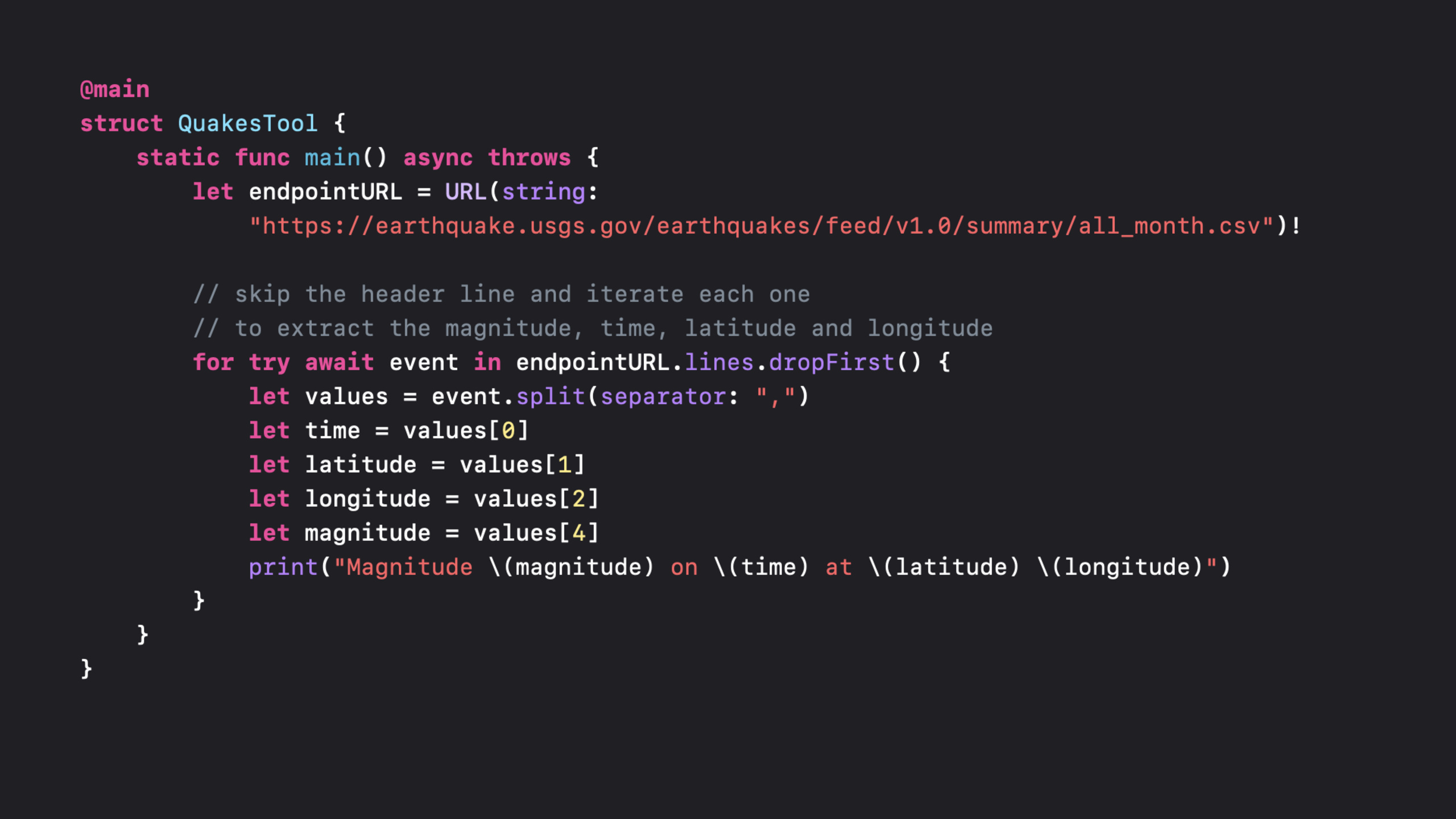
AsyncSequenceIs the core protocol introduced in Swift 5.5, it is a synchronizationSequenceThe asynchronous equivalent of .likefor item in sequenceThe same as traversing the synchronization sequence,for await item in asyncSequenceIt is possible to iterate over asynchronously generated elements.
Core Content
existasync/awaitPreviously, processing a sequence of asynchronous values required callbacks, proxy pattern, or Combine Publisher.Each of these approaches has its own complexity: nested callbacks lead to “callback hell”, agents are scattered across multiple methods, and Combine has a steep learning curve.
AsyncSequenceUse the simplestfor-await-inLooping solves this problem.It makes processing asynchronous sequences look almost the same as synchronous sequences.Behind the scenes, the compiler willfor-await-inConvert to pairsmakeAsyncIterator()call, and then repeatedlyawait iterator.next()。
A large number of APIs in the system framework have been providedAsyncSequenceinterface.URL.linesText files can be read asynchronously line by line.URLSessionofbytes(from:)returnAsyncBytes。NotificationCenterofnotifications(named:)Returns the notification sequence.FileHandleAsynchronous reading is also supported.
Session also introducesAsyncStreamandAsyncThrowingStream, which converts the traditional callback/delegate pattern intoAsyncSequencebridge.you can useAsyncStreamWrap the delegate callbacks of Timer and CLLocationManager intoAsyncSequence。
Detailed Content
Traverse AsyncSequence
(04:28)
for await quake in quakes {
    if quake.magnitude > 3 {
        displaySignificantEarthquake(quake)
    }
}
Key points:
for awaitis Swift 5.5’s new syntax for traversingAsyncSequence- If the sequence is likely to throw an error, use
for try await breakandcontinueexistfor-await-inworking normally
for try await quake in quakeDownload {
    if quake.location == nil {
        break
    }
    if quake.magnitude > 3 {
        displaySignificantEarthquake(quake)
    }
}
How the compiler handles asynchronous iteration
(03:52)
// Synchronous iteration
var iterator = quakes.makeIterator()
while let quake = iterator.next() {
    if quake.magnitude > 3 {
        displaySignificantEarthquake(quake)
    }
}

// Asynchronous iteration
var iterator = quakes.makeAsyncIterator()
while let quake = await iterator.next() {
    if quake.magnitude > 3 {
        displaySignificantEarthquake(quake)
    }
}
Key points:
- Compiler
for-inconverted towhile let+makeIterator()+next() - Compiler
for await-inconverted towhile let await+makeAsyncIterator()+next() - Each iteration may hang, waiting for the next value to arrive
Concurrent iteration
(07:15)
let iteration1 = Task {
    for await quake in quakes {
        displayEarthquake(quake)
    }
}

let iteration2 = Task {
    do {
        for try await quake in quakeDownload {
            updateMap(with: quake)
        }
    } catch {
        handleError(error)
    }
}

// Can be canceled later
iteration1.cancel()
iteration2.cancel()
Key points:
- Bundle
for-await-input onTaskMultiple iterations can be executed concurrently in a closure Taskprovidedcancel()Method, iteration can be canceled externally- For sequences that may run indefinitely (such as notification flows), this way you can manage the life cycle
Read bytes from FileHandle
(07:56)
for try await line in FileHandle.standardInput.bytes.lines {
    processLine(line)
}
Key points:
FileHandle.bytesreturnAsyncSequence<UInt8>.linesExtension converts byte stream into string stream, split by line- Suitable for processing standard input, pipeline data and other streaming scenarios
Read file from URL
(08:16)
let url = URL(fileURLWithPath: "/tmp/somefile.txt")
for try await line in url.lines {
    print(line)
}
Key points:
URL.linesIs a new convenience attribute added in Swift 5.5- Automatically handle file opening, closing and errors
- Reading line by line, not loading the entire file into memory at once
Get the byte stream from URLSession
(08:49)
let (bytes, response) = try await URLSession.shared.bytes(from: url)

guard let httpResponse = response as? HTTPURLResponse,
      httpResponse.statusCode == 200 else {
    throw MyNetworkingError.invalidServerResponse
}

for try await byte in bytes {
    processByte(byte)
}
Key points:
bytes(from:)return(AsyncBytes, URLResponse)tupleAsyncBytesyesAsyncSequence<UInt8>- Byte-by-byte processing, suitable for streaming parsing or large file downloads
Wait for specific notification
(09:12)
let center = NotificationCenter.default
let notification = await center.notifications(named: .NSPersistentStoreRemoteChange).first {
    $0.userInfo[NSStoreUUIDKey] == storeUUID
}
Key points:
notifications(named:)returnAsyncSequence<Notification>- combine
first(where:)You can wait for the first notification that meets the conditions - This is cleaner than implementing a delegate callback or adding an observer
Using AsyncStream
(11:10)
class QuakeMonitor {
    var quakeHandler: (Quake) -> Void
    func startMonitoring()
    func stopMonitoring()
}

let quakes = AsyncStream(Quake.self) { continuation in
    let monitor = QuakeMonitor()
    monitor.quakeHandler = { quake in
        continuation.yield(quake)
    }
    continuation.onTermination = { @Sendable _ in
        monitor.stopMonitoring()
    }
    monitor.startMonitoring()
}

let significantQuakes = quakes.filter { quake in
    quake.magnitude > 3
}

for await quake in significantQuakes {
    displaySignificantEarthquake(quake)
}
Key points:
AsyncStreamThe constructor accepts a closure, providingcontinuationused to generate valuescontinuation.yield()Post a value to the sequencecontinuation.onTerminationCalled when the sequence is canceled to clean up resourcesAsyncStreamcan be withfilter、mapUse in combination with other operators
AsyncStream handling errors
If you need to throw an error, useAsyncThrowingStream:
let events = AsyncThrowingStream(Event.self) { continuation in
    let monitor = EventMonitor()
    monitor.eventHandler = { result in
        switch result {
        case .success(let event):
            continuation.yield(event)
        case .failure(let error):
            continuation.finish(throwing: error)
        }
    }
    monitor.start()
}
Key points:
AsyncThrowingStreamofcontinuation.finish(throwing:)for reporting errors- Needed when iterating
for try await - Error will terminate the sequence, subsequent
next()call returnnil
Core Takeaways
1. Use URL.lines to process large files
If your app needs to process large text files (logs, CSV, JSON Lines), don’t read them into memory all at once.useurl.linesProcessed line by line, memory usage is constant.
Implementation idea: replaceString(contentsOfFile:)forfor try await line in url.lines.Parse line by line within the loop, extract the required information and discard it.
2. Use AsyncStream to wrap Timer callbacks
traditionalTimer.scheduledTimerIt needs to be handled in the target method, which distracts the logic.useAsyncStreamAfter wrapping, all timed events can be processed in a loop.
Implementation ideas: CreateAsyncStream,existTimerCalled in callbackcontinuation.yield(()).Then usefor await _ in timerStreamProcess scheduled tasks.
3. Use AsyncStream to wrap the NotificationCenter callback
Some notifications need to be triggered by specific conditions. The traditional method requires adding observer first and then judging the conditions in the callback.usenotifications(named:)offirst(where:)You can directly wait for notifications that meet the conditions.
Implementation idea: replaceaddObserver(forName:object:queue:using:)forawait center.notifications(named:).first { condition }.The code is cleaner and the intent is clearer.
4. Use AsyncStream to wrap network paging loading
Paged loading of web APIs often requires recursive calls to the next page.useAsyncStreamYou can turn a paging sequence into a linear iteration.
Implementation ideas: CreateAsyncStream, load the first page in the asynchronous closure, bycontinuation.yieldReturn each piece of data, then recursively load the next page.The caller only needs tofor await item in paginatedStream。
5. Use AsyncStream to wrap the CoreLocation callback
CLLocationManagerThe delegate callbacks are spread across multiple methods.useAsyncStreamLocation updates can be handled uniformly.
Implementation idea: create for each required eventAsyncStream(likedidUpdateLocations、didFailWithError), call the corresponding one in the delegate methodcontinuation.yield。
Related Sessions
- Meet async/await in Swift — Detailed explanation of async/await syntax introduced in Swift 5.5
- Explore structured concurrency in Swift — Swift structured concurrency model
- Discover concurrency in SwiftUI — Use concurrency features in SwiftUI
- Protect mutable state with Swift actors — Use Actors to avoid data races
Comments
GitHub Issues · utterances