
Highlight
iPadOS 15 introduces three core capabilities to improve iPad App productivity: Prominent Scenes enables modal focused interaction, UIMenuBuilder allows keyboard shortcuts to have a categorized and searchable menu interface, and Pointer Accessories and Band Selection add multi-selection and visual prompt capabilities to pointer operations.
Core Content
iPad users increasingly rely on the device to complete complex tasks.However, desktop-level capabilities such as multi-window management, keyboard shortcut discovery, and pointer interaction have not been perfect on the iPad.iPadOS 15 works from these three directions at the same time.
Prominent Scenes: New window for focus mode
(02:54)
iPadOS 13 introduces multi-windows, but all windows are horizontal.iPadOS 15 newprominentDisplay style, so that the new window is presented modally and the background window is automatically dimmed.This is suitable for scenarios where you need to focus on a single document or email.
useprominentThe scene should meet three conditions: the content is independent and complete, provides a Done or Close button, and focuses on specific content (such as a single document).The system providesUIWindowScene.ActivationAction, allowing developers to add an “Open in new window” option to the context menu with just a few lines of code.
Keyboard shortcut menu: from hidden to discoverable
(14:11)
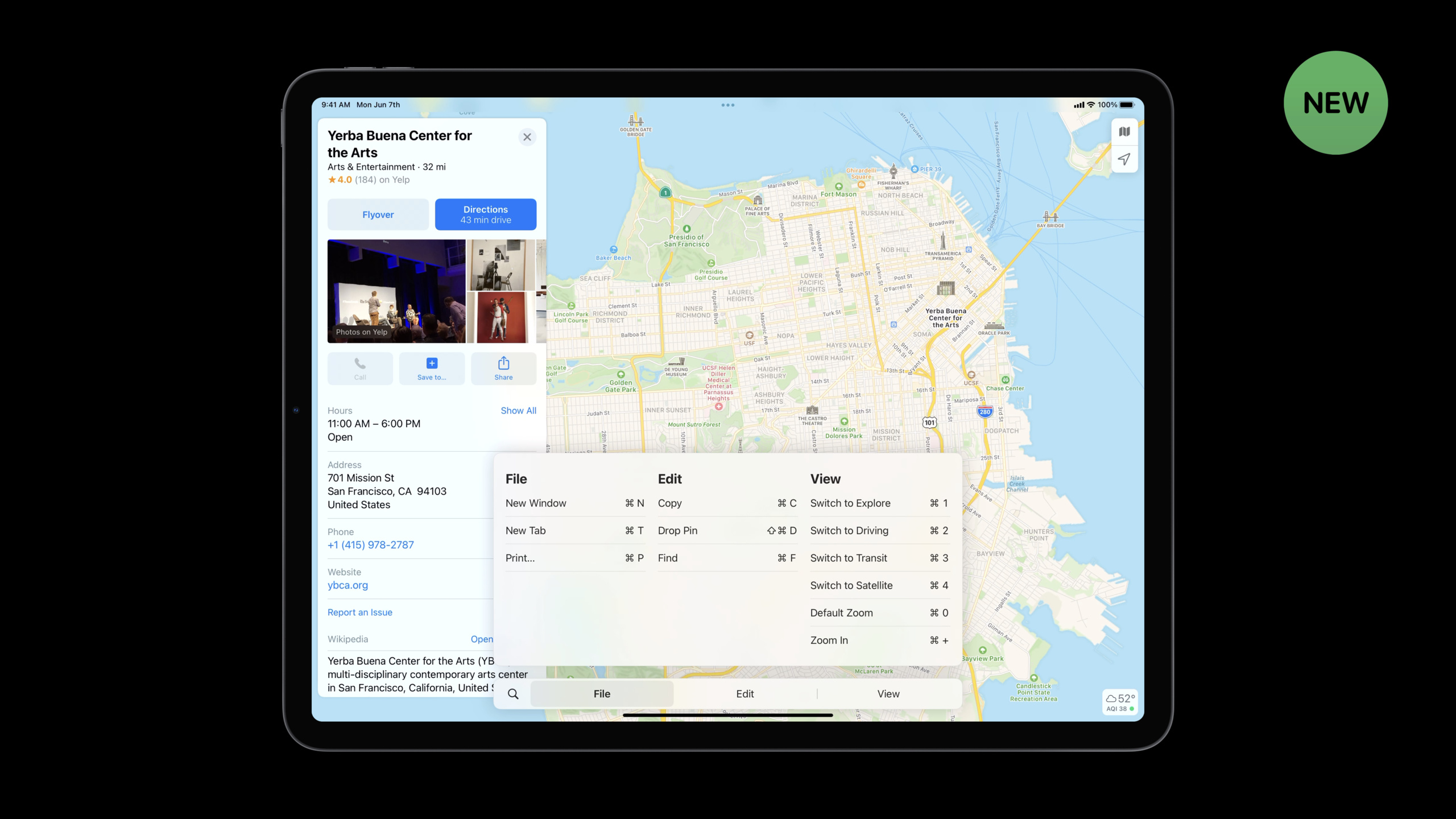
In iPadOS 15, long pressing the Command key will bring up a new shortcut menu.The menu is organized by categories such as File, Edit, View, etc., supports search, and can also be triggered by direct clicks.This shares the same menu bar as Mac CatalystUIMenuBuilder API。
Key changes: previously passedUIResponder.keyCommandsoraddKeyCommandDeclared shortcut keys will appear in an uncategorized area.iPadOS 15 requires all shortcut keys to passbuildMenu(with:)Register to the main menu system to get the complete classification and search experience.
Pointer enhancements: Band Selection and Accessories
(26:42)
iPadOS 15 borrows the Band Selection interaction from Mac.In support of multiple selectionUICollectionViewOn, click and drag to automatically pull out the selection rectangle, and the framed cells are selected.Shiftkey to add selection,Commandkey to switch the selection state.
Pointer Accessories are another new ability.Developers can attach visual cues such as arrows and plus signs to the pointer to tell users that a view can be dragged or perform specific operations.Accessories are independent of pointer styles and can be used in combination with effects such as lift and highlight.
Detailed Content
Create an “Open in new window” action
(04:56)
let newSceneAction = UIWindowScene.ActivationAction { _ in
    let userActivity = NSUserActivity(activityType: "com.myapp.detailscene")
    return UIWindowScene.ActivationConfiguration(userActivity: userActivity)
}
Key points:
UIWindowScene.ActivationActionyesUIActionSubclasses of can be used directly in menus, buttons and navigation bar buttons- Closure return
UIWindowScene.ActivationConfiguration, which contains aNSUserActivityRepresents the content of the new scene - Show “Open in new window” on iPad and Mac Catalyst, auto-hide on iPhone
If you need to provide alternative behavior for iPhone, you can pass inalternateparameter:
let alternateAction = UIAction(title: "Show Details", image: nil) { _ in
    // Fallback behavior on iPhone
}

let newSceneAction = UIWindowScene.ActivationAction(
    alternate: alternateAction
) { _ in
    let userActivity = NSUserActivity(activityType: "com.myapp.detailscene")
    return UIWindowScene.ActivationConfiguration(userActivity: userActivity)
}
Collection View gesture opens a new scene
(06:58)
func collectionView(_ collectionView: UICollectionView,
                    sceneActivationConfigurationForItemAt indexPath: IndexPath,
                    point: CGPoint) -> UIWindowScene.ActivationConfiguration? {
    guard let itemActivity = itemUserActivity(at: indexPath) else {
        return nil
    }
    return UIWindowScene.ActivationConfiguration(userActivity: itemActivity)
}
Key points:
- accomplish
UICollectionViewDelegateA new method to support pinch-to-expand gestures - return
nilIndicates that the cell does not support opening in a new window - Can only be used with
prominentstyle scene display
Custom scene transition preview
(08:53)
let itemActivity = NSUserActivity(activityType: "com.myapp.detailscene")
let configuration = UIWindowScene.ActivationConfiguration(userActivity: itemActivity)

if let cell = collectionView.cellForItem(at: indexPath) as? ThumbnailCell {
    configuration.preview = UITargetedPreview(view: cell.thumbnailView)
}

return configuration
Key points:
- Default transition starts from the entire cell, set by
previewYou can make the transition start from a subview of the cell UITargetedPreviewSpecifies the starting point view of the transition animation- This allows the animation to more accurately reflect content relationships
Scene state saving and restoration
(10:18)
func stateRestorationActivity(for scene: UIScene) -> NSUserActivity? {
    guard let viewController = self.window?.rootViewController as? EditorViewController else {
        return nil
    }

    let stateActivity = NSUserActivity(activityType: "com.myapp.editorstate")
    stateActivity.addUserInfoEntries(from: [
        "content": viewController.textField.text ?? "",
        "interactionState": viewController.textField.interactionState ?? NSNull()
    ])

    return stateActivity
}
Key points:
interactionStateIt is a new attribute of iPadOS 15, including interactive information such as cursor position, scroll position, first responder status, etc.- The content must be restored first, and then the interactive state can be restored
- New for iPadOS 15
scene(_:restoreInteractionState:)Delegate method, called after the storyboard is loaded and before entering the foreground for the first time.
Asynchronous recovery status:
func scene(_ scene: UIScene, restoreInteractionState stateRestorationActivity: NSUserActivity) {
    guard let viewController = window?.rootViewController as? EditorViewController else { return }

    scene.extendStateRestoration()

    loadContentAsync { result in
        viewController.textField.text = result.content
        scene.completeStateRestoration()
    }
}
Key points:
extendStateRestoration()Request an extension of the recovery time and the startup image will remain displayed- Must be called after completion of recovery
completeStateRestoration(), otherwise the system will forcefully close the App - Not suitable for potentially long-running tasks such as network requests
Customize the main menu
(17:15)
override func buildMenu(with builder: UIMenuBuilder) {
    super.buildMenu(with: builder)
    guard builder.system == .main else { return }

    let tabMenu = UIMenu(options: .displayInline, children: [
        UIKeyCommand(title: "New Tab",
                     action: #selector(newTab(_:)),
                     input: "t",
                     modifierFlags: .command),
        UIKeyCommand(title: "Close Tab",
                     action: #selector(closeTab(_:)),
                     input: "w",
                     modifierFlags: .command)
    ])
    builder.insertChild(tabMenu, atStartOfMenu: .file)

    let bookmarksMenu = UIMenu(title: "Bookmarks", children: [...])
    builder.insertSibling(bookmarksMenu, afterMenu: .view)
}
Key points:
- exist
UIApplicationDelegatemedium rewritebuildMenu(with:) builder.system == .mainMake sure to only do this when modifying the main menuUIMenu.IdentifierProvides identifier constants for system menus- Each menu element must have a unique identifier. Repeated shortcut key combinations will cause the insertion to fail and output the console log.
Dynamically control shortcut key availability
(22:38)
override func canPerformAction(_ action: Selector, withSender sender: Any?) -> Bool {
    if action == #selector(closeTab(_:)) {
        return !openTabs.isEmpty
    }
    return super.canPerformAction(action, withSender: sender)
}

override func validate(_ command: UICommand) {
    if command.action == #selector(toggleBookmark(_:)) {
        command.title = currentTab.isInBookmarks
            ? "Remove from Bookmarks"
            : "Add to Bookmarks"
    } else {
        super.validate(command)
    }
}
Key points:
canPerformActionDetermine whether the shortcut key is executable and returnfalseShortcut keys are hidden in the menu whenvalidateCalled before the shortcut key is triggered, the appearance of titles, icons, etc. can be dynamically modified.- Both methods must be called
superHandle uncovered cases
Band Selection Multiple selection interaction
(28:47)
let selectionInteraction = UIBandSelectionInteraction { [weak self] interaction in
    guard let self = self else { return }

    if interaction.state == .selecting {
        self.selectItemsInRect(interaction.selectionRect)
    } else if interaction.state == .ended {
        self.finalizeSelection()
    }
}

view.addInteraction(selectionInteraction)
Key points:
UIBandSelectionInteractionSuitable for custom views, UICollectionView automatically supportsselectionRectIs the rectangular area of the current selection boxinitialModifierFlagsProvides the modifier key (Shift, Command, etc.) that was pressed when dragging started
Pointer Accessories
(33:27)
func pointerInteraction(_ interaction: UIPointerInteraction, styleFor region: UIPointerRegion) -> UIPointerStyle? {
    let preview = UITargetedPreview(view: self)
    let style = UIPointerStyle(effect: .lift(preview))

    if #available(iOS 15.0, *) {
        style.accessories = [
            .arrow(.left),
            .arrow(.right)
        ]
    }

    return style
}
Key points:
accessoriesNew in iOS 15UIPointerStyleproperty.arrow(.left)and.arrow(.right)It is a system predefined arrow accessory.- Accessory position and angle can be customized:
UIPointerAccessory.Position(offset: 23.0, angle: .pi * 1.25)
Core Takeaways
1. Add Prominent Scene support for document apps
If your app handles documents, emails, notes, etc., let users open individual items in new windows.This directly improves multitasking efficiency.
Implementation idea: create for each content itemNSUserActivity, add it to the context menuUIWindowScene.ActivationAction.set upactivationConditionsEnsure the system routes requests correctly.
2. Organize keyboard shortcuts into the main menu system
Audit all existing codekeyCommandsattributes andaddKeyCommandcall, migrate tobuildMenu(with:).This gives shortcut keys a unified discovery experience on both iPad and Mac.
Implementation idea: Classify by function (File, Edit, View, etc.) and set appropriatediscoverabilityTitle, handle shortcut key conflicts (for example, use Control-Command-I instead when Command-I conflicts with the italic shortcut keys).
3. Implement Band Selection on custom views
If your app has a canvas or grid-like layout, users may need to select multiple items.UIBandSelectionInteractionMake this easy.
Implementation ideas: CreateUIBandSelectionInteraction,according tointeraction.stateandselectionRectUpdate selection status.combineinitialModifierFlagsSupports Shift to append selection and Command to switch selection.
4. Use Pointer Accessories to prompt draggable views
When the pointer hovers over a draggable view, an arrow accessory appears to indicate the drag direction.This is more intuitive than a simple pointer shape change.
Implementation idea: inUIPointerInteractionofstyleForIn the method, return the band according to the view stateaccessoriesofUIPointerStyle.combinelatchingAxesLet the pointer effect follow the view when dragging.
5. Improve scene state recovery
After users switch apps or restart their devices, they expect to return to their previous working state.Save content state and interaction state (cursor position, scroll position).
Implementation idea: instateRestorationActivity(for:)save content andinteractionState.existscene(_:restoreInteractionState:)recovery.If recovery requires asynchronous loading, useextendStateRestoration()andcompleteStateRestoration()。
Related Sessions
- What’s new in UIKit — Comprehensive update of the UIKit framework in iOS 15, including buttons, lists, SF Symbols, and more
- Focus on iPad keyboard navigation — Detailed explanation of the Focus system for iPad keyboard navigation
- Meet the UIKit Button System — The new UIButton.Configuration API in iOS 15
- Build for the iPadOS pointer — An in-depth explanation of the iPadOS pointer interaction API
Comments
GitHub Issues · utterances