
Highlight
More than one million iPad and iPhone apps can already run on M1 Mac, and the system automatically bridges iOS APIs to Mac features, so developers only need to follow a few best practices to get a high-quality experience.
Core Content
M1 Macs can run unmodified iPad and iPhone apps out of the box.This is the easiest way to extend your app’s reach.
A lot of compatibility work has been done on the system.Keyboard input, menu bar, drag and drop, printing, settings panel and other functions are automatically bridged to Mac.Share Extension, WidgetKit, Photo Editing Extension, VPN Network Extension, Audio Unit, etc. all work as well.
But “can run” and “experience well” are two different things.The session explains how to make iOS apps truly outstanding on Mac from four dimensions: API bridging, coding practice, system improvement, and store release.
Detailed Content
Keyboard and menu bar
Mac’s physical keyboard can be used directly for text input and UIKeyCommand shortcuts.If more granular key processing is required, useUIPress API。
The menu bar structure is determined at startup, and then changes through enabled/disabled status instead of adding or deleting menu items.The system will automatically generate menu items based on app functions, such as creating a new window, rich text operations, device orientation switching, etc.
Introduced with iOS 13UIMenuBuilderThe API can add semantic structure to UIKeyCommand.These custom structures are reflected in your Mac’s main menu.
// UIKeyCommands find their target through the responder chain
// This determines whether the menu item is available
Key points:
- Attached directly to UIResponder
keyCommandsWill not appear in the menu bar, but shortcut keys have higher priority than menu items (04:00) UIMenuBuilder’s custom structures visible in Mac main menu (04:37)- The enabled state of a menu item is determined by the presence of an executable target in the responder chain (04:52)
Drag and drop and print
UIDragInteractionandUIDropInteractionAutomatically bridge to Mac.Users can seamlessly drag and drop content between apps.
UIPrintInteractionControllerAutomatically mapped to Mac print dialog.Add toUIApplicationSupportsPrintCommandAfter pressing the Info.plist key and implementing the corresponding action, the print and export PDF menu items will automatically appear in the menu bar.
Multiple scenes and window sizes
Apps that support multiple scenes, each scene becomes an independent window on Mac.The system will automatically add the “New Window” menu item.
Multitasking support on iPad automatically converts to resizable windows on Mac.Since the app already supports dynamic layout changes on iPad, real-time window resizing on Mac also works.
func scene(_ scene: UIScene, willConnectTo session: UISceneSession, options connectionOptions: UIScene.ConnectionOptions) {
    guard let windowScene = scene as? UIWindowScene, let sizeRestrictions = windowScene.sizeRestrictions else { return }
    sizeRestrictions.minimumSize = CGSize(width: 640, height: 480)
    sizeRestrictions.maximumSize = CGSize(width: 1920, height: 1080)
}
Key points:
- use
UIWindowScene.sizeRestrictionsLimit window size range (07:16) - Only the scene size will change when the window is resized,
UIScreenDimensions keep device dimensions unchanged - Do not use
UIScreenDimensions for layout calculations - Apps that do not support multitasking use a fixed scene size and aspect ratio, and the content will be automatically scaled
Coding Best Practices
Some coding habits affect cross-platform compatibility.
Only use officially supported APIs.Undocumented methods may not exist on Mac.
Don’t hardcode file system paths.The path is different on Mac than on iOS.useFileManagerThe API determines the path at runtime.
Don’t make assumptions about the screen location of your UI.View hierarchy and popup locations can be very different on Mac than on iOS.
Camera resolution and orientation may differ on Mac.When you take a picture in portrait mode on your iPhone, a landscape image may be returned on your Mac because the camera is positioned horizontally.useAVCaptureDeviceDiscoverySessionQuery the real properties of available cameras.
Some hardware features are not available on Mac.ARKit doesn’t support Mac.If ARKit is an optional feature, checkARConfiguration.isSupported.If you rely on CoreMotion or Multi-Touch, consider alternatives to your Mac keyboard and trackpad.
Touch Alternatives
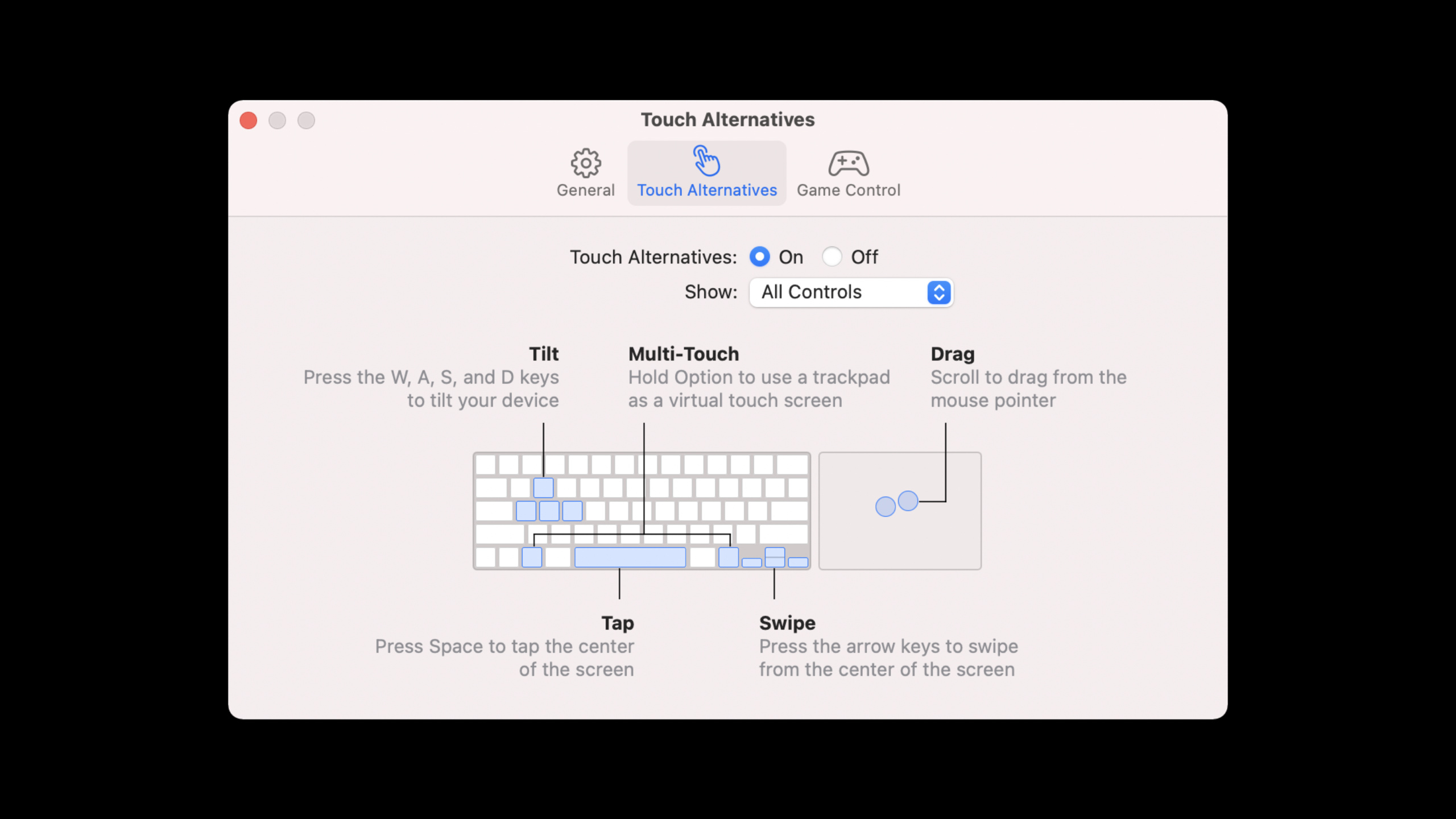
macOS 11.3 introduces Touch Alternatives, which map the keyboard and trackpad to a variety of touch interactions: click, swipe, scroll, tilt, trackpad capture.
Apps can automatically enable Touch Alternatives and display a boot dialog when first launched.
<?xml version="1.0" encoding="UTF-8"?>
<!DOCTYPE plist PUBLIC "-//Apple//DTD PLIST 1.0//EN" "http://www.apple.com/DTDs/PropertyList-1.0.dtd">
<plist version="1.0">
<dict>
    <key>defaultEnablement</key>
    <true/>
    <key>version</key>
    <real>1</real>
    <key>requiredOnboarding</key>
    <array>
        <string>Tap</string>
        <string>Arrow Swipe</string>
        <string>Scroll Drag</string>
        <string>Tilt</string>
        <string>Trackpad Capture</string>
    </array>
</dict>
</plist>
Key points:
-The file is namedcom.apple.uikit.inputalternatives.plist(15:03)
requiredOnboardingOnly include functions useful to the app to avoid showing irrelevant guidance- The racing game in the demo uses WASD to simulate device tilt and trackpad clicking the throttle button
macOS Monterey new features
Apple Pay now supports iPad and iPhone apps on M1 Mac.Uses the same cross-platform API as Mac Catalyst.
optional func paymentAuthorizationController(
    _ controller: PKPaymentAuthorizationController,
    didRequestMerchantSessionUpdate
    handler: @escaping (PKPaymentRequestMerchantSessionUpdate) -> Void)
Key points:
- must be implemented
didRequestMerchantSessionUpdateDelegate methods (17:17) - One set of code covers all platforms that support Apple Pay
AVKit full-screen videos now play in separate windows.Even though the app window has a fixed size limit, the video takes full advantage of your Mac display when it’s full screen.Supports HDR playback and streaming.
SiriKit Shortcuts supports M1 Mac iPad and iPhone apps on macOS Monterey.
Published on Mac App Store
Most apps automatically appear on the Mac App Store.If you opted out before, you can re-check “Make this app available” in App Store Connect.
After verifying compatibility, the “Not verified for macOS” label will change to “Designed for iPad”, giving users a better trust signal.
It is possible to set a custom minimum macOS version.For example, a video app might need Monterey’s AVKit full-screen improvements.Two ways: set in the Pricing and Availability page of App Store Connect (no need to resubmit), or set in Info.plistLSMinimumSystemVersion(Submit with next update).
Tested the same way as iPad.Select “My Mac (Designed for iPad)” as the run target in Xcode.macOS Monterey supports TestFlight to distribute beta builds to testers using M1 Macs.
Core Takeaways
-
Expand user base at zero cost: Developers who already have iPad apps can reach Mac users by simply verifying compatibility and checking the publishing option.
-
Keyboard-first design: While adding physical keyboard support (UIKeyCommand, UIMenuBuilder) to iPad, it also improves the experience on Mac.
-
Game Porting Shortcut: Using Touch Alternatives and virtual game controllers (keyboard/trackpad mapping), iOS games can have a playable experience on M1 Macs without rewriting input logic.
-
Unified payment experience: One set of Apple Pay codes covers iOS, iPadOS, and macOS, simplifying cross-platform business logic.
-
Mac experience for video apps: AVKit full-screen improvements allow iOS video players to provide a professional-grade viewing experience on Mac.
Related Sessions
- What’s new in Mac Catalyst — The latest improvements to Mac Catalyst, suitable for developers who want a more native Mac experience
- Qualities of a great Mac Catalyst app — A detailed guide to building a great Mac Catalyst app
- Meet TestFlight on Mac — TestFlight testing workflow on Mac
- What’s new in Wallet and Apple Pay — Detailed description of Apple Pay cross-platform integration
- What’s new in AVKit — Improvements to AVKit full-screen video and HDR playback
Comments
GitHub Issues · utterances