
Highlight
Vision’s Barcode Detection has been upgraded to Revision 2 to support new barcodes such as Codabar, GS1Databar, and MicroQR. A new VNDocumentSegmentationRequest is added for document segmentation detection. OCR expands multi-language support including accurate recognition modes for Chinese and Japanese.
Core Content
New capabilities of Barcode Detection
Barcode detection has been upgraded to Revision 2 (02:07), with four new barcode types:
- Codabar: used in libraries, blood banks, etc.
- GS1Databar: supermarket coupons, receipts
- MicroPDF: small tags
- MicroQR: QR code in a small space, saving a lot of space than ordinary QR codes
Revision 2 also fixed a behavioral inconsistency (02:40): when previously specifying a Region of Interest (ROI), the returned bounding box was still relative to the full image.Now consistent with other Vision requests, the bounding box coordinates are relative to the ROI.
One advantage of Vision is that it can detect multiple barcodes and multiple barcode types at the same time (04:07) without the need for repeated scanning.But be aware that the more symbologies you specify, the slower the detection will be. Only specify the required types.
Language support for text recognition
Vision’s text recognition has two modes (07:29):
- Fast: Latin character recognizer, supports various Latin character sets (such as German lowercase symbols)
- Accurate: A recognizer based on machine learning, processing by word and line, supporting non-Latin languages such as Chinese and Japanese
Language choice affects the recognition stage and the language correction stage (08:02).In Fast mode, the language selection determines which Latin character sets are supported; in Accurate mode, the language selection determines which recognition model to use (a completely different model is used for Chinese).
Revision 2 significantly expands language support (09:25).Best to usesupportedRecognitionLanguages()Query for supported languages instead of assuming a fixed list.Order is important when using multiple languages, and ambiguous cases are resolved in order.
Document Segmentation: Intelligent document detection
New this yearVNDocumentSegmentationRequest(10:34) is a machine learning-driven document detector trained on multiple document types: papers, signs, notes, receipts, labels, etc.
It returns a low-resolution segmentation mask (each pixel represents the confidence that it belongs to the document), as well as the four corner points.It can run in real time on devices with Neural Engine.VisionKitVNDocumentCameraViewControllerThis request is now used instead of the traditional rectangle detector.
andVNDetectRectanglesRequestThe difference (12:25):
| Feature | Document Request | Rectangle Request |
|---|---|---|
| Algorithm Types | Machine Learning | Traditional Computer Vision |
| Running location | Neural Engine/GPU/CPU | CPU |
| Document shape | Any shape | Must be rectangular |
| Blurred corners | Able to handle | Challenging |
| Folding documents | Able to handle | Challenging |
| Return results | Mask + corner points | Corner points only |
| Detection quantity | Only one is returned | Multiple can be returned |
Detailed Content
Barcode scanning basic code
(06:18)
import Foundation
import Vision

let url = URL(fileReferenceLiteralResourceName: "codeall_4.png") as CFURL

guard let imageSource = CGImageSourceCreateWithURL(url, nil),
      let barcodeImage = CGImageSourceCreateImageAtIndex(imageSource, 0, nil) else {
    fatalError("Unable to create barcode image.")
}

let imageRequestHandler = VNImageRequestHandler(cgImage: barcodeImage)

let detectBarcodesRequest = VNDetectBarcodesRequest()
detectBarcodesRequest.revision = VNDetectBarcodesRequestRevision2
detectBarcodesRequest.symbologies = [.codabar]

try imageRequestHandler.perform([detectBarcodesRequest])

if let detectedBarcodes = detectBarcodesRequest.results {
    drawBarcodes(detectedBarcodes, sourceImage: barcodeImage)

    detectedBarcodes.forEach {
        print($0.payloadStringValue ?? "")
    }
}
Key points:
revisionIt must be set explicitly, otherwise the new SDK will be compiled with the latest revision automatically.symbologiesYou can specify one or more. An empty array means scanning all types.- 1D barcodes (such as Codabar) will return multiple detections and need to be deduplicated using payload
payloadStringValueis the actual data encoded by the barcode
Draw barcode bounding box
public func createCGPathForTopLeftCCWQuadrilateral(
    _ topLeft: CGPoint,
    _ bottomLeft: CGPoint,
    _ bottomRight: CGPoint,
    _ topRight: CGPoint,
    _ transform: CGAffineTransform
) -> CGPath {
    let path = CGMutablePath()
    path.move(to: topLeft, transform: transform)
    path.addLine(to: bottomLeft, transform: transform)
    path.addLine(to: bottomRight, transform: transform)
    path.addLine(to: topRight, transform: transform)
    path.addLine(to: topLeft, transform: transform)
    path.closeSubpath()
    return path
}

public func drawBarcodes(_ observations: [VNBarcodeObservation], sourceImage: CGImage) -> CGImage? {
    let size = CGSize(width: sourceImage.width, height: sourceImage.height)
    let imageSpaceTransform = CGAffineTransform(scaleX: size.width, y: size.height)
    let colorSpace = CGColorSpace(name: CGColorSpace.sRGB)
    let cgContext = CGContext(
        data: nil,
        width: Int(size.width),
        height: Int(size.height),
        bitsPerComponent: 8,
        bytesPerRow: 8 * 4 * Int(size.width),
        space: colorSpace!,
        bitmapInfo: CGImageAlphaInfo.premultipliedLast.rawValue
    )!

    cgContext.setStrokeColor(CGColor(srgbRed: 1.0, green: 0.0, blue: 0.0, alpha: 0.7))
    cgContext.setLineWidth(25.0)
    cgContext.draw(sourceImage, in: CGRect(x: 0.0, y: 0.0, width: size.width, height: size.height))

    for currentObservation in observations {
        let path = createCGPathForTopLeftCCWQuadrilateral(
            currentObservation.topLeft,
            currentObservation.bottomLeft,
            currentObservation.bottomRight,
            currentObservation.topRight,
            imageSpaceTransform
        )
        cgContext.addPath(path)
        cgContext.strokePath()
    }
    return cgContext.makeImage()
}
Key points:
- The four corners of the barcode are used
topLeft、bottomLeft、bottomRight、topRightexpress - Normalized coordinates (0-1) are converted to pixel coordinates by multiplying the image size
CGAffineTransform(scaleX:y:)Construct scaling transformation
Document segmentation and perspective correction
(14:02)
import Foundation
import CoreImage
import Vision
import CoreML

guard var inputImage = CIImage(contentsOf: #fileLiteral(resourceName: "IMG_0001.HEIC"))
else { fatalError("image not found") }

let requestHandler = VNImageRequestHandler(ciImage: inputImage)
let documentDetectionRequest = VNDetectDocumentSegmentationRequest()
try requestHandler.perform([documentDetectionRequest])

guard let document = documentDetectionRequest.results?.first,
      let documentImage = perspectiveCorrectedImage(
        from: inputImage,
        rectangleObservation: document
      ) else {
    fatalError("Unable to get document image.")
}

documentImage
Key points:
VNDetectDocumentSegmentationRequestReturn segmentation mask and four corner points- You need to do perspective correction yourself, use Core Image
CIPerspectiveCorrectionfilter - The corrected image can be directly used for OCR, rectangle detection, and barcode scanning
Perspective correction auxiliary function
public func perspectiveCorrectedImage(
    from inputImage: CIImage,
    rectangleObservation: VNRectangleObservation
) -> CIImage? {
    let imageSize = inputImage.extent.size

    // Validate that the detected rectangle is valid
    let boundingBox = rectangleObservation.boundingBox.scaled(to: imageSize)
    guard inputImage.extent.contains(boundingBox)
    else { print("invalid detected rectangle"); return nil }

    // Get the pixel coordinates of the four corners
    let topLeft = rectangleObservation.topLeft.scaled(to: imageSize)
    let topRight = rectangleObservation.topRight.scaled(to: imageSize)
    let bottomLeft = rectangleObservation.bottomLeft.scaled(to: imageSize)
    let bottomRight = rectangleObservation.bottomRight.scaled(to: imageSize)

    // Apply a perspective correction filter
    let correctedImage = inputImage
        .cropped(to: boundingBox)
        .applyingFilter("CIPerspectiveCorrection", parameters: [
            "inputTopLeft": CIVector(cgPoint: topLeft),
            "inputTopRight": CIVector(cgPoint: topRight),
            "inputBottomLeft": CIVector(cgPoint: bottomLeft),
            "inputBottomRight": CIVector(cgPoint: bottomRight)
        ])
    return correctedImage
}

extension CGPoint {
    func scaled(to size: CGSize) -> CGPoint {
        return CGPoint(x: self.x * size.width, y: self.y * size.height)
    }
}

extension CGRect {
    func scaled(to size: CGSize) -> CGRect {
        return CGRect(
            x: self.origin.x * size.width,
            y: self.origin.y * size.height,
            width: self.size.width * size.width,
            height: self.size.height * size.height
        )
    }
}
Key points:
- Normalized coordinates are multiplied by the image size
CIPerspectiveCorrectionFilters to correct perspective distortion- Cropping to the bounding box first can reduce the amount of data for subsequent processing.
Complex document scanning: Questionnaire analysis example
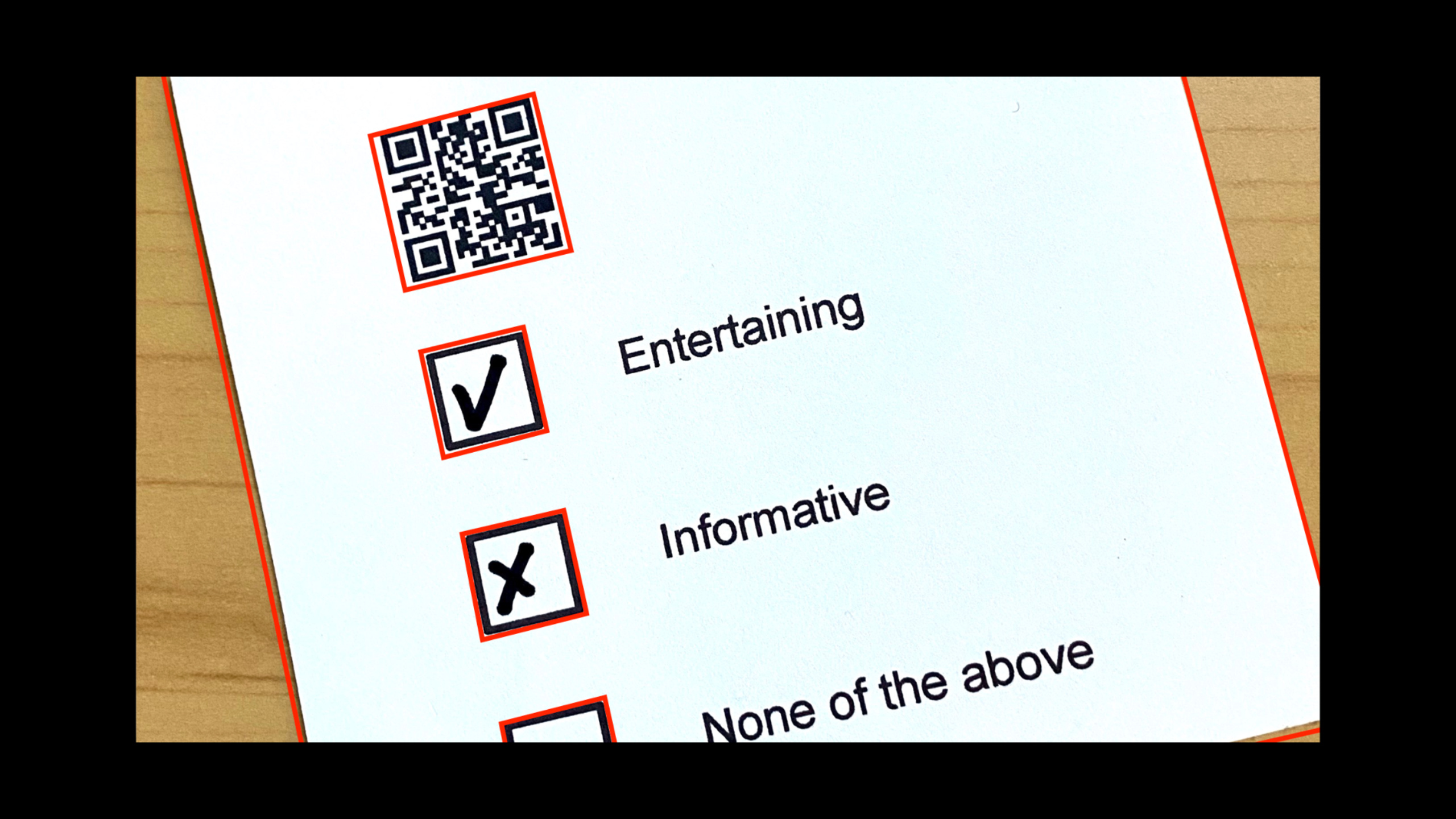
The speaker demonstrated a complete questionnaire scanning process (14:02):
- Document segmentation detection + perspective correction
- Barcode detection (QR code stores questionnaire title)
- Rectangle detection (find the checkbox)
- OCR (recognize question text)
- Core ML classification (determine whether the check box is checked)
Key configuration:
// Rectangle detection configuration
rectanglesDetection.minimumSize = 0.1  // Default is 0.2; too small to detect
rectanglesDetection.maximumObservations = 0  // 0 means unlimited

// OCR request
let ocrRequest = VNRecognizeTextRequest { request, error in
    textBlocks = request.results as! [VNRecognizedTextObservation]
}

// Core ML classifier (whether the checkbox is selected)
let classificationRequest = createclassificationRequest()
After performing perspective correction on each check box area, input the image classifier trained by Create ML to determine whether it is “Yes” or “No”.If confidence > 0.9, find the corresponding question text (match text lines with rectangular positions).
Core Takeaways
1. Multiple barcode scanning App for medical scenarios
- What to do: Use iPhone in the hospital to scan multiple barcodes on patient wristbands, medicine bottles, and prescriptions at once, and automatically summarize the information
- Why it’s worth it: Vision can detect multiple barcodes and types simultaneously, making it more flexible than dedicated handheld scanners
- How to start: Use
VNDetectBarcodesRequestof Revision 2, settingssymbologiesCodabar and QR commonly used in medical scenarios
2. Multi-language bill recognition system
- What to do: Automatically identify key information (amount, date, merchant) on Chinese, Japanese, and Korean bills
- Why it’s worth doing: Accurate mode’s Chinese recognition was improved at WWDC2021 and can handle complex ticket layouts
- How to start: Use
VNRecognizeTextRequestAccurate mode,recognitionLanguagesSet as target language, combined withVNDocumentSegmentationRequestDetect document area first
3. Smart form filling assistant
- What to do: The user takes a paper form, and the App automatically extracts the field content and generates a fillable electronic version.
- Why it’s worth doing: Document segmentation detection can handle various document shapes, rectangle detection can find table cells, and OCR extracts text
- How to start: Use first
VNDocumentSegmentationRequestDetect and correct documents before usingVNDetectRectanglesRequestFind the table entry area, and finally useVNRecognizeTextRequestExtract content
4. Custom checkbox/tickbox recognition
- What to do: Identify the check status in user-completed questionnaires and exam answer sheets
- Why it’s worth doing: Vision’s rectangle detection can locate the checkbox position, and the Core ML image classifier can determine whether it is checked or not.
- How to start: Collect checked and unchecked checkbox images, use Create ML to train a second classifier, and combine Vision’s rectangle detection results in the app
Related Sessions
- Detect people, faces, and poses using Vision — Vision’s human analysis capabilities, together with document recognition, demonstrate the breadth of the Vision framework
- Explore computer vision APIs — A comprehensive introduction to Vision at WWDC20 to understand the overall capabilities of Vision
- Vision and Core Image — Vision from WWDC20 is used in conjunction with Core Image, including document preprocessing technology
- Tune your Core ML models — Core ML custom classifier optimization combined with document recognition
Comments
GitHub Issues · utterances