
Highlight
The Face Detection of the Vision framework has been upgraded to Revision 3, which supports the detection of faces wearing masks and adds pitch posture indicators. All posture indicators have been changed from discrete values to continuous values; the Person Segmentation API has added semantic person segmentation, which can realize virtual background and character cutout on multiple platforms.
Core Content
Face detection in the mask era upgrade
After wearing masks becomes a daily routine, the original face detection algorithm will encounter challenges.WWDC2021 upgraded face detection to Revision 3 (01:15), which not only can identify faces blocked by masks, but also retains the ability to identify obstructions such as glasses and hats.
The face pose indicator has also been improved.Previously there were only roll and yaw, but this year there is a new addition of pitch (a nod).More importantly, all metrics are changed from discrete values (bucketed) to continuous values (01:41).In the past, roll could only return -90, -45, 0, 45, and 90. Now it can return any arc value, making attitude tracking smoother.
The meanings of the three attitude indicators come from flight mechanics (02:54):
- Roll: head tilted left and right (shaking head)
- Yaw: Turn your head left and right (turn back)
- Pitch: nod your head up and down
These indicators passVNFaceObservationofroll、yaw、pitchAttribute acquisition, the unit is radians.
Improvement of human posture detection
Human body rectangle detection has been upgraded to Revision 2 (05:17), with new full-body detection support.Previously, only the upper body could be detected, but now it can be passedupperBodyOnlyProperty switching.The default is stilltrueTo maintain backward compatibility, set tofalseCan detect the whole body.
Hand gesture detection addedchiralityAttribute (06:16), you can determine whether the detected hand is left or right.
Person Segmentation: Semantic person segmentation
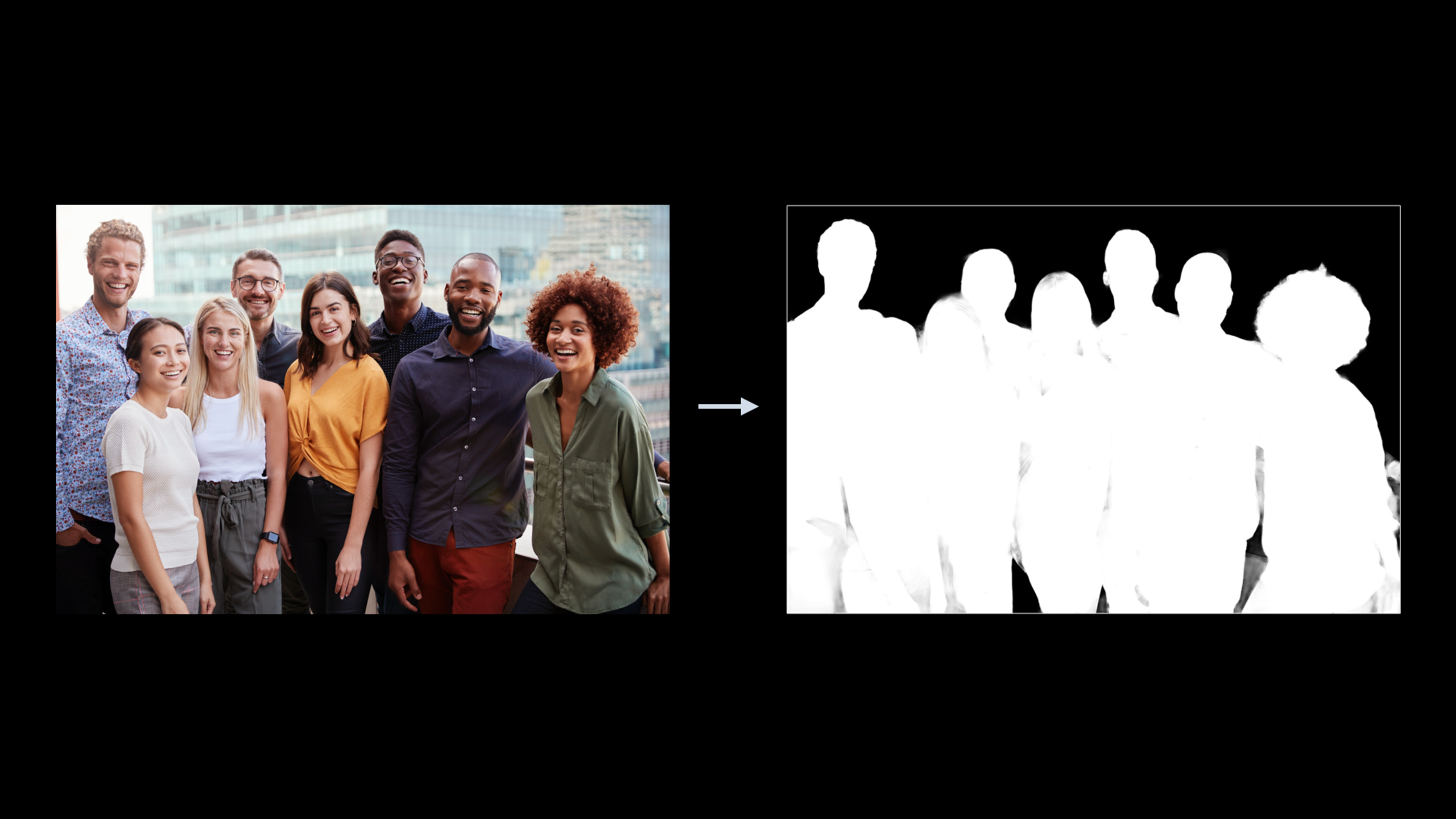
This is the biggest new feature this year (06:53).VNGeneratePersonSegmentationRequestA segmentation mask can be generated to separate the characters in the picture from the background.Different from traditional foreground and background segmentation, Vision implements semantic segmentation - it knows what “people” are and will merge everyone in the picture into the same mask.
The API provides three quality levels (09:06):
- accurate: highest quality, suitable for computational photography
- balanced: balanced, suitable for frame-by-frame video processing
- fast: fastest, suitable for real-time stream processing
The higher the quality, the greater the resource consumption.The dynamic range, resolution, memory footprint, and processing time of masks will all increase as quality increases.
Multi-frame character segmentation capability
Person Segmentation is not only available in Vision, but is also integrated into multiple frameworks (14:15):
- AVFoundation: Can be obtained when taking a photo
AVCapturePhoto.portraitEffectsMatte, supported by some new devices - ARKit:
ARFrame.segmentationBufferProvides character segmentation in AR scenes, requiring A12 bionic chip and subsequent equipment - Core Image:
CIFilter.personSegmentation()Provides an interface to the pure Core Image domain
Detailed Content
Character segmentation request configuration
(08:13)
// Create the request
let request = VNGeneratePersonSegmentationRequest()

// Create the request handler
let requestHandler = VNImageRequestHandler(url: imageURL, options: options)

// Perform the request
try requestHandler.perform([request])

// Get the results
let mask = request.results!.first!
let maskBuffer = mask.pixelBuffer
Key points:
- Request is a state object. The same request needs to be reused in the video stream, which helps with inter-frame smoothing.
- turn out
VNPixelBufferObservation,pixelBufferProperty contains mask data
(08:33)
let request = VNGeneratePersonSegmentationRequest()

// Set the revision (specify it explicitly to avoid behavior changes in future SDK updates)
request.revision = VNGeneratePersonSegmentationRequestRevision1

// Set the quality level
request.qualityLevel = VNGeneratePersonSegmentationRequest.QualityLevel.accurate

// Set the output pixel format
request.outputPixelFormat = kCVPixelFormatType_OneComponent8
Key points:
- Explicitly set revision to ensure deterministic behavior, otherwise the SDK will automatically use the latest revision after updating
- Recommendations for three quality levels in different scenarios: accurate for computational photography, balanced for video, and fast for real-time streaming
- The output format is optional: 8-bit integer, 32-bit floating point, 16-bit floating point (half float).16-bit floating point can be fed directly into the GPU for processing
Apply segmentation mask to replace background
(12:24)
let input = CIImage(contentsOf: imageUrl)!
let mask = CIImage(cvPixelBuffer: maskBuffer)
let background = CIImage(contentsOf: backgroundImageUrl)!

// Scale the mask to the input image size
let maskScaleX = input.extent.width / mask.extent.width
let maskScaleY = input.extent.height / mask.extent.height
let maskScaled = mask.transformed(by: CGAffineTransform(
    maskScaleX, 0, 0, maskScaleY, 0, 0
))

// Scale the background to the input image size
let backgroundScaleX = input.extent.width / background.extent.width
let backgroundScaleY = input.extent.height / background.extent.height
let backgroundScaled = background.transformed(by: CGAffineTransform(
    backgroundScaleX, 0, 0, backgroundScaleY, 0, 0
))

// Use a blend filter
let blendFilter = CIFilter.blendWithRedMask()
blendFilter.inputImage = input
blendFilter.backgroundImage = backgroundScaled
blendFilter.maskImage = maskScaled

let blendedImage = blendFilter.outputImage
Key points:
- Both mask and background need to be scaled to the same dimensions as the input image
CIFilter.blendWithRedMask()Blending foreground and background based on red channel mask- If CIImage is initialized as a single-channel PixelBuffer, the default is the red channel.
Segmentation masks in AVCapture
(14:37)
private let photoOutput = AVCapturePhotoOutput()

if self.photoOutput.isPortraitEffectsMatteDeliverySupported {
    self.photoOutput.isPortraitEffectsMatteDeliveryEnabled = true
}

// Segmentation mask property on AVCapturePhoto
open class AVCapturePhoto {
    var portraitEffectsMatte: AVPortraitEffectsMatte? { get }
    // nil means there are no people in the scene
}
Key points:
isPortraitEffectsMatteDeliverySupportedCheck if the device supports- Automatically calculate segmentation masks when taking photos when enabled
AVPortraitEffectsMatteCan be used for post-processing
Segmentation masks in ARKit
(14:58)
// Check whether person segmentation is supported
if ARWorldTrackingConfiguration.supportsFrameSemantics(.personSegmentationWithDepth) {
    // You can obtain a person segmentation mask
    // ...
}

open class ARFrame {
    var segmentationBuffer: CVPixelBuffer? { get }
}
Key points:
- Requires A12 Bionic chip or newer device (iPhone Xs and later)
supportsFrameSemanticsCheck if a specific device supports it.personSegmentationWithDepthProvides both segmentation masks and depth information
Segmentation in Core Image
(15:31)
let input = CIImage(contentsOf: imageUrl)!

let segmentationFilter = CIFilter.personSegmentation()
segmentationFilter.inputImage = input

let mask = segmentationFilter.outputImage
Key points:
CIFilter.personSegmentation()Is a thin wrapper for the Vision API- Suitable for scenarios that need to be processed entirely in the Core Image domain
- The output is a CIImage, which can be used directly with other Core Image filters
Core Takeaways
1. Virtual Background Video Call App
- What: A Zoom-like virtual background feature that allows users to replace the background during video calls
- Why it’s worth doing: Person Segmentation supports multiple platforms,
balancedQuality levels available to run on live video streams - How to start: Use
AVCaptureVideoDataOutputGet video frames and execute each frameVNGeneratePersonSegmentationRequest(qualityLevel = .balanced), blending the background image with a mask
2. Interactive interface for face gesture control
- What to do: Use head gestures to control the UI, such as turning your head to turn pages, nodding to confirm
- Why it’s worth it: Continuous value facial pose indicators allow for more precise control, unlike discrete values that jump around
- How to start: Use
VNDetectFaceRectanglesRequestofroll、yaw、pitchAttributes, set thresholds to trigger corresponding actions
3. Smart Photo Editing App
- What to do: Automatically identify characters and provide character-specific editing effects (such as background blur, background replacement)
- Why it’s worth doing: Person Segmentation
accurateMode quality is high and suitable for photo editing scenarios - How to start: Use
VNGeneratePersonSegmentationRequestofaccurateQuality, with Core ImageCIFilter.portraitEffect()Realize character lighting effects
4. People occlusion in AR social apps
- What: In AR scenes, real people can block virtual objects to enhance the sense of reality
- Why it’s worth doing: ARKit
personSegmentationWithDepthProvides both masking and depth for more precise occlusion - How to start: Check
supportsFrameSemantics(.personSegmentationWithDepth),fromARFrame.segmentationBufferGet the mask for rendering
Related Sessions
- Classify hand poses and actions with Create ML — Gesture classification is based on Vision’s hand key point detection, and the two work together to achieve gesture recognition
- Extract document data using Vision — Vision’s document recognition capability complements human body analysis to expand Vision’s application scenarios
- Build dynamic iOS apps with the Create ML framework — Create ML model training can be combined with Vision’s detection
- Understanding Images in Vision Framework — Vision basics of WWDC19, understand the overall architecture of the Vision Framework
Comments
GitHub Issues · utterances