
Highlight
Core ML introduces MLShapedArray to replace MLMultiArray to handle multidimensional data, adds ML Package format to separate model components for version control, and launches ML Program model type to support typed execution, allowing developers to accurately control Float16/Float32 accuracy during conversion.
Core Content
Swift replacement for MLMultiArray
Core ML models often output multi-dimensional array data. For example, the target detection model YOLO will output a two-dimensional array, with each row representing a detection box and each column representing the confidence of different categories.In the past, MLMultiArray was used to process this kind of data, and the code was very awkward to write: the runtime type had to be passed during initialization, and NSNumber had to be used during indexing, so there was no type safety.
WWDC2021 introduced MLShapedArray, a pure Swift multi-dimensional array type (01:34).It is a value type, supports copy-on-write, and has slicing syntax similar to Array.Most importantly, MLShapedArray and MLMultiArray are fully compatible and can be converted to each other.
ML Package: Version control scheme for model files
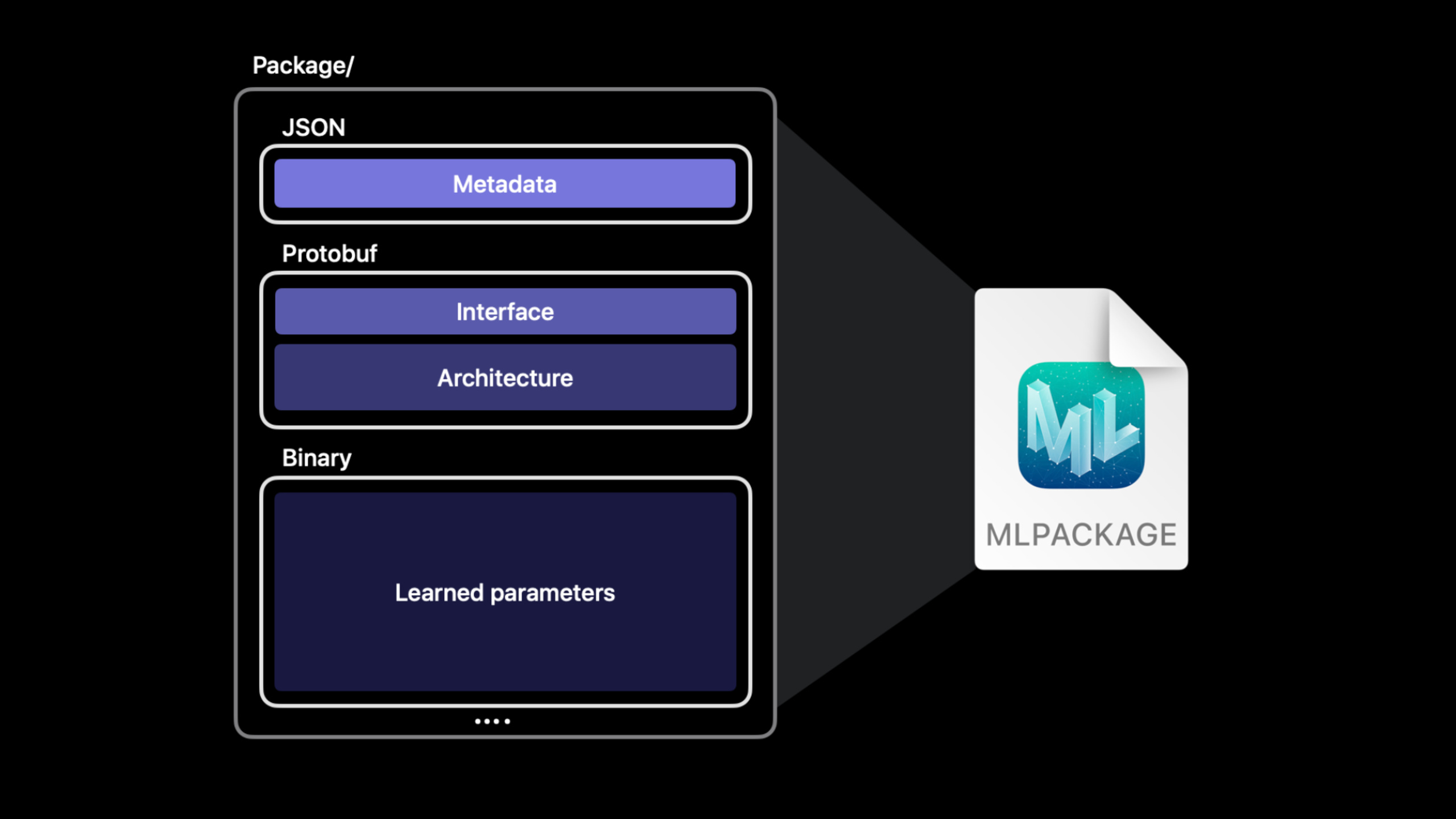
The traditional .mlmodel file is a protobuf binary file that packages metadata, interface definitions, network architecture, and weight parameters all together.This brings about a problem: if you change a metadata field (such as the author’s name), the entire binary file will change, and git diff will show dozens of MB changes.
ML Package uses the package function of macOS to split the model components into independent files (05:30): the architecture, weights, and metadata are each stored in one file.Only one JSON file is changed when metadata is changed, and git diff is clear and readable.Xcode directly supports editing metadata and input and output descriptions in the UI.
ML Program: Model format for the future
ML Program is a new model representation method that describes neural networks as a series of strongly typed operations (ops) instead of traditional layers (10:05).The weights are serialized individually to binary files, and the types of intermediate tensors are determined during conversion.
The core advantage of Typed execution is precision control.The intermediate tensor type of traditional neural network models is determined by the runtime computing unit: Float16 for Neural Engine and GPU, and Float32 for CPU.If the model is sensitive to Float16 precision, computeUnits can only be set to .cpuOnly, sacrificing a lot of performance.
The ML Program’s intermediate tensor types are fixed during model conversion.The Core ML runtime can allocate Float32 ops to the GPU for execution, while retaining Float16 ops for execution on the Neural Engine, eliminating the need for global computeUnits settings.
Detailed Content
Basic usage of MLShapedArray
(01:55)
// Initialize a 2x3 Float ShapedArray
let shapedArray = MLShapedArray<Float>(
    [[1.0, 2.0, 3.0],
     [4.0, 5.0, 6.0]]
)

// Access the second row as a slice
let secondRow = shapedArray[1]

// Access a multi-row, multi-column slice
let subArray = shapedArray[0..<2, 1..<3]
Key points:
MLShapedArray<Float>It is a generic type. The element type is determined at compile time. There is no need to pass type parameters at runtime.- Supports multi-dimensional indexing and range slicing, the syntax is consistent with Swift Array
- Copy-on-write semantics for value types, slicing operations do not copy the underlying data
Conversion between MLShapedArray and MLMultiArray
(02:31)
// Convert MLMultiArray to MLShapedArray
let multiArray: MLMultiArray = ...
let shapedArray = MLShapedArray(multiArray)

// Convert MLShapedArray to MLMultiArray
let shapedArray: MLShapedArray<Float> = ...
let multiArray = MLMultiArray(shapedArray)

// Type conversion: Double MultiArray to Float ShapedArray
let floatShapedArray = MLShapedArray<Float>(multiArrayOfDoubles)
Key points:
- Mutual conversion is completed through the initializer, no need to manually traverse the data
- Support cross-type conversion, such as Double to Float
- The model wrapper class automatically generated by Xcode will add a corresponding ShapedArray attribute for each MultiArray output
YOLO model output processing comparison
(02:51)
MLMultiArray version:
// Process YOLO output with MLMultiArray
func bestLabels(from confidence: MLMultiArray) -> [String] {
    var results: [String] = []
    let rowCount = confidence.shape[0].intValue
    let columnCount = confidence.shape[1].intValue

    for row in 0..<rowCount {
        var maxConfidence: Double = 0
        var bestLabel = ""
        for column in 0..<columnCount {
            let value = confidence[[NSNumber(value: row), NSNumber(value: column)]].doubleValue
            if value > maxConfidence {
                maxConfidence = value
                bestLabel = labels[column]
            }
        }
        results.append(bestLabel)
    }
    return results
}
MLShapedArray version:
// Process the same output with MLShapedArray
func bestLabels(from confidence: MLShapedArray<Float>) -> [String] {
    return confidence.map { row in
        let maxIndex = row.argmax()
        return labels[maxIndex]
    }
}
Key points:
- The MLMultiArray version requires manual processing of NSNumber conversion and two-dimensional indexing, and the code is lengthy
- The MLShapedArray version leverages the Swift collection protocol (
map、argmax), complete the same logic in one line - If the model prediction results output ShapedArray, they can be directly processed using Swift standard library methods.
Convert TensorFlow model to ML Program
(16:54)
import coremltools as ct

# Load the TensorFlow model
model_path = "style_transfer_model"
image_path = "test_image.jpg"

# Set the input type
input_type = ct.ImageType(
    shape=(1, 256, 256, 3),
    bias=[-1, -1, -1],
    scale=1/127.0
)

# Convert to an ML Program (iOS 15 / macOS 12 and later)
ml_program = ct.convert(
    model_path,
    inputs=[input_type],
    minimum_deployment_target=ct.target.iOS15
)

# Generate an ML Program with Float16 precision by default
# Save the model
ml_program.save("StyleTransfer.mlmodel")
Key points:
minimum_deployment_targetWhen set to iOS15 or macOS12, the converter outputs ML Program format- FP16ComputePrecision pass is enabled by default, and all Float32 tensors are converted to Float16
- Float16 models can be executed on the Neural Engine, achieving significant performance improvements and power consumption reductions
Control ML Program accuracy
(20:16)
# Generate an ML Program with Float32 precision
ml_program_fp32 = ct.convert(
    model_path,
    inputs=[input_type],
    minimum_deployment_target=ct.target.iOS15,
    compute_precision=ct.precision.FLOAT32
)

# Evaluate the precision difference
# The Float16 version typically has an SNR of 70+, while the Float32 version is 100+
# For most deep learning models, Float16 precision loss is not visually noticeable
Key points:
compute_precision=FLOAT32Disable Float16 conversion, maintaining full precision- Float32 ML Program executes on GPU and CPU and will not run on Neural Engine
- If the model is sensitive to Float16, there is no need to change computeUnits in the App code, just specify the precision when converting
- Also supports mixed precision: specify specific ops to use Float32, and the rest to use Float16
Core Takeaways
1. Upgrade existing Core ML models to ML Package
- What to do: Convert .mlmodel files in your project to .mlpackage to gain metadata editing and version control benefits
- Why it’s worth doing: Changing metadata no longer generates dozens of MB of git diff, and team members can review model changes.
- How to start: Select the .mlmodel file in Xcode, click the Edit button, Xcode will automatically prompt to convert to ML Package
2. Use MLShapedArray to simplify model output processing
- What: Migrate the code that handles MLMultiArray to MLShapedArray, reducing the amount of code and improving readability
- Why it’s worth doing: MLShapedArray supports the Swift standard collection protocol and can be used
map、filter、argmaxWaiting for the native method, the code is reduced from dozens of lines to a few lines - How to start: Check the model classes automatically generated by Xcode and use the new
xxxShapedArrayattribute substitutionxxxMultiArray Properties
3. Use the Float32 ML Program for accuracy-sensitive models
- What: Identify models that are sensitive to numerical precision (e.g. scientific computing, financial forecasting), specify Float32 precision when converting
- Why it’s worth doing: No longer need to limit computeUnits to .cpuOnly, Float32 ML Program can be executed on the GPU, retaining performance while ensuring accuracy
- How to start: Use
coremltoolsSet when convertingcompute_precision=FLOAT32, comparing the SNR metrics of Float16 and Float32
4. Build a model version management system
- What to do: Use the separated file structure of ML Package to establish the CI/CD process of the model
- Why is it worth doing: The architecture file (JSON) and the weight file (binary) are stored separately. Architecture changes can be code reviewed, and weight changes can go through an independent release process.
- How to start: Add the .mlpackage directory to git, metadata.json and feature description JSON for normal review, and use Git LFS to manage large weight files
Related Sessions
- Build dynamic iOS apps with the Create ML framework — Train Core ML models on the device, combined with ML Program’s typed execution
- Classify hand poses and actions with Create ML — Gesture classification model training to understand the balance between model accuracy and performance
- Detect people, faces, and poses using Vision — ML model usage of the Vision framework, benefiting from MLShapedArray and ML Program
- Accelerate machine learning with Metal Performance Shaders Graph — Metal accelerates machine learning, complementing Core ML’s GPU execution
Comments
GitHub Issues · utterances