
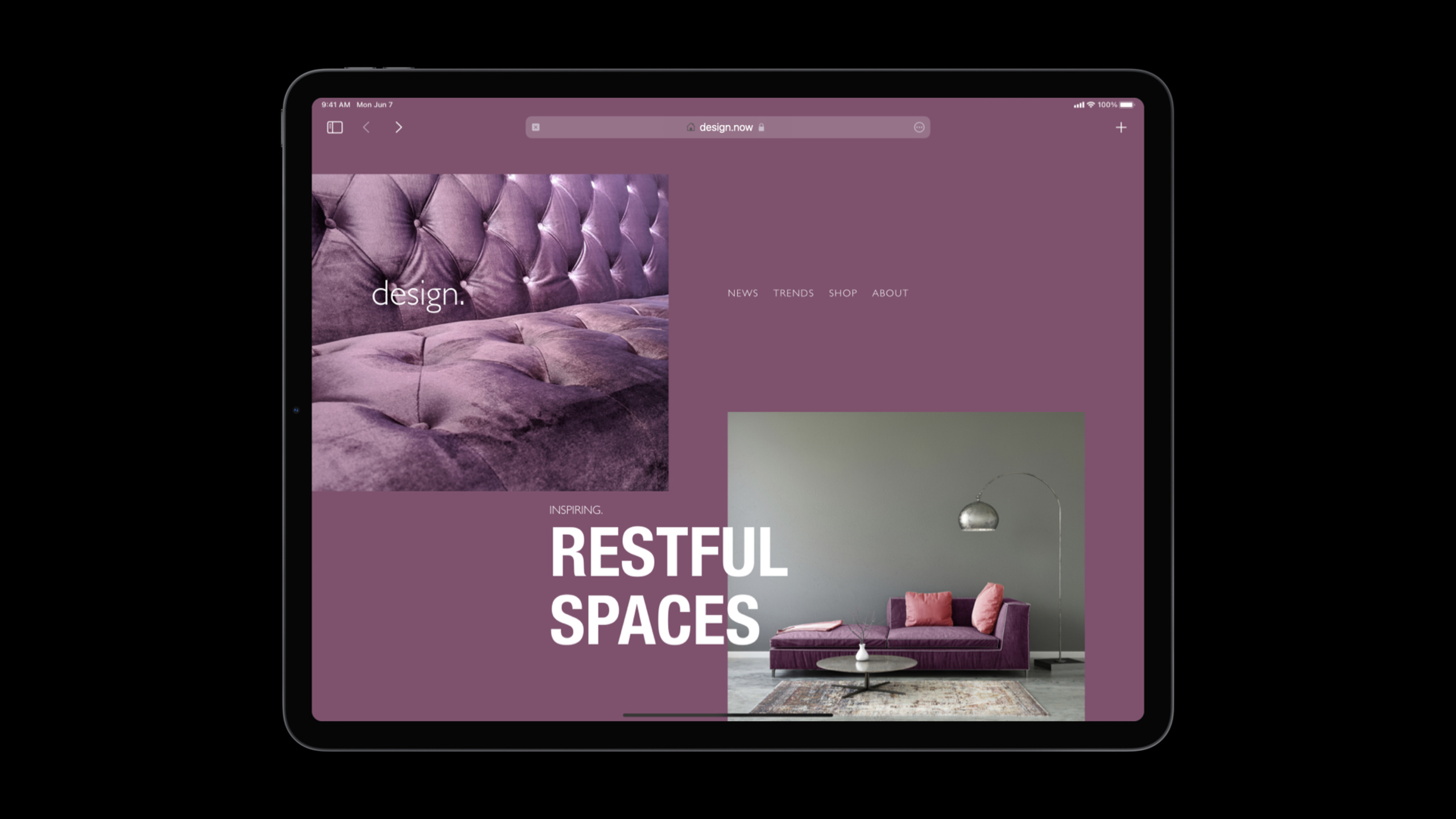
Highlight
Safari 15 redesigns the browser interface. The tab bar and address bar on macOS are merged into a single line, and the tab bar on iOS is moved to the bottom.The website can be accessed via
theme-colorMeta tag controls tab bar color, using CSSaspect-ratioAttributes simplify layout, useenv(safe-area-inset-bottom)Adapt to the bottom tab bar.
Core Content
Safari 15 is the biggest update to Safari’s visual design.The browser interface changes from “dominating the web” to “giving way to the web.”
The tab bar on macOS no longer occupies a separate line, but is merged with the address bar.The entire browser interface is compressed into one line, and web content gets more vertical space.The tab bar on iOS has been moved to the bottom of the screen, allowing users to operate it with one hand.
These changes have a direct impact on web designers.
Control the color of the tab bar
Safari 15 will extract colors from web pages and apply them to the tab bar background.Developers can actively control this color:
<head>
    <!-- Base theme color -->
    <meta name="theme-color" content="#0071e3">

    <!-- Adapt to dark mode -->
    <meta name="theme-color"
          content="#0071e3"
          media="(prefers-color-scheme: light)">
    <meta name="theme-color"
          content="#000000"
          media="(prefers-color-scheme: dark)">
</head>(02:50)
Key points:
theme-colorPlace it in the HTML head and get it immediately when the Safari page loadsmediaAttributes are new to the HTML specification and are supported for the first time in Safari 15- Browsers that do not support the media attribute will take the first one
theme-color, so put fallback first - Can also be modified dynamically using JavaScript
// Dynamically switch the theme color
function enterTheaterMode() {
    document.querySelector('meta[name="theme-color"]')
        .setAttribute('content', '#000000');
}

function exitTheaterMode() {
    document.querySelector('meta[name="theme-color"]')
        .setAttribute('content', '#0071e3');
}(11:05)
Adapt to iOS bottom tab bar
iOS 15’s tab bar is at the bottom of the screen and shrinks to a domain name prompt as the user scrolls.Content at the bottom of the page may be obscured.
Use CSS environment variables to handle:
.footer {
    position: sticky;
    bottom: 0;
    padding: 1rem;
    padding-bottom: calc(1rem + env(safe-area-inset-bottom));
}(14:21)
Key points:
env(safe-area-inset-bottom)The value of will change dynamically as the tab bar expands/collapses.- Safari automatically rearranges the page
- There are corresponding variables in the four directions:
top、right、bottom、left - can be found in
calc()used in
viewport-fit=cover full screen experience
When the iPhone is in landscape orientation, Safari indents web content into a safe area by default to avoid being obscured by bangs and rounded corners.If the website design has taken these areas into consideration, you can useviewport-fit=coverLet the content extend to the edge:
<meta name="viewport" content="width=device-width, initial-scale=1, viewport-fit=cover">(16:03)
Use environment variables to ensure the text is readable:
.header-text {
    margin-left: env(safe-area-inset-left);
}

.paragraph {
    margin-left: env(safe-area-inset-left);
    margin-right: env(safe-area-inset-right);
}
Detailed Content
CSS aspect-ratio property
Previously, keeping a div with a fixed aspect ratio required a padding hack or JavaScript.Safari 15 supports nativeaspect-ratio:
/* Square */
.card {
    aspect-ratio: 1 / 1;
}

/* Shorthand */
.card {
    aspect-ratio: 1;
}

/* 16:9 video */
.video-container {
    aspect-ratio: 16 / 9;
    width: 100%;
}

/* Golden ratio */
.banner {
    aspect-ratio: 1.618;
}(24:38)
Key points:
- When there is too much content, the box will grow in height by default to avoid overflow.
- To force proportionality to be maintained (allowing overflow), add
min-height: 0 - can cooperate
overflow: scrollHandling overflow content - Support decimal writing, such as
aspect-ratio: 1.618
Flexbox gap
Safari 14.1 starts supporting Flexboxgapproperty:
.navbar {
    display: flex;
    gap: 1rem;
}(29:22)
No more setting separate margins for child elements and then dealing with extra spacing on edge elements.
Form control update
iOS 15 redesigns the form controls to look closer to native UIKit:
<!-- Date picker -->
<input type="date">

<!-- Time picker -->
<input type="time">

<!-- Color picker with eyedropper -->
<input type="color">(30:38)
The color picker has three new panels and a color picker (eyedropper).If the site overrides the default styles, the custom styles will be applied normally.
Page title optimization
The space in the new tab bar is limited, and the way the page title is written affects the user experience:
<!-- Bad: site name first -->
<title>My Company - Products - Detail</title>

<!-- Good: content title first -->
<title>Detail - Products - My Company</title>(07:37)
When users open multiple tabs at the same time, the previous content titles are easier to distinguish.
Favicon Suggestions
- Provide high-resolution icons to adapt to Retina screens
- Favicon with transparent background works better in new tab bar
- Check generated by automated tools
theme-color, make sure the colors match the website design
Core Takeaways
1. Design an immersive brand experience for the website
usetheme-colorMake the Safari tab bar consistent with the main color of the website.viewport-fit=coverMake the header image extend to the edge of the screen.Entrance API:<meta name="theme-color"> + viewport-fit=cover。
2. Build a responsive image gallery
useaspect-ratioKeep picture cards in a uniform proportion and use CSS Grid to implement waterfall flow or grid layout.Entrance API:aspect-ratio + display: grid。
3. Optimize bottom navigation on mobile terminal
Reserve a safe area for the iOS bottom tab bar, useenv(safe-area-inset-bottom)Make sure the navigation buttons are not blocked.Entrance API:padding-bottom: env(safe-area-inset-bottom)。
4. Implement Theater Mode for video websites
Toggle Theater Mode on click with JavaScripttheme-colorIt is black, allowing the tab bar to blend into the dark background and enhance the immersion of watching movies.Entrance API:document.querySelector('meta').setAttribute('content', ...)。
5. Design cross-platform consistent forms
Reduce custom style code with Safari 15’s new form control styles.Date, time, color pickers automatically get native experience on iOS.Entrance API:<input type="date"> + <input type="color">。
Related Sessions
- Explore Safari Web Extension improvements — Safari extension development
- What’s new in Web Inspector — Safari Developer Tools
- Develop advanced web content — WebKit new features
Comments
GitHub Issues · utterances