
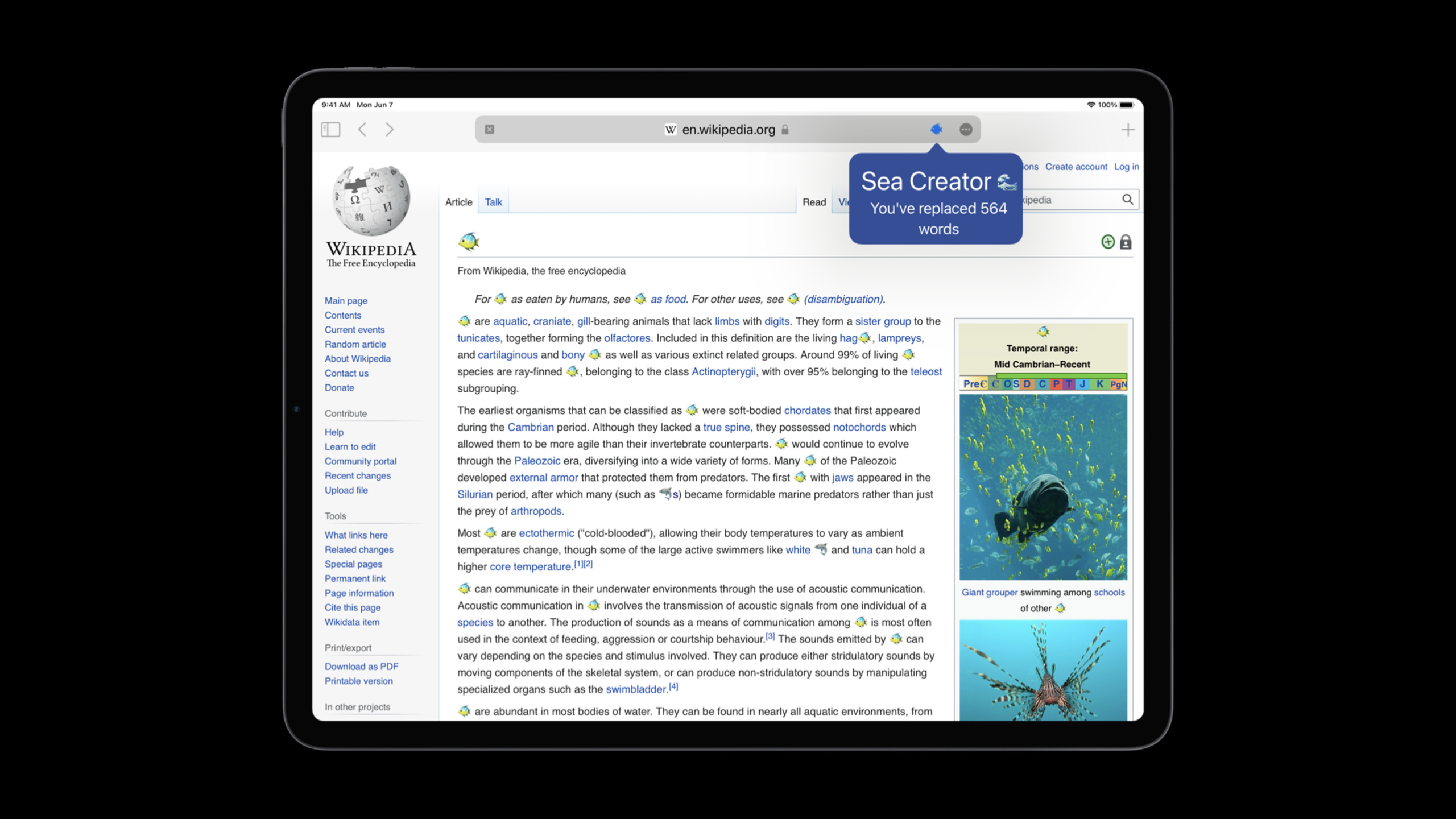
Highlight
Safari 15 brings three key improvements to Web Extensions: non-persistent background pages to reduce memory usage, the declarativeNetRequest API for high-performance content interception, and the ability to customize new tab pages.iOS and iPadOS support Web Extensions for the first time.
Core Content
Browser extension developers have long faced a performance problem: once a background page is opened, it runs forever, consuming memory and CPU even if the user doesn’t use the extension for several hours.
Safari 15 solves this problem with non-persistent background pages.The background page is only loaded when needed and is automatically unloaded after the event is processed.This is especially important for iOS devices—resource-constrained mobile devices cannot afford multiple resident background processes.
Non-persistent background page
The background page of a traditional extension is persistent:
{
  "background": {
    "scripts": ["background.js"]
  }
}
This causes the background process to run forever.Change to non-persistent:
{
  "background": {
    "scripts": ["background.js"],
    "persistent": false
  }
}(03:22)
Key points:
- Event listeners must be registered at the top level of the script and cannot be registered inside the callback
- use
browser.storageAPI saves state instead of global variables - Remove
webRequestListener, its event frequency is too high and is incompatible with non-persistent pages - use
browser.alarmsreplacesetTimeout/setInterval
Use storage API to save state
// background.js

// Incorrect: global variables are lost after the page unloads
let replacementCount = 0;

// Correct: use the storage API
let replacementCount = 0;

browser.storage.local.get('count').then(result => {
    replacementCount = result.count || 0;
});

browser.runtime.onMessage.addListener((message, sender, sendResponse) => {
    if (message.action === 'replace') {
        replacementCount += message.count;
        browser.storage.local.set({ count: replacementCount });
    } else if (message.action === 'getCount') {
        sendResponse({ count: replacementCount });
    }
});(06:55)
Key points:
browser.storage.localIt is an asynchronous API and data is persisted to disk.- Need to be added in manifest
storagePermissions -The event listener is registered instorage.get()Outside the callback, make sure it is registered when the page loads.
declarativeNetRequest content interception
This is an API introduced by Chrome and supported by Safari 15.Rules are declared in JSON format, the browser matches them under the hood, and extensions don’t need to run JavaScript to see the content of the request.
manifest.json:
{
  "permissions": ["declarativeNetRequest"],
  "declarative_net_request": {
    "rule_resources": [
      {
        "id": "ruleset_1",
        "enabled": true,
        "path": "rules.json"
      }
    ]
  }
}(08:37)
rules.json:
[
  {
    "id": 1,
    "priority": 1,
    "action": {
      "type": "block"
    },
    "condition": {
      "regexFilter": ".*\\.(jpg|png|gif)$",
      "resourceTypes": ["image"]
    }
  },
  {
    "id": 2,
    "priority": 2,
    "action": {
      "type": "allow"
    },
    "condition": {
      "urlFilter": "||wikipedia.org",
      "resourceTypes": ["image"]
    }
  }
](09:49)
Key points:
priorityDetermine the order in which rules are applied, giving priority to those with larger values.action.typecan beblock、alloworupgradeSchemeresourceTypesincludemain_frame、script、image、stylesheetwaitdomainTypeDistinguish between first-party and third-party requests- extension not required
webRequestYou can block content with permissions and have better privacy.
Customize new tab page
Extensions can take over Safari’s new tab page:
{
  "chrome_url_overrides": {
    "newtab": "newtab.html"
  }
}(13:34)
newtab.html:
<!DOCTYPE html>
<html>
<head>
    <title>My New Tab</title>
    <meta name="theme-color" content="#ff6b6b">
</head>
<body>
    <h1>Welcome!</h1>
    <p>Fun fact of the day...</p>
</body>
</html>
When a user opens an extension, Safari will ask if they want to allow the extension to take over the new tab page.This selection can be changed at any time in Safari settings.
Detailed Content
Debugging non-persistent background pages
There is a new “Web Extension Background Pages” option in Safari’s Develop menu, which allows you to view the loading status of background pages.
// Check whether the background page is loaded
browser.runtime.getBackgroundPage().then(page => {
    if (page) {
        console.log("Background page is active");
    } else {
        console.log("Background page is unloaded");
    }
});
Key points:
getBackgroundPage()Returns null when the page has been unloaded and will not automatically wake up the page- To wake up the background page, just send a message
- Clicking on the background page in the Develop menu will load it immediately
Special considerations on iOS
iOS extensions must use non-persistent background pages.If omitted in the manifestpersistentfield, the default istrue, causes the extension to fail to load on iOS.
{
  "background": {
    "scripts": ["background.js"],
    "persistent": false
  },
  "permissions": ["storage", "declarativeNetRequest"]
}
Dynamic update of rule sets
// Enable or disable specific rulesets
browser.declarativeNetRequest.updateEnabledRulesets({
    disableRulesetIds: ['ruleset_1'],
    enableRulesetIds: ['ruleset_2']
});

// Get the current ruleset status
browser.declarativeNetRequest.getEnabledRulesets().then(ids => {
    console.log("Enabled rulesets:", ids);
});
Core Takeaways
1. Develop ad/content blocking extension for iOS
Use the declarativeNetRequest API to build a lightweight interceptor, and the rule file can be updated remotely without submitting it to the App Store for review.Entrance API:declarativeNetRequest + updateEnabledRulesets()。
2. Create a cross-platform password manager extension
Use non-persistent backend page + storage API to save user credentials and automatically fill them in web forms through content script.Entrance API:browser.storage.local + content_scripts。
3. Develop productivity class new tab page extension
Take over your Safari new tab and display to-dos, weather, or a quote of the day.usetheme-colorThe meta tag unifies the tab bar color with the extension style.Entrance API:chrome_url_overrides + newtab。
4. Building developer tool extensions
Inject content script on the web page to display the layout information, color value or performance data of the element.usebrowser.runtime.sendMessageCommunicate with the background page to aggregate data.Entrance API:content_scripts + browser.runtime.onMessage。
5. Implement forced switching of dark mode on web pages
Use content script to detect the current theme of the web page, intercept and modify CSS file requests through declarativeNetRequest, or directly use JavaScript to inject styles that invert colors.Entrance API:content_scripts + CSSinjection.
Related Sessions
- Meet Safari Web Extensions on iOS — A complete guide to building and publishing Safari extensions on iOS
- Design for Safari 15 — Visual design and theme-color usage in Safari 15
- What’s new in Web Inspector — New tool for debugging Web Extensions
Comments
GitHub Issues · utterances