
Highlight
SwiftUI natively supports async/await. With
@MainActor,task, andAsyncImage, data loading and remote image display become concise and safe.
Core Content
In the past, doing network requests in SwiftUI meant managing URLSession callbacks yourself. Code scattered across onAppear and completion handlers, state updates could land on background threads, and UI refreshes would crash.
WWDC 2021 wired Swift 5.5 concurrency directly into SwiftUI. You do not need to write scheduling code—the framework ensures state updates run on the main thread.
AsyncImage is a new View added in this release. Pass it a URL and it handles download, caching, and placeholders automatically. You no longer need to wrap things in an ImageLoader ObservableObject.
The task modifier starts an async task when a view appears and cancels it when the view disappears. Unlike onAppear, its lifecycle is bound to the view, so nothing leaks.
refreshable combined with await turns pull-to-refresh into a single line. The system handles loading state and animation for you.
Detailed Content
ObservableObject Meets async/await
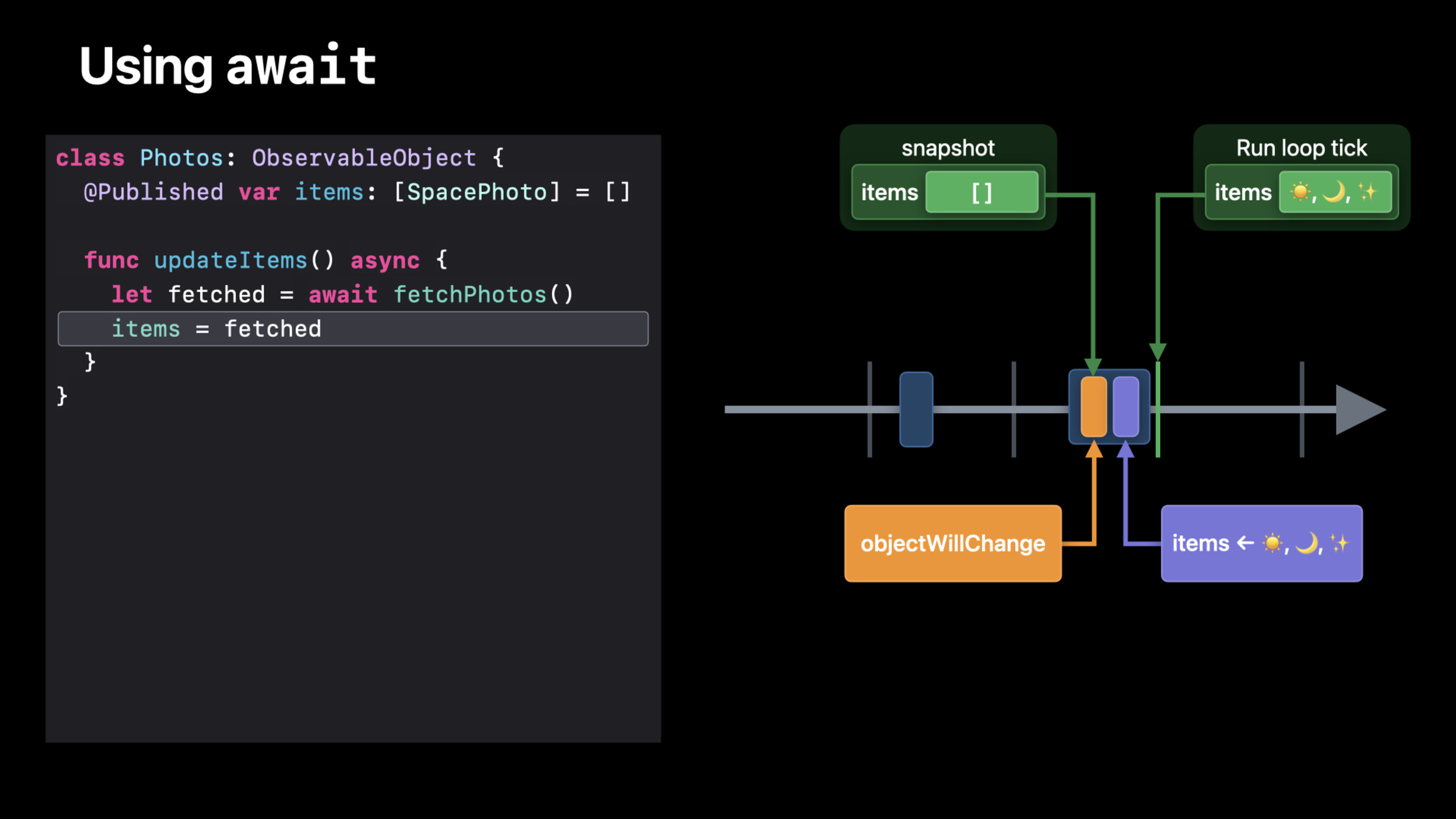
A space photo app’s data model looks like this:
@MainActor
class Photos: ObservableObject {
    @Published private(set) var items: [SpacePhoto] = []

    func updateItems() async {
        let fetched = await fetchPhotos()
        items = fetched
    }

    func fetchPhotos() async -> [SpacePhoto] {
        var downloaded: [SpacePhoto] = []
        for date in randomPhotoDates() {
            let url = SpacePhoto.requestFor(date: date)
            if let photo = await fetchPhoto(from: url) {
                downloaded.append(photo)
            }
        }
        return downloaded
    }

    func fetchPhoto(from url: URL) async -> SpacePhoto? {
        do {
            let (data, _) = try await URLSession.shared.data(from: url)
            return try SpacePhoto(data: data)
        } catch {
            return nil
        }
    }
}
Key points:
@MainActormarks the entire class; all methods run on the main thread by default (10:09)@Publishedproperty updates automatically trigger SwiftUI redrawsawait URLSession.shared.data(from:)replaces callback-style dataTask- No manual
DispatchQueue.main.asyncneeded—the framework guarantees thread safety
Connecting Async Data in the View Layer
struct CatalogView: View {
    @StateObject private var photos = Photos()

    var body: some View {
        NavigationView {
            List {
                ForEach(photos.items) { item in
                    PhotoView(photo: item)
                        .listRowSeparator(.hidden)
                }
            }
            .navigationTitle("Catalog")
            .listStyle(.plain)
            .refreshable {
                await photos.updateItems()
            }
        }
        .task {
            await photos.updateItems()
        }
    }
}
Key points:
.task { await photos.updateItems() }starts loading when the view appears (14:07).refreshablesupports pull-to-refresh; the system shows a loading indicator automatically- When the view disappears, the task created by
taskis cancelled automatically
AsyncImage: Remote Images in One Line
struct PhotoView: View {
    var photo: SpacePhoto

    var body: some View {
        ZStack(alignment: .bottom) {
            AsyncImage(url: photo.url) { image in
                image
                    .resizable()
                    .aspectRatio(contentMode: .fill)
            } placeholder: {
                ProgressView()
            }
            .frame(minWidth: 0, minHeight: 400)

            HStack {
                Text(photo.title)
                Spacer()
                SavePhotoButton(photo: photo)
            }
            .padding()
            .background(.thinMaterial)
        }
        .background(.thickMaterial)
        .mask(RoundedRectangle(cornerRadius: 16))
        .padding(.bottom, 8)
    }
}
Key points:
AsyncImage(url:)downloads and caches images automatically (15:11)- The
placeholderclosure showsProgressViewwhile downloading - After download completes, switches to the actual image; supports modifiers like
.resizable() - No need to manage
URLSessionor image caching yourself
Async Operations in Buttons
struct SavePhotoButton: View {
    var photo: SpacePhoto
    @State private var isSaving = false

    var body: some View {
        Button {
            Task {
                isSaving = true
                await photo.save()
                isSaving = false
            }
        } label: {
            Text("Save")
                .opacity(isSaving ? 0 : 1)
                .overlay {
                    if isSaving {
                        ProgressView()
                    }
                }
        }
        .disabled(isSaving)
        .buttonStyle(.bordered)
    }
}
Key points:
Task { }starts an async task when the button is tapped (18:06)@State var isSavingcontrols the button’s loading state.disabled(isSaving)prevents duplicate taps- No
DispatchQueue.main.asyncneeded to update@State
Core Takeaways
- Use
@MainActorin new projects. Add@MainActorto ObservableObject classes and leave thread-safety issues behind. - Replace custom image loaders with AsyncImage. Skip hundreds of lines of
ImageLoadercode—caching and placeholders are built in. - Use
taskinstead ofonAppear + DispatchQueue. Lifecycle is managed automatically; tasks cancel when the view disappears, so callbacks never hit a deallocated view. refreshablemakes pull-to-refresh trivial. One line of code; the system provides standard interaction and visual feedback.- Wrap button async work in
Task { }. The standard way to start async code from a synchronous context like a Button action.
Related Sessions
- Meet async/await in Swift — Swift 5.5 concurrency syntax fundamentals
- Explore structured concurrency in Swift — Task, TaskGroup, and cancellation
- Swift concurrency: Update a sample app — Migrating an existing project to async/await
Comments
GitHub Issues · utterances