
Highlight
Xcode 12 wraps XCTest failure as
XCTIssue, allowing failures to carry type, detailed description, underlying error, attachments and call stack, and developers can trace the trigger path in Issue Navigator and test reports.
Core Content
The most time-consuming part of maintaining a test suite often occurs after the tests have failed. When a failure occurs locally or in CI, developers need to answer four questions: where it failed, how it failed, why it failed, and which line of test code the failure was triggered from. Xcode 12 puts these issues into the same troubleshooting path.
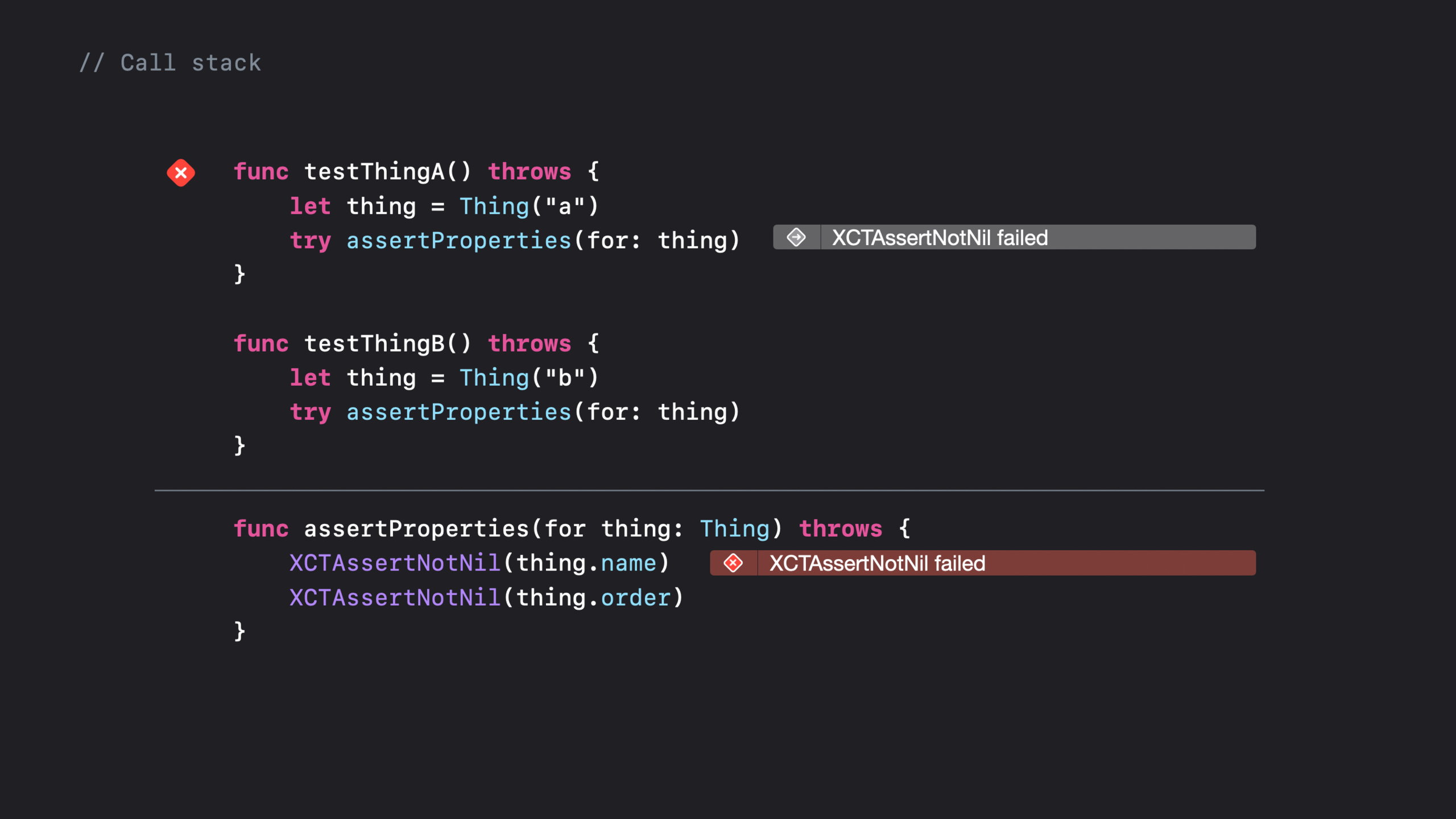
The examples in the speech come from a small project called PlayGarden. In order to reduce duplication, the test code was extracted into shared utility functions. Problems also arise: when the failure mark falls in the helper, the test method itself only displays a gray mark, and the developer has to follow the calling relationship to find the context.
The change in Xcode 12 is to present the failure, source code location and call stack together. Issue Navigator can expand the call stack in the test code; the test report can also display the same group of frames, and the report and source code can be opened side by side through the Jump or Assistant button. For result bundles from CI, this can reduce blind checking time before local replication.
The underlying API has also been tweaked. XCTest used to log failures using four discrete values: message, file path, line number, and whether the failure was expected. For Xcode 12XCTIssueWrap this data and add the type, detailed description, underlying error, and attachments. Custom assertions, failure observation, failure filtering and diagnostic attachments can all be completed around the same object.
Detailed Content
Swift error-throwing tests have source code locations
(04:21) XCTest supports test functions directlythrow. When a test throws an error, the error forms a failure message. Xcode 12 incorporates improvements in the Swift runtime, iOS and tvOS 13.4, and macOS 10.15.4 to report source code locations for this type of error.
(05:15) The same set of conveniences also makes its way into lifecycle methods:setUpWithError()in the originalsetUp()run before,tearDownWithError()in the originaltearDown()run later. The new test file template will contain these methods. Old methods can still be retained, often because the inheritance structure still relies on them.
useXCTIssueWrite custom assertions
(09:52) Custom assertions can be created directlyXCTIssue, write the failure description, attachment and calling location into the same object, and then hand it torecord(_:)。
func assertSomething(about data: Data,
                         file: StaticString = #filePath,
                         line: UInt = #line) {

        // Call out to custom validation function.
        if !isValid(data) {

            // Create issue, declare with var for mutability.
            var issue = XCTIssue(type: .assertionFailure, compactDescription: "Invalid data")

            // Attach the invalid data.
            issue.add(XCTAttachment(data: data))

            // Capture the call site location as the point of failure.
            let location = XCTSourceCodeLocation(filePath: file, lineNumber: line)
            issue.sourceCodeContext = XCTSourceCodeContext(location: location)

            // Record the issue.
            self.record(issue)
        }
    }
Key points:
var issueAllow subsequent modificationsXCTIssue。XCTIssue(type:compactDescription:)Log the failure type and short description. -issue.add(XCTAttachment(data: data))Attach failure data to the test report. -XCTSourceCodeLocationUse the value passed in by the callerfileandline, pointing the report to the location where the custom assertion was called. -self.record(issue)Report issues to XCTest and Xcode.
Observe failures in the test class
(11:12)record(_:)It is the entrance through which all failures in the test class pass. Overriding this allows you to observe failures within a class scope and then proceed to XCTest.
override func record(_ issue: XCTIssue) {

    // Observe, introspect, log, etc.:
    if shouldLog(issue) {
        print("I just observed an issue!")
    }

    // Don't forget to call super!
    super.record(issue)
}
Key points:
override func record(_ issue: XCTIssue)Let the current test class take over the failure recording process. -shouldLog(issue)Represents a local observation or log condition. -super.record(issue)Must be called, otherwise the issue will not continue into the record chain.- If you only want to observe the failure of a certain test class, this method is more local than global observation.
Suppress failure by condition
(11:30) Coveragerecord(_:)After that, do not callsuperThis will prevent the issue from being recorded and reported.
override func record(_ issue: XCTIssue) {

    // If you don't want to record it, just return.
    if shouldSuppress(issue) {
        return
    }

    // Otherwise pass it to super.
    super.record(issue)
}
Key points:
shouldSuppress(issue)Determine whether the current failure should be filtered. -returnThe recording process will end and Xcode will not receive this issue.- Unfiltered failures are still called
super.record(issue). - This type of logic is suitable to be placed in test classes with clear boundaries to avoid hiding problems that really need to be fixed.
Add diagnostic attachments to failures
(11:39) Modify the issue to cover itrecord(_:)common uses. First re-declare the parameters asvar, then add attachments, and finally pass it tosuper。
override func record(_ issue: XCTIssue) {

    // Redeclare using var to enable mutation.
    var issue = issue

    // Add a simple attachment.
    issue.add(XCTAttachment(string: "hello"))

    // Pass it to super.
    super.record(issue)
}
Key points:
var issue = issueTurn the passed object into a modifiable copy. -issue.add(XCTAttachment(string: "hello"))Demonstrates adding a string attachment to a failure.- transcript mentions that the Attachment API supports multiple types that can be used to save custom diagnostic data.
- Called after modification is completed
super.record(issue), let the enhanced issue appear in the Xcode test report.
Call stack makes shared helper failures clearer
(08:28) When there are multiple assertions in the shared helper, passing in only one call location will still leave ambiguity.XCTIssueAfter capturing and symbolizing the call stack, the test method can display a gray mark, the helper line that actually failed displays a red mark, and both the Issue Navigator and the test report can jump along the frame.
This is straightforward for large test suites. Developers can continue to extract reused functions without sacrificing test structure to locate failures. The failure report will retain the trigger path, so that you can go from the test entrance to the actual assertion during troubleshooting.
Core Takeaways
- Write dedicated assertions for data verification: What to do: Remove duplicates
isValid(data)Checks are packaged as test helpers. Why it’s worth doing:XCTIssueAbility to put failure description, data attachment and call location into the same failure record. How to get started: Create from the official snippetvar issue = XCTIssue(type: .assertionFailure, compactDescription: ...),Add toXCTAttachment(data:), then callrecord(_:). - Automatically attach diagnostic text to failures: What to do: Override in a test class
record(_:), to add context for each failure. Why it’s worth doing: The test report will come with additional attachments, and the CI result bundle is easier to read directly. How to start: Copy the incoming issue asvar, callissue.add(XCTAttachment(string: ...)), finally callsuper.record(issue). - Add failure logs for a few test classes: What to do: Only observe failures in one test class, without affecting the entire test bundle. Why it’s worth doing: Speech points out
record(_:)It is the entrance to the failure process and is suitable for local observation and logging. How to get started: Coveragerecord(_:),existshouldLog(issue)Record the information under the condition, and then continue to callsuper.record(issue). - Migrating setup and teardown that will throw errors: What to do: Move the preparation and cleanup logic that needs to throw errors to
setUpWithError()、tearDownWithError(). Why it’s worth doing: Xcode 12 will report source code locations for thrown errors, reducing handwritten error handling boilerplate. How to start: Keep the old method to handle inheritance requirements, and use it first for new testsErrorlife cycle methods. - Enable shared test tools to continue to be reused: What to do: Leave duplicate assertions in a helper, and rely on Xcode 12’s failed call stack location path. Why it’s worth doing: The talk shows gray entry markers and red actual failure markers, illustrating both triggers and failures. How to start: Run the failing test and inspect the frame along the call stack in the Issue Navigator or test report.
Related Sessions
- Write tests to fail — Talking about how to design XCTest and UI tests that are easier to diagnose is the recommended pre-practice in this session.
- Get your test results faster — Pay attention to the test plan, timeout and execution duration to get failures back to developers faster.
- Handle interruptions and alerts in UI tests — Handle interruptions and expected pop-ups in UI tests to reduce noise when troubleshooting fails.
- XCTSkip your tests — Use conditions to skip tests that are inappropriate to run, allowing test reports to retain more meaningful results.
- Eliminate animation hits with XCTest — Demonstrates the use of XCTest in performance and animation regression detection, for use with failure diagnostic reporting.
Comments
GitHub Issues · utterances